1. Introducció
This manual provides detailed instructions for the safe and efficient operation of your Artlii YG300 Mini Portable Projector. Please read this manual thoroughly before using the product and retain it for future reference.
2. Informació de seguretat
Observeu les següents precaucions de seguretat per evitar danys al projector i garantir la seguretat de l'usuari:
- No mireu directament a la lent del projector quan estigui encès.amp està activat.
- Assegureu-vos una ventilació adequada per evitar el sobreescalfament. No obstruïu les obertures de ventilació.
- Use only the provided power adapter or a compatible power bank (5V/2A).
- Mantingueu el projector allunyat de l'aigua o altres líquids.
- No intenteu desmuntar ni reparar el projector vosaltres mateixos. Poseu-vos en contacte amb personal de servei qualificat.
- Mantenir fora de l'abast dels nens petits.
3. Contingut del paquet
Verifiqueu que tots els elements siguin presents al paquet:
- Artlii YG300 Mini Portable Projector
- Adaptador d'alimentació
- Control remot (piles AAA no incloses)
- AV Cable (3-in-1)
- Guia de l'usuari (aquest manual)

Image: Contents of the Artlii YG300 package, including the projector, remote control, power adapter, and AV cable.
4. Producte acabatview
Familiaritzeu-vos amb els components i els controls del projector.
4.1 Davant View
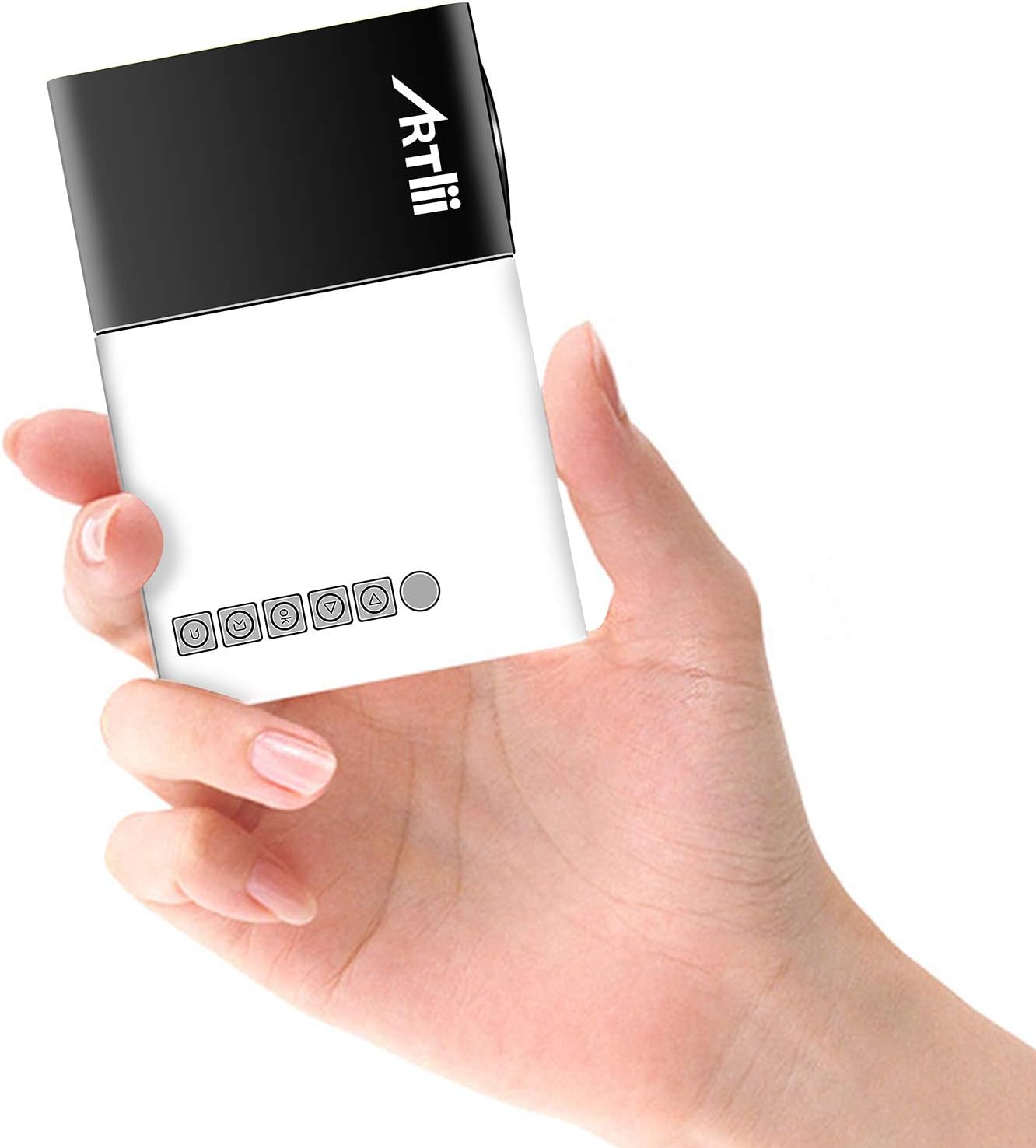
Image: The Artlii YG300 Mini Portable Projector, showing its compact size and top-mounted control buttons.
The front of the projector features the lens and a focus adjustment dial. The top panel includes control buttons for navigation and selection.
4.2 Lateral i posterior Views (Ports and Connections)

Image: Diagram illustrating the various input and output ports on the Artlii YG300 projector, including HDMI, USB, Micro SD, AV, and audio out.
- Port HDMI: Connect to devices like laptops, game consoles, or streaming sticks.
- Port USB: Connecteu unitats flaix USB per reproduir contingut multimèdia.
- Ranura per a targetes Micro SD: Inseriu targetes Micro SD per a la reproducció de contingut multimèdia.
- Port AV: Connect to older devices using the included AV cable.
- Sortida d'àudio (connector de 3.5 mm): Connecteu altaveus externs o auriculars.
- Entrada d'alimentació de CC: Connecteu l'adaptador de corrent.
- Micro USB (5V) Input: Alternative power input for power banks.
5. Configuració
5.1 Powering On the Projector
- Connecteu l'adaptador d'alimentació al port d'entrada d'alimentació de CC del projector i després a una presa de corrent.
- Alternatively, connect a 5V/2A power bank to the Micro USB (5V) Input port.
- Premeu el botó d'engegada del projector o del comandament a distància per encendre'l.

Image: The Artlii YG300 projector being powered by a portable power bank via its Micro USB input, demonstrating its portability.
5.2 Col·locació i mida de la pantalla
Place the projector on a stable surface. The optimal projection distance and screen size are:
- Distància de projecció: 0.8m to 2.0m (approximately 2.6ft to 6.5ft)
- Projected Dimension Range: 24 to 60 inches diagonally
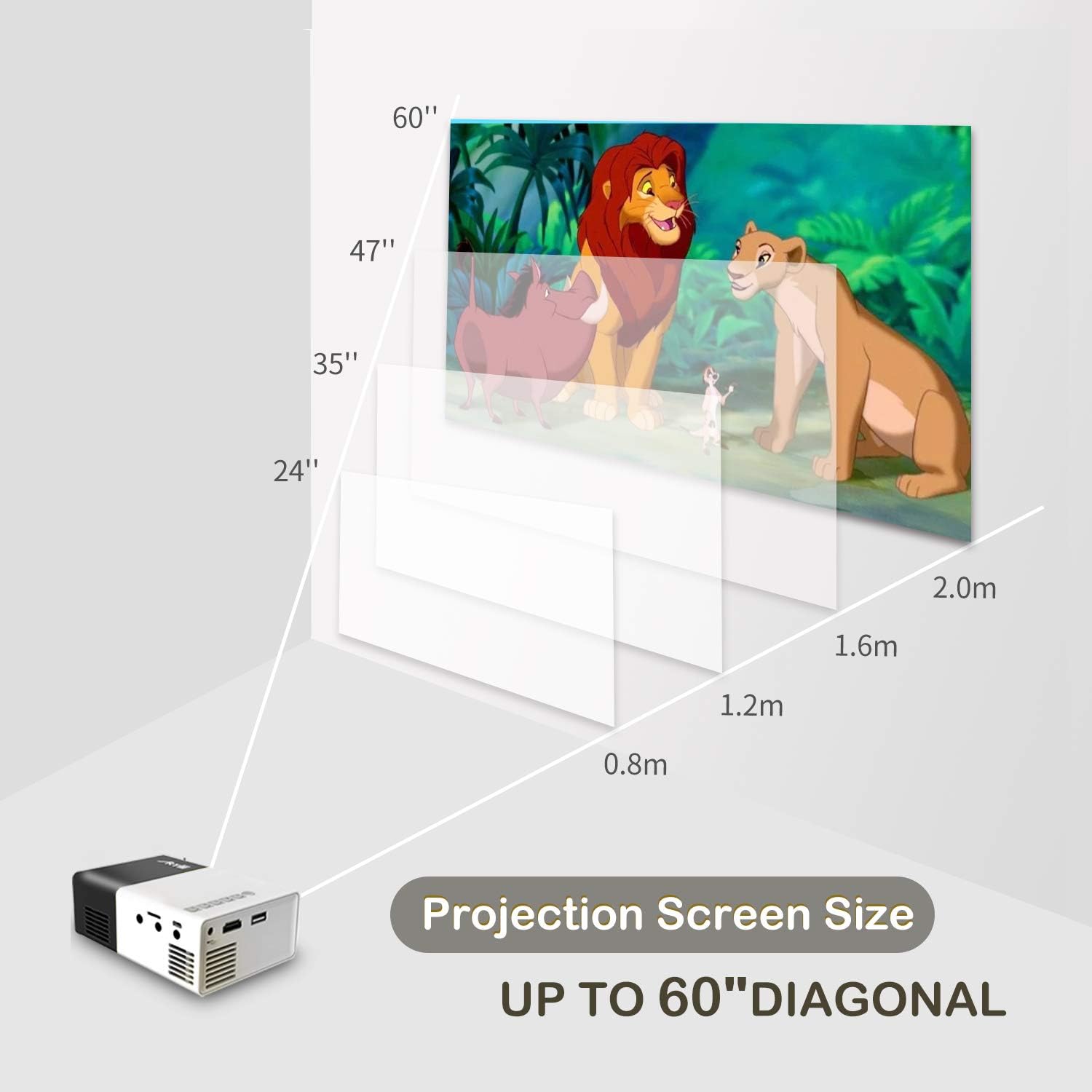
Image: A diagram illustrating the relationship between projection distance and screen size for the Artlii YG300 projector, showing screen sizes from 24 to 60 inches.
5.3 Ajust del focus
Rotate the focus adjustment dial located near the lens until the projected image is clear and sharp.
6. Funcionament del projector
6.1 Connexió de dispositius d'entrada
El projector admet diverses fonts d'entrada:
- HDMI: Connect an HDMI cable from your device (laptop, streaming stick, game console) to the projector's HDMI port.
- USB: Inseriu una unitat flaix USB al port USB.
- Micro SD: Insert a Micro SD card into the Micro SD card slot.
- DE: Use the included 3-in-1 AV cable to connect to devices with AV output.
6.2 Selecció de la font d'entrada
After connecting a device, use the remote control or the projector's control buttons to navigate to the main menu and select the corresponding input source (e.g., HDMI, USB, SD, AV).
6.3 Reproducció multimèdia
When a USB drive or Micro SD card is selected, the projector's interface will allow you to browse and play supported media files:
- Formats de vídeo: AVI(AC3)/FLV/MKV/MP4/RM/MPG(MPEG1)/MPG(MPEG2)/MOV(MPEG4)/AVI (MPEG)/3GP/ DIVX/RMVB/VOB/TS/TP
- Formats d'àudio: MP3/MAV/WMA/M4A(AAC)/AC3
- Formats d'imatge: JPEG/JPG/PNG/BMP/MPO
- Formats de documents: TXT
6.4 Sortida d'àudio
The projector has a built-in speaker. For enhanced audio, connect external speakers or headphones to the 3.5mm Audio Out jack.
7. Manteniment
7.1 Neteja
- Feu servir un drap suau i sec per netejar l'exterior del projector.
- Per a la lent, feu servir un drap de neteja de lents i una solució especialitzada per netejar lents. Eviteu materials abrasius.
- Assegureu-vos que les obertures de ventilació estiguin lliures de pols i deixalles.
7.2 Lamp La vida
El projector utilitza un LEDamp with an estimated lifespan of up to 30,000 hours. No lamp replacement is typically required during the product's lifetime under normal usage conditions.
8. Solució De Problemes
| Problema | Causa possible | Solució |
|---|---|---|
| No es projecta cap imatge |
|
|
| La imatge és borrosa |
|
|
| Sense so |
|
|
| El comandament a distància no funciona |
|
|
9. Especificacions
| Marca | Artlii |
| Model | YG300 (Artlii-MINI) |
| Tecnologia de visualització | LCD |
| Font de llum | LED |
| Lamp Brillantor | 400-600 lúmens |
| Resolució nativa | 320 x 240 píxels |
| Resolució suportada | Up to 1920 x 1080 pixels (1080p) |
| Relació de contrast | 800:1 |
| Relació d'aspecte | 4:3 / 16:9 |
| Projected Dimension Range | 24-60 polzades |
| Relació de llançament | 1.6:1 |
| Ports d'entrada | HDMI, AV, MicroSD (TF), USB, Micro USB (5V) |
| Port de sortida | 3.5mm Àudio Jack |
| Altaveu incorporat | Sí |
| Nivell de soroll | 21 dB |
| Font d'alimentació | AC 220V (adapter) / DC 5V/2A (Micro USB) |
| Consum d'energia | 24 watts |
| Dimensions del producte | 12.4 x 8.3 x 4.6 cm |
| Pes del producte | 250 g |
| Control remot | Inclòs |
10. Garantia i Suport
The Artlii YG300 Mini Portable Projector comes with a 1-month 100% Money-Back Policy and a 1-year factory warranty. For technical assistance or warranty claims, please contact Artlii customer support. Local maintenance centers are available to assist with service needs.
For further information or support, please visit the official Artlii weblloc o poseu-vos en contacte amb el seu departament d'atenció al client.


