1. Introducció
The Auna Belle Epoque 1906 is a nostalgic stereo system designed to bridge the gap between classic aesthetics and modern audio technology. It features an MP3-compatible CD player, a USB port for MP3 playback and direct encoding, and an FM radio tuner. The system is housed in a solid MDF cabinet with a textile speaker cover, complemented by an LCD display and remote control for convenient operation.

Figura 1: Frontal view of the Auna Belle Epoque 1906 Retro Stereo System.
2. Instruccions de seguretat
- Llegiu atentament totes les instruccions abans d'utilitzar el dispositiu.
- Conserveu el manual com a referència futura.
- No exposeu la unitat a la pluja ni a la humitat per evitar incendis o descàrregues elèctriques.
- Assegureu-vos que hi hagi una ventilació adequada. No bloquegeu cap obertura de ventilació.
- Col·loqueu la unitat sobre una superfície plana i estable.
- Disconnect the power plug from the wall outlet during lightning storms or when unused for long periods.
- No obriu la c.asing. Demaneu totes les tasques de manteniment a personal qualificat.
3. Contingut del paquet
Si us plau, comproveu que tots els elements siguin presents i en bon estat:
- 1 x Auna Belle Epoque 1906 Stereo System
- 1 x Remote Control (with 1 x CR2025 battery included)
- 1 x User Manual (German and English versions)
4. Producte acabatview
4.1 Controls del panell frontal

Figure 2: Detailed front panel view.
- Port USB: Per connectar dispositius d'emmagatzematge USB.
- Botó d'encendre: Per encendre o apagar la unitat.
- RECORD FUNCTION Buttons: For initiating and controlling recording to USB.
- Botó de VOLUM: Ajusta el nivell de sortida d'àudio.
- Pantalla LCD: Shows current mode, track information, and radio frequency.
- Safata de CD: Per inserir CD d'àudio.
- Botó d'AFINAMENT: For manual radio station selection.
- Function Buttons (UKW, MW, CD/USB, AUX IN): Selecciona la font d'àudio desitjada.
4.2 Control remot
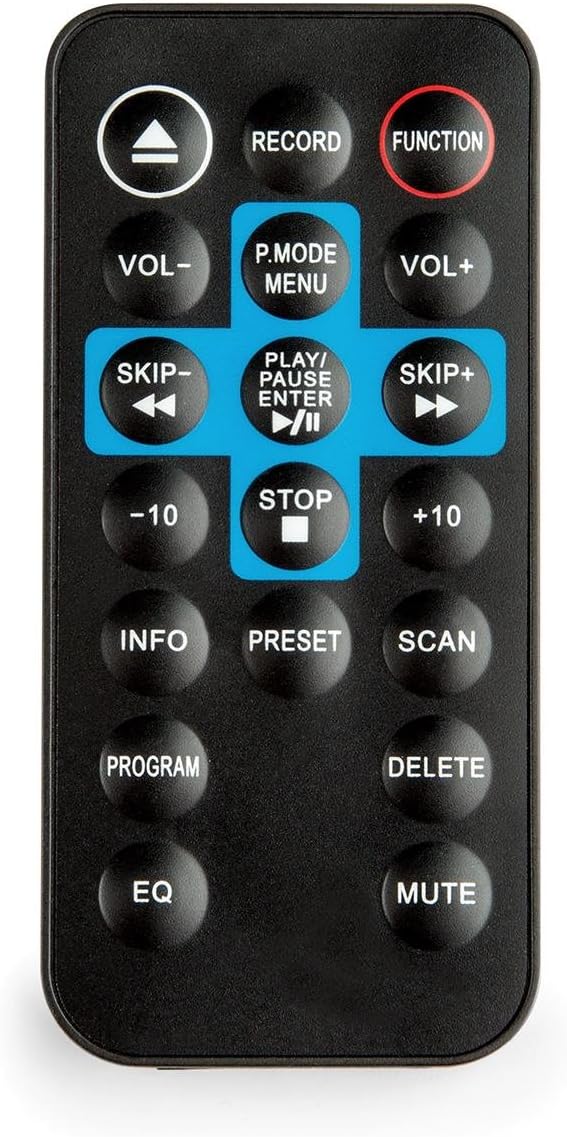
Figure 3: Remote control for the stereo system.
The remote control allows access to all functions of the stereo system from a distance. It requires one CR2025 battery (included).
5. Configuració
5.1 Connexió d'alimentació
- Assegureu-vos que la unitat estigui col·locada sobre una superfície estable.
- Connect the AC power cord to the power inlet on the rear of the unit.
- Plug the other end of the power cord into a standard 230V, 50Hz AC wall outlet.
5.2 Connexió de l'antena
For optimal FM radio reception, extend the included wire antenna fully. Position it for the best signal quality. For MW (AM) reception, the unit has a built-in antenna; rotating the unit may improve reception.
6. Instruccions de funcionament
6.1 Funcionament bàsic
- Encès/apagat: Premeu el botó PODER botó del panell frontal o del comandament a distància.
- Ajust de volum: Gira el VOLUM el botó del panell frontal o utilitzeu el VOL + / VOL- botons del comandament a distància.
- Selecció de la font: Press the corresponding function button (UKW, MW, CD/USB, AUX IN) on the front panel or the FUNCIÓ button on the remote control to cycle through input sources.
6.2 Radio Operation (FM/MW)
- Premeu el botó UKW (FM) or MW (AM) button to select the desired radio band.
- Gira el TUNING knob to manually search for radio stations. The frequency will be displayed on the analog frequency band and LCD screen.
- For automatic scanning, press the ESCANEAR button on the remote control. The system will search and stop at the next strong station.
- To save a station as a preset, tune to the desired station, then press the PRESET button on the remote control. Use the skip buttons to select a preset number, then press PRESET de nou per confirmar.
6.3 Funcionament del reproductor de CD

Figura 4: Safata de CD en posició oberta.
The system is compatible with CD, CD-R, CD-RW, and MP3-CD formats.
- Premeu el botó CD / USB botó per seleccionar el mode CD.
- Gently insert a CD into the CD tray. The tray will automatically pull the disc in.
- Playback will start automatically. If not, press the REPRODUCCIÓ/PAUSA botó.
- Utilitza el SALTAR buttons (◀◀ / ▶▶) to skip tracks.
- Premeu el botó STOP botó per finalitzar la reproducció.
- Funció de repetició: Premeu el botó REPETIR button on the remote control to repeat the current track or all tracks.
- Funció del programa: Premeu el botó PROGRAMA button on the remote control to create a custom playback order for tracks.
6.4 USB Playback and MP3 Encoding

Figure 5: Detail of the USB port and power button.
- Reproducció USB: Inseriu un dispositiu d'emmagatzematge USB a la Port USB. Premeu el botó CD / USB button to select USB mode. Playback of MP3 files will begin automatically.
- Direct MP3 Encoding (CD to USB):
a. Insert an audio CD and a USB storage device.
b. Select CD mode.
c. Premeu el botó REGISTRAR button on the front panel or remote control. The system will begin encoding the current CD track to MP3 format and saving it to the USB device.
d. To stop recording, press the STOP botó.
6.5 Entrada AUX
Connect external audio devices (e.g., MP3 players, smartphones) to the AUX IN port using a 3.5mm audio cable (not included). Press the AUX IN button to select this input source.
7. Manteniment
- Neteja: Feu servir un drap suau i sec per netejar l'exterior de la unitat. No utilitzeu productes de neteja abrasius ni dissolvents.
- Reproductor de CD: Keep the CD tray clean. Avoid touching the lens inside the CD compartment.
- Emmagatzematge: If not using the unit for an extended period, unplug it from the power outlet and store it in a cool, dry place.
8. Solució De Problemes
| Problema | Causa possible | Solució |
|---|---|---|
| Sense poder | Cable d'alimentació no connectat; Presa de corrent no activa. | Comproveu la connexió del cable d'alimentació; proveu una altra presa de corrent. |
| Sense so | Volume too low; Incorrect source selected; Mute function active. | Increase volume; Select correct source; Deactivate mute. |
| El CD no es reprodueix | CD inserit incorrectament; el CD està brut o ratllat; el format de CD no és compatible. | Reinsert CD correctly; Clean or replace CD; Ensure CD is compatible (CD, CD-R, CD-RW, MP3-CD). |
| Mala recepció de ràdio | Antenna not extended or poorly positioned; Interference. | Extend and adjust the wire antenna; Reposition the unit to reduce interference. |
| El comandament a distància no funciona | Battery depleted; Obstruction between remote and unit. | Replace CR2025 battery; Remove any obstructions. |
9. Especificacions
- Marca: AUNA
- Model: RM1-Belle Epoque1906
- Interfície de maquinari: USB
- Dispositius compatibles: MP3 player, PC, Smartphone, Tablet
- Característiques especials: FM radio tuner with analog frequency band display and manual station search, MP3-compatible CD player, direct USB MP3 encoding function from CD to USB, retro design with solid MDF housing and textile speaker cover.
- Formats d'àudio compatibles: MP3, CD
- Configuració dels altaveus: 2.0 estèreo
- Wattage: 20 watts
- Font d'alimentació: 230 V CA, 50 Hz
- Batteries Required (Remote): 1 x CR2025 (inclòs)
- Material: Fusta
- Tipus de suport: CD, CD-R, CD-RW, MP3-CD
- Compatibilitat Bluetooth: No
- Dimensions del producte (A x A x P): 45.01 x 24 x 24.99 cm
- Pes: 6.6 kg
10. Garantia i Suport
Per obtenir informació sobre la garantia i assistència tècnica, consulteu la documentació que s'inclou amb la compra o poseu-vos en contacte amb el vostre distribuïdor. Conserveu el comprovant de compra per a qualsevol reclamació de garantia.


