1. Introducció
The Movo MQ-THM01 Triple Shoe Bracket is designed to expand the accessory mounting capabilities of your camera or tripod. This V-shaped bracket provides three cold shoe mounts, allowing you to attach multiple accessories such as microphones, LED lights, and monitors simultaneously, enhancing your photography and videography setup.
2. Característiques del producte
- Triple Shoe Mounts: Provides three independent cold shoe mounts for attaching various accessories.
- Compatibilitat universal: Can be mounted to any camera via a standard hot/cold shoe mount or to a tripod/rig with a 1/4"-20 screw mount.
- Construcció duradora: Made from robust aluminum alloy for stability and longevity, ensuring a secure, wobble-free mount.
- Disseny compacte: Lightweight and easy to transport, suitable for on-the-go setups.
3. Contingut del paquet
Si us plau, comproveu que hi hagi tots els elements presents en obrir el paquet:
- 1x Movo MQ-THM01 Triple Shoe Bracket
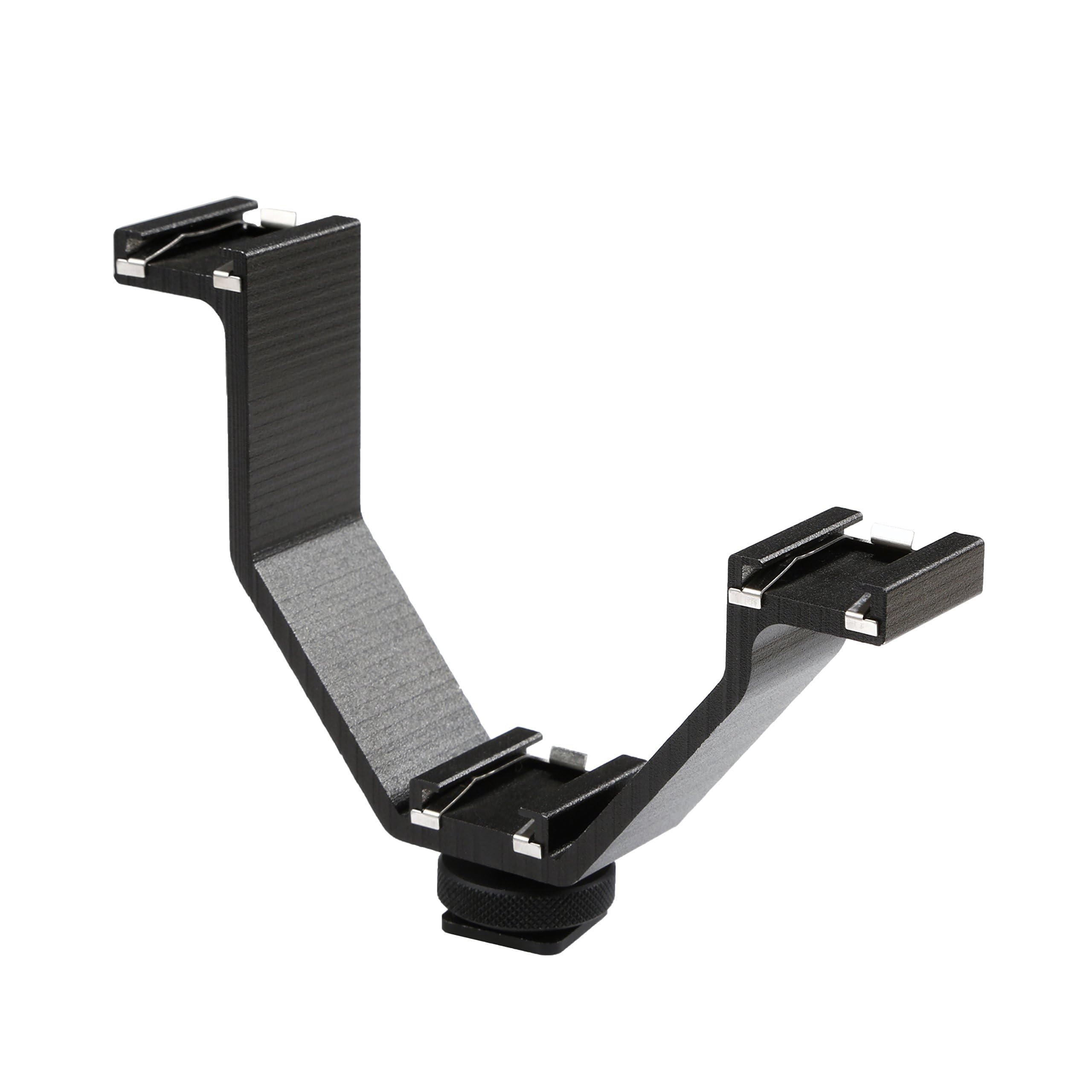
Image: The Movo MQ-THM01 Triple Shoe Bracket, showcasing its V-shape and three cold shoe mounts.
4. Configuració i instal·lació
Follow these steps to properly install your Movo MQ-THM01 Triple Shoe Bracket:
4.1 Attaching to a Camera Hot/Cold Shoe
- Locate the hot/cold shoe mount on your camera (typically on top).
- Slide the base of the Movo MQ-THM01 bracket into the camera's hot/cold shoe.
- Tighten the locking wheel at the base of the bracket clockwise until it is secure. Do not overtighten.

Image: The Movo MQ-THM01 bracket shown mounted on a camera and a tripod, illustrating its universal compatibility.
4.2 Attaching to a Tripod or Rig (1/4"-20 Mount)
- The base of the bracket also features a 1/4"-20 threaded hole.
- Screw the bracket onto any tripod, monopod, or camera rig equipped with a 1/4"-20 screw.
- Ensure the connection is firm to prevent rotation or loosening.
4.3 Col·locació d'accessoris
- Slide your cold shoe compatible accessories (e.g., microphone, LED light, monitor) into the three available cold shoe mounts on the bracket.
- Tighten any locking mechanisms on your accessories to secure them to the bracket.
- Ensure accessories are balanced to maintain stability, especially when using heavier items.

Image: The Movo MQ-THM01 bracket demonstrating how multiple accessories can be attached to its three cold shoe mounts.
5. Instruccions de funcionament
The Movo MQ-THM01 Triple Shoe Bracket is a passive accessory designed to provide additional mounting points. Its operation primarily involves securely attaching and positioning your desired camera accessories.
- Col·locació d'accessoris: Distribute accessories evenly across the three mounts to maintain balance, especially when handheld.
- Gestió de cables: When using multiple powered accessories, manage cables to prevent tangling or interference with camera operation.
- Comprovació d'estabilitat: Before use, always ensure all accessories are firmly attached to the bracket and the bracket itself is securely mounted to your camera or tripod.

Image: A practical application of the Movo MQ-THM01, showing a smartphone, microphone, and LED light mounted for content creation.
6. Manteniment
Proper maintenance ensures the longevity and reliable performance of your bracket.
- Neteja: Wipe the bracket with a soft, dry cloth to remove dust and debris. Avoid using harsh chemicals or abrasive materials.
- Emmagatzematge: Store the bracket in a dry, cool place away from direct sunlight and extreme temperatures.
- Inspecció: Periodically check the cold shoe mounts and the main mounting screw for any signs of wear or damage.
7. Solució De Problemes
If you encounter issues with your Movo MQ-THM01, refer to the following common problems and solutions:
| Problema | Causa possible | Solució |
|---|---|---|
| Bracket feels wobbly on camera/tripod. | Mounting screw/wheel not fully tightened. | Ensure the locking wheel or 1/4"-20 screw is securely tightened. Avoid overtightening. |
| Accessories do not fit into cold shoe mounts. | Accessory is not cold shoe compatible or is too large. | Verify your accessory has a standard cold shoe base. Some larger accessories may interfere with each other due to the compact size of the bracket. Consider the overall dimensions of your setup. |
| Bracket appears bent or damaged. | Excessive force or impact. | Discontinue use if the bracket is damaged. Contact Movo support for assistance. |
8. Especificacions
| Atribut | Detall |
|---|---|
| Número de model | 3BA-1 |
| Material | Alumini |
| Tipus de muntatge | Hot/Cold Shoe, 1/4"-20 Thread |
| Dimensions (L x A x A) | Aprox. 4.3 x 3.4 x 0.9 polzades (10.5 x 8.5 x 2.5 cm) |
| Pes de l'article | 3 unces |
| Color | Negre |
| UPC | 604888903219 |

Image: The Movo MQ-THM01 bracket with approximate dimensions indicated.
9. Garantia i Suport
The Movo MQ-THM01 Triple Shoe Bracket comes with a 1 anys de garantia. This warranty covers manufacturing defects and ensures the product performs as intended under normal use.
For technical assistance, troubleshooting, or warranty claims, please contact Movo's US-Based support team. Refer to the official Movo weblloc web per obtenir la informació de contacte més actualitzada.
Movo is committed to providing reliable products and excellent customer service.


