1. Introducció
This manual provides comprehensive instructions for the installation, operation, and maintenance of your UHPPOTE 4 Channel Color Quad System Video Splitter, Model UT-XYL-440. This device is designed to process and display video feeds from up to four CCTV cameras simultaneously on a single monitor, offering various display modes and control options for effective surveillance monitoring.
2. Informació de seguretat
- Assegureu-vos que el dispositiu estigui col·locat sobre una superfície estable i plana per evitar caigudes accidentals.
- Utilitzeu el dispositiu dins del volum especificattage range (DC 12V) using the provided power adapter.
- Avoid exposing the unit to moisture, rain, or extreme temperatures. This device is intended for indoor use only.
- No obriu la c.asino intenteu reparar la unitat vosaltres mateixos. Envieu totes les tasques de manteniment a personal qualificat.
- Mantingueu una ventilació adequada al voltant de la unitat per evitar el sobreescalfament.
3. Contingut del paquet
Si us plau, verifiqueu que tots els elements siguin presents al vostre paquet:
- UHPPOTE 4 Channel Color Quad System Video Splitter (UT-XYL-440)
- Control Remot per Infrarojos
- BNC Adapters (7 pieces)
- Adaptador d'alimentació (DC 12V)

Image 3.1: UHPPOTE 4 Channel Color Quad System Video Splitter, remote control, and BNC adapters.
4. Producte acabatview
Familiarize yourself with the components and controls of your video splitter.
4.1. Tauler frontal
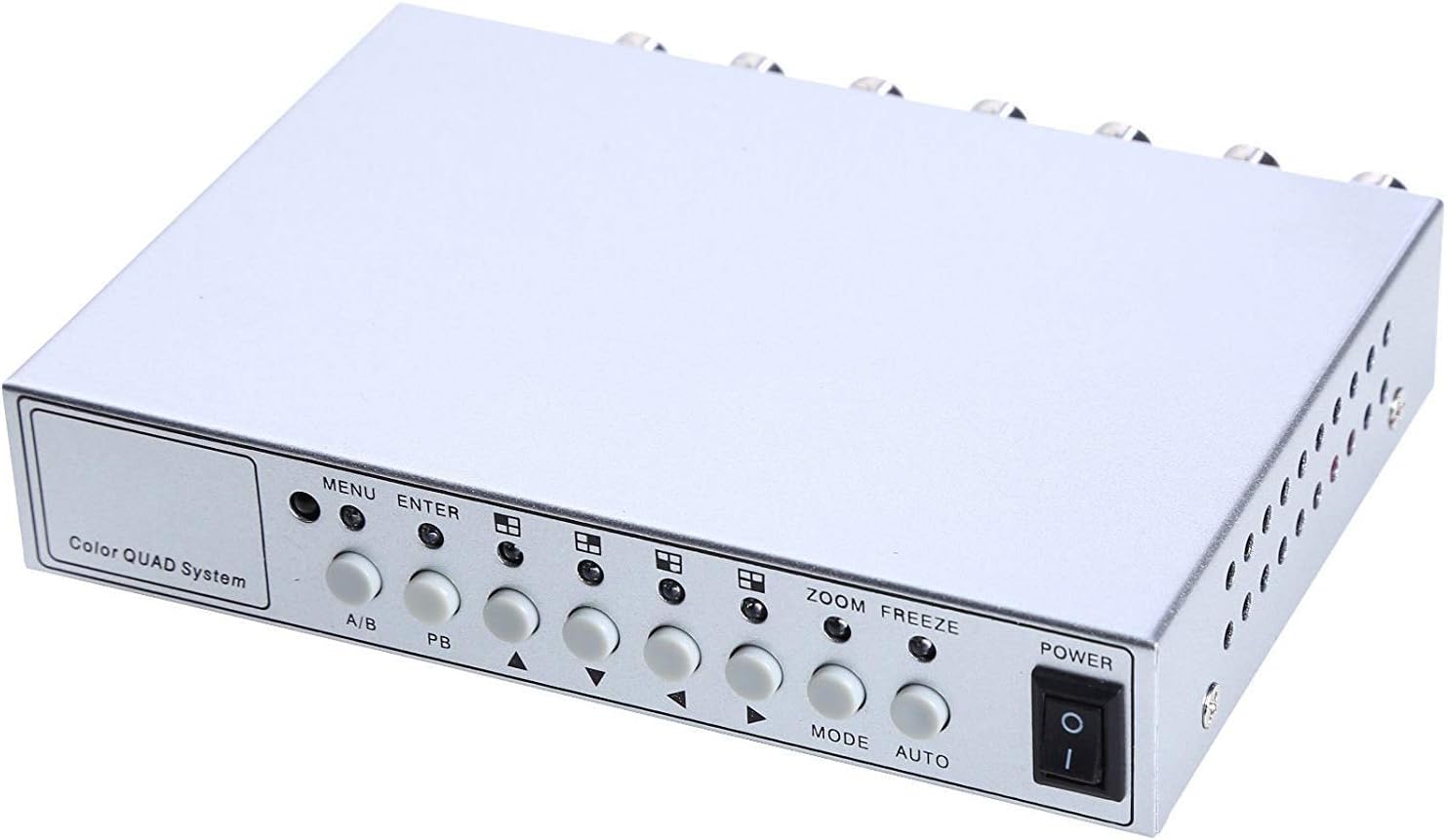
Image 4.1: Front panel controls and indicators.
- MENÚ: Accesses the on-screen display (OSD) menu for settings adjustment.
- ENTRAR: Confirma les seleccions dins del menú OSD.
- A/B: Switches between different display modes or channels.
- PB: Playback control (if connected to a VCR).
- Fletxes direccionals (amunt/avall/esquerra/dreta): Navegueu per les opcions del menú i ajusteu els valors.
- ZOOM: Activates the digital zoom function.
- CONGELAR: Freezes the current video frame.
- Mode: Cycles through various display modes (Quad, Full Screen, PIP, Dual Split).
- AUTOMÀTIC: Activates the auto-sequence display mode.
- POTÈNCIA: Interruptor d'encès/apagat per a la unitat.
4.2. Panell posterior

Image 4.2: Rear panel video input/output ports and power input.
- VIDEO 1-4: BNC inputs for connecting up to four CCTV cameras.
- VCR IN: BNC input for connecting a VCR or other recording device.
- VCR OUT: BNC output for connecting to a VCR or other recording device.
- MONITOR: BNC output for connecting to a display monitor.
- CC 12V: Power input jack for the DC 12V power adapter.
4.3. Control remot

Image 4.3: Infrared remote control for convenient operation.
The remote control provides convenient access to all functions, mirroring the front panel controls and offering direct channel selection.
5. Configuració
Follow these steps to set up your UHPPOTE Video Splitter:
- Connectar càmeres: Connect your CCTV cameras to the VIDEO 1, VIDEO 2, VIDEO 3, i VIDEO 4 BNC input ports on the rear panel. Ensure secure connections.
- Connecta el monitor: Connect your display monitor to the MONITOR BNC output port on the rear panel.
- Connect VCR (Optional): If you wish to record video, connect the VCR IN i VCR OUT BNC ports to your VCR or recording device.
- Connectar l'alimentació: Insert the DC 12V power adapter into the DC 12V input jack on the rear panel, then plug the adapter into a standard electrical outlet.
- Encès: Premeu el botó PODER button on the front panel or remote control to turn on the unit.
6. Instruccions de funcionament
6.1. Encendre/apagar
Premeu el botó PODER button on the front panel or the remote control to switch the unit on or off.
6.2. Modes de visualització
The unit supports various display configurations. Use the MODE button on the front panel or remote to cycle through them:
- QUAD Split Mode: Displays all four camera feeds simultaneously in a four-way split screen.
- Mode de pantalla completa: Displays a single camera feed in full screen. Use the directional arrows or number buttons (1-4) on the remote to select the desired camera.
- Mode PIP (Imatge dins d'imatge): Displays one main camera feed with a smaller window of another camera feed. The position of the PIP window can often be adjusted via the menu.
- Dual Split Mode: Displays two camera feeds simultaneously (e.g., side-by-side or top-bottom).
- Auto Sequence Mode: Automatically cycles through full-screen views of each connected camera. Activate using the AUTO button on the front panel or remote.
6.3. Navegació i configuració del menú
To access and adjust system settings:
- Premeu el botó MENÚ button on the front panel or remote control. The On-Screen Display (OSD) menu will appear.
- Utilitza el Amunt/Avall directional arrows to navigate between menu options.
- Premeu ENTRAR to select an option or enter a sub-menu.
- Utilitza el Esquerra/Dreta directional arrows to adjust values (e.g., brightness, contrast) or change settings.
- Premeu MENÚ torneu a sortir del menú.
Configuració clau:
- Ajustos de vídeo: Adjust Brightness, Contrast, Saturation, Hue, and Sharpness for optimal image quality.
- Format del sistema: Select between NTSC (for North America, Japan, etc.) or PAL (for Europe, Asia, etc.) based on your region's video standard. Incorrect selection can lead to distorted or black and white images.
- Overlay Information: Configure display of Camera Title, Real Time and Date, and Alarm/Loss/Motion messages.
- Event Report: Review event logs and configure buzzer/relay output settings.
6.4. Funció de zoom
In full-screen mode, press the ZOOM button on the front panel or remote to activate digital zoom. Use the directional arrows to select the area to zoom in on.
6.5. Freeze Function
Premeu el botó CONGELACIÓ (FRZ) button on the front panel or remote to pause the current video frame. Press it again to resume live video.
7. Manteniment
- Neteja: Feu servir un drap suau i sec per netejar l'exterior de la unitat. No utilitzeu netejadors líquids ni en aerosol.
- Ventilació: Ensure the ventilation holes are not obstructed to prevent overheating.
- Emmagatzematge: Si guardeu la unitat durant un període prolongat, desconnecteu-la de l'alimentació i guardeu-la en un lloc fresc i sec.
8. Solució De Problemes
| Problema | Causa possible | Solució |
|---|---|---|
| No video signal on monitor |
|
|
| Distorted, black & white, or rolling image |
|
|
| El comandament a distància no funciona |
|
|
| Constant buzzing sound |
|
|
9. Especificacions
| Característica | Detall |
|---|---|
| Número de model | UT-XYL-440 |
| Entrades de vídeo | 4 BNC (for cameras), 1 BNC (VCR In) |
| Sortides de vídeo | 1 BNC (Monitor), 1 BNC (VCR Out) |
| Resolució de vídeo | 720x480 (NTSC 60Hz), 720x576 (PAL 50Hz) |
| Modes de visualització | Quad Split, Full Screen, PIP, Dual Split, Auto Sequence |
| Ajustaments d'imatge | Brillantor, contrast, saturació, tonalitat, nitidesa |
| Funcions especials | Freeze Function, Zoom Function, Video Loss Detection, Motion Detection |
| Font d'alimentació | DC 12V |
| Pes de l'article | 13.4 unces (aprox. 380 g) |
| Dimensions del paquet | 8.54 x 6.06 x 2.4 polzades (aprox. 21.7 x 15.4 x 6.1 cm) |
| Bateria a distància | 1 x CR2 battery (required) |
10. Garantia i Suport
UHPPOTE products are designed for reliability and performance. For warranty information, technical support, or service inquiries, please refer to the contact information provided with your purchase or visit the official UHPPOTE website. Please have your model number (UT-XYL-440) available when contacting support.


