SatLink WS-6933 DVB-S/S2 Satellite Meter Finder User Manual
Model: WS-6933
1. Introducció
The SatLink WS-6933 is a compact, lightweight, and intuitive handheld digital satellite meter designed for the installation and verification of digital TV services in residential homes or multi-dwelling units. It is fully compliant with DVB-S/S2 standards and offers a rich set of features for efficient satellite signal acquisition and analysis.
2. Instruccions de seguretat importants
- Llegiu atentament totes les instruccions abans d'utilitzar el dispositiu.
- Mantingueu el dispositiu allunyat de l'aigua i la humitat.
- No intenteu desmuntar ni reparar el dispositiu vosaltres mateixos. Encarregueu tot el manteniment a personal qualificat.
- Use only the provided power adapter for charging to prevent damage.
- Assegureu-vos que hi hagi una ventilació adequada quan feu servir el dispositiu.
- Eviteu exposar el dispositiu a temperatures extremes o a la llum solar directa.
3. Desembalatge i contingut del paquet
Carefully open the product packaging and ensure all items listed below are present. The device comes protected by a yellow silicone case for durability.
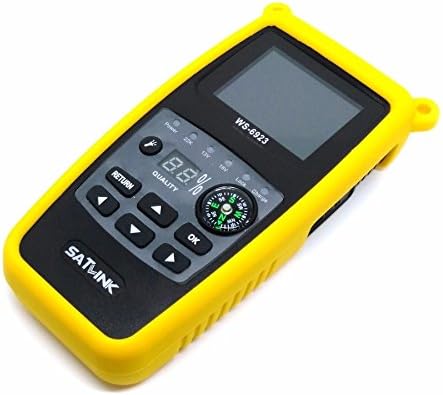
Figure 3.1: SatLink WS-6933 Satellite Meter Finder with its protective yellow silicone case.
Contingut del paquet:
- 1 x WS-6933 Satellite Finder
- 1 x Silicone Case (pre-installed)
- 1 x USB Upgrade Cable
- 1 x Power Adapter (AC/DC 12V/1A)
- 1 x manual d'usuari en anglès
- 1 x Carrying Belt

Figure 3.2: The power adapter, USB cable, and carrying belt included with the device.
Vídeo de desempaquetatge:
Video 3.1: An unboxing video demonstrating the contents of the SatLink WS-6933 package and initial device overview.
4. Producte acabatview and Illustration
The WS-6933 features a 2.4-inch LCD screen, a built-in compass, and intuitive controls for easy operation.

Figura 4.1: Frontal view of the WS-6933, highlighting the screen, control buttons, and compass.
Característiques del panell frontal:
- Pantalla LCD d'2.4 polzades: Displays menu, signal information, and settings.
- Botons de control: Navigation (Up, Down, Left, Right), OK, Return.
- Brúixola: Integrated for directional guidance during satellite alignment.
- Llums indicadores: Display power status, 22KHz tone, 13V/18V LNB power, Lock, and Charge status.
- Quality Display: Digital percentage display for signal quality.

Figura 4.2: lateral view of the WS-6933, showing the power switch, LNB input, USB port, and DC input.
Side and Rear Features:
- Interruptor d'alimentació: On/Off toggle for the device.
- Entrada LNB: F-type connector for connecting to the LNB.
- Port USB: For software upgrades and file transfer via PC.
- DC IN: Power input for charging the device.
- Llanterna: Integrated LED light for use in low-light conditions.

Figura 4.3: Esquena view of the WS-6933, showing the flashlight and ventilation.
5. Configuració
- Carregueu el dispositiu: Before first use, fully charge the internal 7.4V/800mAh Li-Ion battery using the provided 12V/1A AC/DC adapter. Connect the adapter to the DC IN port on the side of the device and plug it into a power outlet. The 'Charge' indicator light will illuminate.
- Attach Carrying Belt (Optional): For convenience during outdoor work, attach the carrying belt to the designated loops on the device's silicone case.
- Encès: Flip the power switch located on the side of the device to the 'ON' position. The SatLink logo will appear on the screen, followed by the main menu.
6. Instruccions de funcionament
The WS-6933 features a user-friendly interface with a main menu providing access to various functions. Use the navigation buttons (Up, Down, Left, Right) to move between options and the 'OK' button to select. Use the 'Return' button to go back to the previous screen.
S'ha acabat el menú principalview:
- Sat Setting: Configure satellite parameters.
- Signal Scan: Measure signal strength and quality.
- Eines: Access calculation tools for satellite alignment.
- Sat Manage: Add, edit, or delete satellite entries.
- TP Manager: Add, edit, or delete transponder entries.
- Conjunt del sistema: Adjust general device settings.
Funcions detallades:
- Sat Setting:
Navigate to 'Sat Setting' and press 'OK'. Here you can select the satellite name, LNB type, and input frequency parameters (Low Freq, High Freq, TP Num, Frequency). This is crucial for accurate signal detection.
- Signal Scan:
Select 'Signal Scan' from the main menu. This screen displays real-time signal strength (S) and quality (Q) percentages, along with other parameters like BER, PWR, S/N, and LNB power (13V/18V). The device also supports 22KHz tone and DISEQC 1.0/1.1 for multi-LNB setups. Sound and light alarms will indicate signal lock.
- Eines:
Access 'Tools' for helpful calculations. This section provides information such as Satellite Name, Sat Longitude, Local Longitude, Local Latitude, Azimuth, Elevation, and Polarization, assisting in precise dish alignment.
- Sat Manage:
In 'Sat Manage', you can 'Add Satellite', 'Edit Satellite', or 'Delete Satellite' entries. This allows customization of the satellite list based on your specific needs and regional bands.
- TP Manager:
The 'TP Manager' allows you to 'Add Transponder', 'Edit Transponder', or 'Delete Transponder' entries. This is useful for managing specific transponder frequencies and symbol rates.
- Conjunt del sistema:
Under 'System Set', you can configure various device preferences:
- Idioma OSD: Change the display language (default is English, other options available).
- Tonalitat clau: Turn button press sounds ON/OFF.
- Lock TONE: Turn signal lock tone ON/OFF.
- Llanterna: Turn the built-in flashlight ON/OFF.
- Unitat PWR: Adjust power unit display.
- Local Longitude/Latitude: Input local coordinates for accurate azimuth and elevation calculations.
Vídeo de demostració de l'operació:
Video 6.1: A demonstration of the SatLink WS-6933's menu navigation and key functions, including signal scanning and system settings.
7. Manteniment
- Neteja: Feu servir un drap suau i sec per netejar el dispositiu. No utilitzeu netejadors líquids ni aerosols.
- Emmagatzematge: Guardeu el dispositiu en un lloc fresc i sec, allunyat de la llum solar directa i de temperatures extremes.
- Cura de la bateria: Per allargar la durada de la bateria, eviteu descarregar-la completament amb freqüència. Carregueu el dispositiu regularment, fins i tot si no l'utilitzeu durant períodes prolongats.
- Actualitzacions de programari: Reviseu periòdicament el fabricant website for software updates to ensure optimal performance and access to new features. Use the provided USB cable for updates.
8. Solució De Problemes
| Problema | Causa possible | Solució |
|---|---|---|
| El dispositiu no s'encén. | Bateria baixa o l'interruptor d'alimentació està apagat. | Charge the device. Ensure the power switch is in the 'ON' position. |
| No s'ha detectat cap senyal. | Incorrect satellite settings, LNB not connected, or dish misalignment. | Verify satellite settings in 'Sat Setting'. Check LNB cable connection. Adjust dish alignment using the signal scan feature. |
| Signal quality is low. | Weak signal from LNB, cable issue, or minor dish misalignment. | Check LNB and cable for damage. Fine-tune dish alignment. |
| La pantalla no respon. | Dispositiu congelat. | Power off the device, then power it back on. If the issue persists, contact support. |
9. Especificacions
| Característica | Especificació |
|---|---|
| Número de model | WS-6933 |
| Dimensions del producte | 6.3 x 3.15 x 1.57 polzades (16 x 8 x 4 cm) |
| Pes de l'article | 1.34 lliures (610 grams) |
| Mostra | Pantalla LCD de 2.4 polzades |
| Bateria | 7.4V/800mAh Li-Ion Battery (1 Lithium Ion battery required) |
| Font d'alimentació | 12V/1A AC/DC Adapter |
| DVB Compliance | DVB-S / S2 |
| Suport de DISEQC | DISEQC 1.0/1.1, 0/22KHz Tone |
| Font d'alimentació LNB | 13V/18V (màx. 300mA) |
| Connectivitat | USB (for software upgrade and file transferència) |
| Característiques addicionals | Mechanical Compass, Beep Integrated, LNB short protect, Flashlight |
10. Garantia i Suport
For warranty information and technical support, please refer to the contact details provided on the product packaging or visit the official SatLink weblloc web. Conserveu el rebut de compra com a comprovant de compra per a qualsevol reclamació de garantia.


