1. Introducció
This manual provides essential information for the safe and efficient operation of your DNP DS820A Professional Dye-Sublimation Printer. The DS820A is designed for high-quality photo printing, offering a resolution of 300 x 600 dpi and supporting various print sizes up to 8x32 inches. It features a high-speed print mode, producing 8x10 inch glossy photos in approximately 29.3 seconds, and supports multiple surface options including Glossy, Luster, Matte, and Fine Matte.
Please read this manual thoroughly before using the printer to ensure proper setup, operation, and maintenance.

Figura 1: Angle frontal view de la impressora DNP DS820A.
2. Informació de seguretat
Observeu les següents precaucions de seguretat per evitar lesions i danys a la impressora:
- Connecteu sempre la impressora a una presa de corrent amb connexió a terra.
- Do not block ventilation openings on the printer. Ensure adequate space around the unit for proper airflow.
- Mantingueu la impressora allunyada de l'aigua o d'una humitat excessiva.
- No intenteu desmuntar ni reparar la impressora vosaltres mateixos. Poseu-vos en contacte amb personal de servei qualificat.
- Use only DNP-approved media and ribbons.
3. Contingut del paquet
Verifiqueu que tots els elements siguin presents al paquet:
- DNP DS820A Printer Unit
- Cable d'alimentació
- Cable USB
- Safata multimèdia
- Guia d'inici ràpid i documentació
Media (paper and ribbon) is typically sold separately.
4. Configuració
4.1 Desembalatge i col·locació
- Traieu amb cura la impressora de l'embalatge.
- Place the printer on a stable, level surface with sufficient space for ventilation and media loading/unloading.
- Traieu totes les cintes protectores i els materials d'embalatge.
4.2 Connexió de la impressora
- Connecteu el cable d'alimentació a l'entrada d'alimentació de la impressora i després a una presa de corrent amb connexió a terra.
- Connecteu el cable USB al port USB de la impressora i a l'ordinador.
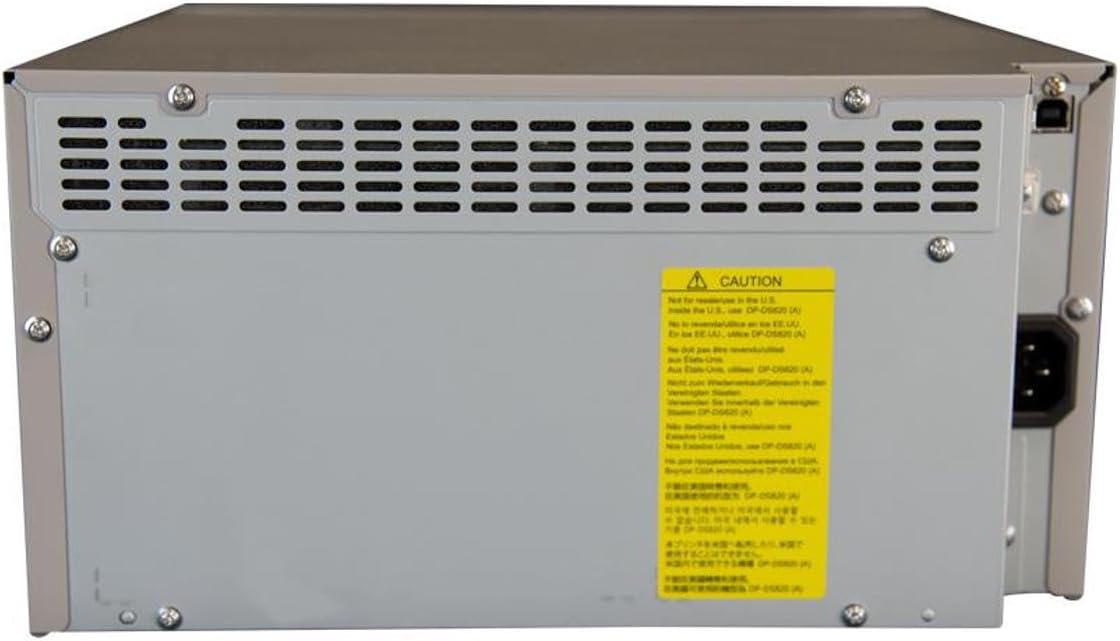
Figura 2: posterior view of the DNP DS820A, highlighting connectivity ports.
4.3 Instal·lació del controlador
Install the latest printer drivers from the DNP website. The printer is compatible with Windows and Mac OS X/macOS operating systems.
4.4 Loading Media (Paper and Ribbon)
The DS820A uses a roll-fed media system. Refer to the specific instructions provided with your DNP media for detailed loading procedures. Generally, this involves opening the front panel, inserting the ribbon cassette, and then loading the paper roll into its designated slot.
5. Instruccions de funcionament
5.1 Engegada/apagada
Locate the power switch on the front or side of the printer. Flip the switch to the 'On' position to power on the printer. To power off, flip the switch to the 'Off' position.
5.2 Llums indicadors
The printer features several indicator lights on the front panel to communicate its status:
- POTÈNCIA: Indica que la impressora està engegada.
- EN ESPERA: Indicates operational status or standby mode.
- CINTA: S'il·lumina quan cal substituir la cinta o està instal·lada incorrectament.
- PAPER: Illuminates when paper needs replacement or is incorrectly loaded.
- ERROR: Indicates a general error. Refer to the troubleshooting section or driver software for details.

Figure 3: Front control panel with status indicator lights.
5.3 Procés d'impressió
- Assegureu-vos que la impressora estigui engegada i connectada a l'ordinador.
- Obriu la imatge o el document que voleu imprimir a l'ordinador.
- Select the DNP DS820A from your printer options.
- Adjust print settings such as print size, resolution (300x600 dpi recommended for color), and surface type (Glossy, Luster, Matte, Fine Matte) in the printer driver settings.
- Initiate the print job. The printer will process and output the photo.
6. Manteniment
6.1 Neteja de la impressora
Una neteja regular ajuda a mantenir la qualitat d'impressió i allarga la vida útil de la impressora.
- Exterior: Netegeu l'exterior amb un drap suau, sec i sense borrissol. No utilitzeu productes de neteja abrasius ni dissolvents.
- Interior: Periodically open the front panel and gently remove any dust or debris from the media path using a soft brush or compressed air.
6.2 Substitució de suports
When the RIBBON or PAPER indicator lights illuminate, it's time to replace the respective media. Open the front access panel to replace the ribbon cassette and paper roll according to the instructions provided with the DNP media.
7. Solució De Problemes
Aquesta secció tracta problemes comuns que podeu trobar.
| Problema | Causa possible | Solució |
|---|---|---|
| La impressora no s'encén | Power cable disconnected; Power switch off | Check power cable connection; Ensure power switch is ON. |
| RIBBON light on | Ribbon empty or incorrectly installed | Replace ribbon; Reinstall ribbon correctly. |
| PAPER light on | Rotlle de paper buit o carregat incorrectament | Replace paper roll; Re-load paper correctly. |
| Llum ERROR encès | Error general de la impressora | Turn printer off and on; Check computer for specific error messages; Consult DNP support. |
| Poca qualitat d'impressió | Dirty print head; Incorrect driver settings; Low quality image source | Clean printer interior; Verify print settings (DPI, media type); Use high-resolution images. |
If you encounter issues not covered here, or if solutions do not resolve the problem, contact DNP customer support.
8. Especificacions
| Característica | Especificació |
|---|---|
| Nom del model | DS820A |
| Tecnologia d'impressió | Sublimació de tint |
| Resolució màxima d'impressió en color | 300 x 600 ppp |
| Resolució màxima d'impressió en blanc i negre | 300 x 300 dpi or 300 x 600 dpi |
| Mides de suports admesos | 5 x 7 inches, 8 x 10 inches, 8 x 12 inches, up to 8 x 32 inches (panoramic) |
| Tipus de suports impresos | Glossy photo paper, Luster, Matte, Fine Matte |
| Print Speed (8x10 Glossy) | Uns 29.3 segons |
| Capacitat màxima del full d'entrada | 250 sheets (depending on media type) |
| Capacitat de fulls de sortida | 250 fulls |
| Nombre de safates | 2 |
| Tecnologia de connectivitat | USB 2.0 |
| Interfície del maquinari | USB |
| Mètode de control | App |
| Sortida de la impressora | Color; Monochrome |
| Pes de l'article | 36 lliures (16.33 kg) |
| Dimensions del producte (L x A x A) | 19.25 x 17.25 x 12 polzades (48.9 x 43.8 x 30.5 cm) |
| Fabricant | DNP |
| UPC | 650415905867 |
9. Garantia i Suport
The DNP DS820A printer comes with a full warranty. For specific warranty terms and conditions, please refer to the documentation included with your product or visit the official DNP weblloc.
For technical assistance, troubleshooting beyond this manual, or to inquire about service, please contact DNP customer support directly. Contact information can typically be found on the DNP weblloc web o a l'embalatge del producte.


