1. Introducció
This user manual provides comprehensive instructions for the Smartby N2QAYB000485 replacement remote control. This remote is designed to function as a direct replacement for original Panasonic TV remotes, offering immediate usability without the need for complex programming. It is compatible with a wide range of Panasonic Plasma, Viera, LCD, and LED television models.
2. Producte acabatview
The Smartby N2QAYB000485 remote control features a standard layout for easy navigation and control of your Panasonic television. Below are images illustrating the remote's design and key buttons.

Figura 1: Davant view of the Smartby N2QAYB000485 remote control, showing all buttons including Power, Input, Viera Tools, Menu, directional pad, volume, channel, number pad, and media playback controls.
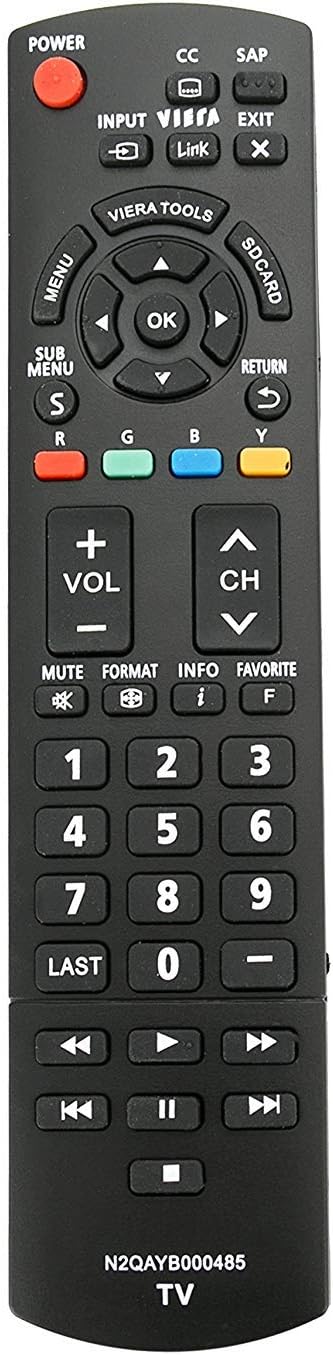
Figura 2: lateral view of the Smartby N2QAYB000485 remote control, highlighting its ergonomic design and button profile.
3. Configuració
The Smartby N2QAYB000485 remote control is designed for immediate use with compatible Panasonic televisions. No programming is required.
3.1. Instal·lació de la bateria
- Localitzeu la tapa del compartiment de la bateria a la part posterior del comandament a distància.
- Feu lliscar la tapa cap avall o premeu el pestell per obrir el compartiment.
- Introduïu dues piles AAA (no incloses), assegurant-vos que els terminals positiu (+) i negatiu (-) s'alineïn correctament amb les marques de l'interior del compartiment.
- Torneu a col·locar la tapa del compartiment de la bateria, assegurant-vos que encaixi correctament al seu lloc amb un clic.
Once batteries are installed, the remote is ready for operation.
4. Instruccions de funcionament
This remote provides full functionality for your Panasonic TV. Key functions include:
- Potència: Encén o apaga el televisor.
- Entrada: Selects video input sources (HDMI, AV, Component, etc.).
- Volum (+/-): Ajusta el nivell de so.
- Channel (CH ^/v): Canvia els canals de televisió.
- Silenciar: Silencia l'àudio del televisor.
- Menú: Accedeix al menú principal del televisor.
- Directional Pad (Up, Down, Left, Right, OK): Navega pels menús i confirma les seleccions.
- Tornada: Torna al menú o pantalla anterior.
- Sortida: Closes the current menu or function.
- Teclat numèric (0-9): Introdueix directament els números de canal.
- Viera Tools: Accesses Panasonic's Viera Tools menu for smart features.
- Controls de reproducció multimèdia: Includes Play, Pause, Stop, Fast Forward, Rewind, Next, and Previous track buttons for media playback.
5. Manteniment
5.1. Substitució de la bateria
When the remote control's performance degrades or it stops responding, replace the batteries with new ones. Always use fresh AAA batteries and ensure correct polarity during installation.
5.2. Neteja
To clean the remote control, gently wipe its surface with a soft, dry cloth. Avoid using liquid cleaners or abrasive materials, as these can damage the remote's finish or internal components.
6. Solució De Problemes
If the remote control does not function as expected, try the following troubleshooting steps:
- Comproveu les bateries:
- Traieu les piles del comandament a distància.
- Press each button on the remote for approximately 3 seconds to drain any residual power. This also helps identify any stuck buttons.
- Insert new batteries, ensuring they are correctly installed with the positive (+) and negative (-) ends in the right direction.
- Reset the Television:
Sometimes, the issue may originate from the television itself. Perform a power cycle on your TV:
- Unplug the television from its power outlet.
- Locate and hold down the power button on the side or back of the TV for 15 seconds. This helps to drain any residual power from the TV's internal components.
- Plug the TV back into the power outlet and power it on.
- Línia de visió: Assegureu-vos que no hi hagi obstacles entre el comandament a distància i el sensor d'infrarojos del televisor.
7. Compatible Panasonic TV Models
The Smartby N2QAYB000485 remote control is compatible with a wide range of Panasonic TV models, including but not limited to:
- TC-32LX24
- TC-42LD24
- TC-42LS24
- TC-42PX24
- TC-50PS24
- TC-50PX24
- TC-58PS24
- TC-65PS24
- TC-L22X2
- TC-L32C22
- TC-L32U22
- TC-L32X2
- TC-L37C22
- TC-L37D2
- TC-L37U22
- TC-L37X2
- TC-L42D2
- TC-L42U22
- TC-L42U25
- TC-P42C2
- TC-P42S2
- TC-P42U2
- TC-P46C2
- TC-P46S2
- TC-P50C2
- TC-P50S2
- TC-P50U2
- TC-P50X2
- TC-P54S2
- TC-P58S2
- TC-P65S2
- TC55DT50
- TCL42ET5
- TCL47DT50
- TCL47ET5
- TCL47WT50
- TCP50GT50
- TCP55GT50
- TCP55ST50
- TCP55VT50
- TCP60GT50
- TCP60ST50
- TCP65GT50
- TCP65ST50
- TCP65VT50
- TC-55LET64
- TC-L47ET60
- TC-L50ET60
- TC-L55ET60
- TC-P50ST60
- TC-P55ST60
- TC-P60ST60
- TC-P65ST60
- TC-L42ET60
- TC-39AS530U
- TC-50AS530U
- TC-50AS530UE
- TC-50ASU534
- TC-55AS530U
- TC-60AS530U
- TH37LRU50
- TH32LRU50
- TC50PS24
- TC58PS24
- TC65PS24
- TH32LRH30U
- TH32LRU5
- TH37LRU5
- TH37LRU30
- TH-42LRU20
- TH55LRU50
- TH42LRU50
- TH42LRU5
- TC-42PS14
- TC-54PS14
- TH-32LRU5
- TH-42LRU50
- TH-55LRU50
- TC-P50S30
This remote may also be compatible with other Panasonic models not listed. It replaces original remotes such as N2QAYB000321 and N2QAYB000570.
8. Especificacions
| Característica | Detall |
|---|---|
| Marca | Smartby |
| Número de model | N2QAYB000485 |
| Dispositius compatibles | Panasonic Televisions (Plasma, Viera, LCD, LED) |
| Tecnologia de connectivitat | Infrarojos (IR) |
| Característica especial | Disseny ergonòmic |
| Nombre màxim de dispositius compatibles | 1 (Televisió) |
| Pes de l'article | 3.2 unces |
| Dimensions del paquet | 8.19 x 2.09 x 0.91 polzades |
9. Garantia i Suport
For warranty information or further support regarding your Smartby N2QAYB000485 remote control, please refer to the seller's terms and conditions at the point of purchase. You may also visit the official Smartby store for additional product information and contact options: