1. Introducció
Gràcies per la compraasing the FONESTAR WA-66R Wall Amplifier. This device is designed to provide a versatile audio solution for your space, featuring Bluetooth connectivity, FM radio, USB and MicroSD playback, and auxiliary inputs. Please read this manual carefully to ensure proper installation, operation, and maintenance of your ampmés viu.
2. Informació de seguretat
- Font d'alimentació: Assegureu-vos el amplifier is connected to a 100-240V AC power source. Incorrect voltagpot fer malbé la unitat.
- Instal·lació: Installation should be performed by qualified personnel to prevent electrical hazards. Ensure proper wiring and insulation.
- Ventilació: No bloquegeu les obertures de ventilació. Assegureu-vos que hi hagi un flux d'aire adequat al voltant de la unitat per evitar el sobreescalfament.
- Humitat: Mantenir el amplifier away from water, moisture, and high humidity environments.
- Neteja: Desconnecteu l'alimentació abans de netejar. Feu servir un drap sec i suau. No utilitzeu netejadors líquids ni aerosols.
- Manteniment: No intenteu atendre aquest producte vosaltres mateixos. Consulteu tots els serveis a personal de servei qualificat.
3. Producte acabatview
3.1 Panell frontal i comandament a distància
The FONESTAR WA-66R features an integrated display and control buttons on its front panel, along with slots for MicroSD cards and USB drives. A remote control is also included for convenient operation.

Imatge 1: Davant view of the FONESTAR WA-66R wall amplificador i el seu comandament a distància. El amplifier features a digital display, control buttons, and slots for MicroSD and USB. The remote control includes power, mode, EQ, volume, and numeric keys.
3.2 Connexions del panell posterior
The rear panel provides all necessary connection terminals for power, audio inputs, and speaker outputs.

Imatge 2: posterior view of the FONESTAR WA-66R wall amplifier, showing connection terminals for power (100-240V AC), FM antenna, two auxiliary audio inputs (AUX1, AUX2), and speaker outputs (8 Ohms).
4. Configuració
4.1 Esquema de cablejat
Follow the diagram below for correct wiring of power, antenna, and speakers.
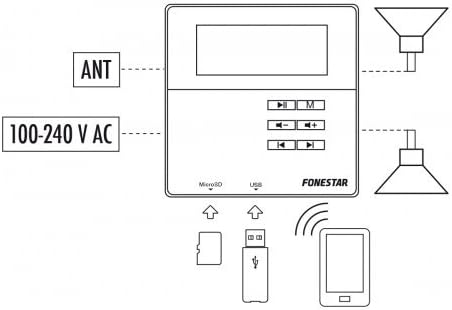
Imatge 3: Diagram illustrating the connection points for the FONESTAR WA-66R wall amplifier, including 100-240V AC power, FM antenna, and speaker outputs. It also shows the MicroSD and USB inputs, and wireless connection to a smartphone.
4.2 Passos d'instal·lació
- Connexió d'alimentació: Connect the 100-240V AC power supply to the designated terminals on the rear panel. Ensure proper polarity (N for Neutral, L for Live).
- Connexió de l'altaveu: Connect your 8 Ohm speakers to the SPEAKER OUT terminals. Ensure correct positive (+) and negative (-) connections for each channel.
- Antena FM: Connect the FM antenna to the ANT terminal for optimal radio reception.
- Auxiliary Inputs (Optional): If using external audio sources (e.g., TV, CD player), connect them to the AUX1 or AUX2 inputs using appropriate audio cables.
- Muntatge: Munteu de manera segura el amplifier into the wall box according to standard electrical installation practices.
5. Instruccions de funcionament
5.1 Encès/Apagat
Premeu el botó Poder button on the remote control or the unit to turn the ampmés viu encès o apagat.
5.2 Selecció del mode
Premeu el botó M button on the remote control or the unit to cycle through available input modes: Bluetooth (BT), FM Radio, USB, MicroSD, AUX1, AUX2.
5.3 Control de volum
Utilitza el Volum + i Volum - buttons on the remote control or the unit to adjust the audio level.
5.4 Vinculació Bluetooth
- Seleccioneu BT mode utilitzant el M button. The display will show 'BT' and indicate pairing mode.
- Al dispositiu amb Bluetooth (per exemple, un telèfon intel·ligent), cerqueu els dispositius disponibles.
- Select 'FONESTAR WA-66R' from the list to pair. A confirmation tone or message will indicate successful pairing.
5.5 Funcionament de la ràdio FM
- Seleccioneu FM mode utilitzant el M botó.
- Premeu el botó Reproduir/Pausa button to initiate an automatic station scan and save available stations.
- Utilitza el Pista anterior / següent botons per navegar per les estacions desades.
5.6 USB/MicroSD Playback
- Insert a USB drive or MicroSD card into the respective slot on the front panel.
- El amplifier will automatically switch to USB or MicroSD mode and begin playback of compatible audio files. If not, select the mode manually using the M botó.
- Utilitza el Reproduir/Pausa i Pista anterior / següent botons per controlar la reproducció.
5.7 Configuració de l'equalitzador (EQ)
Premeu el botó EQ button on the remote control to cycle through various equalizer presets (e.g., Pop, Rock, Jazz, Classic, Flat).
6. Manteniment
- Neteja: Netegeu regularment el amplifier's surface with a soft, dry cloth. Avoid abrasive cleaners or solvents.
- Emmagatzematge: Si guardeu la unitat durant un període prolongat, desconnecteu-la de l'alimentació i guardeu-la en un lloc fresc i sec.
7. Solució De Problemes
- Sense energia:
- Comproveu si el cable d'alimentació està connectat correctament.
- Comproveu que la presa de corrent funcioni.
- Sense so:
- Assegureu-vos que el volum no estigui al mínim ni silenciat.
- Comproveu les connexions dels altaveus per assegurar-vos que la polaritat sigui correcta i que estiguin ben ajustades.
- Verify the correct input mode is selected.
- For AUX inputs, ensure the external device is playing and its volume is adequate.
- Problemes de connexió Bluetooth:
- Assegureu-vos el amplifier is in BT mode and discoverable.
- Desactiva i activa el Bluetooth al dispositiu i, a continuació, intenta emparellar-lo de nou.
- Apropa el dispositiu a la ampmés viu.
- Mala recepció d'FM:
- Ensure the FM antenna is properly connected and extended.
- Adjust the position of the antenna for better signal.
- Torneu a fer una cerca automàtica per trobar emissores més fortes.
8. Especificacions
- Marca: FONESTAR
- Model: WA-66R
- Potència de sortida: 2 x RMS de 10W
- Impedància de l'altaveu: 8 ohms
- Connectivitat: Bluetooth 2.1, USB, MicroSD, FM Radio, 2 x Auxiliary Inputs (AUX1, AUX2)
- Font d'alimentació: 100-240V AC
- Característiques especials: Integrated display, Remote Control, Integrated Microphone, USB Port
- Color: Blanc
- Dispositius compatibles: Television (via AUX input)
9. Garantia i Suport
Warranty and support information for the FONESTAR WA-66R is not available in the provided product data. Please refer to your purchase documentation or contact your retailer for details regarding warranty coverage and technical support.


