1. Introducció
This user manual provides detailed instructions for the Linksys EA9500 Max-Stream AC5400 MU-MIMO Gigabit Router. The EA9500 is designed to provide high-speed Wi-Fi connectivity across multiple devices simultaneously, utilizing Tri-Band technology and MU-MIMO capabilities. This document covers the physical setup, initial configuration, operational guidelines, maintenance tips, and troubleshooting steps to ensure optimal performance of your router.
2. Contingut del paquet
Comproveu que el vostre paquet contingui els elements següents:
- Linksys Max-Stream AC5400 MU-MIMO Gigabit Router
- Adaptador d'alimentació
- Cable Ethernet
- Guia d'inici ràpid (no inclosa en aquest manual digital)
3. Producte acabatview
3.1 Davant View

Figura 1: Davant view of the Linksys EA9500 router. This image displays the router's top surface with ventilation grilles, a central Linksys logo, and eight adjustable external antennas. The central panel illuminates to indicate operational status.
The front of the Linksys EA9500 router features a series of LED indicators that provide information about the router's status, including power, internet connectivity, and Wi-Fi activity for each band. The eight external antennas are designed to optimize wireless signal coverage.
3.2 Darrera View (Ports i botons)
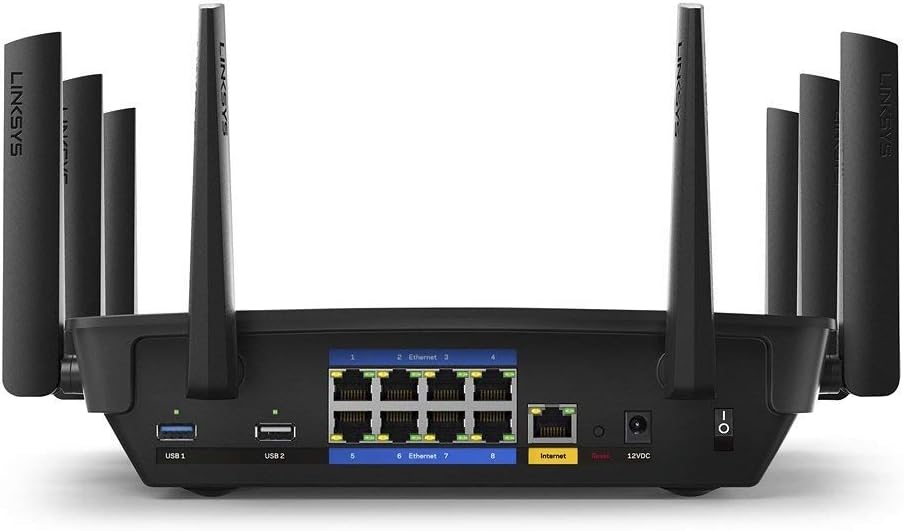
Figura 2: posterior view of the Linksys EA9500 router. This image highlights the various ports and buttons located on the back panel, including USB ports, Ethernet ports, the Internet (WAN) port, power input, and the power switch.
The rear panel of the EA9500 router provides all necessary connection points:
- USB 3.0 Port (USB 1): Per connectar dispositius d'emmagatzematge externs o impressores.
- USB 2.0 Port (USB 2): Per connectar dispositius d'emmagatzematge externs o impressores.
- Ports Ethernet (1-8): Eight Gigabit Ethernet ports for wired connections to computers, gaming consoles, smart TVs, and other network devices.
- Port d'Internet (WAN): Es connecta al mòdem per accedir a Internet.
- Power Input (12VDC): Es connecta a l'adaptador de corrent inclòs.
- Interruptor d'alimentació: Encén o apaga el router.
- Botó de restabliment: Recessed button to restore factory default settings (use a paperclip, press and hold for 10 seconds).
- Botó WPS: For easy connection of WPS-compatible devices.
4. Instruccions de configuració
Follow these steps to set up your Linksys EA9500 router:
- Desempaquetar el router: Traieu amb cura el router i tots els accessoris de l'embalatge.
- Posicioneu el router: Col·loqueu el router en un lloc cèntric de casa vostra o de l'oficina, lluny d'obstacles i dispositius que puguin causar interferències (per exemple, telèfons sense fil, forns microones).
- Connectar-se al mòdem:
- Apagueu el mòdem.
- Connect one end of the included Ethernet cable to the Internet (WAN) port on the back of the EA9500 router.
- Connecteu l'altre extrem del cable Ethernet al port Ethernet del mòdem.
- Connectar l'alimentació:
- Connect the power adapter to the 12VDC power input port on the router.
- Connecteu l'altre extrem de l'adaptador d'alimentació a una presa de corrent.
- Turn on the router using the power switch.
- Engegar el mòdem: Power on your modem and wait for it to establish an internet connection (this may take a few minutes).
- Configuració inicial:
- Connect a computer or mobile device to the router's Wi-Fi network (SSID and password are typically found on a label on the bottom of the router) or via an Ethernet cable to one of the Gigabit Ethernet ports.
- Obre a web navegador i navegueu a linksyssmartwifi.com o l'adreça IP per defecte (per exemple, 192.168.1.1).
- Follow the on-screen instructions to complete the setup process, including setting up your Wi-Fi network name (SSID) and password, and creating an administrator password for the router.
- Alternatively, download and use the Linksys App for guided setup.

Figura 3: The Linksys App interface. This image shows the "Device Prioritization" screen within the app, illustrating how users can manage and prioritize connected devices for optimal network performance.
5. Instruccions de funcionament
The Linksys EA9500 router offers advanced features for an optimized network experience.
5.1 Tri-Band Wi-Fi

Figura 4: Tri-Band Wi-Fi speed distribution. This diagram shows the router providing three distinct Wi-Fi bands: one 2.4 GHz band and two 5 GHz bands, allowing for a total speed of up to 5.3 Gbps and efficient allocation of bandwidth to various device types.
The EA9500 operates on three distinct Wi-Fi bands: one 2.4 GHz band and two 5 GHz bands. This Tri-Band configuration allows for greater network capacity and reduced congestion, enabling multiple devices to connect simultaneously without significant performance degradation. The 2.4 GHz band is suitable for basic internet use and older devices, while the 5 GHz bands provide higher speeds for demanding applications like 4K video streaming and online gaming.
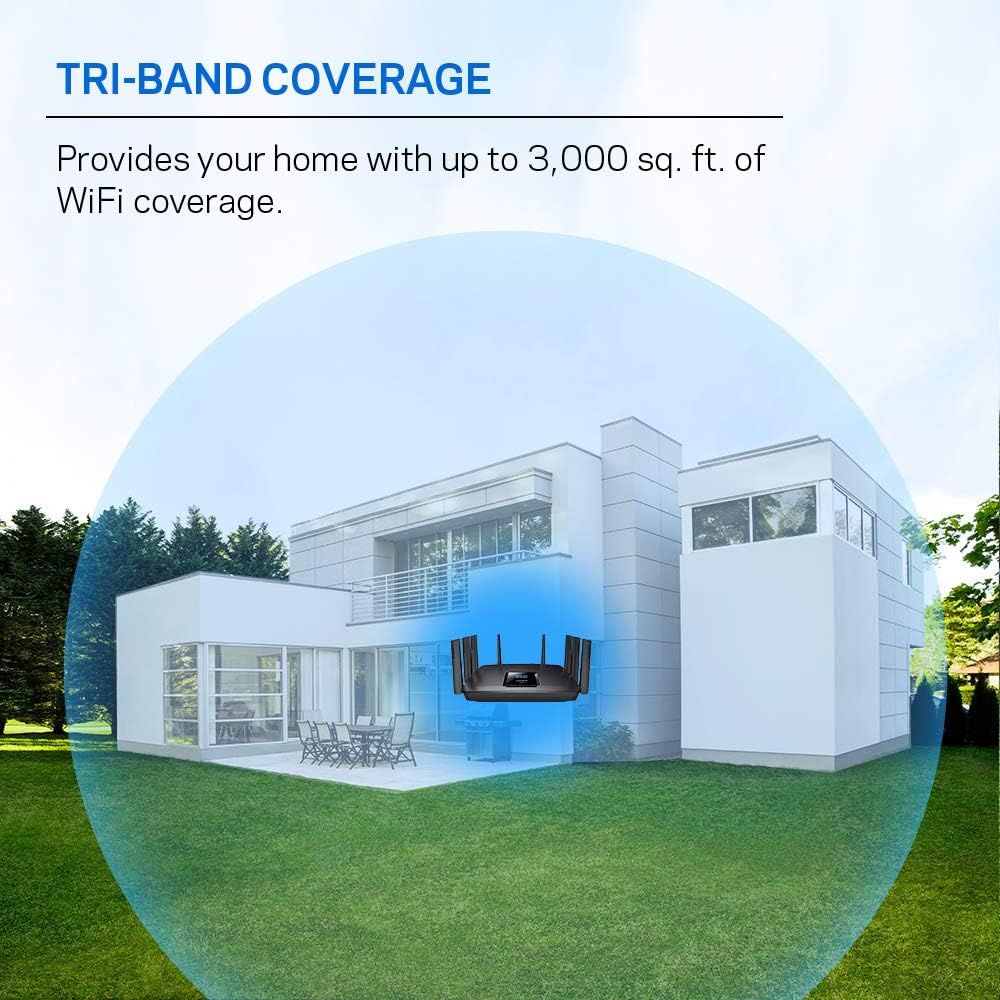
Figura 5: Tri-Band coverage illustration. This image depicts a house with the router centrally located, demonstrating how the Tri-Band Wi-Fi provides extensive coverage throughout the home, up to 3,000 sq. ft.
5.2 Tecnologia MU-MIMO

Figura 6: MU-MIMO vs. Traditional Wi-Fi. This diagram illustrates how MU-MIMO (Multi-User, Multiple-Input, Multiple-Output) technology allows the router to communicate with multiple devices simultaneously, providing each device with a dedicated high-speed connection, unlike traditional Wi-Fi which serves devices sequentially.
MU-MIMO (Multi-User, Multiple-Input, Multiple-Output) technology enables the router to communicate with multiple compatible devices simultaneously, rather than sequentially. This ensures that each connected device receives its own dedicated, high-bandwidth Wi-Fi stream, improving overall network efficiency and performance, especially in environments with many active devices.
5.3 Beamforming Technology

Figura 7: Beamforming technology in action. This image shows the router directing focused Wi-Fi signals towards connected devices, enhancing signal strength and range for each device, rather than broadcasting a general, dispersed signal.
Beamforming technology focuses the Wi-Fi signal directly to your connected devices, instead of broadcasting it in a general, dispersed pattern. This results in stronger, more reliable connections, improved range, and reduced interference, particularly beneficial for devices located further from the router.
5.4 Connexions per cable
The EA9500 features eight Gigabit Ethernet ports, providing wired speeds up to 10 times faster than standard Ethernet. These ports are ideal for connecting devices that require stable, high-speed connections, such as desktop computers, gaming consoles, network-attached storage (NAS) devices, and smart televisions.
5.5 Ports USB
The router includes one USB 3.0 port and one USB 2.0 port. These ports can be used to connect external storage devices (e.g., USB hard drives, flash drives) to create network-attached storage (NAS) for file sharing, or to connect USB printers for network printing.
6. Manteniment
- Actualitzacions de firmware: Regularly check for and install the latest firmware updates from the Linksys support weblloc. Les actualitzacions de firmware sovint inclouen millores de rendiment, pegats de seguretat i noves funcions.
- Neteja física: Keep the router clean and free of dust. Use a soft, dry cloth to wipe the exterior. Ensure ventilation openings are not blocked to prevent overheating.
- Col·locació òptima: Ensure the router remains in a central location, elevated, and away from large metal objects or other electronic devices that could interfere with the Wi-Fi signal.
- Reiniciant: Periodically rebooting the router (power cycling) can help resolve minor network issues and improve performance.
7. Solució De Problemes
If you encounter issues with your Linksys EA9500 router, try the following troubleshooting steps:
- Sense connexió a Internet:
- Comproveu totes les connexions de cable entre el mòdem i l'encaminador, i entre l'encaminador i els vostres dispositius.
- Power cycle both your modem and router (unplug power, wait 30 seconds, plug back in modem first, then router).
- Verify that your modem is receiving an internet signal from your Internet Service Provider (ISP).
- Velocitats Wi-Fi lentes:
- Ensure your devices are connected to the appropriate Wi-Fi band (5 GHz for higher speeds).
- Comproveu si hi ha interferències d'altres dispositius electrònics.
- Actualitza el firmware del router i els controladors de dispositius.
- Consider using the Linksys App to prioritize bandwidth for critical devices.
- Intermittent 2.4 GHz Connectivity:
- If devices on the 2.4 GHz band frequently disconnect or fail to connect, try changing the 2.4 GHz Wi-Fi channel in the router settings to a less congested one (e.g., 1, 6, or 11).
- Assegureu-vos que el firmware del router estigui actualitzat.
- Perform a factory reset if the issue persists after other troubleshooting steps.
- No es pot accedir a la configuració del router:
- Assegureu-vos que el dispositiu estigui connectat a la xarxa del router.
- Try accessing linksyssmartwifi.com or the default IP address (192.168.1.1).
- Esborra la memòria cau i les galetes del navegador o prova un altre navegador.
- If you forgot your administrator password, you may need to perform a factory reset.
- Restabliment de fàbrica: If all other troubleshooting fails, a factory reset can restore the router to its original settings. To do this, with the router powered on, press and hold the recessed Reset button on the rear panel for approximately 10 seconds using a paperclip until the power LED flashes. After resetting, you will need to reconfigure the router.
8. Especificacions
| Característica | Detall |
|---|---|
| Marca | Linksys |
| Nom del model | EA9500 |
| Tipus sense fil | 802.11ac |
| Classe de banda de freqüència | Tribanda (2.4 GHz, 5 GHz, 5 GHz) |
| Tecnologia de connectivitat | Ethernet, Wi-Fi |
| Ports Ethernet | 8 x Gigabit Ethernet |
| Ports USB | 1x USB 3.0, 1x USB 2.0 |
| Característica especial | WPS, MU-MIMO, Beamforming |
| Dispositius compatibles | Gaming Console, Personal Computer, Printer, Security Camera, Smart Television, Smart Thermostat, Smartphone, Tablet |
| Dimensions del producte | 14 x 5 x 7 polzades |
| Pes de l'article | 1.5 lliures |
| Voltage | 120 Volts |
| Sistema operatiu | Linksys OS |
9. Garantia i Suport
This Linksys EA9500 router, being a Certified Refurbished product, typically includes a 90-day warranty from the manufacturer. For specific warranty details, please refer to the documentation provided with your purchase or contact the seller.
For further assistance, technical support, or to download the latest firmware and user guides, please visit the official Linksys support weblloc: www.linksys.com/support.


