Producte acabatview
El Hunter PRO-HC PHC-1200 és un controlador de reg Wi-Fi per a exteriors de qualitat professional dissenyat per a ús residencial. S'integra amb Hydrawise. webprogramari basat en , que permet la gestió intel·ligent de l'aigua, el control remot i la programació basada en el clima. Aquest controlador de 12 estacions ajuda a optimitzar l'ús de l'aigua i a mantenir un paisatge saludable.
Configuració i instal·lació
Una instal·lació correcta és crucial per al rendiment òptim del controlador PRO-HC. Assegureu-vos que tot l'alimentació estigui desconnectada abans de començar qualsevol cablejat.
1. Muntatge del controlador
Seleccioneu una ubicació exterior adequada que estigui protegida de la llum solar directa i de les condicions meteorològiques extremes. Feu servir els elements de muntatge adequats per fixar el controlador fermament a una paret o a una superfície resistent. Assegureu-vos que el controlador estigui muntat verticalment amb el compartiment de cablejat mirant cap avall per a un drenatge correcte.
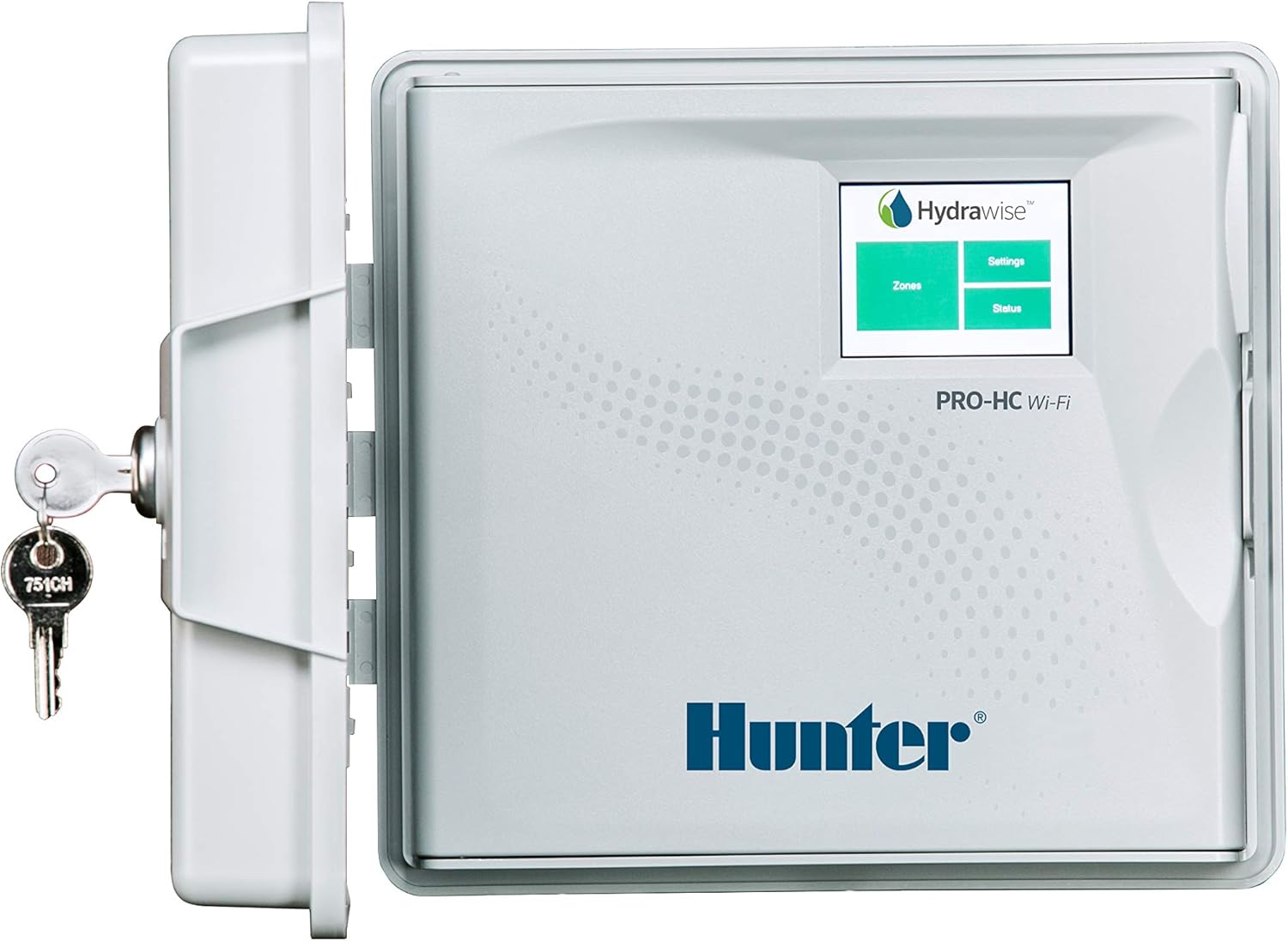
Figura 1: Controlador Hunter PRO-HC PHC-1200 amb la porta protectora oberta, mostrant la pantalla Hydrawise i una clau adjunta per a la seguretat. Aquesta imatge mostra el disseny general i la interfície d'usuari.
2. Connexions de cablejat
El controlador PRO-HC requereix connexió a l'alimentació de CA, vàlvules de zona i un cable comú. També hi ha connexions de sensor opcionals disponibles.
- Alimentació CA: Connecteu els cables d'alimentació de 120 V CA als terminals etiquetats AC-1 i AC-2Assegureu-vos que l'aparell estigui desconnectat abans de fer aquesta connexió.
- Cable comú: Connecteu el cable comú de les vàlvules de reg al terminal etiquetat COMTotes les vàlvules comparteixen aquesta connexió comuna.
- Cables de zona: Connecteu cada cable de la vàlvula de zona individual al terminal numerat corresponent (1, 2, 3, ... 12).
- Cables de sensor (opcional): Si feu servir un sensor de pluja o de flux, connecteu-ne els cables a SEN-1 i SEN-2 terminals. Consulteu el manual del sensor per obtenir instruccions de cablejat específiques.

Figura 2: Detallada view del compartiment de cablejat, que mostra els punts de connexió per als cables de zona individuals (terminals numerats) i el cable comú (COM). L'entrada d'alimentació de CA també és visible a la part superior esquerra.

Figura 3: Una visió més detallada dels terminals d'entrada d'alimentació de CA (AC-1, AC-2) i dels terminals d'entrada del sensor (SEN-1, SEN-2) dins del compartiment de cablejat del controlador Hunter PRO-HC.
3. Configuració del Wi-Fi i de l'aplicació Hydrawise
Un cop connectat el cable, engegueu el controlador. Seguiu les instruccions que apareixen a la pantalla per connectar el controlador a la vostra xarxa Wi-Fi local. Baixeu l'aplicació Hydrawise des de la botiga d'aplicacions del vostre dispositiu (iOS o Android) o accediu a web interfície a hydrawise.comCrea un compte i afegeix el teu controlador seguint les instruccions de l'aplicació. Això habilitarà les funcions de control remot i de reg intel·ligent.
Funcionament del controlador
El programari Hydrawise proporciona un control complet sobre el vostre sistema de reg.
Reg manual
Per executar manualment una zona o totes les zones, utilitzeu la funció "Execució ràpida" de l'aplicació Hydrawise o directament a la pantalla tàctil del controlador. Seleccioneu les zones desitjades i configureu el temps d'execució.
Creació i gestió de programes
Els programes defineixen quan i quant de temps regaran les zones. Podeu crear diversos programes amb diferents horaris d'inici, durades de reg i dies. Hydrawise ofereix opcions de programació flexibles, com ara programacions diàries, setmanals o cícliques.
Reg predictiu™
Aprofita la funció de reg predictiu connectant el controlador a una estació meteorològica local. Això permet que el sistema ajusti automàticament els horaris de reg en funció de les condicions meteorològiques en temps real i previstes, com ara la temperatura, la pluja, la humitat i la velocitat del vent. Aquesta funció ajuda a conservar l'aigua i garanteix una salut òptima de les plantes.
Manteniment
Un manteniment regular garanteix la longevitat i l'eficiència del vostre controlador PRO-HC.
- Neteja: Netegeu periòdicament l'exterior del controlador amb un drap suau i sec.amp tela. Eviteu utilitzar productes químics aggressivs.
- Actualitzacions de programari: Assegureu-vos que l'aplicació i el firmware del controlador Hydrawise estiguin actualitzats. Les actualitzacions normalment es gestionen automàticament a través de la plataforma Hydrawise quan es connecta a la Wi-Fi.
- Hivernització: En regions amb temperatures de congelació, es recomana preparar el sistema de reg per a l'hivern, inclòs el controlador. Desconnecteu l'alimentació i buideu l'aigua del sistema per evitar danys per congelació.
Resolució de problemes
Si teniu problemes amb el controlador PRO-HC, consulteu els passos habituals següents per a la resolució de problemes:
| Problema | Causa possible | Solució |
|---|---|---|
| El controlador no té energia. | No hi ha alimentació de CA, interruptor automàtic saltat, transformador defectuós. | Comproveu la presa de corrent, reinicieu l'interruptor automàtic i verifiqueu la sortida del transformador. |
| Zona sense reg. | Vàlvula defectuosa, cable trencat, programació incorrecta, problema amb la vàlvula mestra. | Comprovar el solenoide de la vàlvula, inspeccionar el cablejat, verificar la configuració del programa i comprovar el funcionament de la vàlvula mestra. |
| Problemes de connectivitat Wi-Fi. | Senyal feble, contrasenya incorrecta, problemes amb el router. | Apropeu el controlador al router, torneu a introduir la contrasenya del Wi-Fi, reinicieu el router i comproveu la configuració de xarxa. |
| Missatge "Sense flux" o "Error de flux". | Problema amb el sensor de cabal, baixa pressió d'aigua, vàlvula principal tancada. | Comproveu la connexió del sensor de cabal, verifiqueu el subministrament d'aigua i assegureu-vos que la vàlvula de tancament principal estigui oberta. |
Per a una resolució de problemes més detallada, consulteu els recursos d'assistència en línia d'Hhydrawise o poseu-vos en contacte amb el servei d'atenció al client de Hunter.
Especificacions
| Model | PHC-1200 |
| Marca | Caçador |
| Nombre d'estacions | 12 |
| Dimensions del producte | 25.4 cm de llargada x 10.16 cm d'amplada x 22.86 cm d'alçada |
| Pes de l'article | 5.44 lliures (2.47 kg) |
| Voltage | 120 volts de corrent altern |
| Color | Blanc |
| Tipus de visualització | LCD o LED |
Garantia i Suport
Hunter Industries ofereix una garantia limitada per al controlador PRO-HC. Per conèixer els termes i condicions específics de la garantia, consulteu la documentació inclosa amb el producte o visiteu el lloc web oficial de Hunter Industries. weblloc.
Per a assistència tècnica, consultes sobre productes o reclamacions de garantia, poseu-vos en contacte amb el servei d'atenció al client de Hunter Industries o visiteu el seu portal d'assistència:
- Oficial de Hunter Industries Weblloc: www.hunterindustries.com
- Suport d'Hydrawise: suport.hydrawise.com
Indiqueu sempre el número de model del producte (PHC-1200) i el número de sèrie quan us poseu en contacte amb el servei d'assistència per obtenir una assistència més ràpida.


