Introducció
Welcome to the user manual for your HyperGear Marathon Sport Wireless Bluetooth Earphones. These earphones are designed for active lifestyles, offering secure fit, sweatproof durability, and high-fidelity stereo sound. With hands-free calling and music control, they are perfect for gym, running, walking, and everyday use. This manual will guide you through the setup, operation, maintenance, and troubleshooting of your new earphones.
Contingut del paquet
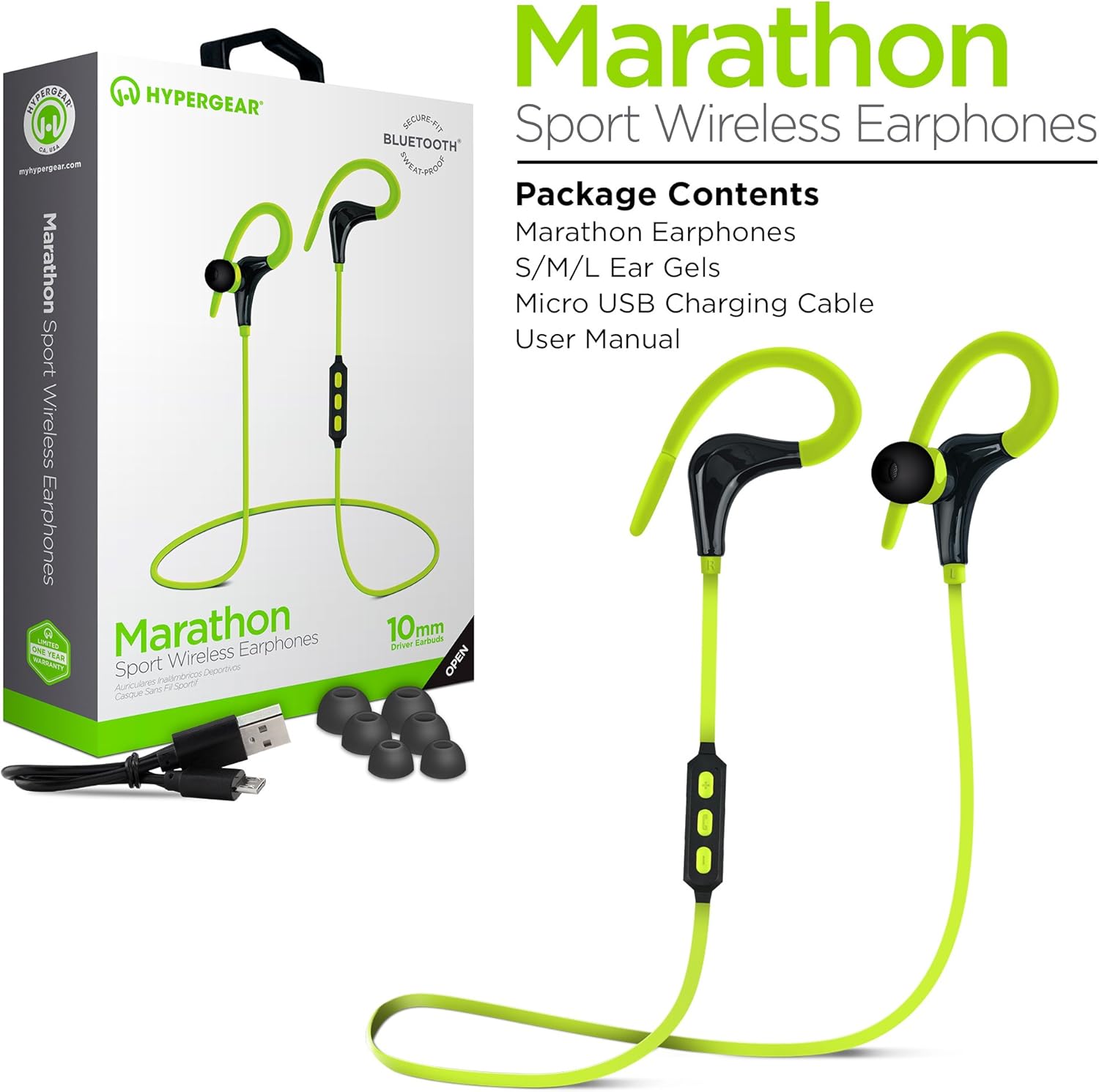
The image displays the HyperGear Marathon Sport Earphones along with their packaging and included accessories. The earphones are green and black, featuring an in-ear design with ear hooks. The package clearly lists the contents.
- HyperGear Marathon Sport Earphones
- Gels per a les orelles S/M/L (diverses mides per a un ajust òptim)
- Cable de càrrega micro USB
- Manual d'usuari (aquest document)
Configuració
1. Càrrega dels auriculars
Before first use, fully charge your Marathon Sport earphones.
- Connect the included Micro USB charging cable to the charging port on the earphones.
- Connecteu l'altre extrem del cable a una font d'alimentació USB (per exemple, un port USB de l'ordinador, un adaptador de paret).
- L'indicador LED mostrarà l'estat de càrrega.
- A full charge typically takes approximately 2 hours and provides up to 5 hours of playback time.
2. Vinculació amb un dispositiu Bluetooth

This image illustrates the wireless freedom of the HyperGear Marathon Sport Earphones, showing them connected via Bluetooth to various devices including a smartphone, tablet, laptop, and desktop computer. Bluetooth and Wi-Fi symbols indicate wireless connectivity.
The Marathon Sport earphones utilize Bluetooth 4.1 technology for easy and reliable wireless connection.
- Assegureu-vos que els auriculars estiguin carregats i apagats.
- Press and hold the Multi-function button (usually the center button on the inline control) until the LED indicator flashes red and blue, indicating pairing mode.
- Al dispositiu (telèfon intel·ligent, tauleta, etc.), activeu el Bluetooth i cerqueu dispositius nous.
- Select "HyperGear Marathon Sport" from the list of available devices.
- Once paired, the LED indicator will turn solid blue (or flash slowly), and you will hear a confirmation tone.
- The earphones have a wireless range of up to 33 feet (10 meters).
3. Aconseguir un ajust segur

The image shows two individuals, a man and a woman, wearing the HyperGear Marathon Sport Earphones while riding bicycles. The earphones are designed with ear hooks to ensure a secure fit during physical activity.
The earphones come with ergonomic ear gels in three sizes (S/M/L) and a behind-the-ear hook design to ensure a comfortable and secure fit, especially during sports and exercise.
- Try different ear gel sizes to find the one that provides the best seal and comfort for your ears. A good seal enhances bass response and noise isolation.
- Position the ear hooks comfortably over your ears to anchor the earphones in place.
- Adjust the cable length if necessary to prevent tangling or pulling.
Instruccions de funcionament
Inline Control Functions

This close-up image highlights the inline control module of the HyperGear Marathon Sport Earphones, showing the volume up (+), multi-function (phone icon), and volume down (-) buttons. A smartphone displaying a music player interface is visible in the background, demonstrating the hands-free music and call capabilities.
Your Marathon Sport earphones feature an inline control with a built-in microphone for easy management of music and calls.
| Botó/Acció | Funció |
|---|---|
| Botó multifunció (Botó central) |
|
| Botó Pujar volum (+). |
|
| Botó per baixar el volum (-) |
|
Qualitat d'àudio

Aquesta imatge ofereix un primer pla view of the HyperGear Marathon Sport Earphones, emphasizing their high-fidelity stereo sound. The text "High-Fidelity Stereo Sound" and "Powerful 10mm Neodymium Drivers" are visible, indicating the audio capabilities.
Equipped with powerful 10mm Neodymium Drivers, these earphones deliver heart-pounding audio with powerful bass and clear highs for an authentic listening experience.
Manteniment
- Neteja: Netegeu regularment les geles de les orelles amb un drap suau iamp cloth. For the earphone body, use a dry, soft cloth. Do not use harsh chemicals or abrasive materials.
- Emmagatzematge: When not in use, store the earphones in a cool, dry place, away from direct sunlight and extreme temperatures. Avoid tangling the cable.
- Resistent a la suor: The earphones are sweatproof, making them suitable for workouts. However, they are not waterproof. Do not submerge them in water.
- Càrrega: Use only the provided charging cable or a certified Micro USB cable. Avoid overcharging the battery.
Resolució de problemes
| Problema | Possible causa/solució |
|---|---|
| Earphones won't turn on. |
|
| No es pot emparellar amb el dispositiu. |
|
| Sense so o amb un volum baix. |
|
| Poor sound quality / Disconnections. |
|
| Durada de la bateria curta. |
|
Especificacions
| Característica | Detall |
|---|---|
| Nom del model | Marathon Sport |
| Número de model | 14075 |
| Marca | HyperGear |
| Tecnologia de connectivitat | Sense fil (Bluetooth) |
| Versió Bluetooth | 4.1 |
| abast sense fils | Fins a 33 peus (10 metres) |
| Mida del controlador | Controladors de neodimi de 10 mm |
| Factor de forma | Intraauricular amb ganxos per a les orelles |
| Micròfon | In-Line Noise Cancelling Microphone |
| Material | Silicona |
| Color | Verd |
| Pes | 8.5 grams |
| Dimensions | 32 x 3.3 x 2.49 cm |
| Característiques especials | Sweatproof, Secure Fit, Hands-free Calls, Music Control |
Garantia i Suport
The HyperGear Marathon Sport Wireless Bluetooth Earphones come with a Un any de garantiaSi us plau, conserveu el comprovant de compra per a reclamacions de garantia.
For technical support, warranty inquiries, or further assistance, please contact HyperGear customer service through their official weblloc web o el venedor on vau comprar el producte.
Important: Do not attempt to disassemble or repair the earphones yourself, as this may void the warranty and cause damage.


