1. Introducció
The Excelvan AOK-6038 is a versatile 4-in-1 multiscanner designed to detect various materials behind walls, floors, and ceilings. It accurately locates the edges and center of wood studs, metal pipes, rebar, and live AC wiring. This device is an essential tool for DIY enthusiasts and professionals, ensuring safety and precision during construction, renovation, or decoration tasks.
2. Informació de seguretat
- Always read and understand this manual before operating the device.
- Do not rely solely on the detector to locate items behind surfaces. Always use caution when cutting or drilling into walls, floors, or ceilings.
- Exercise extreme caution when live AC wires are detected. Turn off the power at the circuit breaker before proceeding with any work.
- Mantingueu el dispositiu allunyat de l'aigua i de temperatures extremes.
- Do not attempt to modify or repair the device. Contact customer support for assistance.
- Traieu les piles si no heu d'utilitzar el dispositiu durant un període prolongat per evitar fuites.
3. Producte acabatview
The Excelvan AOK-6038 features a clear LCD display and intuitive controls for easy operation.

Figura 3.1: Davant view of the Excelvan AOK-6038 multiscanner. This image displays the device's front, featuring the LCD screen at the top, and 'ON/OFF' and '►' (mode selection) buttons below it. The brand 'Excelvan' is visible at the bottom. The LCD shows indicators for STUD, METAL, DEEP, and AC detection modes.
3.1. Components
- Pantalla LCD: Shows detection mode, signal strength, battery status, and detection indicators.
- Botó ON/OFF: Encén o apaga el dispositiu.
- Mode Selection Button (►): Cycles through different detection modes (Stud, Metal, Deep, AC).
- PUSH Button (Side): Activates the scanning function when pressed and held.
- Àrea del sensor: Located at the back of the device, this area must be flat against the surface for accurate scanning.
- Compartiment de la bateria: Situat a la part posterior per a la instal·lació de la bateria.

Figura 3.2: Enrere view of the Excelvan AOK-6038 multiscanner. This image shows the rear of the device, including the product label with 'Model: AOK-6038 Multi-Function Detector' and 'Made in China'. Below the label is the battery compartment cover.
3.2. Indicadors de la pantalla LCD
- STUD: Indicates detection of wood studs.
- METALL: Indicates detection of metal objects.
- PROFUNDA: Indicates detection in deep scan mode.
- AC: Indicates detection of live AC electrical wiring. A lightning bolt symbol may also appear.
- Barres d'intensitat del senyal: Increase as the device approaches the target.
- Icona de la bateria: Mostra el nivell actual de la bateria.
4. Especificacions
| Característica | Detall |
|---|---|
| Model | AOK-6038 |
| Modes de detecció | Stud, Metal, Deep, AC |
| Profunditat de detecció de perns | Fins a 19 mm (0.75 polzades) |
| Profunditat de detecció de metalls | Fins a 50 mm (2 polzades) |
| Profunditat de detecció de cables de CA | Fins a 50 mm (2 polzades) |
| Font d'alimentació | Battery (e.g., 9V, not included) |
| Mostra | LCD amb llum de fons |
| Material | Plastic with anti-slip rubber coating |
| Color | Plata |
| Dimensions | Aprox. 150 mm x 73 mm x 35 mm (5.91 polzades x 2.87 polzades x 1.38 polzades) |

Figura 4.1: Dimensions of the Excelvan AOK-6038 multiscanner. This image illustrates the approximate measurements of the device: 150mm (5.91in) in length, 73mm (2.87in) in width, and 35mm (1.38in) in thickness.
5. Configuració
5.1. Instal·lació de la bateria
- Localitzeu la tapa del compartiment de la bateria a la part posterior del dispositiu.
- Feu lliscar la coberta oberta.
- Insert a 9V battery, ensuring correct polarity (+/-).
- Tanqueu bé la tapa del compartiment de la bateria.
The device requires a 9V battery for operation. Ensure the battery is fresh for optimal performance.
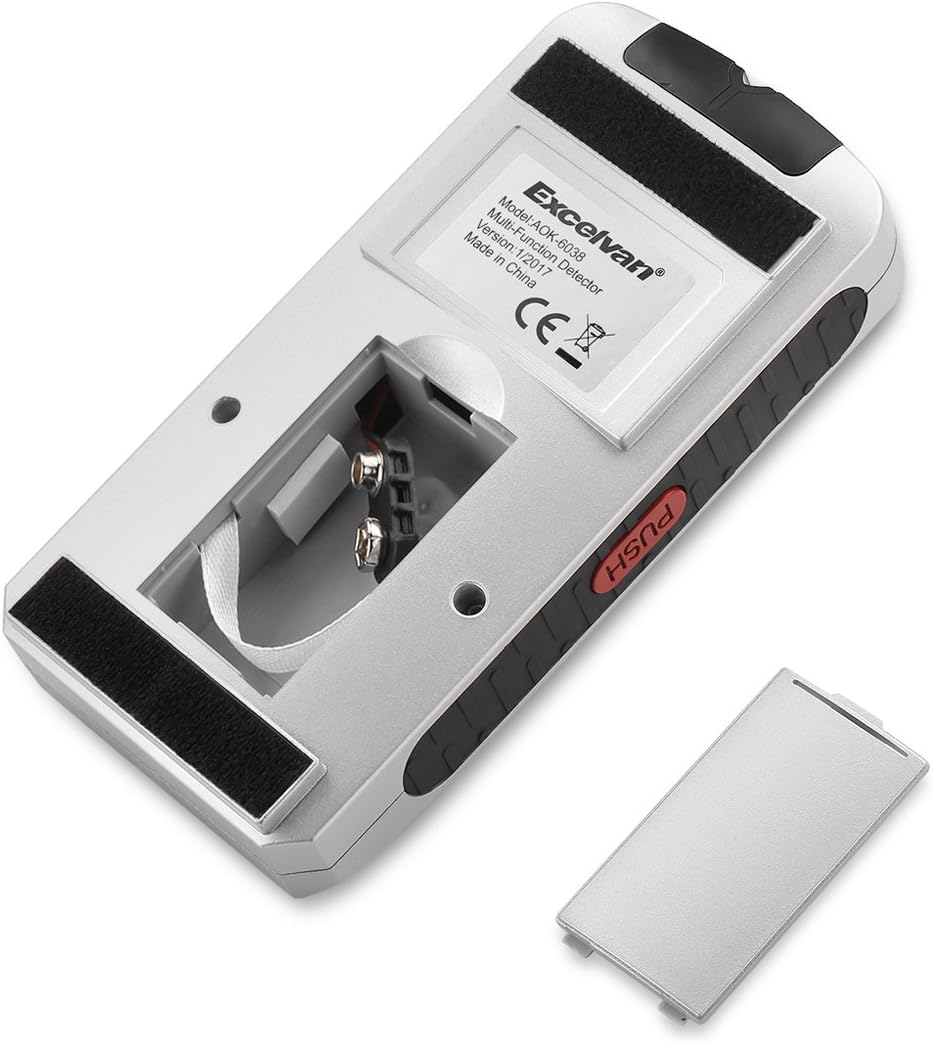
Figura 5.1: Battery compartment of the Excelvan AOK-6038 multiscanner. This image shows the back of the device with the battery cover removed, revealing the 9V battery connector and compartment.
6. Instruccions de funcionament
6.1. Encendre/apagar
- Premeu el botó ON/OFF button to turn the device on. The LCD will illuminate.
- Premeu el botó ON/OFF botó de nou per apagar el dispositiu.
6.2. Selecting a Scan Mode
Després d'encendre, premeu el botó ► (mode selection) button to cycle through the available detection modes: STUD, METAL, DEEP, and AC. The selected mode will be indicated on the LCD display.
6.3. Scanning Procedure
- Col·loca el dispositiu: Position the scanner flat against the surface you wish to scan. Ensure the sensor area on the back is in full contact.
- Press and Hold 'PUSH': While keeping the device flat against the surface, press and hold the EMPUJAR button located on the side. The device will calibrate for a few seconds. Do not move the device during calibration.
- Scan the surface: Slowly slide the device horizontally across the surface. Keep it flat and maintain constant pressure.
- Interpret results: As the device detects an object, the signal strength bars on the LCD will increase, and an audible beep will sound. The specific mode indicator (STUD, METAL, DEEP, AC) will also highlight.
- Mark the location: When the signal strength is highest, mark the location. Continue scanning past the object to determine its edges.

Figura 6.1: Examples of detection modes. This image shows three scenarios: AC detection near an electrical outlet, Stud detection locating a wooden beam, and Metal detection identifying a metal pipe within a wall.

Figura 6.2: Detection indication. This image illustrates the device detecting an object, with the LCD displaying a series of arrowheads and an audible 'Beep!' indicating a find. The user is shown pressing the 'PUSH' button during detection.
6.4. Specific Mode Usage
- Escaneig de stud: Use to locate the edges and center of wooden studs behind drywall.
- Escaneig de metalls: Use to detect metal pipes, rebar, or other metallic objects.
- Deep Scan: Provides increased depth for detecting studs and metal objects that are further embedded in the wall.
- Escaneig de CA: Specifically designed to detect live unshielded AC electrical wiring. Always confirm power is off before any work.
7. Manteniment
- Neteja: Netegeu el dispositiu amb un suau, damp tela. No utilitzeu netejadors abrasius ni dissolvents.
- Emmagatzematge: Guardeu el dispositiu en un lloc sec i fresc, allunyat de la llum solar directa i de temperatures extremes.
- Bateria: Remove the battery if the device is not used for extended periods to prevent corrosion.
8. Solució De Problemes
- El dispositiu no s'encén: Comproveu la instal·lació de la bateria i assegureu-vos que tingui prou càrrega. Substituïu-la si cal.
- Inaccurate readings/False positives: Ensure the device is calibrated correctly by pressing and holding the PUSH button while flat against the surface before scanning. Avoid scanning over highly textured or damp superfícies.
- No detection: Verify the correct mode is selected for the target material. Ensure the device is moved slowly and consistently across the surface.
- Senyal feble: The object might be deeper than the selected mode's detection capability. Try the Deep Scan mode if applicable.
9. Garantia i Suport
Per obtenir informació sobre la garantia o assistència tècnica, consulteu la documentació proporcionada en el moment de la compra o poseu-vos en contacte amb el vostre distribuïdor. Conserveu el rebut de compra com a comprovant de compra.


