Introducció
This manual provides comprehensive instructions for the setup, operation, maintenance, and troubleshooting of your beats by Dr. Dre beatsX Wireless In-Ear Headphones. Please read this guide thoroughly to ensure proper use and to maximize your listening experience.

Image: The beatsX Wireless In-Ear Headphones in black, featuring the flexible neckband design and magnetic earbuds. The headphones are shown in a typical wearing position around the neck.
Què hi ha a la caixa
Verify that all the following items are included with your beatsX Wireless In-Ear Headphones:
- beatsX earphones
- Four different sized eartips (various sizes for optimal fit)
- Removable secure-fit wingtips (for added stability during activity)
- Pocket-sized carrying case
- Cable de càrrega Lightning a USB-A

Image: The included Lightning to USB-A charging cable and the compact, black oval carrying case for the beatsX headphones.
Configuració
1. Carregant els auriculars
Before first use, fully charge your beatsX headphones. A full charge provides up to 8 hours of playback. The Fast Fuel feature allows for 2 hours of playback from a 5-minute charge when the battery is low.
- Connect the Lightning end of the charging cable to the charging port on your beatsX headphones.
- Connect the USB-A end of the charging cable to a USB power adapter or a powered USB port.
- The LED indicator light will show charging status. It will turn white when fully charged.
2. Emparellament amb el dispositiu
The beatsX headphones utilize Apple's W1 chip for seamless pairing with Apple devices and standard Bluetooth for other devices.
For Apple Devices (iOS 10 or later):
- Ensure your iPhone, iPad, or iPod touch is unlocked and near your beatsX headphones.
- Press and hold the power button on your beatsX headphones for 1 second.
- A setup animation will appear on your iOS device. Follow the on-screen instructions.
- Your beatsX headphones are now connected and set up with all Apple devices signed into iCloud.
Per a altres dispositius Bluetooth:
- Press and hold the power button on your beatsX headphones for 5 seconds until the LED indicator light flashes white. This puts the headphones in pairing mode.
- Al dispositiu, vés a la configuració de Bluetooth i assegura't que el Bluetooth estigui activat.
- Select "beatsX" from the list of available devices.
- Once paired, the LED indicator light will stop flashing and remain solid white.
3. Finding Your Optimal Fit
Proper fit is crucial for sound quality and comfort. Experiment with the included ear tips and wingtips.
- Consells per a les orelles: Choose the size that creates a comfortable seal in your ear canal. This helps with sound isolation and bass response.
- Wingtips: If desired, attach the secure-fit wingtips for added stability, especially during physical activity.
Funcionament dels auriculars
The RemoteTalk control on the left cable allows you to manage music, calls, and Siri.
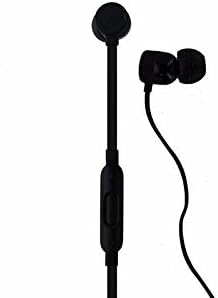
Imatge: Una imatge detallada view of the beatsX earbud and the in-line RemoteTalk control, which features volume buttons and a multi-function button.
RemoteTalk Controls:
| Acció | Funció |
|---|---|
| Press center button once | Play/Pause audio, Answer/End call |
| Press center button twice | Saltar endavant |
| Press center button three times | Saltar enrere |
| Press and hold center button | Activate Siri or voice assistant |
| Press volume up button | Augmentar el volum |
| Press volume down button | Disminuir el volum |
Encès/apagat:
- To power on, press and hold the power button until the LED indicator light illuminates.
- To power off, press and hold the power button until the LED indicator light turns off.
Auriculars magnètics:
The earbuds are magnetic, allowing them to snap together when not in use. This helps prevent tangling and keeps them securely around your neck.
Manteniment
Proper care will extend the life of your beatsX headphones.
- Neteja: Use a soft, dry, lint-free cloth to clean the headphones. Do not use abrasive cleaners or solvents.
- Consells per a les orelles: Traieu-vos les puntes de les orelles periòdicament i netegeu-les amb aiguaamp cloth and mild soap, then rinse and dry thoroughly before reattaching.
- Emmagatzematge: When not in use, store your headphones in the provided carrying case to protect them from dust and damage. The magnetic earbuds help keep them tangle-free.
- Resistència a l'aigua: Aquests auriculars ho són no resistent a l'aigua. Avoid exposure to excessive moisture, rain, or submersion in liquids.
- Temperatura: Eviteu exposar els auriculars a temperatures extremes.
Resolució de problemes
If you encounter issues with your beatsX headphones, try the following solutions:
- Sense energia:
- Ensure the headphones are charged. Connect them to a power source using the Lightning to USB-A cable.
- Comproveu si el cable de càrrega i l'adaptador de corrent estan danyats.
- No es pot emparellar:
- Make sure the headphones are in pairing mode (LED flashing white).
- Ensure Bluetooth is enabled on your device and it is within range (typically 30 feet or 10 meters).
- Prova de desactivar i tornar a activar el Bluetooth al dispositiu.
- Si ja s'havia emparellat, intenta "oblidar-te" del dispositiu a la configuració de Bluetooth i tornar-lo a emparellar.
- Sense so o qualitat de so deficient:
- Check the volume level on both your headphones and your connected device.
- Assegureu-vos que els auriculars estiguin correctament emparellats i connectats.
- Try different sized ear tips to ensure a proper seal in your ear canal.
- Clean any debris from the ear tips and speaker grilles.
- Apropa't més al dispositiu per evitar interferències.
- RemoteTalk Not Responding:
- Assegureu-vos que els auriculars estiguin encesos i connectats al dispositiu.
- Reinicieu el dispositiu connectat.
If issues persist, you may need to reset your beatsX headphones. Consult the official beats support weblloc web per obtenir instruccions específiques de restabliment.
Especificacions
| Característica | Detall |
|---|---|
| Nom del model | beatsX Wireless In-Ear Headphones |
| Número de model | MLYE2LL/A |
| Marca | beats by Dr. Dre |
| Color | Negre |
| Tecnologia de connectivitat | Bluetooth (Class 1 with Apple W1 chip) |
| Tecnologia de comunicació sense fils | Bluetooth |
| Durada de la bateria | Fins a 8 hores |
| Fast Fuel Charging | Càrrega de 5 minuts per a 2 hores de reproducció |
| Tipus de control | RemoteTalk (in-line control) |
| Col·locació de l'orella | A l'orella |
| Factor de forma | A l'orella |
| Control de soroll | Aïllament acústic |
| Nivell de resistència a l'aigua | No resistent a l'aigua |
| Pes de l'article | 3.52 unces |
| UPC | 817689015474 |
Informació de la garantia
As this product is a renewed item, warranty coverage may vary. Please refer to the specific warranty details provided by the seller at the time of purchase. For standard manufacturer warranty information on new products, please visit the official beats by Dr. Dre weblloc.
Suport
For further assistance, technical support, or additional product information, please visit the official beats by Dr. Dre support website or contact their customer service. You can typically find support resources, FAQs, and contact options on their official weblloc.
For issues related to your renewed product purchase, please contact the seller directly.


