1. Introducció
The MS8229 is an auto-ranging digital multimeter designed for professional and home use. It combines multiple measurement functions including AC/DC voltage and current, resistance, frequency, duty cycle, and capacitance. Additionally, it features built-in sensors for sound level, light (Lux), ambient temperature, and humidity, making it a versatile 5-in-1 testing instrument. Its large dual LCD display with backlight ensures clear readings in various conditions.

Figura 1.1: Frontal view of the MS8229 Digital Multimeter, showing the display, rotary switch, and input jacks.
2. Característiques clau
- Visualització: 4000 counts, large dual LCD with backlight.
- Sensors integrats: Built-in Sound Level Meter, Light Meter (Lux), Ambient Temperature, and Humidity Tester.
- Core Measurements: Tests AC/DC Voltage and Current, Resistance, Frequency, Duty Cycle, and Capacitance.
- Diode & Continuity: Diode Check and Continuity Test with audible buzzer (if resistance is less than 40 ohms).
- Mesura de la temperatura: Type K thermocouple contact temperature measurement.
- Data Functions: Data Hold and Relative Measurement.
- Funcionament: Auto Ranging / Selection.
- Indicador d'alimentació: Indicador de bateria baixa.
3. Contingut del paquet
En obrir el paquet, comproveu que tots els elements que s'enumeren a continuació hi són presents i que es troben en bon estat:
- 1 x MASTECH MS8229 Digital Multimeter
- 1 x Test Clip (Test Leads)
- 1 x Temperature Probe (Type K Thermocouple)
- 1 x manual en anglès

Figure 3.1: The MS8229 Multimeter shown with its included test leads, temperature probe, and user manual.
4. Informació de seguretat
To ensure safe operation and service of the meter, follow these safety precautions:
- Always ensure the meter is in the correct function and range for the measurement being taken.
- No aplicar voltage or current that exceeds the maximum rated input for the selected range.
- Tingueu precaució quan treballeu amb voltagper sobre de 30 V CA RMS, 42 V pic o 60 V CC. Aquests voltagsuposen un risc de xoc.
- Before changing functions or ranges, disconnect the test leads from the circuit under test.
- Inspeccioneu els cables de prova per detectar danys a l'aïllament o metall exposat abans d'utilitzar-los. Substituïu-los si estan danyats.
- No feu funcionar el mesurador si sembla danyat o si la carcassa està oberta.
- Replace the batteries as soon as the low battery indicator appears to ensure accurate readings.
- Adhere to all local and national safety codes.
5. Configuració
5.1 Instal·lació de la bateria
The MS8229 requires three (3) 1.5V AAA batteries (not included) for operation.
- Assegureu-vos que el comptador estigui apagat.
- Localitzeu la tapa del compartiment de la bateria a la part posterior del mesurador.
- Feu servir un tornavís per afluixar el cargol que fixa la tapa de la bateria.
- Traieu la coberta.
- Insert three AAA batteries, observing the correct polarity (+ and -) as indicated inside the compartment.
- Substituïu la tapa de la bateria i fixeu-la amb el cargol.
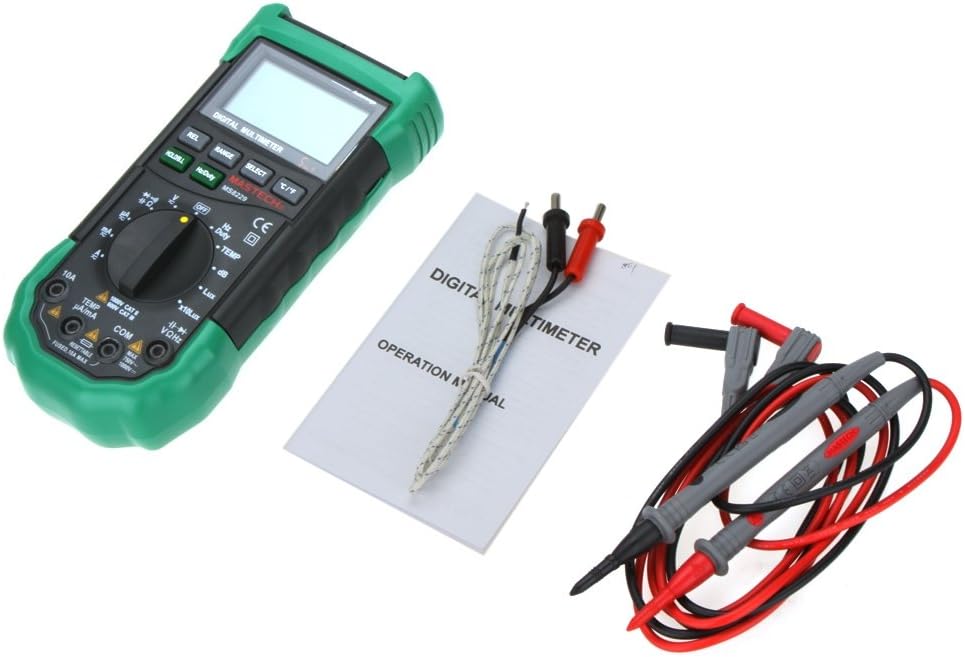
Figura 5.1: View of the battery compartment, showing the slots for three AAA batteries and the fuse location.
5.2 Connexió dels cables de prova
Proper connection of test leads is crucial for accurate and safe measurements.
- Per a la majoria de volumstage, resistance, frequency, capacitance, diode, and continuity measurements, insert the red test lead into the VΩHz jack and the black test lead into the COM jack.
- For current measurements (mA/µA), insert the red test lead into the TEMP µA/mA jack and the black test lead into the COM jack.
- For high current measurements (10A), insert the red test lead into the 10A jack and the black test lead into the COM jack.
- For temperature measurements, connect the Type K thermocouple probe to the TEMP µA/mA i COM endolls, observant la polaritat si escau.

Figure 5.2: The MS8229 Multimeter with red and black test leads properly inserted into the input jacks.
6. Instruccions de funcionament
The MS8229 features a rotary switch for function selection and several buttons for additional features.

Figure 6.1: The MS8229 Multimeter display showing typical readings for humidity and temperature, along with a main measurement.
6.1 Rotary Switch Functions
Turn the rotary switch to select the desired measurement function:
- DESACTIVAT: Turns the meter off.
- V~: Vol. ACtage mesura.
- V-: DC Voltage mesura.
- Ω: Mesura de la resistència.
- Díode/Continuitat: Diode test and Continuity test.
- Hz/Funció: Frequency and Duty Cycle measurement.
- TEMP: Temperature measurement using the Type K thermocouple.
- dB: Sound Level measurement.
- Lux / x10Lux: Light (Illumination) measurement.
- RH: Relative Humidity measurement.
- A~: AC Current measurement (400µA to 10A).
- A-: DC Current measurement (400µA to 10A).
6.2 Funcions dels botons
- HOLD/B.L: Press once to hold the current display reading. Press and hold to activate/deactivate the backlight.
- Hz/Funció: In Frequency/Duty Cycle mode, press to toggle between Hz and Duty Cycle display.
- REL: Activates relative measurement mode, displaying the difference between the current reading and a stored reference value.
- GAMMA: Manually selects the measurement range (overrides auto-ranging).
- SELECCIONAR: Toggles between different functions within a single rotary switch position (e.g., AC/DC in voltage/current modes, Diode/Continuity).
- °C/°F: In Temperature mode, toggles between Celsius and Fahrenheit units.
6.3 Performing Measurements (Exampells)
6.3.1 DC Voltage Mesura
- Configureu el commutador rotatiu a V-.
- Introduïu el cable de prova vermell al VΩHz jack and the black test lead into the COM jack.
- Connecteu els cables de prova en paral·lel al voltatge de CCtage source or component to be measured.
- Llegeix el voltage valor a la pantalla.
6.3.2 Mesura de la Resistència
- Assegureu-vos que el circuit o component estigui desenergitzat abans de mesurar la resistència.
- Configureu el commutador rotatiu a Ω.
- Introduïu el cable de prova vermell al VΩHz jack and the black test lead into the COM jack.
- Connect the test leads across the component whose resistance is to be measured.
- Llegiu el valor de resistència a la pantalla.
6.3.3 Mesura de la temperatura
- Configureu el commutador rotatiu a TEMP.
- Connect the Type K thermocouple probe to the TEMP µA/mA i COM preses.
- Place the tip of the thermocouple probe on or near the object/area whose temperature is to be measured.
- Premeu el botó ° C / ° F botó per canviar entre Celsius i Fahrenheit.
- Llegiu el valor de la temperatura a la pantalla.
7. Manteniment
7.1 Neteja
Netegeu el cas amb l'anunciamp cloth and mild detergent. Do not use abrasives or solvents. Keep the input terminals free of dirt or debris.
7.2 Substitució de la bateria
When the low battery indicator appears on the display, replace the batteries as described in Section 5.1. Prompt battery replacement ensures continued accuracy and proper operation.
7.3 Canvi de fusibles
The 10A input jack is protected by a resettable fuse. If the 10A current measurement function stops working, it indicates the fuse has tripped. Disconnect the meter from the circuit, turn it off, and wait a few moments for the fuse to reset. If the fuse continues to trip, check for short circuits or excessive current draw in your application.
7.4 Emmagatzematge
If the meter is not to be used for an extended period, remove the batteries to prevent leakage and damage to the meter.
8. Solució De Problemes
Si el comptador no funciona correctament, comproveu el següent:
- Sense pantalla o pantalla tènue: Comproveu la instal·lació de la bateria i substituïu-les si cal.
- Lectures incorrectes: Ensure the correct function and range are selected. Verify test lead connections. Check for damaged test leads.
- "OL" o Indicació de sobrecàrrega: The measured value exceeds the selected range. Switch to a higher range or ensure the input is within the meter's maximum specifications.
- La mesura actual no funciona: Check if the 10A fuse has tripped (see Section 7.3). Ensure test leads are connected to the correct current input jacks.
- Continuity Buzzer Not Sounding: Ensure the resistance is below 40 ohms for the buzzer to activate.
Si els problemes persisteixen, poseu-vos en contacte amb el servei d'atenció al client.
9. Especificacions
| Tipus de mesura | Interval / Valor | Precisió |
|---|---|---|
| DC Voltage (DCV) | 400m/4/40/400/1000V | 0.7% + 2 |
| Vol. ACtage (ACV) | 400m/4/40/400V; 750V | 0.8%+3; 1%+3 |
| Corrent DC (DCA) | 400/4000µ/40m/400mA; 4/10A | 1.2%+3; 2.0%+10 |
| Corrent CA (ACA) | 400/4000µ/40m/400mA; 4/10A | 1.5%+5; 3.0%+10 |
| Resistència | 400/4K/40K/400K/4MΩ; 40MΩ | 1.2%+5; 2%+5 |
| Capacitat | 40n/400n/4µ/40µ/100µF | 3.0% + 3 |
| Freqüència | 10/100/1K/10K/100KHz | 2.0% + 5 |
| Temperatura | -20 ~ 1000°C; 4 ~ 1832°F | 2.0% |
| Humitat relativa (RH) | del 20 al 95% | 5.0% |
| Llum (Lux) | 4,000/40,000 Lux | 5.0% |
| Nivell de so (dB) | 40 ~ 100 dB | 3.5% |
| Prova de díode | Sí | |
| Comprovador de continuïtat | Buzzer if resistance < 40 ohms | |
| Cicle de treball | 0.1% - 99.9% | 3.0% |
| Font d'alimentació | 3 * 1.5V AAA batteries (not included) | |
| Dimensió | 195 * 92 * 55 mm | |
| Pes del producte | 390 g |
10. Garantia i Suport
This product is designed for reliability and performance. For any issues or inquiries not covered in this manual, please refer to your purchase documentation for warranty details or contact the retailer/manufacturer's customer support. Keep your purchase receipt as proof of purchase.


