1. Producte acabatview
The LEXIN LX-R6 is a high-performance Bluetooth intercom system designed for motorcycle riders. It facilitates communication between riders, allows for hands-free phone calls, and provides stereo music streaming and GPS voice instructions. The unit is built for durability and clear audio in various riding conditions.
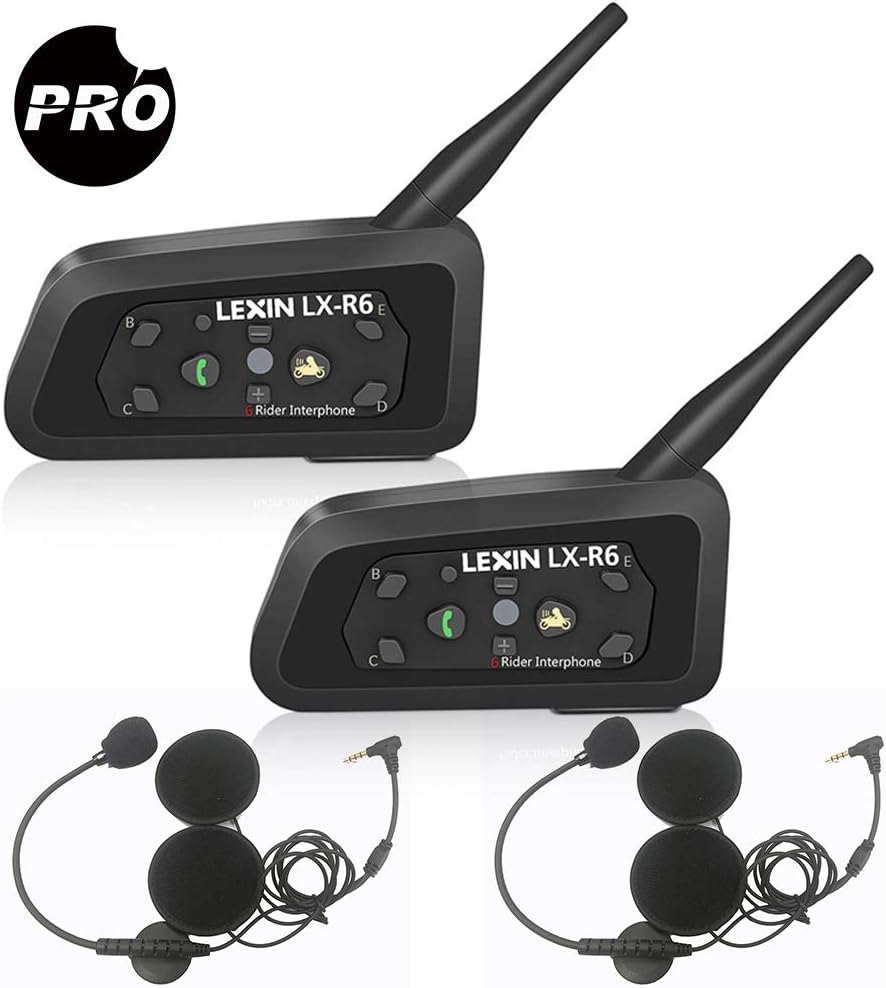
Image: Two LEXIN LX-R6 intercom units, each with a speaker and microphone set, illustrating the complete product package.
Característiques principals:
- Full-duplex intercom communication for up to 6 riders (2 simultaneous).
- Intercom range of up to 1000 meters (0.62 miles).
- Bluetooth V2.1 for mobile phone connectivity (HFP, A2DP).
- Hands-free calling and GPS voice navigation.
- Stereo music streaming.
- DSP Noise Reduction for clear audio.
- Waterproof design (IPX5 rated).
- Long-lasting battery: 8-12 hours talk time, 150 hours standby.
- 3.5mm line-in for non-Bluetooth audio devices.

Image: Visual representation of the LX-R6's core functionalities, including its waterproof rating, group chat capability, GPS compatibility, intercom range, hands-free calling, music playback, and noise reduction technology.
2. Configuració i instal·lació
2.1 Contingut del paquet:
Abans de començar la instal·lació, assegureu-vos que hi hagi tots els components:
- LX-R6 Main Unit (x2)
- Speaker and Microphone Set (x2)
- Cable d'àudio de 3.5 mm (x2)
- USB Charger (x2)
- Clamp (x2)
- Suport de muntatge (x2)
- Cargols (x2)
- Screw Driver (x1)
- Manual d'usuari (x1)

Imatge: Una completa view of all items included in the LEXIN LX-R6 product box, detailing each accessory and component.
2.2 Mounting the Intercom Unit:
- Choose a suitable location on the left side of your helmet, typically near the chin bar or base.
- Attach the mounting bracket to the helmet using either the clamp method (for helmets with a suitable edge) or the adhesive method (for smooth surfaces). Ensure a secure fit.
- Slide the LX-R6 main unit onto the mounted bracket until it clicks into place.

Image: The LX-R6 intercom unit securely attached to the side of a motorcycle helmet, demonstrating a typical installation.
2.3 Installing Speakers and Microphone:
- Carefully remove the helmet's inner padding to expose the ear pockets.
- Place the ultra-thin speakers into the ear pockets, ensuring they are centered over your ears for optimal audio quality.
- Route the speaker wires discreetly under the helmet padding to the main unit.
- Attach the boom microphone to the inside of the chin bar, positioning it close to your mouth but away from direct airflow to minimize wind noise.
- Connect the speaker and microphone cable to the corresponding port on the LX-R6 main unit.
- Reinstall the helmet's inner padding, ensuring no wires are pinched or exposed.
2.4 Charging the Unit:
Before first use, fully charge the LX-R6 unit. Connect the provided USB charging cable to the unit's charging port and plug the other end into a USB power source (e.g., computer, wall adapter). The indicator light will show charging status and turn off when fully charged. A full charge provides 8-12 hours of talk time or 150 hours of standby time.
3. Instruccions de funcionament
3.1 Funcions dels botons:

Image: A detailed layout of the LX-R6's control buttons, indicating the function of each button for easy operation.
- Power/Rider A Button: Press and hold to power on/off. Short press to initiate/end intercom with Rider A.
- Phone/Play Button: Short press to answer/end calls. Long press to reject calls. Short press to play/pause music.
- Volum + botó: Premeu breument per augmentar el volum.
- Volum - Botó: Premeu breument per reduir el volum.
- Rider B/C/D/E Buttons: Short press to initiate/end intercom with corresponding rider.
- Botó de restabliment: Small pinhole button for factory reset.
- Llum indicadora: Mostra l'estat del dispositiu (engegada, emparellament, càrrega).
3.2 Encès/apagat:
- Encès: Manteniu premut el botó Power/Rider A button for approximately 3 seconds until the indicator light flashes.
- Apagar: Manteniu premut el botó Power/Rider A button for approximately 3 seconds until the indicator light turns off.
3.3 Bluetooth Pairing (Mobile Phone/GPS):
- Ensure the LX-R6 is powered off.
- Manteniu premut el botó Phone/Play button for approximately 5-7 seconds until the indicator light flashes red and blue alternately, indicating pairing mode.
- On your mobile phone or GPS device, enable Bluetooth and search for new devices. Select
Documents relacionats - LEXINR6

LEXIN LX-FT4 Motorcycle Bluetooth Intercom System User Manual
Comprehensive user manual for the LEXIN LX-FT4 4-way motorcycle Bluetooth intercom system, covering installation, operation, pairing, and features for motorcycle riders.
Manual d'usuari de l'intercomunicador Bluetooth per a motocicleta LEXIN LX-B4FM
The LEXIN LX-B4FM is a Bluetooth 5.0 motorcycle intercom system designed for clear communication and entertainment. It features DSP/CVC noise reduction, hands-free calling, music playback, FM radio, GPS navigation, voice assistant support, and allows group intercom connections for up to 10 riders over a 2-kilometer range. This user manual provides comprehensive instructions for installation, operation, and troubleshooting.
LEXIN LX-FT4 Motorcycle 4-Way Conference Intercom User Guide
Comprehensive user guide for the LEXIN LX-FT4 Motorcycle 4-Way Bluetooth Conference Intercom, covering installation, operation, pairing, features, maintenance, and safety information. Learn how to connect up to four riders for intercom communication and phone calls.
Guia de l'usuari de l'intercomunicador Bluetooth per a motocicleta LEXIN LX-FT4
Guia d'usuari completa per a l'intercomunicador de conferència de 4 vies per a motocicleta LEXIN LX-FT4, que cobreix la instal·lació, el funcionament, l'emparellament, les funcions de l'intercomunicador, la ràdio FM, el manteniment i la informació de seguretat.
LEXIN LX-B4FM Motorcycle 4-Way Conference Intercom User Guide
Comprehensive user guide for the LEXIN LX-B4FM Bluetooth intercom system, covering installation, operation, pairing, and maintenance for motorcycle riders. Learn how to connect multiple units for group communication.
LEXIN G2P Motorcycle Bluetooth Intercom User Manual
A comprehensive user manual for the LEXIN G2P Motorcycle Bluetooth Intercom, detailing its features, installation, operation, pairing procedures, and important safety and warranty information.