1. Introducció
The ABKO Hacker K600 Hades RGB Mechanical Keyboard is designed to provide a responsive and customizable typing and gaming experience. Featuring durable blue mechanical switches and vibrant RGB backlighting, this keyboard offers both performance and aesthetic appeal. This manual provides essential information for setting up, operating, maintaining, and troubleshooting your K600 Hades keyboard to ensure optimal performance and longevity.
2. Contingut del paquet
Si us plau, verifiqueu que tots els elements siguin presents al vostre paquet:
- ABKO Hacker K600 Hades RGB Mechanical Keyboard
- Manual d'usuari
3. Producte acabatview
The ABKO Hacker K600 Hades keyboard features a full-size layout with dedicated function keys and a numeric keypad. It utilizes blue mechanical switches known for their tactile feedback and audible click. The keyboard is equipped with customizable RGB backlighting, offering various lighting effects and colors.
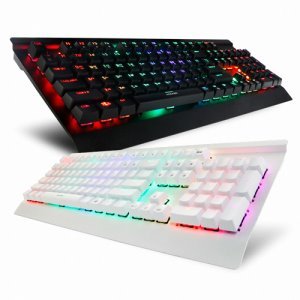
Imatge 1: Anglesa view of the ABKO Hacker K600 Hades RGB Mechanical Keyboard, showcasing el seu disseny complet i la il·luminació RGB.

Imatge 2: Frontal view of the ABKO Hacker K600 Hades RGB Mechanical Keyboard, highlighting the vibrant RGB backlighting across all keys.
4. Configuració
Follow these steps to set up your ABKO Hacker K600 Hades keyboard:
- Unpack the keyboard and ensure all package contents are present.
- Localitzeu un port USB-A disponible al vostre ordinador.
- Connecteu el connector USB-A del cable del teclat al port USB-A de l'ordinador.
- Your operating system should automatically detect and install the necessary drivers. The keyboard is plug-and-play, requiring no additional software for basic functionality.
- Once installed, the keyboard's default RGB lighting will illuminate, indicating it is ready for use.
5. Instruccions de funcionament
5.1 Funcions bàsiques del teclat
The ABKO Hacker K600 Hades functions as a standard QWERTY keyboard for typing and general computer use.
5.2 Control d'il·luminació RGB
The keyboard features various RGB lighting modes and customization options. Use the following key combinations to adjust the lighting:
- Fn + Ins/Home/PgUp/Del/End/PgDn: Cycle through different RGB lighting effects and modes.
- Fn + Fletxa amunt/avall: Adjust the brightness level of the backlighting.
- Fn + Fletxa esquerra/dreta: Ajusta la velocitat dels efectes d'il·luminació dinàmica.
- Fn + Impr Pant: Toggle between various static color presets.
5.3 Tecles multimèdia i de funció
Combina el Fn key with the F1-F12 keys to access multimedia controls and other functions:
- Fn + F1-F12: Specific functions may vary, but commonly include media playback controls (play/pause, stop, previous/next track), volume control (mute, volume up/down), and launching applications. Refer to the keycap legends for exact functions.
6. Manteniment
Un manteniment adequat garanteix la longevitat i el rendiment del teclat:
- Neteja: Use a soft, dry cloth to wipe the surface of the keyboard. For dust and debris between keycaps, use compressed air. For stubborn dirt, a slightly damp cloth with mild soap solution can be used, ensuring no liquid enters the keyboard.
- Eliminació de la tapa de les tecles: If necessary, keycaps can be carefully removed using a keycap puller (not included) for deeper cleaning. Exercise caution to avoid damaging the switches.
- Emmagatzematge: Quan no l'utilitzeu durant períodes prolongats, guardeu el teclat en un lloc net i sec, allunyat de la llum solar directa i de temperatures extremes.
7. Solució De Problemes
If you encounter issues with your ABKO Hacker K600 Hades keyboard, refer to the following common solutions:
- El teclat no respon:
- Assegureu-vos que el cable USB estigui connectat correctament tant al teclat com a l'ordinador.
- Prova de connectar el teclat a un port USB diferent de l'ordinador.
- Reinicieu l'ordinador.
- Prova el teclat en un altre ordinador per determinar si el problema és amb el teclat o amb el port/controladors de l'ordinador.
- Claus que no es registren:
- Check for any debris or foreign objects lodged under the keycap.
- If a specific key is not working, it might indicate a faulty switch.
- Problemes d'il·luminació RGB:
- Assegureu-vos que el teclat estigui connectat correctament.
- Cycle through lighting modes and brightness levels using the Fn key combinations (refer to Section 5.2).
- If the lighting is completely off, check if it has been accidentally turned off.
8. Especificacions
| Característica | Descripció |
|---|---|
| Marca | ABKO |
| Model | K600 Hades |
| Tecnologia de connectivitat | USB-A (amb cable) |
| Descripció del teclat | Jocs, Mecànica |
| Tipus de canvi | Interruptor blau |
| Il·luminació del teclat | RGB |
| Color | Negre |
| Material | Estirol acrilonitril butadiè |
| Característica especial | Ergonòmic |
| Dispositius compatibles | Consola de jocs, ordinador portàtil, PC, telèfon intel·ligent, tauleta |
| Data de primera disponibilitat | 11 de juny de 2017 |
9. Garantia i Suport
This product is covered by a standard manufacturer's warranty. For detailed information regarding warranty terms, conditions, and duration, please refer to the warranty card included with your purchase or visit the official ABKO website. For technical support, troubleshooting assistance, or any product-related inquiries, please contact ABKO customer service through their official channels.


