1. Introducció
This manual provides essential information for the safe and efficient use of your Brother DCP-L8410CDW Color Laser Multifunction Printer. This 3-in-1 device is designed for professional environments, offering printing, copying, and scanning functionalities. It features an intuitive touchscreen, Wi-Fi, and Ethernet connectivity, making it suitable for various work settings.
Les característiques clau inclouen:
- Print, copy, and scan capabilities
- High-quality color laser printing (up to 2400 dpi)
- Impressió dúplex automàtica
- Flexible paper handling with a maximum capacity of 300 sheets
- Integrated Wi-Fi and Gigabit Ethernet for versatile connectivity

Imatge 1.1: Frontal view of the Brother DCP-L8410CDW printer.
2. Configuració
Follow these steps to set up your Brother DCP-L8410CDW printer:
- Desembalatge: Traieu amb cura la impressora del seu embalatge. Assegureu-vos que totes les cintes protectores i els materials d'embalatge s'han tret de l'exterior i l'interior del dispositiu.
- Instal·leu els cartutxos de tòner: Open the front cover and install the toner cartridges into their respective slots. Refer to the labels for correct color placement.
- Carrega paper: Open the paper tray and adjust the paper guides to fit your paper size (e.g., A4). Load paper into the tray and close it securely.
- Connectar l'alimentació: Connecteu el cable d'alimentació a la impressora i després a una presa de corrent amb connexió a terra.
- Connect to Network/Computer:
- Sense fil (Wi-Fi): On the printer's touchscreen, navigate to Network settings and follow the prompts to connect to your Wi-Fi network.
- Cablejat (Ethernet): Connecteu un cable Ethernet des del port LAN de la impressora al vostre encaminador o commutador de xarxa.
- USB: Connect a USB 2.0 cable from the printer to your computer.
- Instal·leu els controladors: Inseriu el CD d'instal·lació (si s'inclou) a l'ordinador o descarregueu els controladors i el programari més recents del servei d'assistència oficial de Brother. weblloc. Seguiu les instruccions que apareixen a la pantalla per completar la instal·lació.

Imatge 2.1: Lateral view of the Brother DCP-L8410CDW, showing the paper tray.
3. Instruccions de funcionament
The Brother DCP-L8410CDW features an intuitive touchscreen for easy operation.
3.1. Impressió
- Ensure the printer is powered on and connected to your network or computer.
- Obriu el document o la imatge que voleu imprimir a l'ordinador o al dispositiu mòbil.
- Select the 'Print' option from your application.
- Choose the Brother DCP-L8410CDW from the list of available printers.
- Adjust print settings (e.g., number of copies, color/mono, duplex) as needed.
- Feu clic a "Imprimeix".
3.2. Còpia
- Place your document face down on the scanner glass or face up in the Automatic Document Feeder (ADF).
- On the printer's touchscreen, select the 'Copy' function.
- Adjust settings such as number of copies, color/mono, and enlargement/reduction.
- Premeu "Inici" per començar a copiar.
3.3. Escaneig
- Place your document face down on the scanner glass or face up in the ADF.
- On the printer's touchscreen, select the 'Scan' function.
- Choose your desired scan destination (e.g., Scan to PC, Scan to USB, Scan to Email).
- Ajusta la configuració d'escaneig (per exemple, la resolució, file type) if necessary.
- Premeu "Inici" per començar l'escaneig.

Image 3.1: The intuitive touchscreen control panel of the DCP-L8410CDW.

Image 3.2: Using the Automatic Document Feeder for scanning or copying, and the USB port for direct printing/scanning.
4. Manteniment
Un manteniment regular garanteix un rendiment òptim i allarga la vida útil de la impressora.
4.1. Substitució dels cartutxos de tòner
- When a 'Low Toner' or 'Replace Toner' message appears on the display, order new genuine Brother toner cartridges.
- Obriu la coberta frontal de la impressora.
- Remove the old toner cartridge and drum unit assembly.
- Separate the toner cartridge from the drum unit.
- Unpack the new toner cartridge and install it into the drum unit until it clicks into place.
- Insert the new toner and drum unit assembly back into the printer.
- Tanqueu la coberta frontal.
4.2. Neteja de la impressora
- Exterior: Netegeu l'exterior de la impressora amb un drap suau i sense borrissol. No utilitzeu productes de neteja abrasius.
- Vidre de l'escàner: Netegeu el vidre de l'escàner amb un drap suau i sec. Per a marques difícils, apliqueu una petita quantitat de netejador de vidres al drap (no directament al vidre).
- Filferro Corona: Periodically clean the corona wire inside the drum unit to prevent print quality issues. Refer to the printer's internal instructions or the full user guide for detailed steps.
5. Solució De Problemes
Aquesta secció tracta els problemes habituals que podeu trobar amb la impressora.
5.1. Embussos de paper
If a 'Paper Jam' message appears:
- Apagueu la impressora i desconnecteu el cable d'alimentació.
- Open the rear cover or other access points as indicated on the display or in the full user guide.
- Carefully pull out any jammed paper in the direction of the paper path. Avoid tearing the paper.
- Check all paper trays and internal areas for small pieces of torn paper.
- Tanqueu totes les cobertes, connecteu el cable d'alimentació i engegueu la impressora.
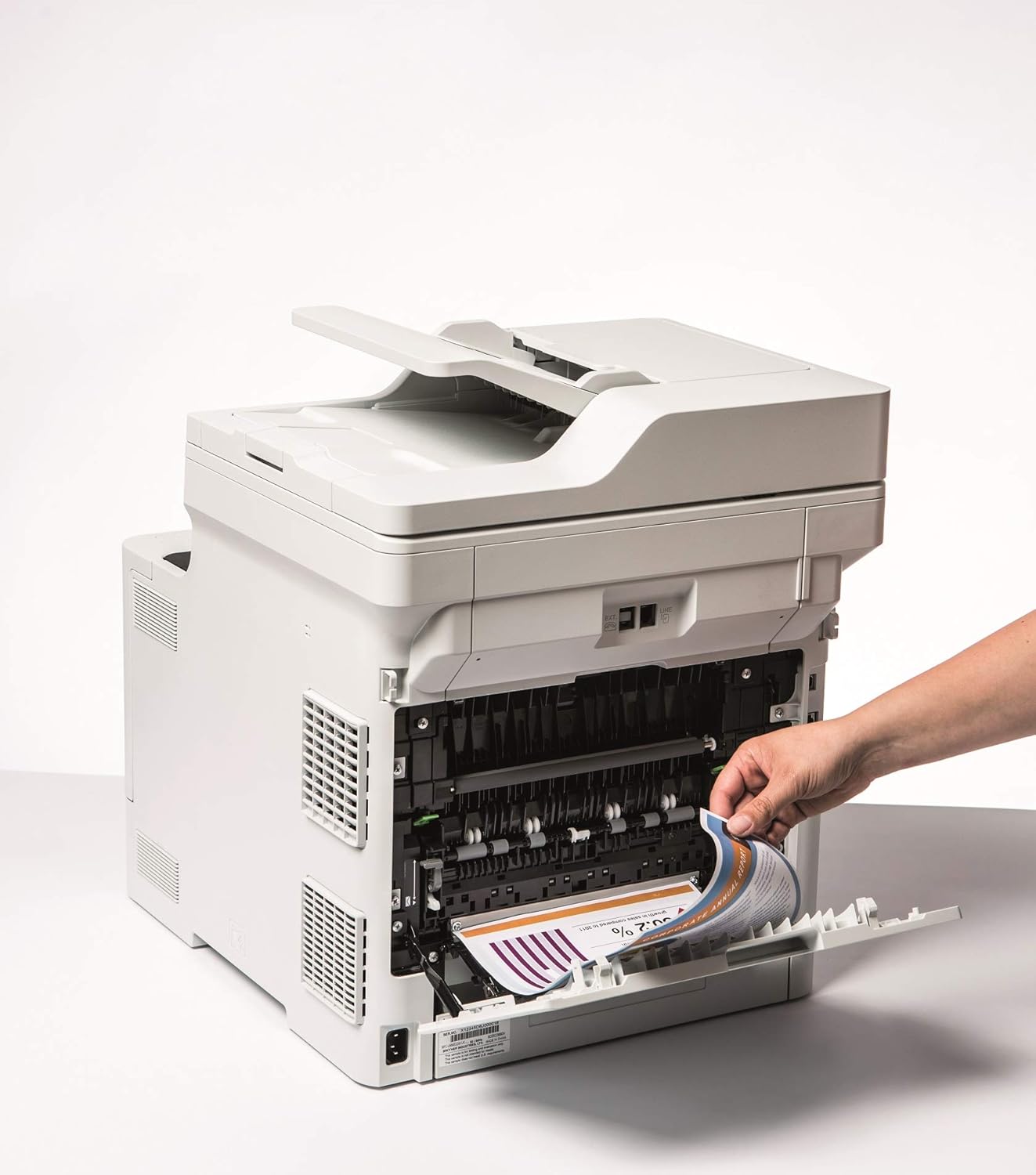
Image 5.1: Clearing a paper jam from the rear of the printer.
5.2. Problemes de qualitat d'impressió
- Faded Prints: Toner cartridge may be low. Replace if necessary.
- Ratlles o taques: Clean the corona wire or check for foreign objects on the drum unit.
- Colors incorrectes: Ensure genuine Brother toner cartridges are used and perform a color calibration from the printer's menu.
5.3. Problemes de connectivitat
- Wi-Fi Disconnected: Check network settings on the printer and ensure your router is functioning correctly. Restart both devices if needed.
- Cannot Print from PC: Verify that the printer drivers are correctly installed and updated. Check cable connections for wired setups.
6. Especificacions
| Característica | Especificació |
|---|---|
| Nom del model | DCP-L8410CDW |
| Dimensions del producte (PxWxH) | 43.5P x 53.9W x 52.6H cm |
| Mida màxima del suport | A4 |
| Capacitat màxima de fulls | 300 fulls |
| Velocitat màxima de còpia (blanc i negre) | 31 pàgines per minut |
| Resolució màxima d'impressió en color | 61 dpcm |
| Resolució màxima d'impressió en blanc i negre | 2400 ppp |
| Impressió dúplex | Sí |
| Tecnologia de connectivitat | Ethernet, USB 2.0, Wireless LAN (Wi-Fi) |
| Tecnologia d'impressió | Làser |
| Sortida de la impressora | Color |
| Velocitat màxima d'impressió (color) | 31 pàgines per minut |
| Pes de l'article | 27.6 quilos |
| Consum d'energia | 500 watts |
| Tipus d'escàner | Llit pla |
7. Informació de la garantia
This Brother DCP-L8410CDW printer comes with a Garantia limitada. For detailed information regarding the terms, conditions, and duration of your warranty, please refer to the warranty card included with your product or visit the official Brother weblloc web. Conserveu el comprovant de compra per a reclamacions de garantia.
8. Atenció al client
For further assistance, including driver downloads, FAQs, and contact information for technical support, please visit the official Brother support weblloc:
You can also find additional resources and troubleshooting guides specific to your model on the support page.


