Introducció
This manual provides essential information for the installation, operation, and maintenance of your XFX AMD Radeon RX 550 4GB Core Edition graphics card. Please read these instructions carefully before proceeding with installation to ensure proper functionality and to avoid potential issues. The XFX RX 550 is designed to deliver reliable graphics performance for various computing tasks, including gaming and multimedia.
Configuració i instal·lació
1. Requisits del sistema
- Placa base compatible amb PCI Express amb una ranura per a gràfics x16.
- Minimum 400W power supply recommended.
- Memòria de sistema (RAM) mínima de 4 GB.
- Supported operating system (Windows 10, Windows 7 64-bit, Linux 64-bit).
- CD-ROM drive or internet connection for driver installation.
2. Instal·lació física
- Prepareu el vostre sistema: Power off your computer and disconnect the power cable. Open the computer case.
- Locate the PCI Express x16 slot: Identifica una ranura PCI Express x16 disponible a la placa base. Normalment, aquesta és la ranura més llarga.
- Traieu la tapa de la ranura: Remove the metal slot cover from the back of your computer case corresponding to the chosen PCI Express x16 slot.
- Inseriu la targeta gràfica: Carefully align the graphics card with the PCI Express x16 slot. Apply even pressure to both ends of the card until it is fully seated in the slot. A click may be heard.
- Assegura la targeta: Use a screw or the case's retention mechanism to secure the graphics card bracket to the computer case.
- Tanca el cas: Replace the computer case cover and reconnect the power cable.

Figura 1: Frontal view of the XFX AMD Radeon RX 550 graphics card, showing the cooling fan and heatsink assembly.
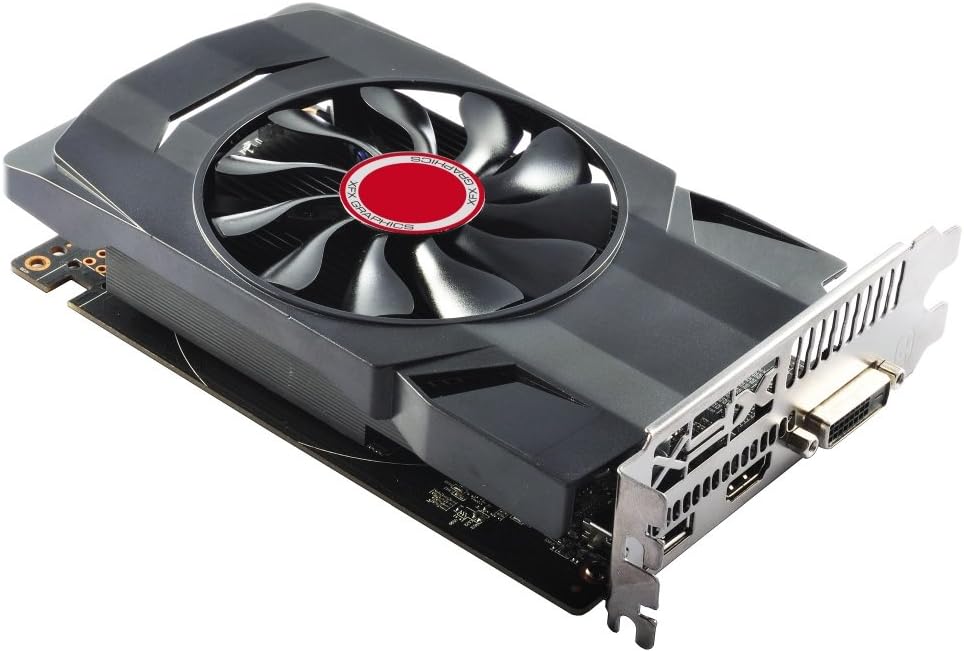
Figura 2: Angle view of the XFX AMD Radeon RX 550 graphics card, illustrating its compact form factor and single-slot bracket.
3. Instal·lació del controlador
- Power on your computer: Connect your monitor to one of the display outputs on the graphics card (HDMI, DisplayPort, or DVI).
- Instal·leu els controladors:
- From included CD: Insert the driver CD into your optical drive and follow the on-screen instructions.
- From XFX/AMD weblloc: Visit the official XFX or AMD website, navigate to the support section, and download the latest drivers for the Radeon RX 550. Run the installer and follow the prompts.
- Restart your system: After the driver installation is complete, restart your computer for the changes to take effect.
Funcionament de la targeta gràfica
1. Connexió de pantalles
The XFX RX 550 graphics card supports multiple display outputs. Connect your monitor(s) to the available ports: HDMI, DisplayPort, or DVI. Ensure your display cables are securely connected to both the graphics card and your monitor.

Figura 3: posterior view of the graphics card showing the DVI, HDMI, and DisplayPort outputs.
2. AMD Radeon Software
Once drivers are installed, you can access the AMD Radeon Software. This utility allows you to:
- Adjust display settings (resolution, refresh rate, color).
- Configure gaming profiles per a un rendiment òptim.
- Monitor GPU performance and temperature.
- Update drivers directly.
Refer to the AMD Radeon Software documentation for detailed instructions on using its features.
Manteniment
Un manteniment adequat garanteix la longevitat i el rendiment òptim de la targeta gràfica.
- Eliminació de pols: Periodically clean the graphics card's fan and heatsink to prevent dust buildup, which can hinder cooling performance. Use compressed air to gently blow dust away from the fins and fan blades. Ensure the fan is held stationary while cleaning to prevent damage.
- Actualitzacions de controladors: Regularly check for and install the latest graphics drivers from the official AMD website. Driver updates often include performance improvements, bug fixes, and compatibility enhancements.
- Condicions ambientals: Ensure your computer case has adequate airflow to prevent overheating. Operate the graphics card within recommended temperature ranges.
Resolució de problemes
Si teniu problemes amb la targeta gràfica, tingueu en compte els passos següents per resoldre'ls:
- Sense sortida de pantalla:
- Assegureu-vos que el cable del monitor estigui connectat correctament tant a la targeta gràfica com al monitor.
- Verifiqueu que el monitor estigui encès i configurat a la font d'entrada correcta.
- Confirm the graphics card is fully seated in the PCI Express slot.
- If you have integrated graphics, try booting with the integrated graphics to check if the system POSTs.
- Problemes del controlador:
- Perform a clean installation of the graphics drivers. Uninstall existing drivers using a utility like Display Driver Uninstaller (DDU) in Safe Mode, then install the latest drivers.
- Ensure you have downloaded the correct drivers for your operating system and graphics card model.
- Performance Problems (Low FPS, Stuttering):
- Check GPU temperatures using monitoring software. Overheating can lead to performance throttling.
- Ensure your system meets the recommended specifications for the applications or games you are running.
- Verifiqueu que la vostra font d'alimentació (PSU) proporciona prou aiguatage.
- System Instability (Crashes, Freezes):
- Check for system memory (RAM) issues.
- Ensure all system components, including the graphics card, are properly seated.
- Update your motherboard BIOS to the latest version.
If problems persist after attempting these steps, contact XFX customer support for further assistance.
Especificacions
| Característica | Detall |
|---|---|
| Número de model | RX-550P4SFG5 |
| Chipset | AMD Radeon RX 550 |
| Memòria de vídeo | 4 GB GDDR5 |
| Rellotge de memòria | 7000 MHz |
| Interfície de memòria | 128 bits |
| Autobús estàndard | PCI-Express x16 |
| Resolució de pantalla màxima | 4096 x 2160 |
| Ports de sortida | DisplayPort, HDMI, DVI |
| Pes de l'article | 1 lliures (aprox. 0.45 kg) |
| Dimensions del producte (LxWxH) | 6.69 x 1.57 x 4.76 polzades (aprox. 17 x 4 x 12 cm) |
Garantia i Suport
XFX products are covered by a limited warranty. For specific warranty terms and conditions, please refer to the warranty information included with your product or visit the official XFX weblloc web. Conserveu el comprovant de compra per a reclamacions de garantia.
For technical support, driver downloads, and frequently asked questions, please visit the XFX support weblloc:
When contacting support, please have your product model number (RX-550P4SFG5) and serial number ready.


