Introducció
This manual provides detailed instructions for the proper use and maintenance of your Casio fx-260 Solar II Scientific Calculator. Designed for students in middle school through high school, this calculator offers a range of functions including fraction calculations, trigonometric operations, and statistical analysis. Please read this manual thoroughly to ensure optimal performance and longevity of your device.

Imatge: Frontal view of the Casio fx-260 Solar II Scientific Calculator, displaying its 10-digit screen and key layout.
Configuració
Font d'alimentació
The Casio fx-260 Solar II calculator is primarily solar-powered. It operates efficiently in well-lit environments. For low-light conditions or extended use, it features a battery backup system. The calculator comes with 2 AA batteries pre-installed.
- Ús inicial: The calculator should power on automatically when exposed to sufficient light.
- Encesa: Premeu el botó ON button to activate the calculator.
- Apagat: The calculator will automatically power off after a period of inactivity to conserve energy. You can also manually turn it off by pressing MAJÚS aleshores AC (DESACTIVAT).
Canvi de bateria
If the display becomes dim or unresponsive in adequate lighting, the battery may need replacement. Use 2 AA batteries. Refer to the diagram below for battery compartment location, typically on the back of the unit.
- Ensure the calculator is off.
- Carefully remove the battery compartment cover on the back of the calculator.
- Remove the old batteries and insert new AA batteries, ensuring correct polarity (+/-).
- Col·loqueu la coberta del compartiment de la bateria amb seguretat.
Instruccions de funcionament
This section outlines the basic and advanced functions of your Casio fx-260 Solar II calculator.
Operacions aritmètiques bàsiques
Enter numbers using the numeric keypad and perform operations using the +, -, ×, i ÷ claus. Premeu = per mostrar el resultat.
- Clarificar entrada (C): Clears the last entered number or operation.
- Tot esborrat (AC): Clears all calculations and memory, returning the calculator to its initial state.
Configuració del mode
Premeu el botó MODE button to cycle through different calculation modes and settings. Common modes include:
- COMP (Computation): Càlculs aritmètics i científics estàndard.
- SD (Standard Deviation): Per a càlculs estadístics.
- REG (Regression): For regression analysis.
Use the arrow keys or MODE button to select the desired mode, then press = or the corresponding number.
Càlculs de fraccions
El d/c or ab/c key is used for entering and calculating with fractions.
- Entering Simple Fractions: Enter the numerator, press d/ci, a continuació, introduïu el denominador.
- Entering Mixed Numbers: Enter the whole number, press ab/c, introdueix el numerador, prem d/ci, a continuació, introduïu el denominador.
- Converting Fractions to Decimals: Premeu MAJÚS aleshores d/c (or the appropriate conversion key) to toggle between fraction and decimal display.
Funcions trigonomètriques
The calculator supports standard trigonometric functions (sine, cosine, tangent) and their inverses.
- Angle Units: Ensure the correct angle unit (DEG for degrees, RAD for radians, GRA for gradians) is selected. Press MODE repeatedly until the desired unit appears, or use MAJÚS + DRG (if available) to cycle. The current unit is indicated on the display.
- Sine (sin), Cosine (cos), Tangent (tan): Enter the angle value, then press the corresponding function key.
- Inverse Trigonometric Functions (sin-1, cos-1, bronzejat-1): Premeu MAJÚS, després el pecat, cos, o bronzejat key. Enter the value, then press =.
Logarithms and Exponents
- Common Logarithm (log): Premeu registre, introduïu el número i, a continuació, premeu =.
- Logaritme natural (ln): Premeu ln, introduïu el número i, a continuació, premeu =.
- Powers (xy): Enter the base, press xy, introduïu l'exponent i premeu =.
- Arrel quadrada (√): Premeu √, introduïu el número i, a continuació, premeu =.
- Square (x2): Introduïu el número i, a continuació, premeu x2.
Funcions de memòria
La calculadora inclou funcions de memòria per emmagatzemar i recuperar valors.
- Store to Memory (M+): Afegeix el valor mostrat a la memòria independent.
- Recall Memory (MR): Recalls the value stored in the independent memory.
- Clear Memory (M-): Subtracts the displayed value from the independent memory. To clear the memory completely, press MAJÚS aleshores M+ (MCL).

Imatge: Primer pla view of the Casio fx-260 Solar II calculator, highlighting the arrangement of its function keys.
Manteniment
- Neteja: Wipe the calculator with a soft, dry cloth. Avoid using abrasive cleaners or solvents, as they may damage the casing o pantalla.
- Emmagatzematge: Store the calculator in a cool, dry place away from direct sunlight and extreme temperatures. Use the provided hard case cover to protect the keys and display from scratches and impact.
- Durada de la bateria: The solar panel helps extend battery life significantly. If the calculator is stored in darkness for prolonged periods, the battery will be used more frequently.

Image: The Casio fx-260 Solar II calculator shown alongside its removable hard case, emphasizing protection.
Resolució de problemes
| Problema | Solució |
|---|---|
| La pantalla està en blanc o tènue. | Ensure the calculator is in a well-lit area. If the issue persists, replace the AA batteries. |
| Resultats de càlcul incorrectes. | Check the current mode (COMP, SD, REG) and angle unit (DEG, RAD, GRA). Press AC to clear previous calculations. Review your input sequence. |
| Les tecles no responen. | Premeu ON. If still unresponsive, try replacing the batteries. Ensure no debris is lodged under the keys. |
| "ERROR" message on display. | This indicates a mathematical error (e.g., division by zero, invalid input for a function). Press AC to clear the error and re-enter the calculation. |
Especificacions
- Model: FX-260 SOLARII
- Visualització: 10 dígits
- Font d'alimentació: Solar with AA battery backup (2 AA batteries included)
- Dimensions: 5 x 2.9 x 0.1 polzades (aproximadament)
- Pes: 0.317 unces (aproximadament)
- Funcions: Fraction calculations, trigonometric functions, inverse trigonometric functions, logarithms, exponents, standard deviation, permutations, combinations, random number generator, variable storage.
- Permitted for Exams: AP, SAT, PSAT, ACT, NMSQT (check specific exam regulations as policies may change).
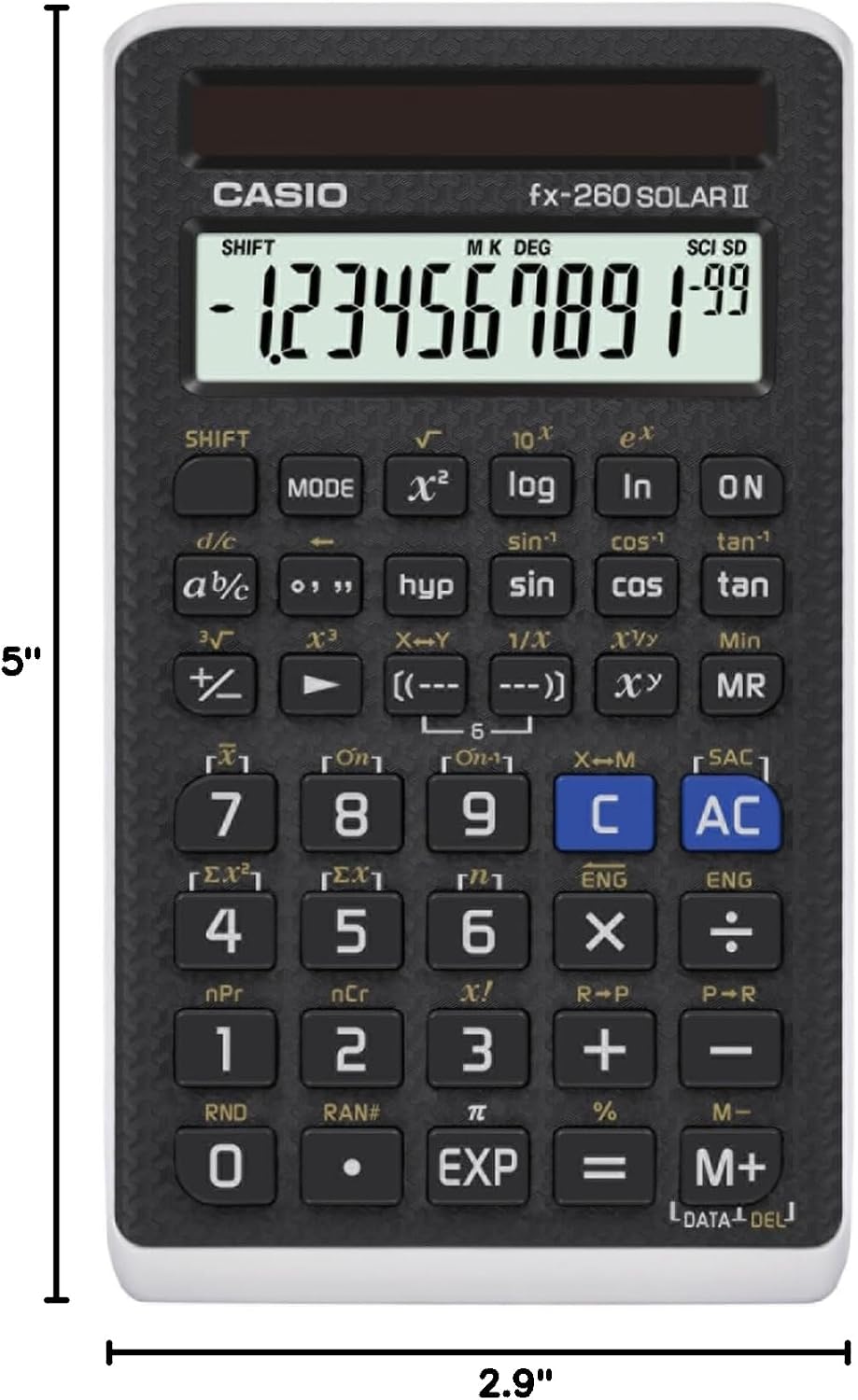
Image: The Casio fx-260 Solar II calculator displaying its approximate dimensions of 5 inches in length and 2.9 inches in width.
Garantia i Suport
For warranty information and customer support, please refer to the documentation included with your purchase or visit the official Casio weblloc web. Els termes i condicions específics de la garantia poden variar segons la regió i el distribuïdor.
Podeu trobar recursos addicionals i informació de contacte a Casio Brand Store.


