1. Introducció
Thank you for choosing the ZTE MF65 Router. This mobile 3G WiFi hotspot allows you to connect multiple devices to the internet on the go. This manual provides essential information for setting up, operating, maintaining, and troubleshooting your device. Please read this manual carefully before using the device to ensure proper and safe operation.
Important Note: This device is designed for use with specific network frequencies and NO FUNCIONA ALS EUA.
2. Informació de seguretat
- No exposeu el dispositiu a temperatures extremes, llum solar directa ni humitat elevada.
- Use only original or authorized accessories, including the battery and charger.
- Eviteu deixar caure, colpejar o doblegar el dispositiu.
- Mantingueu el dispositiu allunyat d'aigua i líquids.
- No intenteu desmuntar o modificar el dispositiu.
- Desfeu-vos de les piles i del dispositiu d'acord amb la normativa local.
3. Contingut del paquet
Please check the package contents. If any item is missing or damaged, contact your retailer.
- ZTE MF65 Router Unit
- Bateria de ions de liti
- Cable USB
- Guia d'inici ràpid (aquest manual)
4. Producte acabatview
The ZTE MF65 is a compact and portable 3G mobile Wi-Fi hotspot, designed to provide wireless internet access for up to 5 devices simultaneously. It features a simple design with essential indicators and controls.
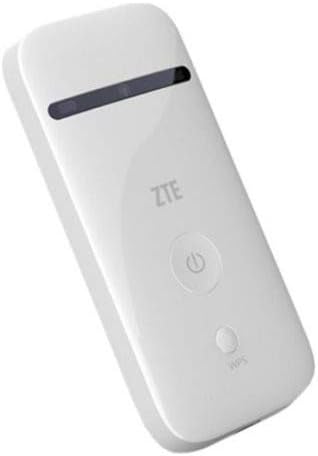
Figura 1: Frontal view of the ZTE MF65 Router. The device is white and rectangular, featuring a black indicator strip near the top, a prominent circular power button with a power symbol, and a smaller oval button labeled 'WPS' below the power button. The ZTE logo is visible above the power button.
Característiques principals:
- Mobile 3G Connectivity: Provides internet access via a 3G cellular network.
- Punt d'accés Wi-Fi: Creates a Wi-Fi network for multiple devices.
- Funcionalitat WPS: Supports Wi-Fi Protected Setup for easy connection.
- Pantalla LED: Indicators for status updates.
- Connectivitat USB: Can be connected to a computer via USB.
5. Configuració
5.1. Inserció de la targeta SIM i la bateria
- Traieu la coberta posterior del dispositiu.
- Carefully insert your 3G SIM card into the SIM card slot with the gold contacts facing down and the notched corner aligned correctly.
- Insert the provided Lithium Ion battery into its compartment, ensuring the contacts align.
- Torneu a col·locar la coberta posterior fins que encaixi al seu lloc.
5.2. Càrrega del dispositiu
Before first use, fully charge the device. Connect the USB cable to the device's USB port and the other end to a power adapter or a computer's USB port. The LED indicator will show charging status.
5.3. Encès / apagat
- Per encendre: Press and hold the Power button (circular button with power symbol) for a few seconds until the LED indicators light up.
- Per apagar: Press and hold the Power button again until the LED indicators turn off.
6. Instruccions de funcionament
6.1. Connexió de dispositius mitjançant Wi-Fi
- Ensure the ZTE MF65 Router is powered on.
- On your Wi-Fi enabled device (e.g., smartphone, laptop, tablet), search for available Wi-Fi networks.
- Select the network name (SSID) of your ZTE MF65 Router. The default SSID and Wi-Fi key (password) are usually found on a label inside the battery compartment or on the device packaging.
- Introduïu la clau Wi-Fi quan se us demani.
- Once connected, your device will have internet access through the ZTE MF65 Router.
6.2. Ús de WPS (configuració protegida Wi-Fi)
WPS allows for a quick and secure connection without manually entering the Wi-Fi key.
- Ensure your client device (e.g., laptop) supports WPS.
- Press the WPS button (smaller oval button) on the ZTE MF65 Router for a few seconds.
- Within two minutes, activate the WPS function on your client device. The devices should automatically connect.
6.3. Connexió mitjançant USB
You can connect the ZTE MF65 Router to a personal computer via the USB cable to use it as a USB modem or to access its web interfície de gestió.
- Connecteu el dispositiu a l'ordinador mitjançant el cable USB proporcionat.
- The computer may automatically install necessary drivers. Follow any on-screen prompts.
6.4. Indicadors LED
The LED display provides visual cues about the device's status:
- Indicador de senyal: Mostra la força del senyal de xarxa.
- Indicador de Wi-Fi: Indica l'activitat de la xarxa Wi-Fi.
- Indicador de bateria: Displays battery level and charging status.
7. Manteniment
- Neteja: Feu servir un drap suau i sec per netejar el dispositiu. No utilitzeu netejadors líquids ni aerosols.
- Cura de la bateria: To prolong battery life, avoid fully discharging the battery frequently. If storing the device for a long period, charge the battery to about 50% and store it in a cool, dry place.
- Emmagatzematge: Store the device in a dry environment, away from dust and direct sunlight.
8. Solució De Problemes
If you encounter issues with your ZTE MF65 Router, try the following solutions:
- El dispositiu no s'encén: Ensure the battery is correctly inserted and charged. Try charging the device for at least 30 minutes.
- No es pot connectar a Wi-Fi: Check if the Wi-Fi indicator is on. Verify the Wi-Fi password. Restart both the router and your client device.
- No internet access: Check the signal indicator. Ensure your SIM card is active and has a data plan. Try restarting the device.
- Velocitat d'internet lenta: Check signal strength. Move to an area with better network coverage. Reduce the number of connected devices.
- El dispositiu es bloqueja o deixa de respondre: Press and hold the Power button until the device turns off, then power it on again.
9. Especificacions
| Característica | Descripció |
|---|---|
| Número de model | MF65 |
| Dimensions del producte | 4.01 x 0.53 x 1.96 polzades |
| Pes de l'article | 2.39 unces |
| Bateries | 1 bateria de ions de liti (inclosa) |
| Tecnologies de connectivitat | Wi-Fi, USB |
| Característiques especials | WPS |
| Tecnologia de visualització | LED |
| Altres funcions de visualització | Sense fil |
| Fabricant | ZTE |
| Data de primera disponibilitat | 14 de febrer de 2017 |
| Classe de banda de freqüència | Banda única |
| Comunicació sense fils estàndard | 802.11b |
| Dispositius compatibles | Ordinador personal |
| Usos recomanats | Llar, Negocis |
| Mètode de control | veu |
10. Garantia i Suport
Per obtenir informació sobre la garantia i assistència tècnica, consulteu la targeta de garantia inclosa amb el producte o visiteu el lloc web oficial de ZTE. weblloc web. Conserveu el comprovant de compra per a reclamacions de garantia.


