1. Introducció
The Ancel AD310 is a universal OBD2 car diagnostic scanner designed to help you quickly read and clear engine fault codes. This device provides comprehensive OBD-II/EOBD functions, allowing users to diagnose engine system issues efficiently. It is a plug-and-play tool, making it accessible for both beginners and experienced users to identify and resolve common vehicle problems related to the engine.
Característiques principals:
- Full OBD-II/EOBD Diagnostic Functions
- Reads and Clears Engine Fault Codes (DTCs)
- Turns off Malfunction Indicator Light (MIL)
- Views Live Data Stream and Freeze Frame Data
- I/M Readiness Status Check
- O2 Sensor Test and On-Board Monitor Test
- Retrieves Vehicle Information (VIN, CIN, CVN)
- Built-in DTC Lookup Library
- Suport multi-idioma
2. Producte acabatview i Components
The Ancel AD310 features a compact design with an LCD display and intuitive button controls for easy navigation.

Figura 2.1: Ancel AD310 device showing its dimensions and labeled components including the LCD display, scroll up/down buttons, Enter button, Exit button, and OBD II connector.
Components:
- Pantalla LCD: Shows diagnostic menus and results.
- Botó de desplaçament cap amunt: Navigates upwards through menus or increases values.
- Botó de desplaçament cap avall: Navigates downwards through menus or decreases values.
- Botó Enter: Confirma les seleccions o accedeix a un menú.
- Botó de sortida: Returns to the previous menu or exits a function.
- OBD II Connector: Connects the scanner to the vehicle's OBD II port.
3. Configuració i connexió
The Ancel AD310 is designed for plug-and-play operation, requiring no batteries or external power source as it draws power directly from the vehicle's OBD II port.
3.1 Locating the OBD II Port
The OBD II (On-Board Diagnostics II) port is typically located under the dashboard on the driver's side, or sometimes under a panel in the center console.

Figura 3.1: Illustration of the common location for the OBD II diagnostic link connector (DLC) in a vehicle.
3.2 Connexió de l'escàner
- Assegureu-vos que el contacte del vehicle estigui apagat.
- Locate the 16-pin OBD II Data Link Connector (DLC) in your vehicle.
- Firmly plug the Ancel AD310's OBD II connector into the vehicle's DLC.
- Turn the vehicle's ignition to the 'ON' position (engine can be off or running, depending on the test). The scanner will power on automatically.

Figura 3.2: The Ancel AD310 connected to a vehicle's OBD II port, demonstrating its simple plug-and-play setup.
4. Instruccions de funcionament
Once connected, the Ancel AD310 will display the main diagnostic menu. Use the UP/DOWN buttons to navigate and the ENTER button to select options.
4.1 Navegació al menú principal

Figura 4.1: The main menu of the Ancel AD310, showing options like 'Diagnosis' and 'Language'. The device supports multiple languages including English, French, German, Spanish, Russian, Portuguese, Finnish, and Dutch.
4.2 8-Step Guide to Using the Code Reader

Figura 4.2: A visual 8-step guide detailing the process of using the Ancel AD310 OBD II code reader, from initial connection to clearing fault codes.
- Find the Diagnostic Link Connector (DLC): Locate the 16-pin OBD II port in your vehicle.
- Plug in the OBDII diagnostic tool: Connect the AD310 to the vehicle's DLC.
- Engegar l'encesa: Turn your car's ignition to the 'ON' position.
- Wait for the scan: The device will automatically scan and identify the vehicle model.
- Read the fault codes: Select 'Read Codes' from the menu to view diagnostic trouble codes.
- Figure out what the codes mean: Use the built-in DTC lookup or external resources to understand the codes.
- Fix the issues: Address the underlying problems indicated by the codes.
- Clear the fault codes: After repairs, select 'Erase Codes' to turn off the MIL.
4.3 Funcions OBD2 completes
The AD310 supports all 10 modes of OBD II testing, providing comprehensive diagnostic capabilities for engine systems.

Figura 4.3: The Ancel AD310's display showing various full OBD2 functions available, such as Live Data Stream, View Freeze Frame, Retrieve Vehicle Information, Read Codes, Erase Codes, I/M Readiness, DTC Lookup, EVAP Leak Test, On-Board Monitor, and O2 Sensor Test.
4.3.1 Lectura i esborrat de codis
The primary function of the AD310 is to read and clear Diagnostic Trouble Codes (DTCs) that cause the Check Engine Light (MIL) to illuminate.
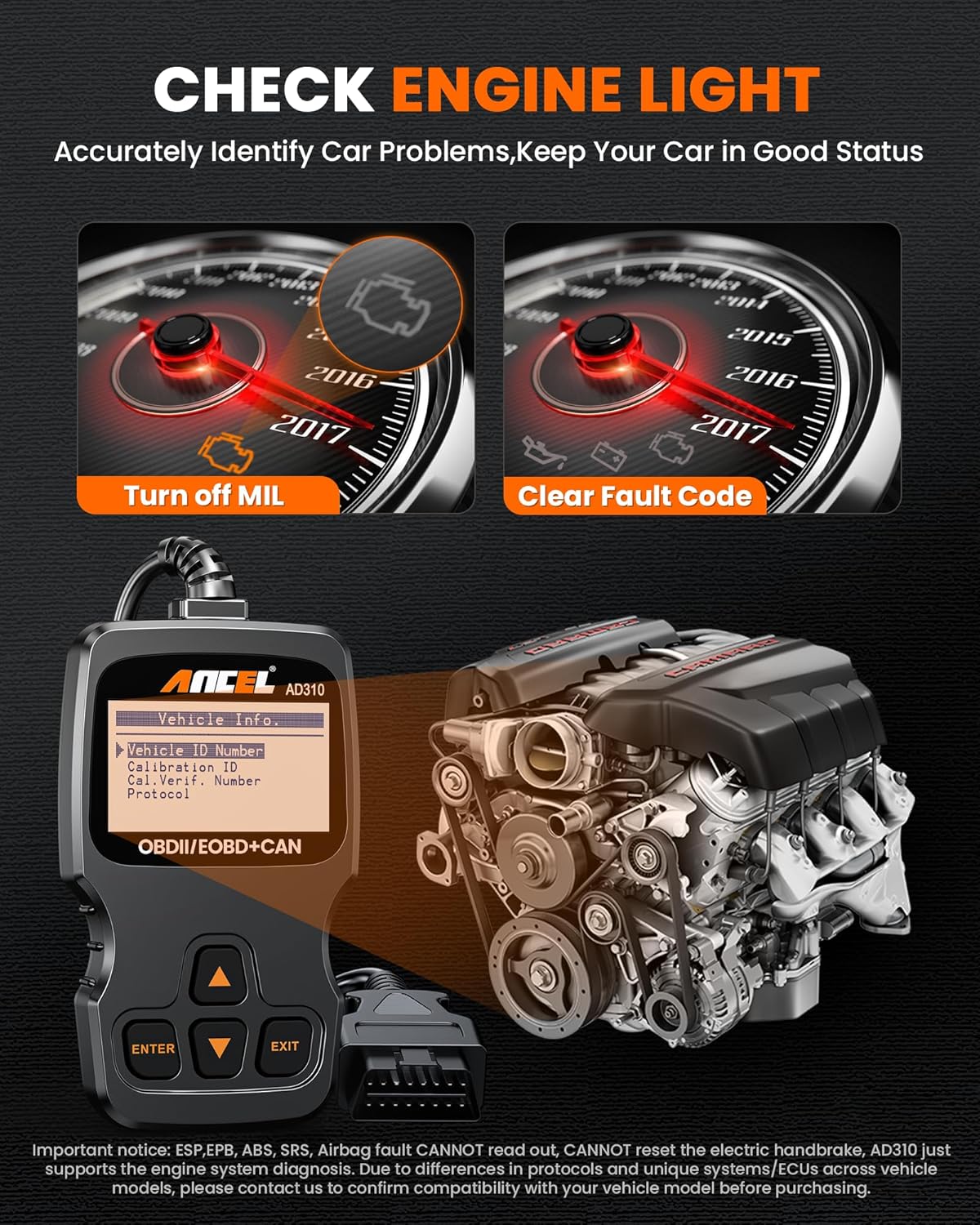
Figura 4.4: Visual representation of turning off the Malfunction Indicator Light (MIL) and clearing fault codes using the Ancel AD310, restoring the dashboard to a clear state.
4.3.2 ViewTransmissió de dades en directe
The Live Data Stream function allows you to view real-time operational parameters of the vehicle's engine, such as engine RPM, vehicle speed, oxygen sensor readings, and more. This data can be displayed numerically or graphically.

Figura 4.5: A graphical representation of live data stream items, such as LOADPCT (Load Percentage), ECT (Engine Coolant Temperature), SHRFT1 (Short Term Fuel Trim), and LONGFT1 (Long Term Fuel Trim), providing real-time insights into engine performance.
4.3.3 Cerca de DTC
The built-in DTC Lookup library provides definitions for generic and manufacturer-specific diagnostic trouble codes, helping you understand the meaning of the codes retrieved from your vehicle.

Figura 4.6: An illustration depicting the DTC Lookup feature, where fault codes and their definitions can be accessed directly from the device's library.
5. Compatibilitat del vehicle
The Ancel AD310 is compatible with most OBD-II compliant vehicles. This includes:
- Most US-based vehicles manufactured after 1996.
- Most European vehicles manufactured after 2000.
- Most Asian vehicles manufactured after 2008.
Protocols admesos: KWP2000, ISO9141, J1850 VPW, J1850 PWM, and CAN.

Figura 5.1: Acabatview of the Ancel AD310's extensive vehicle coverage, including American, Australian, Asian, and European vehicles, along with the supported OBD-II protocols.
Nota important: The ANCEL AD310 only supports engine system diagnosis. It no pot read or clear codes for ABS (Anti-lock Braking System), Airbag (SRS), Oil Service Light, or other non-OBDII systems. Please contact customer service with your vehicle's VIN if you are unsure about compatibility before purchase.

Figura 5.2: A critical notice highlighting that the Ancel AD310 is limited to engine system diagnosis and does not support ABS, Airbag, ESP, EPB, SAS, Oil Reset, or AdBlue Reset functions.
6. Especificacions
| Característica | Especificació |
|---|---|
| Marca | ANCEL |
| Model | AD310 |
| Pes de l'article | 220 g |
| Dimensions del paquet | 16.2 x 7.9 x 5.2 cm |
| Vol. Operatiutage | 12 Volts (Vehicle Power) |
| Mida de la pantalla | 1.4 polzades |
| UPC | 602938440288 |
| Protocols compatibles | KWP2000, ISO9141, J1850 VPW, J1850 PWM, CAN |
| Característiques específiques | Engine system diagnosis only; cannot diagnose ABS/Airbag |
7. Solució De Problemes
If you encounter issues while using your Ancel AD310, refer to the following common troubleshooting steps:
7.1 Why Can't the AD310 Read the Fault Code?

Figura 7.1: Common reasons and solutions for the AD310 failing to read fault codes, including checking ignition status and ensuring all ECUs are scanned.
- Estat del vehicle: Ensure the vehicle's engine emission fault indicator light is on. If the code was previously cleared, switch off the engine for more than 10 seconds, then reignite and reconnect to read the code.
- Multiple ECUs: If your vehicle has more than one Engine Control Unit (ECU), ensure you read all of them.
7.2 Why Can't the AD310 Clear the Error Code?

Figura 7.2: Solutions for when the AD310 cannot clear error codes, emphasizing the need to fix underlying hard faults and understanding permanent codes.
- Ignition and Mode: Try clearing the code with the ignition on and in diagnostic mode.
- Eliminate Hard Faults: The AD310 can only clear codes if the underlying issue causing the fault has been resolved. Fix the problem first, then attempt to clear the codes.
- Permanent Codes: Some codes are permanent and cannot be cleared manually. They will disappear on their own after the car has been driven for a few complete drive cycles without the fault recurring.
7.3 Why Is the AD310 Not Connecting to My Vehicle?

Figura 7.3: Steps to troubleshoot connection issues with the AD310, including checking the diagnostic interface and vehicle's starting state.
- Diagnostic Interface: Ensure the diagnostic interface is a 16-pin OBD II port.
- Vehicle State: The vehicle engine should be in a starting state (ignition ON or engine running) before attempting to connect. The vehicle instrument panel should show RPM to represent the vehicle starting state.
- Connexió USB: Do not connect the diagnostic interface and a USB cable at the same time, as this can interfere with communication.
8. Garantia i Suport
ANCEL is committed to providing excellent customer service and support for the AD310 diagnostic scanner.
8.1 Atenció al client
We offer comprehensive pre-sales and after-sales support. Professional technicians are available 24 hours a day to assist you with any questions or issues you may encounter, ensuring your satisfaction and peace of mind.
8.2 Política de devolucions
If you are not satisfied with your AD310 code reader, you may be eligible for a return within 30 days of purchase. Please refer to the retailer's return policy for specific instructions.


