Introducció
The Plantronics Voyager 3240 Bluetooth Earpiece is designed for seamless communication on the go. This manual provides essential information for setting up, operating, and maintaining your device, ensuring optimal performance and longevity.
Què hi ha a la caixa
Verifiqueu que tots els elements siguin presents al vostre paquet:
- Plantronics Voyager 3240 Bluetooth Earpiece
- Estoig de càrrega portàtil
- Cable de càrrega micro USB
- Ergonomic Ear Tips (various sizes)
- Optional Clip-on Ear Loop

Image: The Plantronics Voyager 3240 Bluetooth Earpiece shown alongside its portable charging case. The earpiece is black with a textured finish, and the charging case is a matching dark gray with a subtle pattern. An optional clear ear hook is visible on the earpiece.
Configuració
1. Càrrega dels auriculars i la funda
Before first use, fully charge your headset and charging case. The charging case provides additional talk time for your headset.
- Connect the micro USB cable to the charging case and the other end to a USB wall charger or computer USB port.
- Place the headset into the charging case.
- Charging indicators on the case and headset will illuminate. A full charge typically takes approximately 90 minutes for the headset and longer for the case.
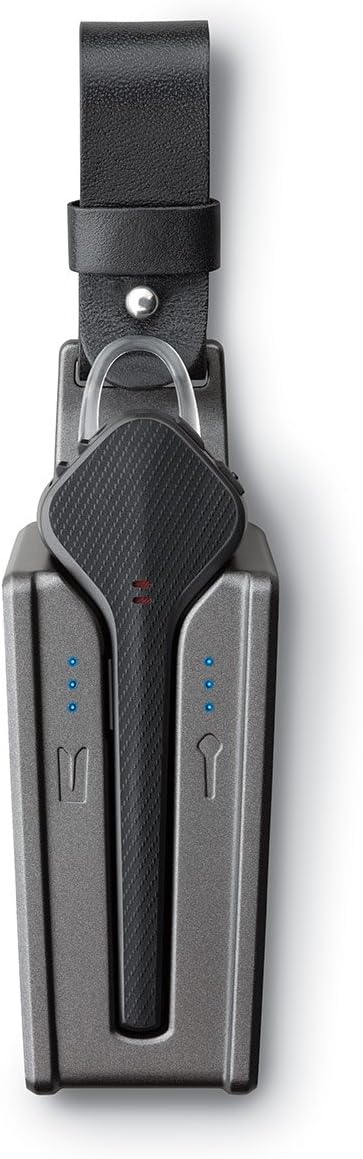
Imatge: Vista de dalt a baix view of the Plantronics Voyager 3240 earpiece docked inside its charging case. Blue LED lights on the case indicate charging status for both the earpiece and the case itself. The earpiece is securely seated in its compartment.
2. Vinculació amb un dispositiu
The headset can be paired with Bluetooth-enabled devices such as smartphones, tablets, and computers.
- Primera parella: When you first turn on your headset, it automatically enters pairing mode. The indicator light will flash red and blue.
- Acoblament manual: If the headset is not in pairing mode, press and hold the Call button until the indicator light flashes red and blue.
- Al dispositiu, activa el Bluetooth i cerca dispositius nous.
- Select "PLT V3200 Series" from the list of available devices.
- Si se us demana un codi d'accés, introduïu "0000" (quatre zeros).
- Once paired, the headset indicator light will stop flashing and you will hear "pairing successful."
The headset can connect to two phones simultaneously and answer calls from either one.
Funcionament dels auriculars
Controls i Funcions
| Control | Funció |
|---|---|
| Botó de trucada | Press to answer/end a call. Press and hold for 2 seconds to reject a call. Double-press to redial last number. |
| Pujar/Bajar el volum | Adjust call or media volume. |
| Botó de silenci | Press to mute/unmute the microphone during a call. Voice alerts will confirm mute status. |
| Interruptor d'alimentació | Slide to turn the headset On or Off. |
| Botó d'ordres de veu | Press to activate voice assistant (Siri, Google Assistant, Cortana). |
Sensors intel·ligents
The Voyager 3240 features smart sensors that react to how you wear the headset:
- Contestar trucades: Put on the headset to automatically answer an incoming call.
- Transferència d'àudio: Remove the headset to transfer audio back to your phone. Put it back on to transfer audio to the headset.
- Pausa del contingut multimèdia: Remove the headset to pause streaming audio. Put it back on to resume.
Anuncis de veu
The headset provides voice alerts for various statuses:
- Caller name announcement (if enabled on your phone).
- Mute on/off status.
- Connection status (e.g., "Headset connected").
- Battery level (e.g., "Battery high").
Manteniment
Una cura adequada garanteix la longevitat i el rendiment dels auriculars.
- Neteja: Gently wipe the earpiece and ear tips with a soft, dry, lint-free cloth. Do not use harsh chemicals or abrasive materials.
- Emmagatzematge: When not in use, store the headset in its charging case to protect it and keep it charged. Avoid extreme temperatures.
- Cura de la bateria: For optimal battery life, avoid fully discharging the battery frequently. Charge the headset regularly.
Resolució de problemes
| Problema | Solució |
|---|---|
| Els auriculars no s'emparellaven |
|
| Sense àudio o mala qualitat d'àudio |
|
| Smart sensors not working |
|
Especificacions
| Característica | Detall |
|---|---|
| Nom del model | 207360-01 |
| Tecnologia de connectivitat | Sense fil (Bluetooth) |
| Versió Bluetooth | 4.1 |
| Interval Bluetooth | Fins a 30 metres (98 peus) |
| Durada de la bateria (auriculars) | Fins a 6 hores de conversa |
| Caixa de càrrega de la bateria | Provides an extra 10 hours of talk time |
| Control de soroll | Active Noise Cancellation (Triple-mic technology with enhanced DSP) |
| Dispositius compatibles | All Bluetooth 4.1 ready devices (phones, computers, tablets) |
| Tipus de control | Call Control, Voice Control |
| Pes | Aproximadament 0.8 unces (22.7 grams) |
| Material | Plàstic, silicona |
Garantia i Suport
For warranty information and technical support, please refer to the official Plantronics (Poly) weblloc web o poseu-vos en contacte amb el servei d'atenció al client. Conserveu el comprovant de compra per a reclamacions de garantia.
Recursos en línia:


