1. Introducció
Gràcies per la compraasing the Supersonic SC-20H DVD Player. This manual provides essential information for the proper installation, operation, and maintenance of your device. Please read this manual thoroughly before using the product and retain it for future reference.
2. Informació de seguretat
Per garantir un funcionament segur i evitar danys, observeu les precaucions següents:
- Font d'alimentació: Connect the player only to a power supply within the specified range (110-240V, 50/60Hz).
- Ventilació: No bloquegeu les obertures de ventilació. Assegureu-vos que hi hagi prou espai al voltant de la unitat per a un flux d'aire adequat.
- Humitat: Do not expose the player to rain, moisture, or dripping/splashing liquids. Do not place objects filled with liquids, such as vases, on the apparatus.
- Calor: Mantingueu el reproductor allunyat de fonts de calor com ara radiadors, registres de calor, estufes o altres aparells (inclosos amplificadors) que produeixen calor.
- Neteja: Unplug the player from the wall outlet before cleaning. Use a dry cloth for cleaning.
- Manteniment: No intenteu atendre aquest producte vosaltres mateixos. Consulteu tots els serveis a personal de servei qualificat.
- Advertència de la Proposició 65 de Califòrnia: Aquest producte conté productes químics coneguts per l'estat de Califòrnia per causar càncer i defectes de naixement o altres danys reproductius.
3. Contingut del paquet
Verifiqueu que tots els elements siguin presents al paquet:
- Supersonic SC-20H DVD Player
- Cable d'alimentació
- AV Cables (Composite)
- Full Function Remote Control (Batteries not included)
- Manual d'usuari (aquest document)
4. Producte acabatview
4.1 Tauler frontal
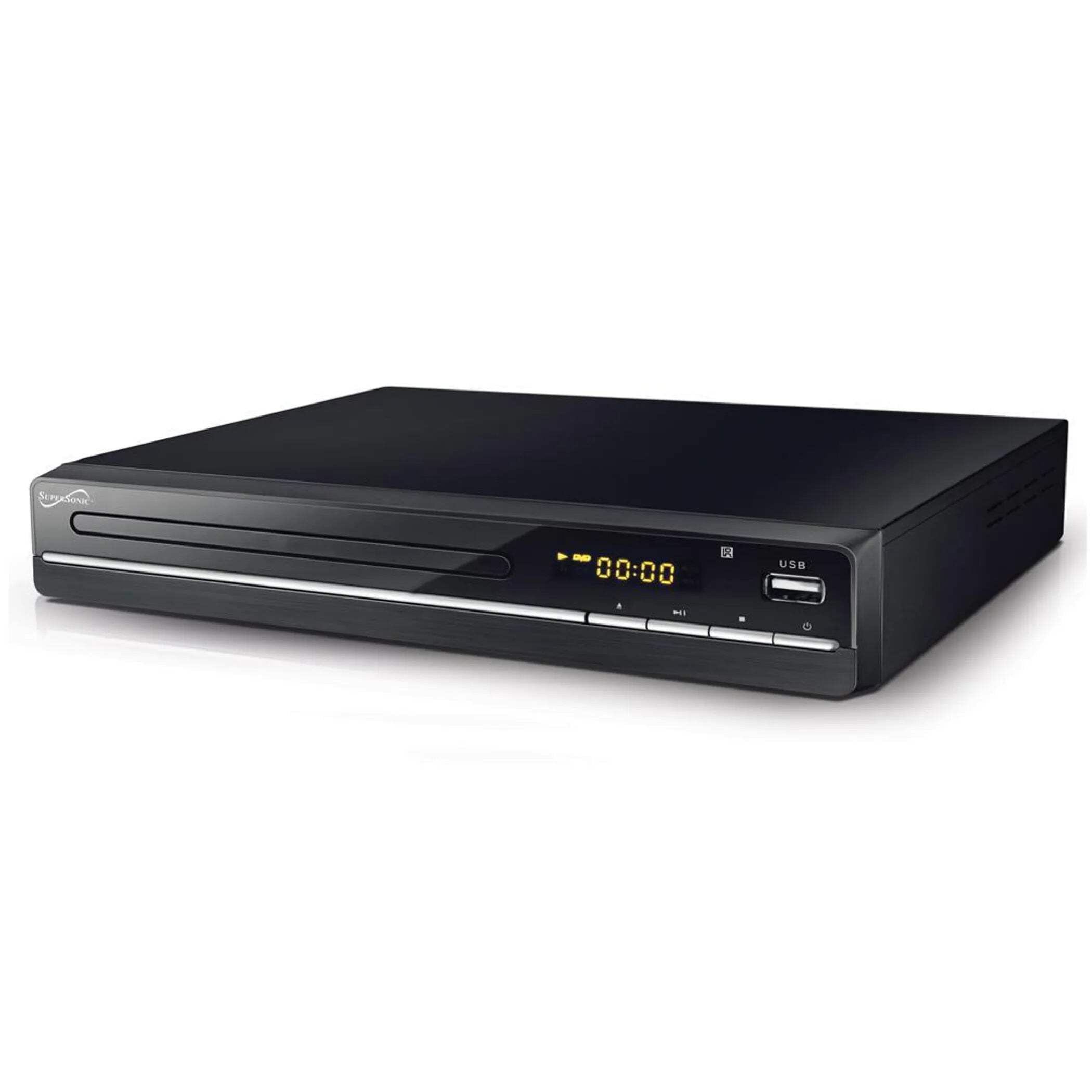
The image above displays the front panel of the SC-20H DVD Player. Key features include:
- Safata de disc: For inserting DVDs, VCDs, CDs, and other compatible discs.
- Pantalla de visualització: Shows playback time, track number, and other operational information.
- Botons de control: Includes Play/Pause, Stop, Previous, Next, and Power buttons for direct control.
- Entrada USB: Allows connection of USB flash drives for media playback.
- Ranura per a targeta SD: For inserting SD cards to play media files. (Note: The image primarily shows the USB port, but the product features indicate an SD input as well, typically located near the USB port or on the side).
4.2 Panell posterior
The rear panel of the DVD player contains all the necessary connection ports for audio and video output.
- Sortida HDMI: Connects to an HDMI-enabled TV or display for high-definition audio and video.
- Composite A/V Output (RCA): Yellow (Video), White (Left Audio), Red (Right Audio) jacks for standard definition connection to older TVs.
- Component YUV Output: Y (Luminance), Pb (Blue difference), Pr (Red difference) jacks for progressive scan video output, offering better quality than composite.
- Entrada d'alimentació: For connecting the power supply cable.
5. Configuració
5.1 Connexió a un televisor
Trieu un dels mètodes de connexió següents:
- Connexió HDMI (recomanada):
- Connect one end of an HDMI cable (not included) to the HDMI OUT port on the DVD player.
- Connect the other end of the HDMI cable to an HDMI IN port on your television.
- Select the corresponding HDMI input on your TV using its remote control.
- Composite A/V Connection:
- Connect the yellow RCA cable to the VIDEO OUT port on the DVD player and the VIDEO IN port on your TV.
- Connect the white RCA cable to the L AUDIO OUT port on the DVD player and the L AUDIO IN port on your TV.
- Connect the red RCA cable to the R AUDIO OUT port on the DVD player and the R AUDIO IN port on your TV.
- Select the corresponding A/V input on your TV.
- Component YUV Connection:
- Connect the Y, Pb, and Pr cables to the corresponding YUV OUT ports on the DVD player and YUV IN ports on your TV.
- For audio, use the white and red RCA cables to connect the L/R AUDIO OUT ports on the DVD player to the L/R AUDIO IN ports on your TV.
- Select the corresponding Component input on your TV.
5.2 Connexió d'alimentació
After connecting the audio/video cables, plug the power supply cable into the DVD player's power input and then into a wall outlet.
6. Instruccions de funcionament
6.1 Reproducció bàsica de discs
- Encès: Press the Power button on the front panel or remote control.
- Insereix disc: Press the OPEN/CLOSE button to open the disc tray. Place a compatible disc (DVD, VCD, CD, KODAK CD, DVD±R/RW, CD-R, CD-RW) onto the tray with the label side facing up. Press OPEN/CLOSE again to close the tray.
- Reproducció: The player will typically begin playback automatically. If not, press the PLAY button.
- Pausa/Reprèn: Press the PAUSE button to temporarily stop playback. Press PLAY again to resume.
- Atura: Premeu el botó STOP per finalitzar la reproducció.
- Skip Tracks/Chapters: Use the PREVIOUS and NEXT buttons to navigate between tracks or chapters.
6.2 Reproducció multimèdia USB/SD
- Inserir suports: Inseriu una unitat flaix USB al port USB o una targeta SD a la ranura per a targetes SD.
- Seleccioneu la font: Use the SOURCE or USB/SD button on the remote control to switch to the USB or SD input.
- Navega Files: Use the navigation buttons (Up, Down, Left, Right) and OK button on the remote to browse through your media files (MP3, video formats).
- Jugar File: Seleccioneu el desitjat file and press the PLAY button to begin playback.
6.3 System Settings (OSD Menu)
Access the On-Screen Display (OSD) menu to configure various settings:
- Menú d'accés: Press the SETUP button on the remote control.
- Navegació: Feu servir els botons de navegació per moure's per les opcions del menú.
- Selecció: Press OK to select an option or enter a sub-menu.
- Sortida: Press SETUP again to exit the menu.
Els paràmetres clau inclouen:
- Idioma: Set OSD menu language and subtitle language (supports multiple languages).
- Relació d'aspecte: Choose between 4:3 (Standard) and 16:9 (Widescreen) for video output.
- Control parental: Set a password and rating level to restrict playback of certain content.
- Configuració d'àudio: Adjust audio output modes (e.g., Surround).
7. Manteniment
Proper maintenance ensures the longevity of your DVD player:
- Neteja de la unitat: Wipe the exterior of the player with a soft, dry cloth. Do not use liquid cleaners or aerosol sprays.
- Discs de neteja: Use a soft, lint-free cloth to wipe discs from the center outwards. Do not use abrasive cleaners or solvents.
- Manipulació del disc: Always hold discs by their edges to avoid fingerprints and scratches. Store discs in their cases when not in use.
- Ventilació: Assegureu-vos que les obertures de ventilació estiguin netes de pols i deixalles per evitar el sobreescalfament.
8. Solució De Problemes
Si teniu problemes, consulteu els següents problemes i solucions habituals:
| Problema | Causa possible | Solució |
|---|---|---|
| Sense poder | Cable d'alimentació no connectat; Presa de corrent defectuosa | Ensure power cable is securely plugged in. Test the outlet with another device. |
| Cap imatge | Incorrect video connection; Wrong TV input selected | Check video cables (HDMI, Composite, Component) are correctly connected. Select the correct input source on your TV. |
| Sense so | Incorrect audio connection; TV/player volume too low; Mute activated | Check audio cables (HDMI, RCA) are correctly connected. Increase volume on TV and player. Deactivate mute function. |
| El disc no es reprodueix | Disc inserted incorrectly; Disc is dirty or scratched; Incompatible disc format | Ensure disc is inserted label-side up. Clean the disc. Check if the disc format is supported (DVD, VCD, CD, KODAK CD, DVD±R/RW, CD-R, CD-RW, MP3). |
| No es reprodueix el suport USB/SD | Incorrect source selected; Incompatible file format; USB/SD device faulty | Select USB or SD source. Ensure media files are compatible. Try another USB/SD device. |
9. Especificacions
Detailed technical specifications for the Supersonic SC-20H DVD Player:
- Model: SC-20H
- Marca: Supersònic
- Compatibilitat del disc: DVD, VCD, KODAK CD, DVD±R/RW, CD, CD-R, CD-RW, MP3
- Sortida de vídeo: HDMI, Composite A/V, Component YUV
- Mode de sortida d'àudio: Envoltant
- Resolució: 1920x1080 (via HDMI)
- Connectivitat: USB 2.0, SD Card Slot
- Font d'alimentació: 110-240V, 50/60Hz
- Consum d'energia: 15W
- Dimensions (L x A x A): 10.5 x 10 x 3.3 polzades
- Pes de l'article: 1.75 lliures
- Característiques especials: Multi-language subtitles (up to 32 languages), PAL/NTSC compatible, Parental Lock, Aspect Ratio (4:3, 16:9)
10. Garantia i assistència
Per obtenir informació sobre la garantia i assistència tècnica, consulteu la documentació inclosa amb la compra o visiteu el lloc web oficial de Supersonic. weblloc web. Conserveu el comprovant de compra per a qualsevol reclamació de garantia.


