Introducció
Gràcies per la compraasing the Blackweb BWA16AA003 1000W HiFi Bluetooth Stereo System. This powerful audio system is designed to provide a rich and immersive sound experience with its front speakers and subwoofer. It features wireless Bluetooth connectivity, a digital FM radio, and a top-loading CD player, allowing you to enjoy your favorite music from various sources. This manual provides detailed instructions for setup, operation, maintenance, and troubleshooting to ensure optimal performance and longevity of your device.
Informació important de seguretat
Si us plau, llegiu atentament totes les instruccions de seguretat i funcionament abans d'utilitzar aquest producte. Conserveu aquestes instruccions per a futures consultes.
- No exposeu aquest aparell a la pluja o la humitat.
- No bloquegeu cap obertura de ventilació. Instal·leu-ho d'acord amb les instruccions del fabricant.
- No instal·leu a prop de cap font de calor com ara radiadors, registres de calor, estufes o altres aparells (inclosos amplificadors) que produeixen calor.
- Protegiu el cable d’alimentació perquè no es pugui caminar ni pessigar, sobretot als endolls, endolls i el punt on surten de l’aparell.
- Utilitzeu només accessoris/accessoris especificats pel fabricant.
- Desendolleu aquest aparell durant les tempestes amb llamps o quan no l'utilitzeu durant llargs períodes de temps.
- Demaneu tot el servei a personal de servei qualificat. El manteniment és necessari quan l'aparell s'ha fet malbé d'alguna manera, com ara el cable d'alimentació o l'endoll està danyat, s'ha vessat líquid o han caigut objectes a l'aparell, l'aparell ha estat exposat a la pluja o la humitat, no funciona amb normalitat. , o s'ha deixat caure.
Contingut del paquet
Carefully unpack your stereo system and ensure all items are present. If any items are missing or damaged, please contact your retailer.
- Negreweb BWA16AA003 Main Unit
- Altaveu esquerre
- Altaveu dret
- Subwoofer
- Cable d'alimentació
- Manual d'usuari
Producte acabatview
Familiarize yourself with the main unit's controls and features.
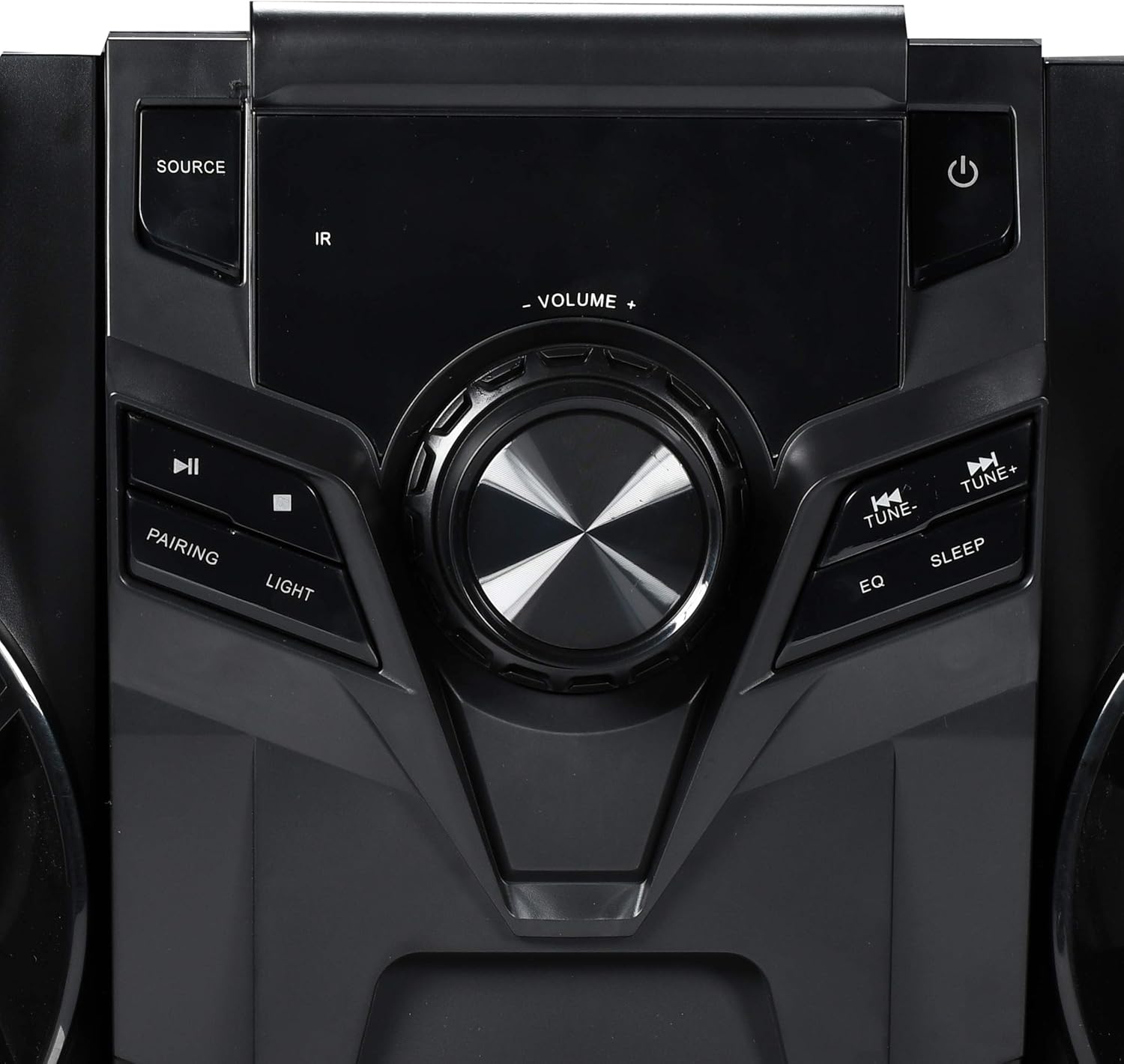
Figura 1: Controls del panell frontal
This image displays the central control panel of the Blackweb BWA16AA003 stereo system. Key controls visible include the large central volume knob, a "SOURCE" button on the upper left for input selection, and a power button (represented by the universal power symbol) on the upper right. Below the source button are playback controls: a play/pause button and a pairing button for Bluetooth. Below the power button are "TUNE-" and "TUNE+" buttons for radio tuning, along with "EQ" and "SLEEP" buttons. An "IR" sensor for remote control input is also visible.
Funcions del tauler de control:
- Botó d'encendre (⏻): Activa o desactiva el sistema.
- Botó SOURCE: Selects the input source (e.g., CD, Bluetooth, FM Radio).
- Botó de VOLUM: Ajusta el nivell de volum principal.
- Botó Reproduir/Pausa (⏸): Plays or pauses audio playback (CD/Bluetooth).
- PAIRING Button: Inicia el mode d'emparellament Bluetooth.
- Botó LLUM: Controls the multi-color LED lighting effects on the speakers.
- Botons TUNE- / TUNE+: Tunes FM radio frequencies or navigates tracks/chapters.
- Botó EQ: Passa ciclísticament pels preajustos de l'equalitzador.
- Botó SLEEP: Estableix el temporitzador de son.
- Sensor IR: Receives signals from a compatible remote control (note: remote control not included as per specifications).
- Port USB: Located on the front or rear panel, used for charging compatible devices (charging cable sold separately).
- Safata de CD: Top-loading tray for inserting audio CDs.
Configuració
1. Col·locació
Place the main unit and speakers on a stable, flat surface. Ensure adequate ventilation around the unit to prevent overheating. For optimal sound, position the left and right speakers equidistant from the main unit and facing the listening area.
2. Connexió d'altaveus
Connect the speaker wires from the left and right speakers and the subwoofer to the corresponding speaker terminals on the rear of the main unit. Ensure correct polarity (positive to positive, negative to negative) for optimal sound quality.
3. Connexió d'alimentació
Plug the power cord into the AC IN socket on the rear of the main unit, then plug the other end into a standard wall outlet (AC 120V~60Hz).
Instruccions de funcionament
Encès/Apagat
Premeu el botó Botó d'engegada (⏻) on the front panel to turn the system on or off.
Selecció de la font
Premeu el botó Botó SOURCE repeatedly to cycle through available input modes: CD, Bluetooth, FM Radio.
Funcionament Bluetooth
- Switch the system to Bluetooth mode using the Botó SOURCE. The display will indicate "BT" or "Bluetooth".
- The system will automatically enter pairing mode. If not, press the PAIRING Button. The Bluetooth indicator will flash.
- Al dispositiu amb Bluetooth (telèfon intel·ligent, tauleta, ordinador portàtil), activeu el Bluetooth i cerqueu els dispositius disponibles.
- Select "Blackweb BWA16AA003" (or similar name) from the list of devices.
- Once paired, the Bluetooth indicator will stop flashing and remain solid. You can now play audio wirelessly from your device.
Reproducció de CD
- Switch the system to CD mode using the Botó SOURCE.
- Gently place an audio CD (CD or CD-R/RW) into the top-loading CD tray with the label side facing up.
- The system will automatically begin playing the CD. If not, press the Botó Reproduir/Pausa (⏸).
- Utilitza el TUNE- / TUNE+ Buttons per saltar pistes.
Funcionament de la ràdio FM
- Switch the system to FM Radio mode using the Botó SOURCE.
- Extend the FM antenna fully for better reception.
- Premeu el botó TUNE- / TUNE+ Buttons to manually tune to a desired frequency.
- To auto-scan and save presets (if available), refer to the on-screen display or specific instructions for your model's auto-scan function.
Càrrega USB
Connect your compatible device's USB charging cable (sold separately) to the USB port on the stereo system to charge your device.
Control de llum LED
Premeu el botó Botó LLUM to cycle through different multi-color LED lighting effects on the speakers or to turn them off.
Ajust de volum
Gira el Pom de VOLUM en sentit horari per augmentar el volum i en sentit antihorari per disminuir-lo.
Equalitzador (EQ)
Premeu el botó Botó EQ to cycle through various preset equalizer modes (e.g., Rock, Pop, Jazz, Classic, Flat) to optimize sound for different music genres.
Temporitzador de dormir
Premeu el botó Botó SLEEP repeatedly to set a sleep timer (e.g., 15, 30, 60, 90 minutes). The system will automatically turn off after the selected time.
Manteniment
Neteja
Wipe the unit with a soft, dry cloth. Do not use abrasive cleaners, waxes, or solvents as they may damage the finish. Ensure the unit is unplugged before cleaning.
Emmagatzematge
If the unit is to be stored for an extended period, unplug it from the power outlet and store it in a cool, dry place, away from direct sunlight and extreme temperatures.
Resolució de problemes
Abans de contactar amb l'atenció al client, consulteu la taula següent per veure els problemes habituals i les seves solucions.
| Problema | Causa possible | Solució |
|---|---|---|
| Sense poder | Cable d'alimentació no connectat correctament. La presa de corrent no funciona. | Assegureu-vos que el cable d'alimentació estigui ben connectat a la unitat i a la presa de corrent. Proveu la presa amb un altre dispositiu. |
| Sense so | El volum és massa baix o està silenciat. Incorrect source selected. Speaker wires not connected properly. | Augmenta el volum. Press the SOURCE button to select the correct input. Check speaker wire connections at both the unit and speakers. |
| Falla l'aparellament de Bluetooth | Bluetooth device is too far away. Bluetooth not enabled on your device. System is not in pairing mode. | Move your Bluetooth device closer to the stereo system. Assegureu-vos que el Bluetooth estigui habilitat al vostre dispositiu. Press the PAIRING button on the stereo system. |
| El CD no es reprodueix | El CD està brut o ratllat. El CD està inserit incorrectament. Incorrect source selected. | Clean the CD with a soft cloth. Re-insert the CD with the label side facing up. Premeu el botó SOURCE per seleccionar el mode CD. |
| Poor FM Reception | FM antenna not extended. Interferències d'altres dispositius electrònics. | Amplieu completament l’antena FM. Move the unit away from other electronic devices. |
Especificacions
| Marca | Negreweb |
| Model | BWA16AA003 |
| Potència de sortidatage | 1000 watts |
| Dispositius compatibles | Telèfon intel·ligent, tauleta, ordinador portàtil |
| Tecnologia de connectivitat | Bluetooth, USB |
| Tipus d'altaveu | Stereo (with Subwoofer) |
| Reproductor de CD | Yes (CD and CD-R/RW compatible) |
| Ràdio FM | Yes (Digital FM with presets) |
| Port USB | Yes (for device charging) |
| Il·luminació LED | Multi-color LED speaker illumination |
| Dimensions (L x A x A) | 72.64 x 36.83 x 32.77 cm (aprox. 28.6 x 14.5 x 12.9 polzades) |
| Pes | 14.17 kg (aprox. 31.24 lliures) |
Garantia i Suport
For warranty information or technical support, please refer to the documentation included with your purchase or contact Blackweb customer service. Keep your proof of purchase for warranty claims.


