Introducció
This manual provides comprehensive instructions for the setup, operation, maintenance, and troubleshooting of your AudioCodes 405HD IP Phone. Please read this manual carefully before using the device to ensure proper functionality and to avoid potential issues.
The AudioCodes 405HD is a cost-effective IP phone designed for Voice over IP (VoIP) communication, offering essential features for business and office environments.
Contingut del paquet
Before proceeding with the setup, verify that all components are present in the package. The standard package for the AudioCodes 405HD IP Phone typically includes:
- AudioCodes 405HD IP Phone Base Unit
- Telèfon
- Cable de l'auricular
- Cable Ethernet
- Suport d'escriptori
Note: A power adapter is typically not included with this model. The phone is designed to be powered via Power over Ethernet (PoE) or a compatible external power supply (sold separately).
Configuració
1. Connexions físiques
Follow these steps to connect your AudioCodes 405HD IP Phone:
- Attach the Desk Stand: Align the tabs on the desk stand with the slots on the back of the phone base unit and slide it into place until it clicks securely.
- Connecteu el telèfon: Plug one end of the coiled handset cord into the handset and the other end into the port labeled with a handset icon on the side of the phone base unit.
- Connexió a la xarxa (PoE): If using Power over Ethernet, connect one end of the Ethernet cable to the LAN port on the back of the phone and the other end to a PoE-enabled network switch or router. The phone will power on automatically.
- Connect to Network (Non-PoE with Power Adapter): If not using PoE, connect one end of the Ethernet cable to the LAN port on the back of the phone and the other end to your network switch or router. Then, connect a compatible external power adapter (not included) to the power port on the back of the phone and plug it into a power outlet.
- Connexió a l'ordinador (opcional): If you wish to connect a computer through the phone, connect an Ethernet cable from your PC to the PC port on the back of the phone.
2. Arrencada inicial
Once connected to power and network, the phone will begin its boot-up sequence. This process may take a few minutes as the phone obtains an IP address and registers with your VoIP service provider. The display will show progress messages. Upon successful boot-up, the display will show the current date, time, and line status.
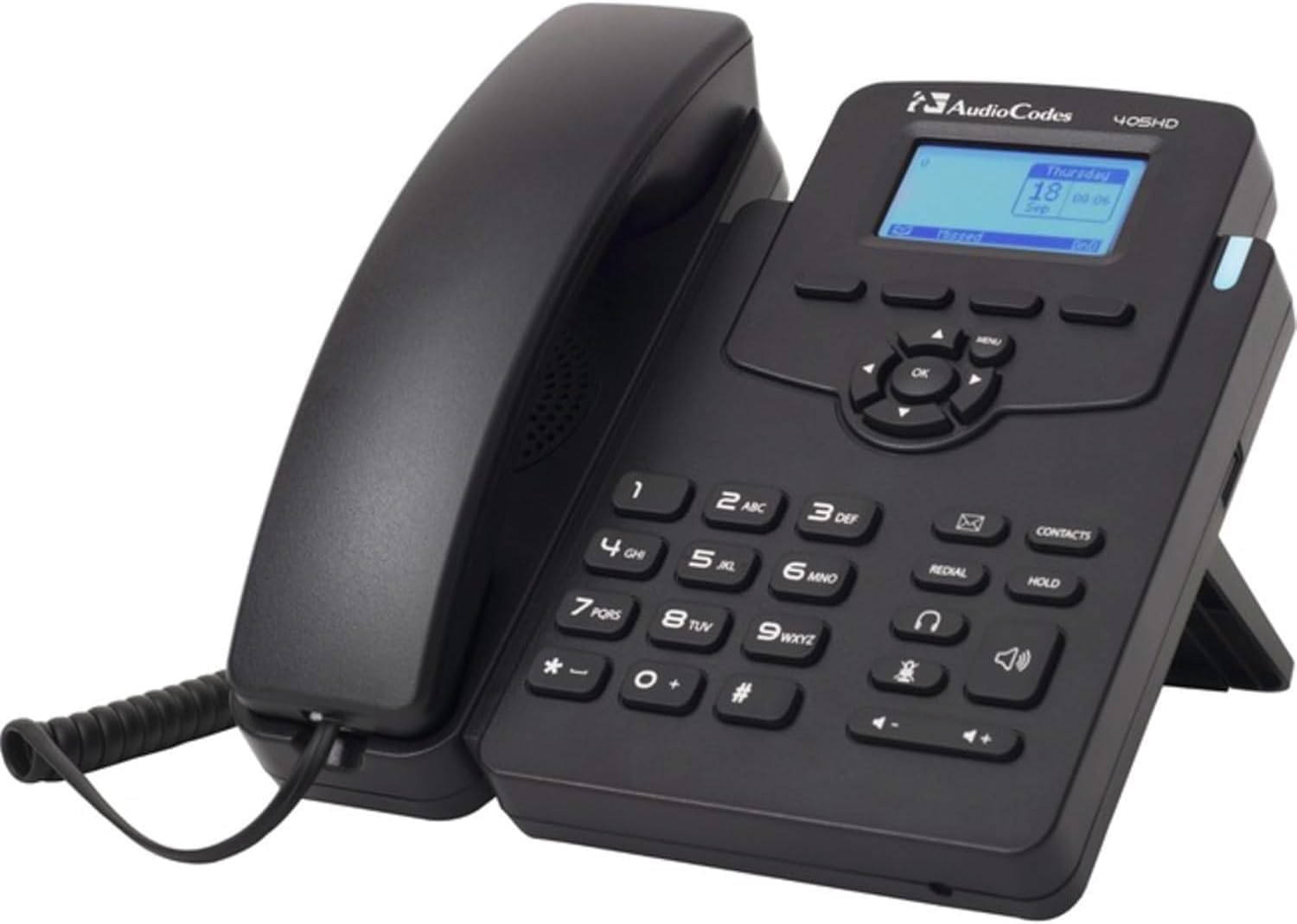
This image displays the AudioCodes 405HD IP Phone, a black corded VoIP phone. The handset is cradled on the left side of the base unit. The base features a numeric keypad, function buttons for redial, hold, contacts, speakerphone, and headset, and a central navigation cluster with an 'OK' button. A small blue-backlit LCD screen shows 'Thursday 18 Sep 00:06'. The phone is designed to stand upright with a built-in kickstand.
Instruccions de funcionament
Funcions de trucada bàsiques
- Fer una trucada:
- Agafeu el telèfon o premeu Altaveu botó.
- Marqueu el número de telèfon desitjat amb el teclat.
- Premeu el botó Marqueu soft key (if displayed) or wait for the call to connect automatically.
- Respondre una trucada:
- Quan soni el telèfon, agafeu l'auricular o premeu la tecla Altaveu botó.
- Alternativament, premeu el botó Respon soft key (if displayed).
- Finalització d'una trucada:
- Place the handset back in the cradle.
- Si feu servir l'altaveu o els auriculars, premeu la tecla Finalitzar la trucada tecla programable o la Altaveu botó de nou.
Keypad and Navigation
- Teclat numèric (0-9, *, #): S'utilitza per marcar números i introduir text.
- Navigation Cluster (Up, Down, Left, Right, OK): Used to navigate menus and confirm selections on the display.
- Botó de menú: Accesses the phone's main menu for settings and features.
- Botó de tornar a marcar: Marca l'últim número trucat.
- Botó premut: Posa una trucada activa en espera.
- Botó de contactes: Accesses the phone's contact directory.
- Botó d'altaveu: Activa/desactiva el mode d'altaveu.
- Botó d'auriculars: Toggles headset mode on/off (if a headset is connected).
- Botons de volum (+/-): Adjusts handset, speakerphone, or ringer volume.
Manteniment
Proper maintenance ensures the longevity and optimal performance of your AudioCodes 405HD IP Phone.
- Neteja:
- Disconnect the phone from power before cleaning.
- Utilitzeu un suau, lleugerament damp, drap sense borrissol per netejar les superfícies del telèfon.
- Do not use harsh chemicals, abrasive cleaners, or aerosol sprays directly on the phone.
- Eviteu que entri humitat a cap obertura.
- Atenció general:
- Mantingueu el telèfon allunyat de la llum solar directa, de fonts de calor i de la humitat excessiva.
- Avoid dropping the phone or subjecting it to strong vibrations.
- Assegureu-vos una ventilació adequada al voltant del dispositiu.
Resolució de problemes
This section addresses common issues you might encounter with your AudioCodes 405HD IP Phone.
| Problema | Causa possible | Solució |
|---|---|---|
| El telèfon no s'encén. | No power from PoE switch or power adapter. Defective power adapter or phone unit. |
|
| Sense to de marcatge. | Phone not registered with VoIP service. Network connectivity issue. |
|
| No es poden fer ni rebre trucades. | No dial tone (see above). Incorrect dialing procedure. Service provider issue. |
|
| La pantalla està en blanc o il·legible. | No power. Display settings. |
|
Especificacions
| Característica | Detall |
|---|---|
| Marca | Codis d’àudio |
| Número de model | UC405HDEG |
| Pes de l'article | 2.08 lliures |
| Color | Negre |
| Tipus de telèfon | Cordat |
| Font d'alimentació | Corded Electric (requires external adapter or PoE) |
| Tipus de marcador | Teclat únic |
| Tipus de contestador | Digital |
| Dispositius compatibles | VoIP services, multi-line systems |
| Capacitat de trucades de conferència | Bàsica |
| Operació multilínia | Operació multilínia |
Garantia i Suport
Information regarding product warranty and technical support for the AudioCodes 405HD IP Phone is typically provided by the original reseller or your VoIP service provider. Please refer to your purchase documentation or contact your vendor for specific details on warranty coverage and support options.


