1. Introducció
This user manual provides comprehensive instructions for the operation and maintenance of your Sealey VS8812 EOBD Code Reader. This device is designed to provide fast and easy access to On-Board Diagnostics (EOBD) codes for petrol vehicles manufactured from 2001 onwards and diesel vehicles from 2004 onwards. It helps identify the cause of the illuminated Malfunction Indicator Lamp (MIL), commonly known as the engine check light.
The VS8812 is a CAN-enabled tool capable of retrieving generic P0, P2, P3, and U10 codes related to engine emissions, as well as manufacturer-specific P1, P3, and U1 codes. It can turn off the MIL light, clear diagnostic trouble codes (DTCs), and reset monitors. The device supports the new extended sensor list (SAE J1979 2007) and provides access to live data streams from engine and transmission modules, including O2 sensor data. It also stores freeze-frame data for later evaluation and includes I/M Readiness functionality with color-coded LEDs to assist with emissions testing preparation.
2. Informació de seguretat
Always observe the following safety precautions when using the Sealey VS8812 EOBD Code Reader:
- Seguretat del vehicle: Ensure the vehicle is parked on a level surface with the parking brake engaged. The ignition should be off before connecting or disconnecting the tool.
- Seguretat elèctrica: Do not connect or disconnect the tool while the ignition is on or the engine is running, as this may damage the tool or the vehicle's electronic system.
- Seguretat personal: Wear appropriate personal protective equipment, such as safety glasses, when working on vehicles. Avoid contact with hot engine components or moving parts.
- Cura de les eines: Keep the tool dry and clean. Do not expose it to extreme temperatures or direct sunlight for prolonged periods.
- Ús adequat: Use the tool only for its intended purpose as an EOBD code reader. Misuse may lead to inaccurate readings or damage.
3. Producte acabatview
The Sealey VS8812 EOBD Code Reader is a compact, handheld device designed for automotive diagnostics. It features a clear display screen and intuitive button controls.

Figura 3.1: Davant view of the Sealey VS8812 EOBD Code Reader, showing the display screen, "ENTER/Exit" button, "SCROLL" button, and "Fn" button. The device is red with a black screen and buttons.
Components clau:
- Pantalla de visualització: Shows diagnostic information, menus, and live data.
- ENTER/Exit Button: Confirms selections or returns to the previous menu.
- SCROLL Button: Navigates through menu options and data lists.
- Botó Fn (Funció): Provides access to additional functions or shortcuts.
- Cable connector OBD-II: Permanently attached cable for connecting to the vehicle's OBD-II port.

Figura 3.2: The Sealey VS8812 EOBD Code Reader shown with its integrated OBD-II diagnostic cable, which connects to the vehicle's diagnostic port.
4. Configuració
Setting up your Sealey VS8812 EOBD Code Reader is a straightforward process:
- Localitzeu el port OBD-II: The OBD-II port is typically located under the dashboard on the driver's side, though its exact position may vary by vehicle model. Refer to your vehicle's owner's manual if you cannot locate it.
- Turn Off Ignition: Assegureu-vos que el contacte del vehicle estigui en la posició OFF.
- Connect the Tool: Plug the OBD-II connector cable from the VS8812 into the vehicle's OBD-II port. Ensure a secure connection.
- Encès: Once connected, the VS8812 will typically power on automatically, drawing power from the vehicle's battery. If it does not power on, turn the vehicle's ignition to the ON position (engine off).
- Pantalla inicial: The device will display the main menu or a welcome screen.
5. Instruccions de funcionament
The Sealey VS8812 offers various diagnostic functions. Navigate through the menus using the SCROLL button and confirm selections with the ENTER/Exit button.

Figura 5.1: The main menu screen of the Sealey VS8812, displaying options such as "OBD/EOBD", "Ready Test", "Setup", and "About".
5.1. Reading and Clearing Diagnostic Trouble Codes (DTCs)
- Al menú principal, seleccioneu "OBD/EOBD" i premeu INTRO.
- Tria "Llegir codis" to display current, pending, and historic DTCs. The screen will show the code and its definition.
- Per esborrar els codis, seleccioneu "Esborrar codis" from the OBD/EOBD menu. Confirm your choice when prompted. This action will turn off the Malfunction Indicator Lamp (MIL) and reset all monitors.
5.2. Flux de dades en directe
The VS8812 can display real-time data from various vehicle sensors and modules.
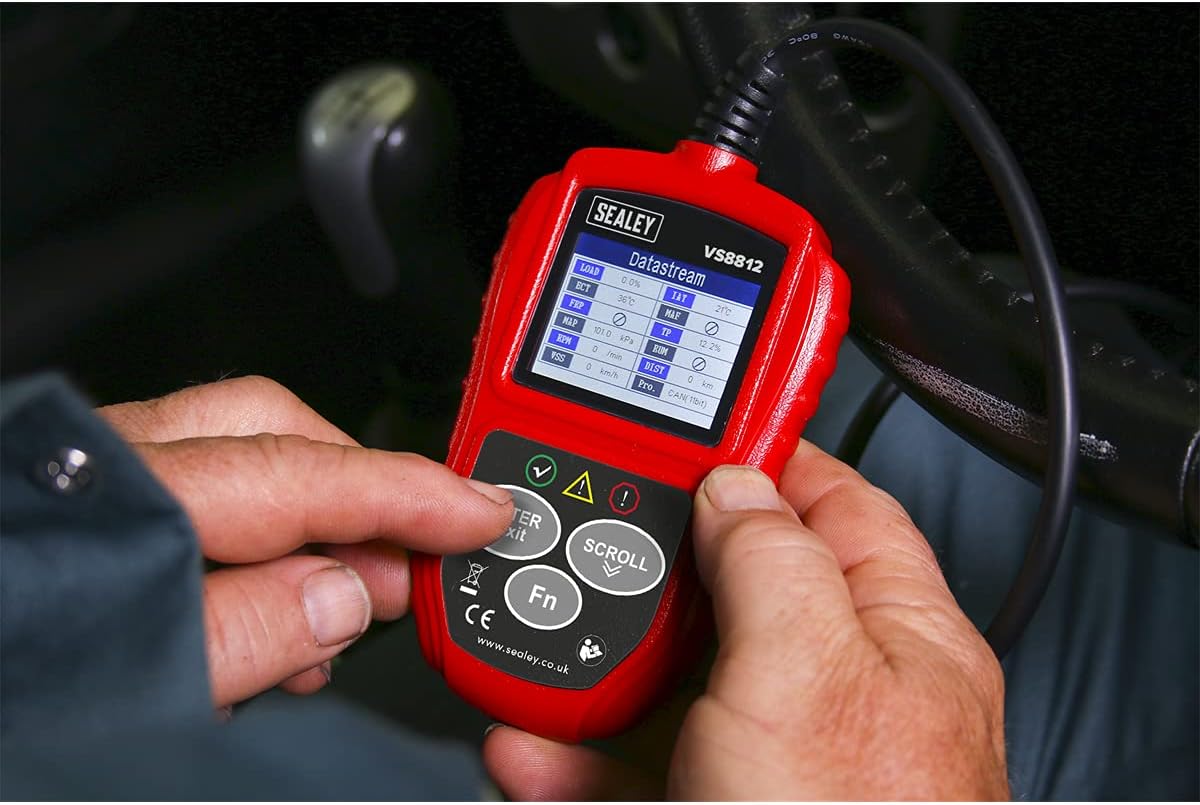
Figura 5.2: The Sealey VS8812 being used to display live data streams, showing various engine parameters such as LOAD, ECT, RPM, and vehicle speed.
- From the OBD/EOBD menu, select "Dades en directe".
- Utilitzeu el botó de desplaçament per view different parameters such as engine RPM, vehicle speed, coolant temperature, O2 sensor readings, and more.
- The tool also stores freeze-frame data, which captures engine conditions at the moment a fault code was set.
5.3. Preparació I/M
This function checks the readiness of the emission-related monitoring systems on the vehicle, which is crucial for emissions testing.
- Al menú principal, seleccioneu "Ready Test".
- The screen will display the status of various monitors (e.g., O2 Sensor Monitor, Catalyst Monitor). Color-coded LEDs on the device may also indicate readiness status (e.g., green for ready, yellow for incomplete).
6. Manteniment
Proper maintenance ensures the longevity and accuracy of your Sealey VS8812 EOBD Code Reader:
- Neteja: Netegeu l'eina amb un drap suauamp tela. No utilitzeu netejadors abrasius ni dissolvents.
- Emmagatzematge: Store the tool in a clean, dry environment, away from direct sunlight and extreme temperatures.
- Cura del cable: Do not bend or crimp the diagnostic cable excessively. Store it neatly to prevent damage.
- Actualitzacions de programari: Check the official Sealey website periodically for any available software updates for your model to ensure compatibility with newer vehicles and improved functionality.
7. Solució De Problemes
If you encounter issues with your Sealey VS8812, refer to the following common troubleshooting steps:
| Problema | Causa possible | Solució |
|---|---|---|
| L'eina no s'encén. |
|
|
| Missatge "Error d'enllaç" o "Error de comunicació". |
|
|
| No es poden esborrar els codis. |
|
|
If problems persist, contact Sealey customer support or a qualified technician.
8. Especificacions
| Característica | Detall |
|---|---|
| Número de model | VS8812 |
| Fabricant | Sealey |
| Dimensions del producte | 0.71 x 3.23 x 0.71 polzades (aprox.) |
| Pes de l'article | 12 unces (aprox.) |
| Font d'alimentació | Corded Electric (via OBD-II port) |
| Color | Vermell |
| Protocols compatibles | EOBD (Petrol 2001+, Diesel 2004+), CAN |
| Funcions | Read/Clear DTCs, Live Data, Freeze Frame, I/M Readiness |
| Components inclosos | Sealey VS8812 EOBD Code Reader - Live Data |
9. Garantia i Suport
For warranty information, technical support, or service inquiries regarding your Sealey VS8812 EOBD Code Reader, please refer to the official Sealey weblloc web o poseu-vos en contacte amb el seu departament d'atenció al client. Conserveu el rebut de compra com a comprovant de compra per a reclamacions de garantia.
Sealey Oficial Weblloc: www.sealey.co.uk


