1. Introducció
Thank you for choosing the Ajazz AK33 Mechanical Keyboard. This manual provides detailed instructions for setting up, operating, and maintaining your new keyboard. Designed for performance and durability, the AK33 features responsive mechanical switches, a compact layout, and customizable backlighting, making it ideal for both gaming and everyday use.
2. Producte acabatview
The Ajazz AK33 is a compact 82-key mechanical keyboard built with an aluminum structure for enhanced durability. It features black mechanical switches known for their linear feel and 60g actuation force, providing precise and rapid response, particularly beneficial for fast-paced applications like real-time strategy games. The keyboard also includes a vibrant white backlight system with multiple customizable effects.

Figura 2.1: Frontal view of the Ajazz AK33 Mechanical Keyboard, showcasing its compact layout and vibrant backlight.
Les característiques clau inclouen:
- 82 Mechanical Keys: Each key features an individual mechanical switch for precise tactile feedback and extended lifespan.
- Black Switches: Linear switches with a 60g actuation force, optimized for rapid keystrokes and minimizing accidental presses.
- Estabilitat millorada: Larger keys like Space, Shift, Enter, and Backspace are designed with two secondary axes for improved balance and stability.
- Disseny compacte: With a width of only 310.5 mm, the keyboard offers a space-saving layout, allowing for greater mouse movement and ergonomic posture.
- Retroiluminació blanca: Features a white LED backlight system with various lighting effects to personalize your setup.
- Cable USB desmuntable: For easy storage and portability, preventing cable damage.
- Hot-Swappable Keys: Supports hot-swapping for all keys, allowing users to easily change switches without soldering.
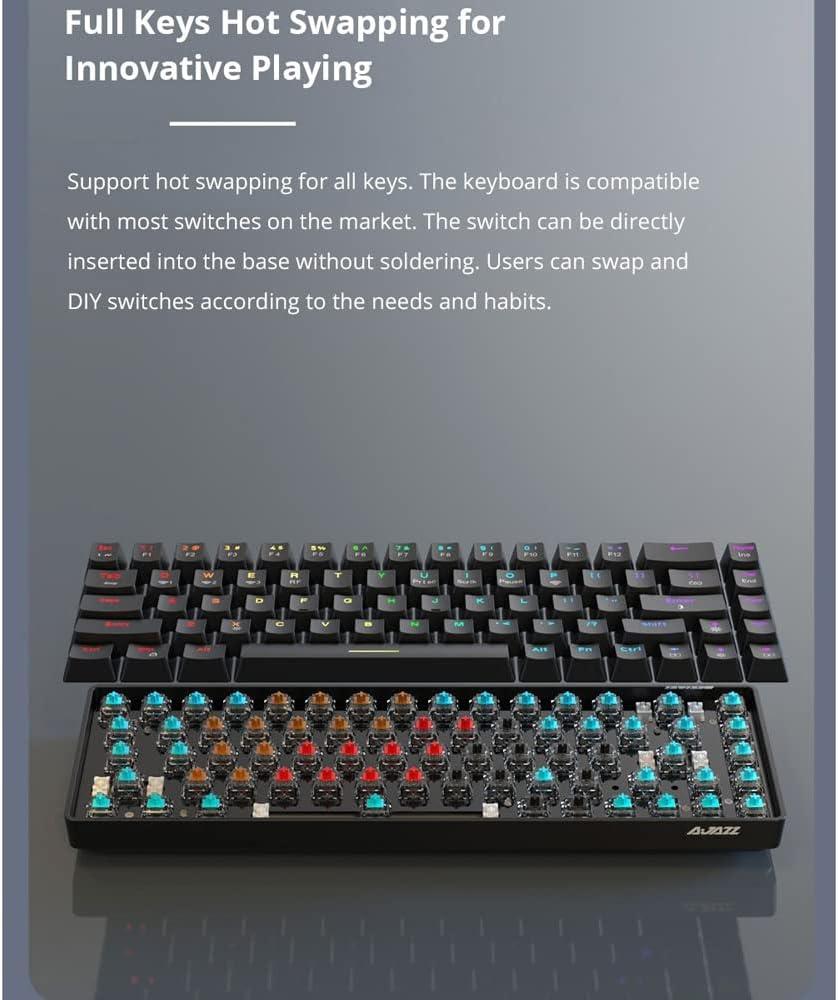
Figure 2.2: The Ajazz AK33 keyboard demonstrating its hot-swappable switch capability, allowing for easy customization and maintenance of individual key switches.
3. Instruccions de configuració
3.1 Contingut del paquet
Si us plau, comproveu el contingut del paquet en desempaquetar-lo:
- 1 x Ajazz AK33 Mechanical Keyboard (Black)
- 1 x Detachable USB Cable
- 1 x Manual d'usuari (Aquest document)
3.2 Requisits del sistema
The Ajazz AK33 Mechanical Keyboard is compatible with a wide range of operating systems:
- Windows 10/8/7/XP/Vista
- Mac OS
- Linux
- Other compatible systems
3.3 Connexió del teclat
- Localitzeu el port USB del vostre ordinador.
- Connect the smaller end of the detachable USB cable to the port on the back of the Ajazz AK33 keyboard.
- Connecteu l'extrem USB-A estàndard del cable a un port USB disponible de l'ordinador.
- The keyboard will be automatically recognized by your operating system. No additional drivers are typically required.
4. Instruccions de funcionament
4.1 Ús bàsic
The Ajazz AK33 functions as a standard keyboard. Simply type as you normally would. The mechanical switches provide a distinct tactile and auditory feedback for each keystroke.
Control de retroiluminació 4.2
The AK33 features a white backlight with multiple lighting effects. Use the Function (Fn) key in combination with specific keys to control the backlight.
- Fn+F9: Cycle through different backlight modes/effects.
- Fn+F10: Ajusta la brillantor de la retroiluminació (augmenta).
- Fn+F11: Ajusta la brillantor de la retroiluminació (redueix).
- Fn+F12: Activa/desactiva la retroiluminació.
- Note: Specific key combinations for backlight speed or direction may vary based on firmware version. Experiment with Fn + arrow keys or other function keys if available.

Figura 4.1: Primer pla view of the Ajazz AK33 keyboard, highlighting the function keys (F9-F12) used for backlight control.
4.3 Multimèdia i tecles de drecera
The AK33 keyboard may include multimedia and shortcut functions accessible via the Fn key in combination with other keys (e.g., F1-F8). Refer to the keycap legends for specific functions.
- Fn + F1-F8: Typically control multimedia playback (play/pause, stop, previous, next, volume up/down, mute) or open common applications.
- Fn + Win: Lock/unlock the Windows key to prevent accidental presses during gaming.
5. Manteniment
5.1 Neteja del teclat
To ensure the longevity and performance of your keyboard, regular cleaning is recommended.
- Desconnecteu el teclat de l'ordinador abans de netejar-lo.
- Feu servir una llauna d'aire comprimit per treure la pols i les restes que hi ha entre les tecles.
- Netegeu les tecles i la superfície del teclat amb un drap suau i lleugerament dryamp, drap sense borrissol. Eviteu la humitat excessiva.
- For stubborn stains, a small amount of mild soap solution can be used on the cloth, but ensure it is almost dry before wiping.
- Do not use harsh chemicals, abrasive cleaners, or solvents as they may damage the keyboard's finish or keycap legends.
5.2 Manteniment de les tecles i els interruptors
The AK33 features hot-swappable switches, allowing for easy replacement or customization.
- To remove a keycap, gently pull it upwards using a keycap puller (not included, but recommended for safe removal).
- To remove a switch, use a switch puller (not included) to carefully unclip it from the PCB.
- When inserting a new switch, align the pins correctly with the sockets on the PCB and press down gently until it clicks into place. Do not force it.
- Ensure the keyboard is disconnected from power before performing any keycap or switch removal/installation.
6. Solució De Problemes
If you encounter issues with your Ajazz AK33 keyboard, please refer to the following common troubleshooting steps:
- El teclat no respon:
- Assegureu-vos que el cable USB estigui connectat correctament tant al teclat com a l'ordinador.
- Prova de connectar el teclat a un port USB diferent de l'ordinador.
- Prova el teclat en un altre ordinador per descartar problemes específics del sistema.
- Reinicieu l'ordinador.
- La retroiluminació no funciona o és incorrecta:
- Premeu Fn + F12 to ensure the backlight is not turned off.
- Premeu Fn + F10 or Fn + F11 per ajustar la brillantor.
- Premeu Fn + F9 per alternar entre els diferents modes d'il·luminació.
- Ensure your operating system's power settings are not interfering with USB device power.
- Tecles específiques que no funcionen:
- Carefully remove the keycap and inspect the switch for any visible damage or debris.
- If you have spare switches, try replacing the faulty switch (refer to Section 5.2).
- Assegureu-vos que la tapa de la tecla estigui correctament assentada a la tija de l'interruptor.
- Keyboard Input Lag or Disconnects:
- Assegureu-vos que no hi hagi altres dispositius USB d'ample de banda elevat connectats al mateix concentrador USB.
- Try a different USB port, preferably a direct port on your motherboard (for desktop PCs).
- Check for any software conflicts or background processes consuming system resources.
If the problem persists after trying these steps, please contact Ajazz customer support for further assistance.
7. Especificacions
| Característica | Detall |
|---|---|
| Marca | Ajazz |
| Model | AK33 (K685T) |
| Material | Alumini + ABS |
| Color | Black (Keyboard), White (Backlight) |
| Nombre de claus | 82 |
| Tipus de canvi | Mecànica |
| Canvia de color | Negre |
| Força d'accionament | 60 cN (61 g) |
| Distància d'accionament | 2 mm |
| Llum de fons | Yes, White LED with multiple effects |
| Vida útil | 60 milions de pulsacions de tecles |
| Font d'alimentació | Cable USB desmuntable |
| Longitud del cable | 1.6 m |
| Dimensions (L x A x A) | 310.5 x 120 x 36.8 mm |
| Pes | 607 g |
| Dispositius compatibles | Portàtil, PC |
| Tecnologia de connectivitat | Micro USB |
| Ús recomanat | Jocs |

Figure 7.1: Diagram showing the dimensions of the Ajazz AK33 keyboard (approx. 311mm x 102mm x 35mm) and some key specifications.
8. Garantia i Suport
Ajazz products are designed and manufactured to the highest quality standards. For information regarding warranty coverage, please refer to the warranty card included with your purchase or visit the official Ajazz weblloc.
If you require technical support or have any questions not covered in this manual, please contact Ajazz customer service through their official channels.
- Oficial Weblloc: www.ajazz.com (Si us plau, consulteu les variacions regionals)
- Correu electrònic d'atenció al client: Consulteu l'embalatge del producte o la informació oficial weblloc.


