1. Introducció
This manual provides detailed instructions for the setup, operation, and maintenance of your Volcora Cash Register Drawer. Designed for Point of Sale (POS) systems, this heavy-duty drawer offers secure and efficient cash management for various commercial environments.

Imatge 1.1: El calaix de la caixa registradora Volcora, mostraasing its open cash tray with bill and coin compartments, along with the included keys.
2. Característiques del producte
- Dimensions: 16" x 16" x 4" (5" including rubber legs).
- Construcció: Built with heavy gauge steel for durable commercial use, featuring a black matte finish.
- Cash Tray: Includes 5 bill slots and 8 coin slots. The separate bill tray with stainless steel money clips and the coin compartment are both independently removable for secure and flexible cash handling.
- Connectivitat: RJ11/RJ12 (Drawer Kick interface or DKD), compatible with most major Point of Sale (POS) systems and receipt printers (e.g., Star, Citizen, JAY, Bixolon). An RJ11/RJ12 interface cable is included.
- Seguretat: Secured with a 3-position key lock: 1-manual open, 2-auto open by printer/POS, 3-lock. Four keys are included for backup.
- Voltage: 24VDC, micro switch.
- Media Slots: Two media slots for storing large bills, checks, and receipts without opening the main drawer.
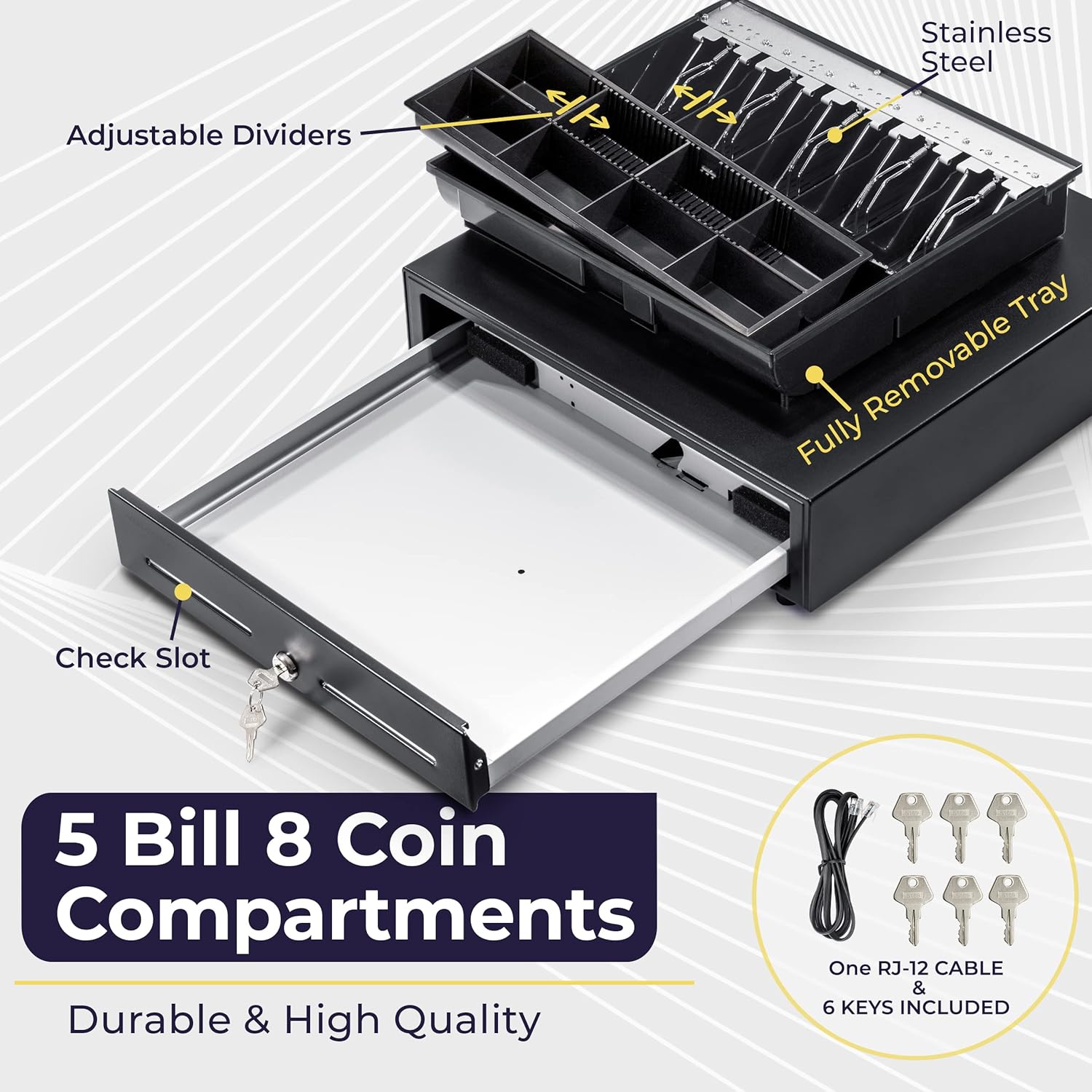
Imatge 2.1: Detallada view of the cash drawer's interior, showing the 5 bill and 8 coin compartments, the fully removable tray, check slot, and the included RJ-12 cable and multiple keys.
3. Configuració
- Desembalatge: Carefully remove the cash drawer and all accessories from the packaging. Verify that all included components (cash drawer, keys, RJ11/RJ12 cable) are present.
- Col·locació: Position the cash drawer on a stable, flat surface. Ensure adequate space for the drawer to open fully. The rubber feet on the bottom provide stability and prevent scratching.
- Connecting to POS System/Printer: Locate the RJ11/RJ12 port on the back of the cash drawer. Connect one end of the provided RJ11/RJ12 cable to this port. Connect the other end of the cable to the corresponding cash drawer port on your receipt printer or POS system. This connection enables the drawer to open automatically via commands from the POS system or printer.
- Key Lock Position: Familiarize yourself with the 3-position key lock. For initial setup, ensure the key is in the 'Auto Open' position (typically the middle position) if you intend for the drawer to be triggered by your POS system/printer.

Image 3.1: Illustration of the three methods for opening the cash drawer, including the RJ-12 interface for connection to a receipt printer or POS system.
4. Instruccions de funcionament
4.1 Opening the Cash Drawer
The Volcora Cash Register Drawer can be opened using three methods:
- Manual Open (Key): Insert one of the provided keys into the lock and turn it to the 'Manual Open' position (usually the leftmost position). The drawer will spring open.
- Auto Open by Receipt Printer: When connected to a compatible receipt printer via the RJ11/RJ12 cable, the drawer will automatically open upon a print command from the POS system. Ensure the key is in the 'Auto Open' position.
- Auto Open by POS/PC (via USB Adapter - Not Included): For direct connection to a POS system or PC without a printer, a compatible USB to RJ11/RJ12 adapter (sold separately) can be used. Ensure the key is in the 'Auto Open' position.

Image 4.1: Detail of the 3-position key lock, showing the 'Manual Open' and 'Lock' settings, and the rubber stand.
4.2 Using Bill and Coin Compartments
The cash tray features 5 bill slots with stainless steel money clips and 8 coin compartments. Organize your currency efficiently within these designated areas. The bill and coin sections can be removed independently for easier cash counting or secure transport.
4.3 Utilizing Media Slots
Two media slots are located on the front of the drawer. These slots allow for the insertion of large bills, checks, or receipts without needing to open the main cash drawer, enhancing security and speed during transactions.

Image 4.2: The cash drawer shown as part of a complete Point of Sale (POS) setup, demonstrating its typical use in a commercial environment.
5. Manteniment
- Neteja: Wipe the exterior of the cash drawer with a soft, damp drap. Eviteu utilitzar netejadors abrasius o dissolvents que puguin danyar l'acabat.
- Neteja interior: Periodically remove the cash tray and clean any dust or debris from the interior of the drawer.
- Atenció clau: Keep the keys in a secure location. Avoid bending or forcing the keys in the lock.
- Inspecció del cable: Regularly inspect the RJ11/RJ12 cable for any signs of wear or damage. Replace if necessary to ensure reliable operation.
6. Solució De Problemes
- El calaix no s'obre automàticament:
- Ensure the RJ11/RJ12 cable is securely connected to both the cash drawer and the receipt printer/POS system.
- Verify that the key lock is in the 'Auto Open' position.
- Check your POS software or printer settings to ensure the cash drawer trigger is enabled and configured correctly.
- Confirm the receipt printer is powered on and functioning correctly.
- Drawer Not Opening Manually:
- Ensure the key is fully inserted and turned to the 'Manual Open' position.
- Check for any obstructions preventing the drawer from sliding open.
- Enganxament del calaix:
- Remove the cash tray and inspect the drawer slides for any debris or foreign objects.
- Ensure the drawer is placed on a level surface.
7. Especificacions
| Característica | Detall |
|---|---|
| Marca | Volcora |
| Dimensions del producte | 4 "P x 16" W x 16" H |
| Tipus de bloqueig | clau |
| Color | Negre |
| Material | Acer d'aliatge, acer inoxidable |
| Característica especial | Antirobatori |
| Tipus de muntatge | Sota el taulell |
| Components inclosos | clau |
| Pes de l'article | 16 lliures |
| Nivell de resistència a l'aigua | No resistent a l'aigua |
| UPC | 865860000344 |
| Número de model de l'article | 500002 |
| Data de primera disponibilitat | 22 de juny de 2017 |
| Fabricant | Volcora |

Image 7.1: Dimensional specifications of the Volcora Cash Register Drawer, highlighting its compact size.

Image 7.2: Visual comparison of different sizes and color options available for Volcora cash drawers.
8. Garantia i Suport
This product is manufactured by Volcora. For specific warranty details, please refer to the documentation included with your purchase or contact Volcora customer support directly. General return policies typically allow for returns or replacements within 30 days of purchase.
For customer support, please visit the official Volcora website or refer to the contact information provided on your product packaging. Volcora is committed to providing quality products and support.


