Introducció
Gràcies per la compraasing the Wireless Bluetooth Headset. This manual provides essential information for the proper use, setup, and maintenance of your new headset. Please read it thoroughly before use to ensure optimal performance and longevity of the product.
Contingut del paquet
Si us plau, verifiqueu que tots els elements que s'enumeren a continuació estiguin inclosos al vostre paquet:
- Wireless Bluetooth Headset (2 units)
- USB Charging Cable (2 units)
- Manual d'usuari

Image: Contents of the headset package, showing one black headset and a white USB charging cable.
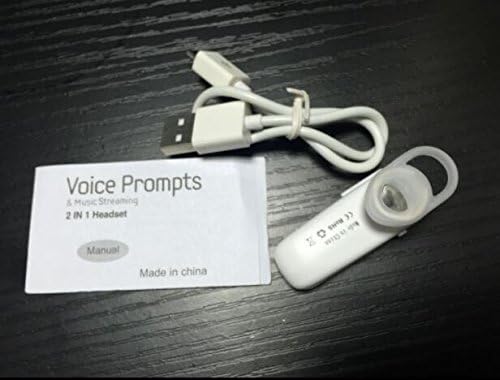
Image: Contents of the headset package, showing one white headset, a white USB charging cable, and the printed user manual.
Producte acabatview
The Wireless Bluetooth Headset is designed for convenience and portability, ideal for sports, driving, and daily use. It features a super mini design and supports voice prompts and music streaming.

Imatge: Frontal view of the product packaging, displaying the black wireless Bluetooth headset inside its clear plastic casing.
Especificacions
| Característica | Descripció |
|---|---|
| Versió Bluetooth | V3.0 + EDR |
| Suport Profiles | Headset, Handsfree, A2DP |
| Talk Time/Playing Time | Fins a 5 hores |
| Temps d'espera | Fins a 80 hores |
| Font d'alimentació | Bateria d'ió de liti recarregable integrada |
| Tecnologia de connectivitat | Sense fil |
| Factor de forma | A l'orella |
| Pes de l'article | 15.8 ounces (for 2 units) |
| Dimensions del paquet | 1.97 x 1.57 x 1.18 polzades |
| Número de model | Yu- TLXgo-2201 |

Image: Back of the product packaging, displaying a list of product specifications including Bluetooth version, talk time, and power source.
Configuració
Càrrega dels auriculars
- Connecteu l'extrem petit del cable de càrrega USB al port de càrrega dels auriculars.
- Connecteu l'extrem més gran del cable de càrrega USB a una font d'alimentació USB (per exemple, un port USB de l'ordinador, un adaptador de paret USB).
- The indicator light on the headset will illuminate during charging. It will change color or turn off once fully charged.
- Una càrrega completa sol trigar aproximadament 1-2 hores.
Vinculació amb un dispositiu Bluetooth
- Ensure the headset is fully charged before initial pairing.
- With the headset turned off, press and hold the Multi-function Button (MFB) for approximately 5-7 seconds until the indicator light flashes red and blue alternately. This indicates the headset is in pairing mode.
- On your Bluetooth-enabled device (smartphone, tablet, etc.), go to the Bluetooth settings and ensure Bluetooth is enabled.
- Cerca available devices. The headset should appear in the list, typically named "MBT2013" or similar.
- Select the headset from the list to connect. If prompted for a password, enter "0000" (four zeros).
- Once successfully paired, the indicator light will stop flashing and may show a steady blue light, and you may hear a voice prompt confirming the connection.
- The headset will automatically connect to the last paired device when turned on, if the device's Bluetooth is active and within range.
Instruccions de funcionament
Encès/Apagat
- Encès: Press and hold the Multi-function Button (MFB) for about 3 seconds until the blue indicator light flashes and you hear a voice prompt.
- Apagar: Press and hold the MFB for about 3-4 seconds until the red indicator light flashes and you hear a voice prompt.
Gestió de trucades
- Respon a la trucada: Premeu el MFB una vegada.
- Finalitzar la trucada: Premeu el botó multifunció una vegada durant una trucada.
- Rebutja la trucada: Press and hold the MFB for about 2 seconds during an incoming call.
- Torna a marcar l'últim número: Premeu dues vegades el botó multifunció quan no estigueu en una trucada.
Reproducció de música
- Reproduir/pausa: Press the MFB once during music playback.
Note: Volume control may be managed directly from your connected device.
Manteniment
- Neteja: Feu servir un drap suau i sec per netejar els auriculars. No utilitzeu productes químics agressius ni materials abrasius.
- Emmagatzematge: Guardeu els auriculars en un lloc fresc i sec, allunyat de la llum solar directa i de temperatures extremes.
- Cura de la bateria: To prolong battery life, charge the headset regularly, even if not in frequent use. Avoid fully discharging the battery for extended periods.
- Resistència a l'aigua: Aquests auriculars no són impermeables. Eviteu l'exposició a l'aigua o a una humitat excessiva.
Resolució de problemes
- Els auriculars no s'encén:
- Ensure the headset is fully charged. Connect it to a power source and try again.
- No es pot emparellar amb el dispositiu:
- Ensure the headset is in pairing mode (red and blue lights flashing alternately). Make sure Bluetooth is enabled on your device and it is within range (typically 10 meters). Try restarting both the headset and your device.
- No hi ha so o hi ha mala qualitat de so:
- Check the volume levels on both the headset and your connected device. Ensure the headset is properly connected to your device. Move closer to your device to avoid interference.
- Headset disconnects frequently:
- Ensure the headset is within range of your device. Check for potential interference from other wireless devices. Try re-pairing the headset.
Informació de seguretat
- Do not disassemble, repair, or modify the headset. This may cause fire, electronic breakdown, or complete damage to the product.
- Keep the headset away from extreme temperatures, humidity, and corrosive substances.
- Eviteu deixar caure els auriculars ni sotmetre'ls a impactes forts.
- Do not expose the headset to open flames or dispose of it in fire.
- Desfeu-vos del producte i de la bateria de manera responsable d'acord amb la normativa local.
Garantia i Suport
Per obtenir informació sobre la garantia o assistència tècnica, consulteu les dades de contacte proporcionades pel vostre distribuïdor o el representant oficial del fabricant. weblloc web. Si us plau, conserveu el comprovant de compra per a reclamacions de garantia.


