Introducció
The Intermatic DT101 Digital Time Switch is designed to provide precise, automated control over electrical circuits. This electronic time switch offers advanced features compared to traditional mechanical timers, including up-to-the-minute programming, battery backup for power outages, and automatic Daylight Saving Time adjustments. It supports up to 28 programmable events and operates on a standard 24-hour cycle, making it ideal for daily repeating schedules.
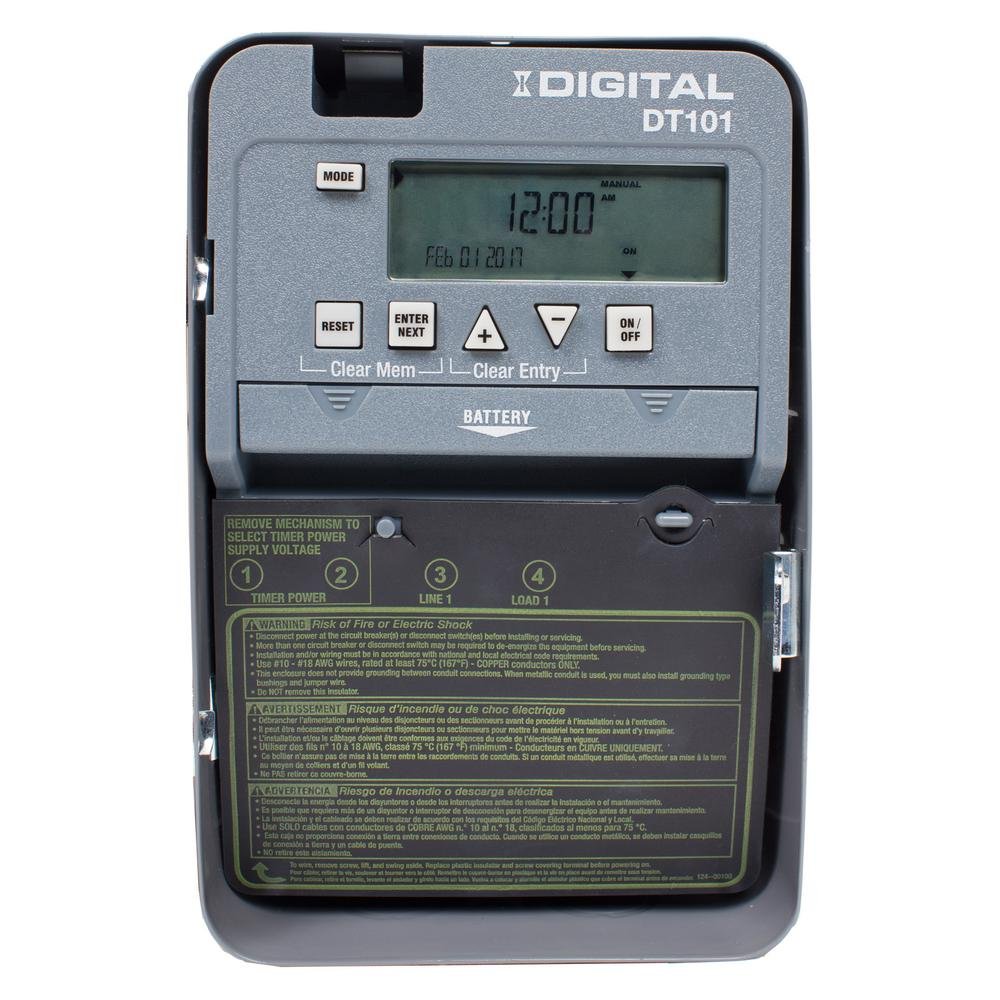
Figura 1: Frontal view of the Intermatic DT101 Digital Time Switch, showing the digital display, control buttons, and battery compartment.
Informació important de seguretat
ADVERTÈNCIA: Risc d'incendi o descàrrega elèctrica. Installation and servicing of this product must be performed by a qualified electrician in accordance with all national and local electrical codes. Always disconnect power at the circuit breaker or disconnect switch before installing or servicing the unit. This enclosure does not provide grounding between conduit connections. If metal conduit is used, you must also install grounding type bushings and jumper wires.
- Llegiu totes les instruccions abans d'instal·lar o utilitzar aquest dispositiu.
- Assegureu-vos que la font d'alimentació coincideixi amb el voltage requirements of the timer (120-277 VAC, 50/60 Hz).
- No supereu les capacitats de càrrega màximes de l'interruptor.
- This device is intended for indoor use only unless installed in a suitable outdoor enclosure.

Figure 2: The Intermatic DT101 unit with its cover open, revealing the internal components, wiring terminals, and printed safety warnings on the inside of the door.
Configuració i instal·lació
Proper installation is critical for the safe and effective operation of your DT101 Digital Time Switch. Follow these steps carefully:
- Desconnecteu l'alimentació: Before beginning any installation, ensure that power to the circuit where the timer will be installed is completely disconnected at the main circuit breaker or fuse box. Verify with a voltage provador.
- Muntatge: Mount the timer enclosure securely to a wall or suitable surface using appropriate fasteners. Ensure it is level and accessible for wiring and programming.
- Instal·lació de la bateria: Install the two (2) AAA batteries (required, not included) into the battery compartment. This provides backup power for settings during power outages.
- Cablejat: Connect the electrical wires to the appropriate terminals inside the timer. The DT101 supports 120-277 VAC. Refer to the wiring diagram printed inside the unit's door for correct connections (Line 1, Load 1, Neutral, Ground). Ensure all connections are tight and secure.
- Initial Power-Up and Reset: After wiring, close the enclosure door. Restore power to the circuit. The unit should power on. If the display is blank or unresponsive, or if the AUTO function does not work as expected, perform a reset. To reset, press the RESET button. Some users have reported needing to press ENTRAR i RESET simultaneously if the unit does not function correctly after initial power-up. Ensure the device is ON before connecting the main power.
- Voltage Selecció: If applicable, ensure the selector switch inside the unit is set to the correct input voltage (120V, 208V, 240V, or 277V) matching your electrical supply.

Figura 3: Primer pla view of the internal wiring and circuit board of the Intermatic DT101, illustrating the connection points for electrical installation.
Instruccions de funcionament
The DT101 allows for flexible programming of up to 28 ON/OFF events. Follow these steps to set the time and program schedules:
Configuració de l'hora i la data actuals
- Premeu el botó MODE button repeatedly until "SET CLOCK" appears on the display.
- Utilitza el + i - botons per ajustar l'hora i, a continuació, premeu ENTRAR/SEGUIR.
- Adjust minutes, then press ENTRAR/SEGUIR.
- Adjust the year, then press ENTRAR/SEGUIR.
- Adjust the month, then press ENTRAR/SEGUIR.
- Adjust the day, then press ENTRAR/SEGUIR.
- The display will return to the current time. The DT101 automatically adjusts for Daylight Saving Time.
Programming ON/OFF Events
- Premeu el botó MODE button repeatedly until "SET PROGRAM" appears.
- The display will show "PROG 1 ON". Use + i - to set the desired ON time for the first event. Press ENTRAR/SEGUIR.
- Select the days of the week for this ON event (e.g., MO TU WE TH FR SA SU for everyday, or specific days). Press ENTRAR/SEGUIR.
- The display will show "PROG 1 OFF". Set the desired OFF time for the first event. Press ENTRAR/SEGUIR.
- Select the days of the week for this OFF event. Press ENTRAR/SEGUIR.
- Repeat steps 2-5 for additional ON/OFF events (up to 28 total). To exit programming, press MODE.
Anulació manual
The DT101 allows for temporary or permanent manual override of the programmed schedule:
- Anul·lació temporal: Premeu el botó ON/OFF button once. The output will switch to the opposite state (ON if OFF, OFF if ON) until the next programmed event.
- Permanent Override: Manteniu premut el botó ON/OFF button for 3 seconds. The output will remain in its current state, ignoring all programmed events, until the button is pressed and held again for 3 seconds to return to automatic mode.
Manteniment
The Intermatic DT101 Digital Time Switch is designed for minimal maintenance. However, periodic checks can ensure its longevity and reliable operation:
- Substitució de la bateria: The two AAA batteries provide backup for settings during power outages. Replace them every 3-5 years, or if a low battery indicator appears on the display. Always replace batteries with the unit powered off at the circuit breaker.
- Neteja: Netegeu l'exterior de la unitat amb un drap suau i sec. No utilitzeu productes de neteja abrasius ni dissolvents.
- Comprovació de la connexió: Periodically, with power disconnected, inspect the wiring connections to ensure they remain tight and free from corrosion.
Resolució de problemes
| Problema | Causa possible | Solució |
|---|---|---|
| Display is blank or unit is unresponsive. | No power to the unit; incorrect wiring; dead batteries. | Check circuit breaker. Verify wiring connections. Replace AAA batteries. |
| Timer does not follow programmed schedule (stays ON/OFF). | Unit is in permanent manual override mode; incorrect initial setup sequence; programming error. | Mantén premut ON/OFF button for 3 seconds to return to AUTO mode. Ensure batteries were installed and unit was ON before connecting main power. Perform a full reset (RESET botó o ENTRAR + RESET if needed) and re-program. Double-check programmed times and days. |
| L'hora o la data són incorrectes. | Time not set correctly; power outage sense bateria de reserva. | Re-set current time and date. Ensure batteries are installed and functional. |
| Cannot program events. | Unit not in programming mode; maximum events reached. | Premeu MODE until "SET PROGRAM" appears. The unit supports up to 28 events. |
Especificacions
- Número de model: DT101D89
- Entrada Voltage: 120-277 VAC, 50/60 Hz (selectable)
- Tipus d'interruptor: SPST (Single Pole Single Throw)
- Ampera: 20 Amp
- Number of Events: Up to 28 ON/OFF events
- Còpia de seguretat de la bateria: 2 piles AAA (no incloses)
- Dimensions: 3.2" de profunditat x 8" d'amplada x 5.4" d'alçada (8.1 cm de profunditat x 20.3 cm d'amplada x 13.7 cm d'alçada)
- Pes: 2.4 lliures (1.09 kg)
- Color: Gris
- Característiques: To-the-minute accuracy, Temporary/Permanent manual override, Automatic Daylight Saving Time adjustment.
Garantia i Suport
For warranty information and technical support, please contact Intermatic customer service or visit the official Intermatic weblloc web. Conserveu el rebut de compra com a comprovant de compra per a reclamacions de garantia.
Intermatic Weblloc: www.intermatic.com


