Introducció
Extended computer use can lead to fatigue and discomfort in the hands and arms. The Logilink ID0159 ergonomic vertical mouse is designed to address this by promoting a natural hand position, which helps reduce strain on the hand and wrist. This ergonomic design supports comfortable and focused computer work.
This manual provides essential information for the proper setup, operation, and maintenance of your Logilink ID0159 Wireless Ergonomic Optical Mouse. Please read it carefully before use.
Característiques del producte
- Disseny vertical ergonòmic: Promotes a natural hand and wrist posture to reduce strain.
- Connectivitat sense fils: Utilizes radio frequency for a stable connection.
- Sensor òptic: Provides precise tracking with 1200 dpi resolution.
- 5 Botons: Includes standard left/right click, scroll wheel, and two thumb buttons for enhanced functionality.
- Right-Handed Orientation: Specifically designed for right-hand users.
- Plug & Play: Compatible with Windows 98 and newer operating systems, requiring no additional driver installation.
- Funciona amb piles: Uses 1 AA alkaline battery (included).
Contingut del paquet
Si us plau, comproveu el contingut del paquet per assegurar-vos que hi hagi tots els elements:
- Logilink ID0159 Wireless Ergonomic Optical Mouse
- Receptor USB
- 1 x piles alcalines AA
- Manual d'usuari (aquest document)
Instruccions de configuració
- Insereix la bateria:
Locate the battery compartment on the underside of the mouse. Open the compartment cover, insert the provided AA battery, ensuring correct polarity (+/-), and close the cover securely.
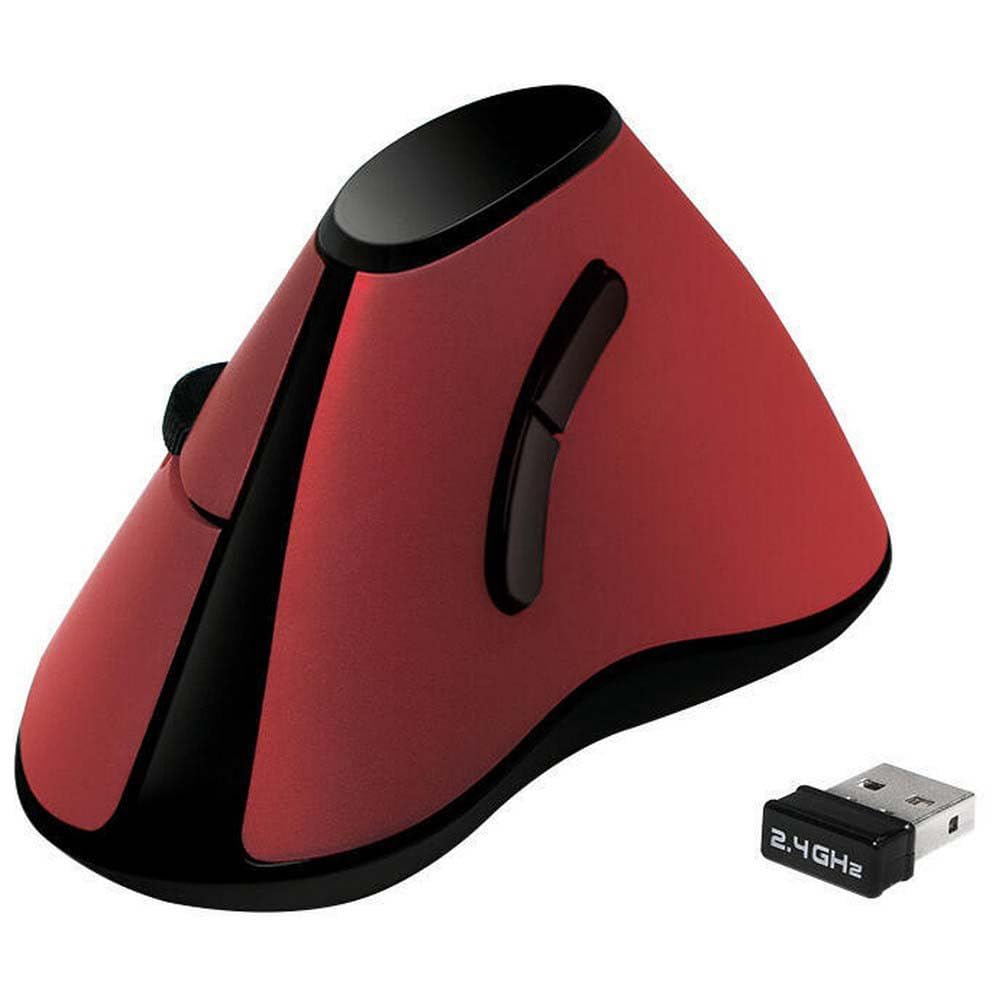
Imatge: De dalt a baix view of the Logilink ID0159 mouse, illustrating its ergonomic shape and the location of the scroll wheel. The underside, where the battery compartment is typically found, is not visible in this specific image, but it represents the overall product.
- Connecteu el receptor USB:
Plug the small USB receiver into an available USB port on your computer. Your operating system should automatically detect and install the necessary drivers. This is a plug-and-play device.
- Encès:
The mouse typically activates automatically once the battery is inserted and the receiver is connected. Some models may have an on/off switch on the underside; if present, ensure it is in the 'ON' position. An indicator light may illuminate briefly.
- Funcionalitat de prova:
Move the mouse to check if the cursor on your screen responds. Click the left and right buttons and scroll the wheel to confirm basic functionality.
Instruccions de funcionament
The Logilink ID0159 mouse features a standard set of buttons for intuitive control.

Image: A hand holding the Logilink ID0159 mouse, illustrating the natural, vertical grip that the ergonomic design promotes.
- Botó esquerre de clic: Located on the top left side, used for selecting items, opening files, and confirming actions.
- Botó dret: Located on the top right side, used for accessing context menus and special functions.
- Roda de desplaçament: Positioned between the left and right click buttons, used for scrolling through documents and web pàgines. També pot funcionar com a botó de clic central.
- Botons Endavant/Enrere: Two buttons located on the thumb side of the mouse (left side for right-handed users). These are typically used for navigating forward and backward in web navegadors o file exploradors.

Imatge: Lateral view of the Logilink ID0159 mouse, clearly showing the two thumb buttons designed for easy access during operation.
Manteniment
- Neteja: Feu servir un drap suau i sec per netejar el ratolí. Per a la brutícia persistent, fregueu lleugerament.ampNetegeu el drap amb aigua o una solució de neteja suau. Eviteu productes químics agressius o materials abrasius.
- Substitució de la bateria: When the mouse performance degrades or the indicator light (if present) signals low battery, replace the AA battery. Ensure the new battery is inserted with correct polarity.
- Emmagatzematge: When not in use for extended periods, consider removing the battery to prevent leakage, especially if using non-alkaline batteries. Store the mouse and receiver in a dry, dust-free environment.
Resolució de problemes
- El ratolí no respon:
- Check if the battery is correctly inserted and has sufficient charge. Replace if necessary.
- Assegureu-vos que el receptor USB estigui ben connectat a un port USB que funcioni de l'ordinador. Proveu-ho amb un altre port USB.
- If your mouse has an on/off switch, ensure it is in the 'ON' position.
- Reinicieu l'ordinador.
- Moviment erràtic del cursor:
- Netegeu el sensor òptic de la part inferior del ratolí.
- Assegureu-vos que feu servir el ratolí sobre una superfície adequada. Les superfícies molt reflectants o transparents poden causar problemes. Es recomana una estora de ratolí.
- Comproveu si hi ha interferències d'altres dispositius sense fil. Acosteu el ratolí al receptor.
- Els botons o la roda de desplaçament no funcionen:
- Comproveu el nivell de la bateria i substituïu-la si és baixa.
- Assegureu-vos que no hi hagi residus que obstrueixin els botons o la roda de desplaçament.
- Prova el ratolí en un altre ordinador per descartar problemes de programari.
Especificacions
| Característica | Detall |
|---|---|
| Nom del model | ID0159 |
| Marca | Logilink |
| Tecnologia de connectivitat | Freqüència de ràdio |
| Tecnologia de detecció de moviment | Òptic |
| Nombre de botons | 5 |
| Orientació de la mà | D'acord |
| Resolució DPI | 1200 ppp |
| Sistemes operatius compatibles | Windows 98 i posteriors |
| Tipus de bateria | 1 x AA Alkaline (included) |
| Ús recomanat | Office, Universal |
| Color | Vermell |
Garantia i Suport
The Logilink ID0159 Wireless Ergonomic Optical Mouse comes with a Disponibilitat d'1 any per a peces de recanvi. For warranty claims or technical support, please contact your retailer or the Logilink customer service department.
Si us plau, conserveu el comprovant de compra per a qualsevol consulta relacionada amb la garantia.


