Introducció
The iLuv Metal Forge Air 2 are wireless Bluetooth in-ear earphones designed for a comfortable listening experience. They feature a durable metallic design, noise-isolating ear tips, and a multi-functional remote for hands-free control of music and calls. This manual provides instructions for setup, operation, maintenance, and troubleshooting to ensure optimal performance of your earphones.
Contingut del paquet
Si us plau, verifiqueu que tots els elements siguin presents al vostre paquet:
- iLuv Metal Forge Air 2 Wireless Bluetooth Earphones
- Cable de càrrega USB
- Multiple Sizes of Noise-Isolating Ear Tips (Small, Medium, Large)
- Manual d'usuari (aquest document)

Image: The retail packaging for the iLuv Metal Forge Air 2 earphones, showing the earphones, remote, and ear tips.
Configuració
1. Càrrega dels auriculars
Before first use, fully charge your iLuv Metal Forge Air 2 earphones. Connect the USB charging cable to the charging port on the remote control and plug the other end into a USB power source (e.g., computer USB port, wall adapter). The LED indicator will show charging status. A full charge provides up to 5 hours of playback time and up to 200 hours of standby time.
2. Encès / apagat
- To power on: Press and hold the multi-function button on the remote until the LED indicator flashes.
- To power off: Press and hold the multi-function button until the LED indicator turns off.
3. Emparellament Bluetooth
- Assegureu-vos que els auriculars estiguin apagats.
- Press and hold the multi-function button for approximately 5-7 seconds until the LED indicator flashes red and blue alternately. A voice prompt will indicate "Pairing Mode".
- Al telèfon intel·ligent o al dispositiu amb Bluetooth, aneu a la configuració de Bluetooth.
- Cerca available devices and select "iLuv Metal Forge Air 2" from the list.
- Once connected, a voice prompt will confirm "Connected", and the LED indicator will flash blue periodically.
The earphones can stream music wirelessly up to 30 feet (9 meters) from your paired device.
Instruccions de funcionament
Funcions de control remot
The in-line remote control allows you to manage music playback, calls, and voice commands.
| Botó/Acció | Funció |
|---|---|
| Botó multifunció (Centre) |
|
| Puja el volum (+) |
|
| Baixar el volum (-) |
|
Comandaments de veu
The built-in microphone supports voice control functions such as Siri or Google Now, depending on your smartphone model. Activate by pressing and holding the multi-function button (check specific device instructions for activation).
Magnetic Earbuds for Easy Carrying
The earbuds feature built-in magnets. When not in use, you can connect the two earbuds together, allowing them to rest securely around your neck and preventing tangling or loss.
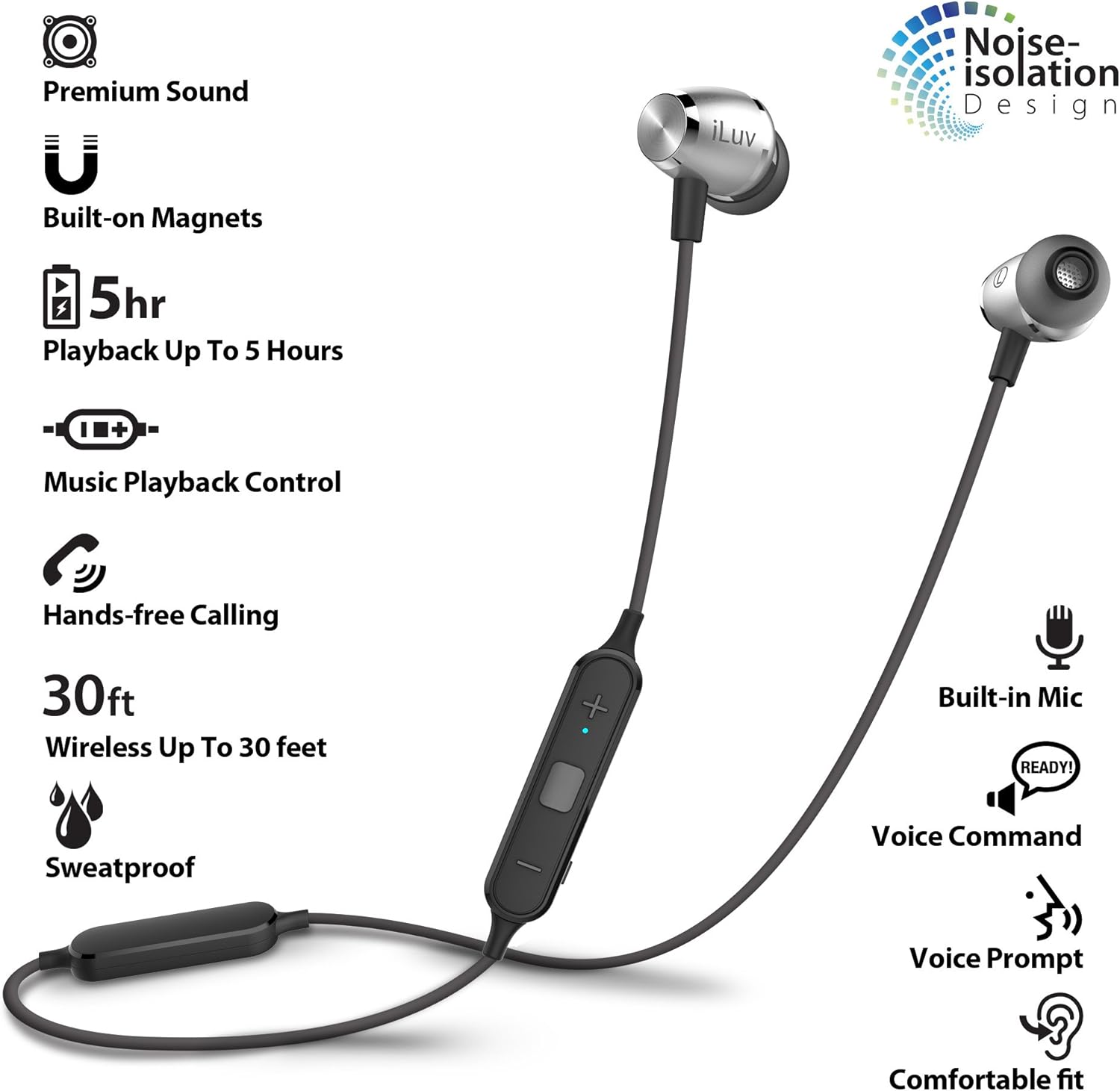
Image: Two hands holding the iLuv Metal Forge Air 2 earbuds, demonstrating how the magnets attract them together for easy carrying around the neck.

Image: A man wearing the iLuv Metal Forge Air 2 earphones, showing the in-ear fit and the remote control hanging down.
Manteniment
Neteja
Regularly clean your earphones to maintain sound quality and hygiene. Use a soft, dry, lint-free cloth to wipe the earbuds and cable. For ear tips, you may gently remove them and clean with a mild soap solution, then rinse thoroughly and ensure they are completely dry before reattaching.
Emmagatzematge
When not in use, store the earphones in a cool, dry place away from direct sunlight and extreme temperatures. Utilize the magnetic feature to keep the earbuds together and prevent tangling of the flat cable.
Sweat Proof Design
The iLuv Metal Forge Air 2 features a sweat-proof design, making them suitable for active lifestyles. However, they are not waterproof. Avoid submerging them in water or exposing them to heavy rain.
Resolució de problemes
If you encounter issues with your iLuv Metal Forge Air 2 earphones, please refer to the following common solutions:
- Sense energia: Assegureu-vos que els auriculars estiguin completament carregats. Connecteu-los a una font d'alimentació i comproveu l'indicador de càrrega.
- No es pot emparellar:
- Make sure the earphones are in pairing mode (LED flashing red and blue alternately).
- Ensure Bluetooth is enabled on your device and it is within 30 feet (9 meters) of the earphones.
- Try turning off and on your device's Bluetooth, or restarting your device.
- If previously paired, try "forgetting" the device in your phone's Bluetooth settings and re-pairing.
- Sense so o volum baix:
- Comproveu els nivells de volum tant dels auriculars com del dispositiu connectat.
- Assegureu-vos que els auriculars estiguin correctament emparellats i connectats.
- Comproveu que la font d'àudio s'està reproduint.
- Intermittent Disconnections / Turns Off Frequently:
- Ensure the earphones are fully charged. Low battery can cause unstable connections.
- Reduce the distance between the earphones and your device.
- Eviteu obstacles (parets, objectes grans) que puguin interferir amb el senyal Bluetooth.
- Minimitzar les interferències d'altres dispositius sense fil (encaminadors Wi-Fi, altres dispositius Bluetooth).
- Qualitat de so baixa:
- Ensure the ear tips are correctly sized and seated in your ears for optimal noise isolation and sound delivery.
- Clean the ear tips and speaker grilles to remove any debris.
- Prova una font d'àudio diferent o file per descartar problemes d'origen.
Especificacions
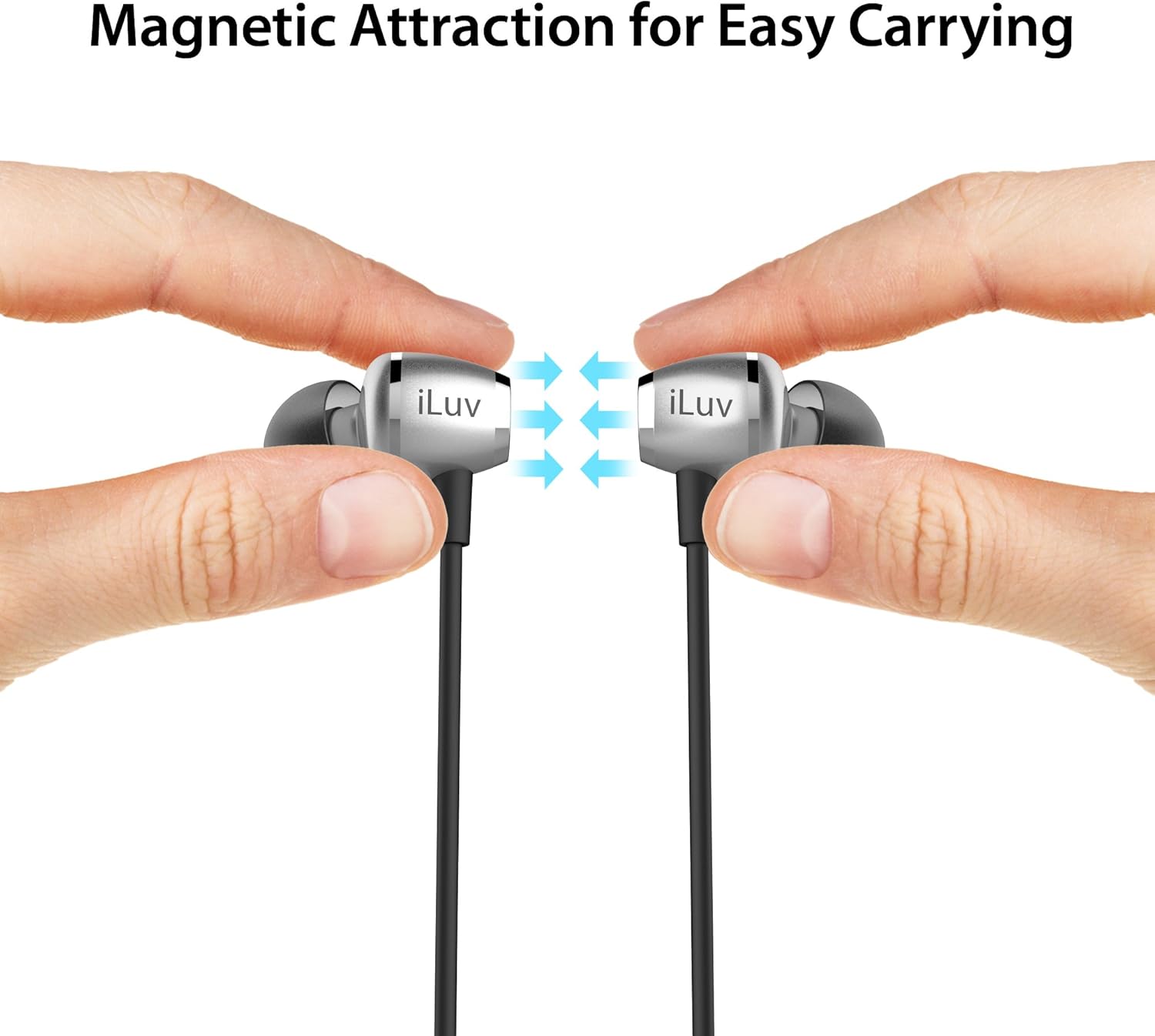
Image: An infographic highlighting key features of the iLuv Metal Forge Air 2, including premium sound, built-on magnets, 5-hour playback, music playback control, hands-free calling, 30ft wireless range, sweatproof design, built-in mic, voice command, voice prompt, and comfortable fit with noise isolation.
| Característica | Detall |
|---|---|
| Número de model | MFAIR2SI |
| Tecnologia de connectivitat | Bluetooth |
| abast sense fils | Fins a 30 peus (9 metres) |
| Temps de reproducció | Fins a 5 hores |
| Temps d'espera | Fins a 200 hores |
| Tipus de control | Remote (Multi-function, Volume Up/Down) |
| Mètode de control | Toc, veu |
| Micròfon | Integrat |
| Control de soroll | Aïllament acústic |
| Material | Alumini, metall |
| Pes de l'article | 0.704 unces (0.02 quilograms) |
| Dimensions del producte | 0.39 x 0.39 x 0.39 polzades |
| Bateria | 1 bateria de ions de liti (inclosa) |
| Compatibilitat | Apple and Android smartphones/tablets supporting Bluetooth |
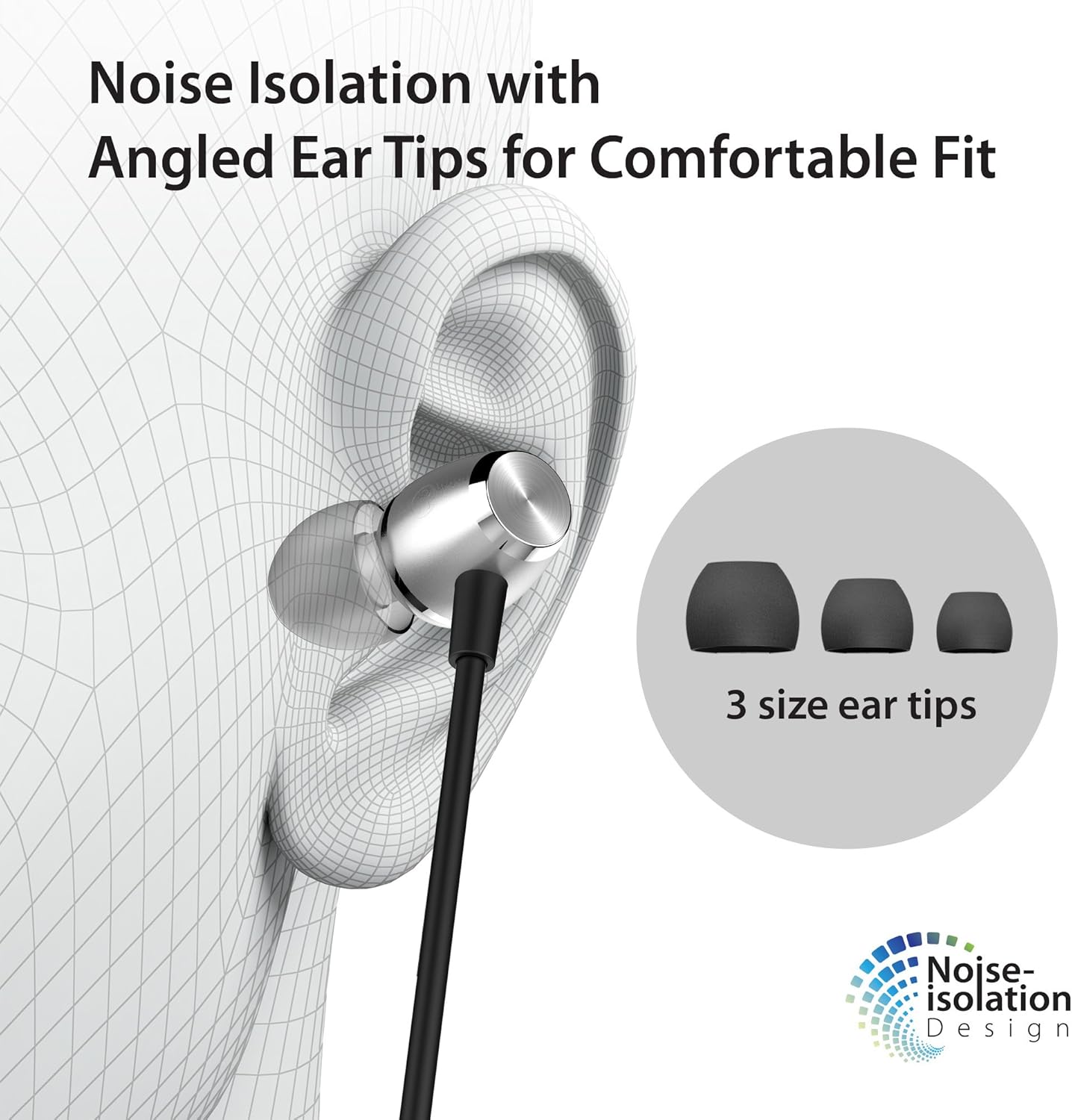
Image: A diagram showing an ear with an iLuv Metal Forge Air 2 earbud inserted, highlighting the angled ear tip design and the concept of noise isolation. Three different sizes of ear tips are also shown.
Garantia i Suport
iLuv is committed to providing quality products and customer satisfaction. For any questions or support needs, please refer to the following resources:

Necessites ajuda?
If you are experiencing any problems, please contact us through the official iLuv seller page for assistance. Our support team is available to help with product issues.
Visit iLuv Store
Got a Question?
For compatibility inquiries or other questions, you can leave a question on the product page in the customer questions & answers section.

Política de devolució de 30 dies
All products are eligible for a full hassle-free refund within 30 days of purchase if you are not satisfied or unable to resolve an issue.


