Introducció
This manual provides comprehensive instructions for the setup, operation, maintenance, and troubleshooting of your COMICA CVM-VM10II Professional Video Microphone. Designed for optimal audio recording with various devices, this compact shotgun microphone enhances sound quality for your video content.
Què hi ha a la caixa
Verifiqueu que tots els components siguin presents al vostre paquet:
- CVM-VM10II Microphone
- Shock-Mount
- Wind Screen (Foam)
- Wind Muff (Deadcat)
- TRS Camera Cable (3.5mm)
- TRRS Smartphone Cable (3.5mm)
- Maleta de transport

Image: All components included in the COMICA CVM-VM10II package, neatly arranged in the carry case.
Característiques
- Compatibilitat universal: Includes 3.5mm TRS and TRRS cables for broad device support (DSLR cameras, camcorders, smartphones).
- Battery-Free Design: Operates directly from device power, eliminating the need for external batteries.
- Mini Cardioid Directional Pattern: Effectively captures target sound while minimizing background noise.
- Noise-Canceling Construction: Built with 100% aluminum material to reduce interference and vibration noise.
- Rycote Lyre Shock Mount: Designed to prevent noise from handling and movement during video recording.
- Compacte i lleuger: Easy to carry and integrate into various recording setups.

Image: The COMICA CVM-VM10II microphone highlighting its compact, plug-and-play, and cardioid features.
Configuració
- Attach Microphone to Shock Mount: Gently slide the CVM-VM10II microphone into the Rycote Lyre Shock Mount until it is securely held.
- Mount to Device: Attach the shock mount (with microphone) to your camera's hot shoe or a smartphone rig using the integrated cold-shoe mount.
- Connectar el cable:
- For DSLR Cameras/Camcorders: Use the 3.5mm TRS Camera Cable.
- For Smartphones: Use the 3.5mm TRRS Smartphone Cable.
- Adapter Notes:
- For iPhone 7 or above: An original iPhone adapter cable (e.g., Lightning to 3.5mm) is required.
- For new Samsung mobile phones or updated Samsung systems: Use Samsung's original Type-C adapter. Third-party Type-C adapters may not be supported.
- For Android devices: Use in recording mode. For video mode, a third-party video app may be necessary as most phones are not compatible with the native video app.
- Canon Rebel T5/T5i/T6/T7/T7i/HFR800: An additional adapter cord may be required.

Image: The compact and lightweight design of the CVM-VM10II microphone, emphasizing its portability and battery-free operation.
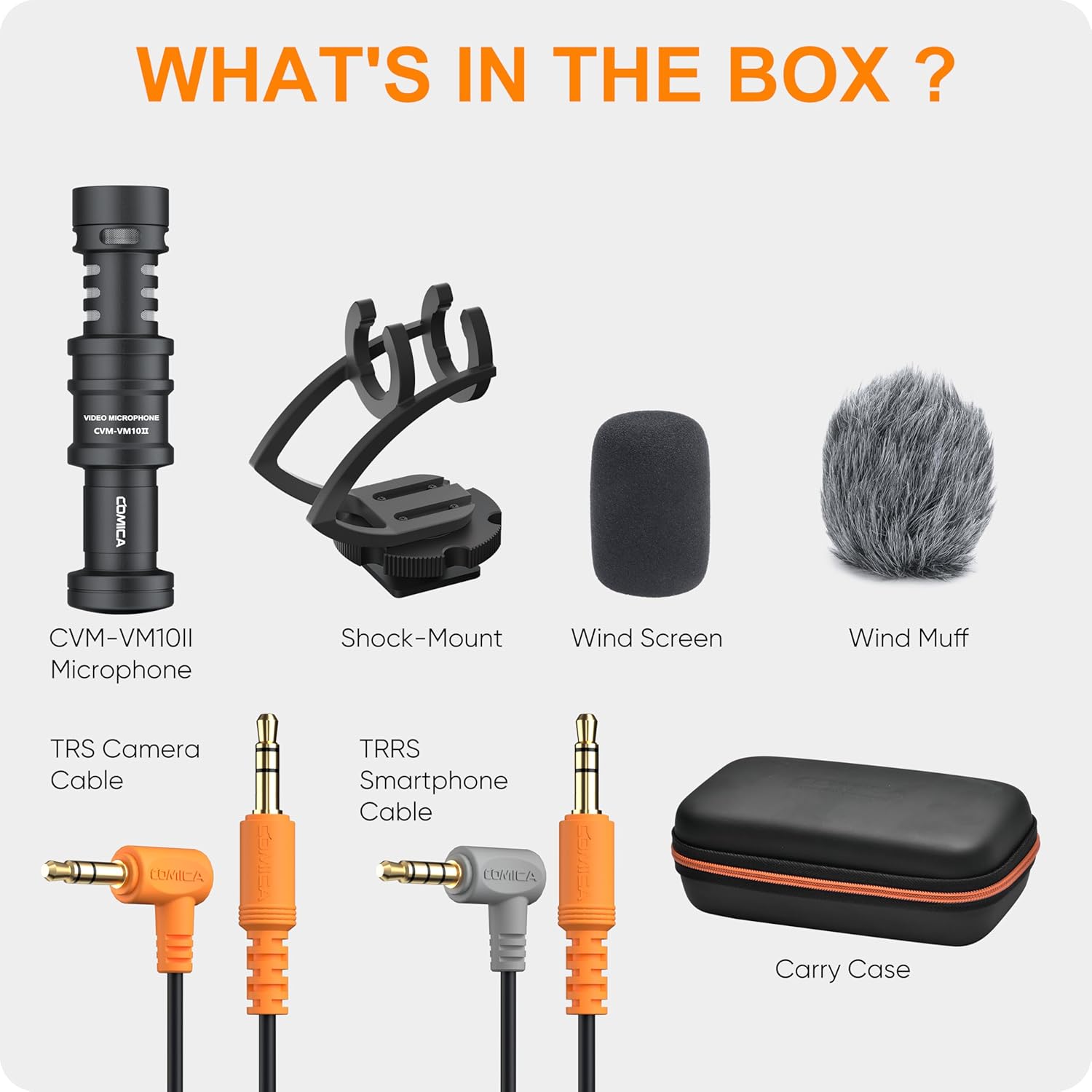
Image: A visual guide illustrating which adapters are needed for different devices, including 3.5mm TRS for cameras and TRRS for smartphones.
Vídeo: Un overview of the Comica VM10II Professional shotgun camera microphone, demonstrating its features and basic setup.
Instruccions de funcionament
- Posicionament: Due to its cardioid directional pattern, aim the microphone directly at your sound source for optimal audio capture and background noise reduction.
- Ús del parabrisa:
- Foam Wind Screen: Ideal for indoor use or light breeze conditions to reduce plosives and minor wind noise.
- Wind Muff (Deadcat): Recommended for outdoor use in windy conditions to significantly minimize wind noise interference.
- Monitorització d'àudio: If your recording device allows, monitor your audio in real-time to ensure optimal levels and clarity.

Image: A diagram illustrating the cardioid polar pattern of the microphone, showing its directional sound pickup.
Video: An actual sound quality demonstration of the microphone in various environments, without unboxing.
Video: A sound comparison between the built-in iPhone microphone and the Comica CVM-VM10II.
Video: A test of the Comica CVM-VM10II microphone with a DJI Osmo Action Camera, demonstrating its performance in a real-world scenario.
Manteniment
- Neteja: Wipe the microphone body with a soft, dry cloth. Avoid using harsh chemicals or abrasive materials.
- Cura del parabrisa: Gently clean foam windscreens with mild soap and water, then air dry completely. The deadcat can be gently shaken or brushed to remove debris.
- Emmagatzematge: Store the microphone and its accessories in the provided carry case to protect them from dust, moisture, and physical damage.
Resolució de problemes
- Sense àudio/Mala qualitat d'àudio:
- Ensure the correct 3.5mm cable (TRS for camera, TRRS for smartphone) is used and fully inserted.
- Verify that any required adapters (e.g., Lightning to 3.5mm for iPhone, original Type-C for Samsung) are correctly connected and functional.
- Check device audio input settings to ensure the external microphone is selected and input levels are appropriate.
- For Android devices, try using a third-party video recording app if the native app does not support external microphones.
- Soroll excessiu del vent:
- For outdoor recording, ensure the Wind Muff (Deadcat) is properly installed over the microphone.
- For indoor recording, use the Foam Wind Screen to reduce minor air disturbances.
- Soroll de manipulació:
- Ensure the microphone is securely seated in the Rycote Lyre Shock Mount to minimize vibrations from handling.
- Avoid excessive movement of the camera or rig during recording.
Especificacions
| Característica | Detall |
|---|---|
| Marca | CÒMICA |
| Nom del model | CVM-VM10IIBlak |
| Patró polar | Unidireccional (cardioide) |
| Tecnologia de connectivitat | Auxiliar |
| Tipus de connector | 3.5 mm TRRS, 3.5 mm TRS |
| Dispositius compatibles | Càmera de vídeo, càmera, telèfon intel·ligent |
| Material | Alumini |
| Font d'alimentació | Plug and Play (Battery-free) |
| Pes de l'article | 7.8 unces (220 grams) |
| Dimensions del producte (L x A x A) | 4.02 x 2.52 x 7.48 polzades |
| Sensibilitat d'àudio | 10 decibels |
| Ràtio senyal / soroll | 75 |
| Resposta de freqüència | 18 kHz |
Garantia i Suport
For warranty information, technical support, or service inquiries, please refer to the official COMICA weblloc web o contacteu directament amb el servei d'atenció al client. Conserveu el rebut de compra com a comprovant de compra per a reclamacions de garantia.


