1. Introducció
The BenQ MH760 is designed for reliable performance in meeting rooms, offering high picture quality and convenient digital connectivity. This manual provides essential information for setting up, operating, and maintaining your projector.

Figure 1: BenQ MH760 1080P Business Projector, front-angled view.
2. Característiques clau
- Alt Brillantor: 5000 ANSI Lumens for clear projections in various lighting conditions.
- Alta qualitat d'imatge: Full HD (1920 x 1080) resolution with a high native contrast ratio for sharp and visible images.
- Control de xarxa: Supports Crestron, AMX, and PJ-Link for control via LAN, and RS-232 for installations up to 49 feet.
- Configuració flexible: Keystone correction for versatile projection from various angles.
- Connectivitat digital: Equipped with 2x HDMI ports and other universal ports.
3. Què hi ha a la caixa
Verifiqueu que tots els elements estiguin presents a l'embalatge:
- Control remot
- Cable d'alimentació
- Manual d'usuari (aquest document)
- Targeta de garantia
- Cable VGA
- Coberta de la lent del projector
4. Configuració
4.1. Col·locació i muntatge
The BenQ MH760 projector offers flexible placement options, including front table, rear table, front ceiling, and rear ceiling mounting. Adjust the 'Projector Position' setting in the system menu to match your installation. For ceiling mounts, ensure the projector is securely fastened using a compatible mounting kit (sold separately).
4.2. Projection Distance
The optimal projection distance varies based on the desired screen size. Refer to the diagram below for recommended distances for common screen sizes.
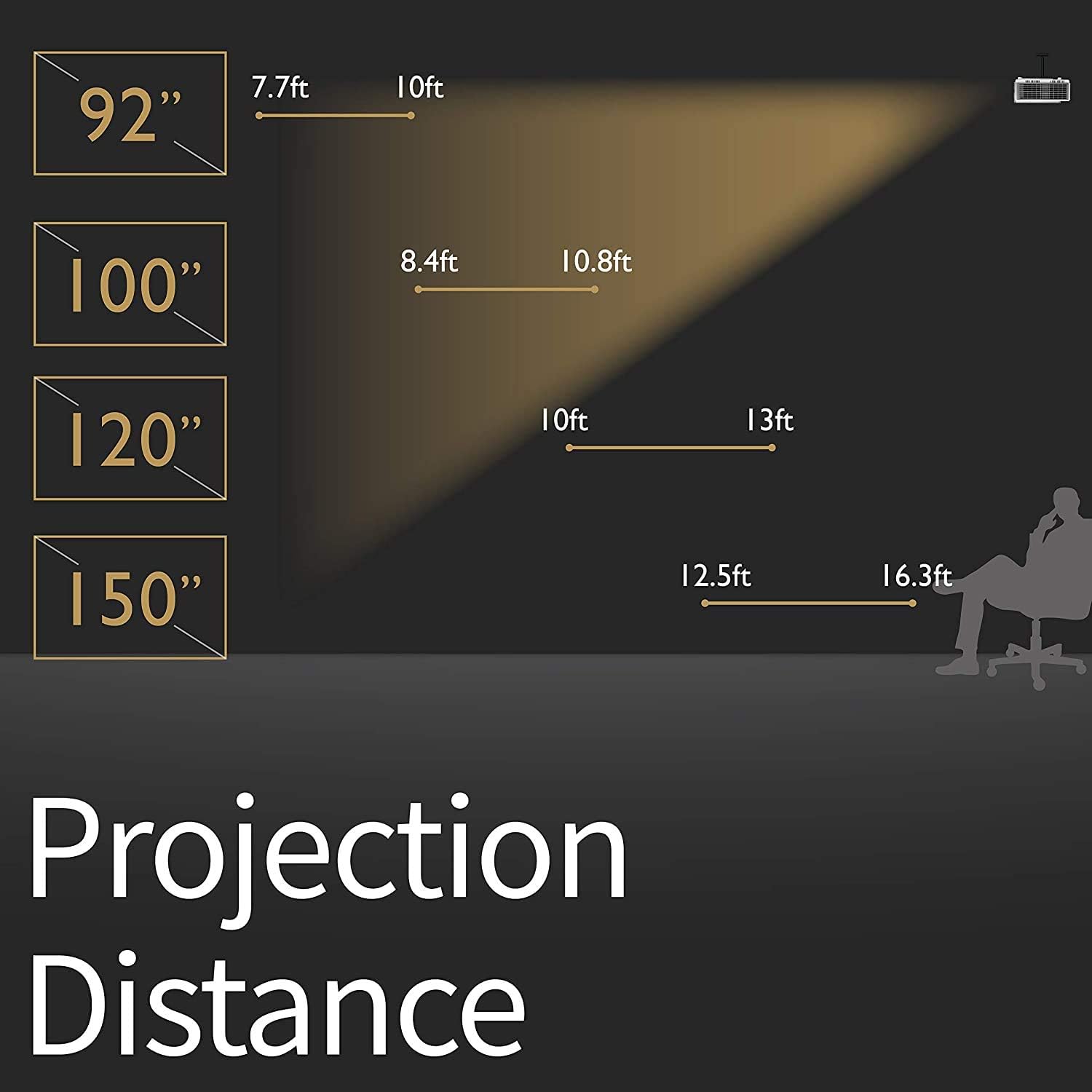
Figure 2: Recommended projection distances for various screen sizes. For a 92-inch screen, the distance is approximately 7.7-10 ft. For a 100-inch screen, 8.4-10.8 ft. For a 120-inch screen, 10-13 ft. For a 150-inch screen, 12.5-16.3 ft.
4.3. Dispositius de connexió
The projector features multiple input ports for various devices. Connect your source device (e.g., laptop, game console, streaming stick) to the appropriate port on the projector.

Figura 3: posterior view of the BenQ MH760 projector showing various connectivity ports. These include PC in, S-Video in, Composite Video in, Monitor Out, Audio in (x2), Microphone in, LAN (RJ-45) in, RS-232, DC 12V Trigger, Security Bar, USB Type A (power, 5V/1.5A), USB Type Mini B (FW Upgrade), and HDMI (1.4a) x 2 (for share with MHL).
5. Instruccions de funcionament
5.1. Encendre/apagar
Press the power button on the projector or the remote control to turn the unit on or off. Allow a few moments for the projector to warm up or cool down.
5.2. Navegació del menú
Use the remote control or the control panel on the projector to navigate the on-screen display (OSD) menu. The OSD allows you to adjust various settings including display, image, system, and power management.

Figura 4: superior view of the BenQ MH760 projector showing the control panel buttons for power, menu navigation, source selection, and color mode.
5.3. Ajust de l'enfocament i el zoom
Adjust the focus and zoom rings located near the lens to achieve a clear and appropriately sized image on your screen. The projector supports a wide range of screen sizes up to 300 inches.
5.4. Configuració de la imatge
Within the OSD menu, you can fine-tune image settings such as brightness, contrast, color temperature, and aspect ratio to optimize your viewexperiència.
6. Manteniment
6.1. Neteja de la lent
Use a soft, lint-free cloth and a specialized lens cleaning solution to gently clean the projector lens. Avoid abrasive materials that could scratch the lens surface.
6.2. Neteja/substitució del filtre d'aire
Regularly check and clean the air filter to prevent dust buildup, which can affect performance and lamp life. Refer to the full user manual for specific instructions on accessing and cleaning/replacing the air filter.
6.3. Lamp Substitució
The projector uses a high-performance lamp. Quan la lamp life is nearing its end, a warning message will appear. Replace the lamp with an authorized BenQ replacement lamp to ensure optimal performance and safety. Always allow the projector to cool down completely before attempting lamp substitució.
7. Solució De Problemes
- Sense imatge: Ensure all cables are securely connected and the correct input source is selected. Check power connections.
- Imatge borrosa: Adjust the focus and zoom rings on the projector. Ensure the projection surface is flat.
- Image Distorted: Use the keystone correction feature in the OSD menu to adjust the image shape.
- Sense so: Check audio cable connections. Adjust the volume on the projector and your source device. Ensure the projector's internal speaker is enabled if desired.
- Avís de sobreescalfament: Ensure the projector's ventilation vents are not blocked. Clean the air filter if necessary.
8. Especificacions
| Característica | Valor |
|---|---|
| Marca | BenQ |
| Número de model | MH760 |
| Dimensions del producte | 23.62 x 15.75 x 9.06 polzades |
| Pes de l'article | 10.36 lliures |
| Resolució de visualització | 1920 x 1080 (Full HD) |
| Brillantor | 5000 lúmens ANSI |
| Tecnologia de connectivitat | Ethernet, HDMI |
| Característica especial | Wireless (Optional with dongle) |
| Usos recomanats | Negocis, Educació |
9. Suport
For further assistance, technical support, or warranty information, please refer to the official BenQ website or contact their customer service. Keep your purchase receipt and product serial number handy for any inquiries.


