1. Introducció
The Zoom LiveTrak L-12 is a versatile 12-channel digital mixer that also functions as a 24-bit/96kHz 12-track recorder. Designed for musicians, podcasters, and live performers, it integrates multiple functionalities into a single, compact unit. This manual provides essential information for setting up, operating, maintaining, and troubleshooting your L-12 LiveTrak.

Figura 1: superior view of the Zoom L-12 LiveTrak Digital Mixer.
Key features include 5 monitor outputs for customizable headphone mixes, a 3-band EQ on each channel, 16 built-in effects, and a 14-in/4-out USB audio interface for seamless integration with Mac, PC, or iOS devices. The L-12 allows for direct recording to an SD card, making it ideal for on-the-go production without the need for a computer.
Video 1: Official introduction to the Zoom LiveTrak L-12, highlighting its core features and capabilities.
2. Configuració
Before operating your Zoom L-12 LiveTrak, ensure proper setup to maximize performance and prevent damage.
2.1. Connexió d'alimentació
Connect the supplied AC adapter to the DC IN jack on the rear panel of the L-12. Plug the adapter into a suitable power outlet. Press the POWER switch to turn the unit on.

Figure 2: Rear panel of the Zoom L-12, showing power input and other connections.
2.2. Connexions d'entrada
- Channels 1-8 (Mic/Line): Use XLR or 1/4-inch connectors for microphones and line-level instruments. Channels 1-2 offer Hi-Z inputs for direct connection of electric guitars or basses, eliminating the need for a direct box.
- Channels 9/10 & 11/12 (Line): These stereo channels feature TRS and RCA connectivity, suitable for keyboards, media players, or other audio devices.
2.3. Connexions de sortida
- Master Out: Connect your main speakers or PA system using the XLR outputs.
- Monitor Out (Phones A-E): Connect up to five sets of headphones for individual monitor mixes. Each output has its own volume control.
2.4. Inserció de la targeta SD
Insert a compatible SD card into the SD card slot on the rear panel. This is essential for direct recording and playback.

Figura 3: Angle view of the L-12 with various inputs and outputs connected.
3. Operating the L-12 LiveTrak
The L-12 LiveTrak offers intuitive controls for mixing, recording, and monitoring.
3.1. Controls de canal
Each of the 12 channels features dedicated controls:
- Botons de guany: Adjust the input level for each channel.
- COMP Buttons: Engage the compressor for dynamic control on channels 1-8.
- SEL Buttons: Select a channel to adjust its EQ and effects settings via the Channel Strip.
- REC/PLAY Buttons: Arm tracks for recording or enable playback for individual channels.
- MUTE Buttons: Mute individual channels.
- Faders: Control the volume level of each channel.

Figure 4: Illuminated controls on the L-12, showing active channels and settings.
3.2. Channel Strip & Effects
The central Channel Strip allows for detailed adjustments:
- EQ: A 3-band mid-parametric EQ (High, Mid, Low) is available for each channel.
- SEND EFX: Adjust the amount of effect sent from the selected channel.
- Type Knob: Select from 16 built-in effects (e.g., Hall, Spring, Delay, Chorus, Vocal effects).
3.3. Recording & Playback
The L-12 offers robust recording capabilities:
- Direct to SD Card: Record up to 12 discrete tracks at 24-bit/96kHz directly to an SD card.
- Enregistrament simultània: Record to a computer and an SD card simultaneously (up to 48kHz).
- Sobredoblatge: Mix and overdub your projects directly on the unit.
- Scene Saving: Save and recall up to 9 custom mixer settings (fader positions, EQ, pan, mute) for quick setup changes.
- Auto-Record: Automatically start recording when the master fader detects a certain dB level.
- Pre-enregistrament: Capture data up to 2 seconds before recording starts.

Figure 5: Close-up of the L-12's recording and scene management controls.
3.4. Seguiment
The L-12 provides five independent, customizable headphone mixes, allowing each band member or performer to hear exactly what they need. Adjust individual monitor levels using the dedicated knobs in the Monitor Out section.
3.5. Interfície d'àudio USB
The L-12 functions as a 14-in/4-out USB audio interface, compatible with Mac, PC, and iOS devices (Apple Lightning-to-USB Camera Adapter required for iOS). This allows for simultaneous recording and streaming, and integration with your Digital Audio Workstation (DAW).
Vídeo 2: Un resum detallatview of the Zoom LiveTrak L-12's features, including its recording, mixing, and interface capabilities.
4. Manteniment
Proper maintenance ensures the longevity and optimal performance of your L-12 LiveTrak.
- Neteja: Use a soft, dry cloth to wipe down the unit. Avoid abrasive cleaners, solvents, or waxes.
- Emmagatzematge: Guardeu la unitat en un lloc fresc i sec, allunyat de la llum solar directa, de temperatures extremes i d'alta humitat.
- Manipulació: Avoid dropping or subjecting the unit to strong impacts. Do not place heavy objects on top of it.
- Exposició líquida: Keep the unit away from liquids. If liquid enters the unit, immediately disconnect power and consult a qualified service technician.
5. Solució De Problemes
If you encounter issues with your L-12 LiveTrak, refer to the following common solutions:
- Sense energia: Ensure the AC adapter is securely connected to both the unit and a working power outlet. Check the power switch.
- Sense sortida de so: Verify that all cables are correctly connected to the Master Out and your speakers/headphones. Check master fader levels, individual channel faders, and mute buttons. Ensure input gain is sufficient.
- So distorsionat: Reduce input gain levels to prevent clipping. Check for proper impedance matching for instruments connected to Hi-Z inputs.
- Problemes de gravació: Ensure an SD card is inserted and has sufficient free space. Verify that tracks are armed for recording. Check sampconfiguració de la taxa.
- Problemes de connectivitat USB: Ensure the USB cable is securely connected. For iOS devices, confirm the Apple Lightning-to-USB Camera Adapter is used. Check device drivers on your computer if necessary.
For more complex issues, consult the official user guide or contact Zoom customer support.
6. Especificacions
| Característica | Especificació |
|---|---|
| Pes de l'article | 5.65 lliures (2.56 kg) |
| Dimensions del producte | 17.5 x 3 x 11 polzades (44.45 x 7.62 x 27.94 cm) |
| Número de model de l'article | L-12 |
| Font d'alimentació | Elèctric amb cable |
| Voltage | 120 Volts |
| Nombre de canals | 12 |
| Tecnologia de connectivitat | USB |
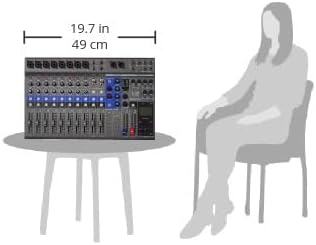
Figure 6: Size comparison of the L-12 LiveTrak Digital Mixer.
7. Garantia i Suport
Per obtenir informació detallada sobre la garantia i assistència tècnica, consulteu la pàgina oficial de Zoom. website or the comprehensive user guide provided with your product. The user guide contains in-depth instructions and troubleshooting steps not covered in this summary.
Guia d'usuari oficial (PDF): Descarrega aquí


