1. Introducció
This manual provides detailed instructions for the assembly, operation, and maintenance of your VIVO STAND-V102F Dual Monitor Free-Standing Desk Mount. This mount is designed to hold two flat or curved display screens ranging from 13 to 30 inches, with a maximum weight capacity of 17.6 lbs per screen. It supports VESA mounting patterns of 75x75mm or 100x100mm.
Advertència de seguretat:
- Assegureu-vos que tots els components estiguin ben subjectats abans d'utilitzar-los.
- No supereu la capacitat màxima de pes de 17.6 lliures per pantalla.
- Avoid pulling monitors too far forward or backward unless the stand is bolted down, as this may compromise stability.
- Always check that the base size fits your available desk space to prevent tipping.
2. Contingut del paquet
Please verify that all components listed below are present in your package. If any parts are missing or damaged, contact VIVO customer support.
- Heavy-Duty Base (11" x 15.4")
- Center Pole (16.4" height)
- Dual Monitor Arms with VESA Plates
- Clips de gestió de cables
- All necessary hardware (screws, washers, Allen keys)
3. Instruccions de muntatge
Follow these steps to assemble your VIVO Dual Monitor Free-Standing Desk Mount.
- Attach the Center Pole to the Base: Securely fasten the center pole to the heavy-duty base using the provided screws and Allen key. Ensure it is stable.
- Install Monitor Arms: Slide the dual monitor arms onto the center pole. Adjust their height to your preference and tighten the locking mechanism.
- Fixeu les plaques VESA als monitors: Remove the VESA plates from the monitor arms. Attach these plates to the back of your monitors using the appropriate screws for your monitor's VESA pattern (75x75mm or 100x100mm).
- Mount Monitors: Carefully slide the monitors (with attached VESA plates) onto the monitor arms. Ensure they click securely into place.
- Gestió de cables: Utilize the included cable management clips to route and organize your monitor cables along the arms and down the center pole for a tidy setup.

Figure 1: Assembled VIVO Dual Monitor Free-Standing Desk Mount with monitors.

Figure 2: Detail of VESA plate for monitor attachment.
4. Instruccions de funcionament
The VIVO STAND-V102F offers full articulation for optimal viewangles d'ajust.
- Ajust d'alçada: Afluixa el clamp on the center pole to slide the monitor arms up or down. Re-tighten the clamp firmly once the desired height is achieved.
- Ajust d'inclinació: Monitors can be tilted +45° to -45°. Adjust the tilt knob on the VESA plate to achieve your preferred vertical viewangle de ing.
- Ajust de gir: The monitor arms allow for 180° swivel, enabling you to adjust the horizontal angle of each monitor independently.
- Rotació: Monitors can be rotated 360° for portrait or landscape orientation. Simply turn the monitor to the desired orientation.
- Arm Articulation: The double center arm joints provide additional articulation, allowing for flexible monitor placement and positioning.

Figure 3: Full articulation features including tilt, swivel, and rotation.
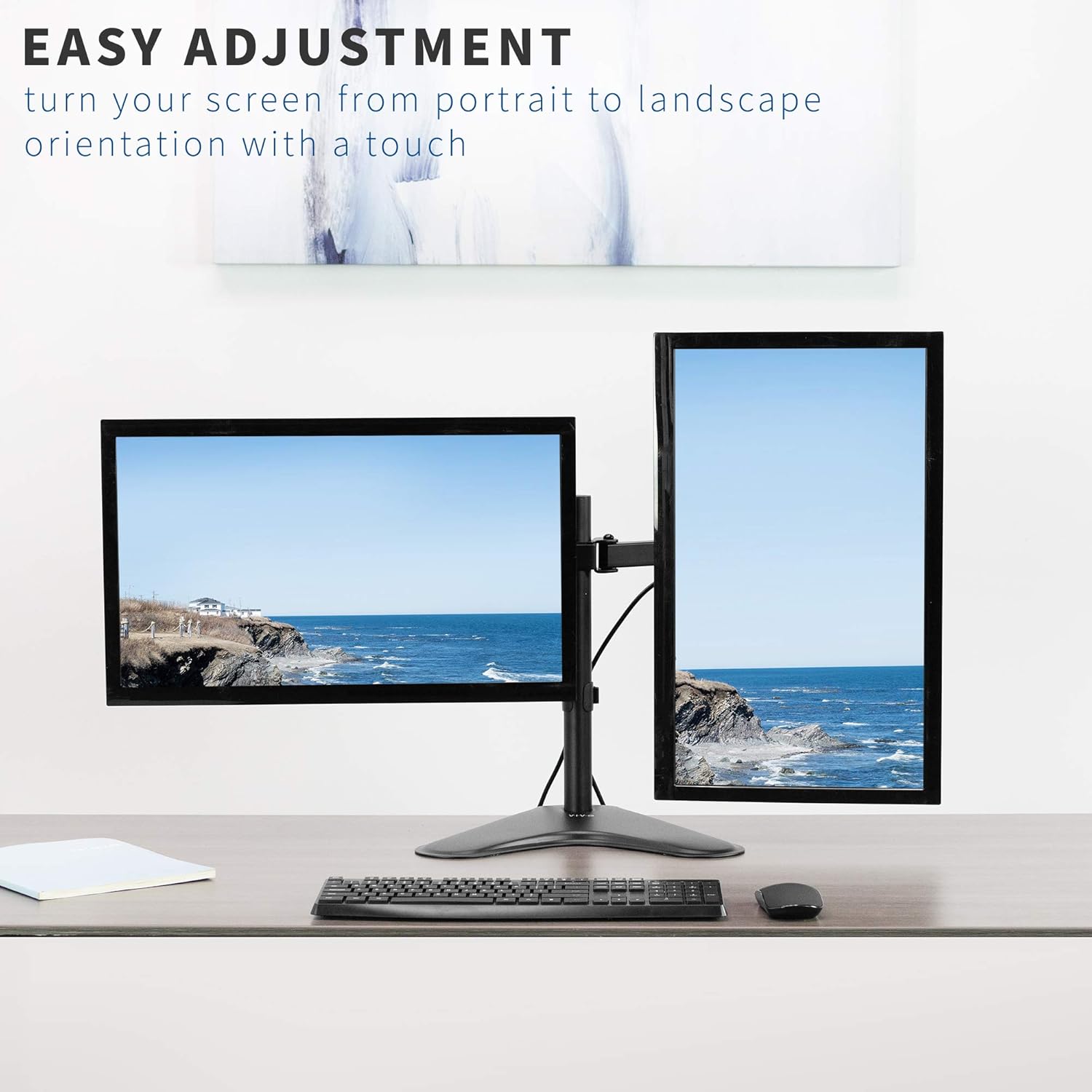
Figura 4: Example of monitors in both portrait and landscape orientations.
5. Característiques
- Compatibilitat universal: Fits two screens from 13" to 30" and up to 17.6 lbs each. Supports VESA 75x75mm or 100x100mm mounting patterns.
- Articulació completa: Offers +45° to -45° tilt, 180° swivel, and 360° rotation for flexible viewing.
- Ajust d'alçada: Monitors can be adjusted along the 16.4" center pole.
- Heavy-Duty Base: A solid steel 11" x 15.4" base ensures stability for your monitor setup.
- Gestió integrada de cables: Clips are included to keep cables organized and out of sight.

Figure 5: Key dimensions and compatibility information.

Figure 6: The heavy-duty base providing stability.

Figure 7: Integrated cable management system.
6. Especificacions
| Atribut | Detall |
|---|---|
| Número de model | STAND-V102F |
| Compatibilitat amb la mida de la pantalla | 13" to 30" (Dual) |
| Capacitat de pes | 17.6 lbs per screen |
| Compatibilitat VESA | 75x75mm, 100x100mm |
| Angle d'inclinació | +45° a -45° |
| Angle de gir | 180° |
| Rotació | 360° (Retrat/Paisatge) |
| Alçada del pol | 16.4 polzades |
| Dimensions de la base | 11 cm x 15.4 cm |
| Material | Acer d'aliatge |
| Color | Negre |
7. Manteniment
Per garantir la longevitat i el rendiment òptim del suport de monitor VIVO, seguiu aquestes pautes de manteniment:
- Neteja regular: Netegeu la muntura amb un drap suauamp cloth to remove dust and debris. Avoid abrasive cleaners or solvents.
- Comprovació dels elements de fixació: Periodically inspect all screws and bolts to ensure they remain tight. Re-tighten as necessary to maintain stability.
- Lubricació: If any joints become stiff, a small amount of silicone-based lubricant can be applied to the moving parts.
8. Solució De Problemes
Si teniu problemes amb el suport del monitor, consulteu els problemes i solucions més comuns següents:
- Mount is Unstable/Tipping:
- Ensure the heavy-duty base is fully on a flat, stable surface.
- Verify that the combined weight of your monitors does not exceed the maximum capacity.
- Avoid extending monitors too far forward or backward from the center pole without securing the base to the desk (if applicable).
- Monitors Sagging/Not Holding Position:
- Tighten the tilt adjustment knob on the VESA plate.
- Ensure all arm joints are securely tightened with the provided Allen key.
- Difficulty Adjusting Tilt:
- Some tilt bolts may require a specific Allen key or tool for proper tightening/loosening. Refer to the assembly diagram for exact locations.
- Ensure the monitor is not exceeding the weight limit, which can make adjustments difficult.
9. Vídeos oficials de productes
Full Motion Dual Monitor Free-Standing Desk Stand
This video demonstrates the full motion capabilities of the VIVO Dual Monitor Free-Standing Desk Stand, including articulation and double center arm joints for flexible monitor positioning.
Dual Monitor Free-Standing Desk Stand (STAND-V102F) Overview
Aquest vídeo ofereix un finalview of the VIVO STAND-V102F Dual Monitor Free-Standing Desk Stand, showcasing el seu disseny i les seves característiques.
10. Garantia i Suport
VIVO products are backed by a manufacturer's warranty. For specific warranty details, product registration, or technical support, please visit the official VIVO weblloc web o poseu-vos en contacte amb el seu departament d'atenció al client. Conserveu el rebut de compra per a reclamacions de garantia.
VIVO is a US-based company committed to providing quality ergonomic solutions. Their sales and technical support teams are available to assist with any product-related inquiries.
Figure 8: VIVO's commitment to customer support.


