1. Introducció
This manual provides essential information for the safe and effective use of your Vivibright GP90 UP Portable Video Projector. Please read it thoroughly before operating the device and retain it for future reference. The Vivibright GP90 UP is a portable video projector featuring an Android 4.42 operating system, 3200 lumens brightness, and 1280x800 native resolution, designed for multimedia entertainment and presentations.
2. Instruccions de seguretat
- No bloquegeu les obertures de ventilació. Assegureu-vos que hi hagi un flux d'aire adequat al voltant del projector per evitar el sobreescalfament.
- Do not expose the projector to rain or moisture to avoid electric shock or fire.
- Eviteu mirar directament a la lent del projector quan lamp està encès, ja que la llum brillant pot causar lesions oculars.
- Col·loqueu el projector sobre una superfície estable i plana per evitar que caigui.
- Feu servir només l'adaptador de corrent que s'inclou amb el projector.
- No intenteu desmuntar ni reparar el projector vosaltres mateixos. Encarregueu totes les tasques de manteniment a personal qualificat.
- Mantingueu el projector allunyat de fonts de calor i de la llum solar directa.
3. Contingut del paquet
Verifiqueu que tots els elements siguin presents al paquet:
- Vivibright GP90 UP Projector
- Cable d'alimentació
- Remote Control (may not be included with all models)
- Manual d'usuari (aquest document)
4. Producte acabatview
Familiarize yourself with the projector's components and connection ports.
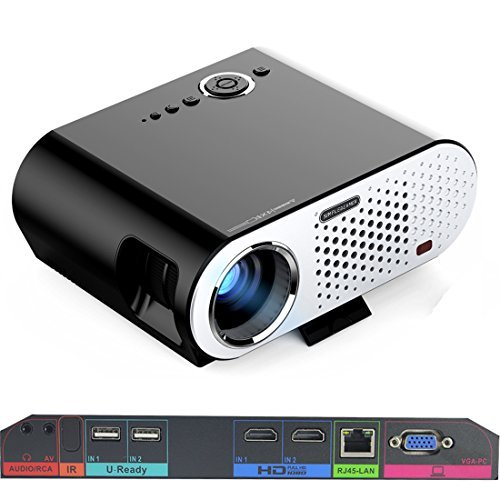
Image: The Vivibright GP90 UP projector showing its top controls, lens, and various input/output ports on the rear panel. The top features power and navigation buttons. The front has the projection lens. The rear panel includes Audio/RCA, IR receiver, two USB ports (U-Ready), two HDMI ports (HD), an RJ45-LAN port, and a VGA-PC port.
4.1 Tauler frontal
- Lent de projecció: Emits the image.
4.2 Tauler superior
- Botons de control: Power, navigation, and menu access.
4.3 Rear Panel (Input/Output Ports)
- AUDIO/RCA: Audio output and composite video input.
- IR: Receptor d'infrarojos per a control remot.
- IN 1 / IN 2 (USB): Two USB ports for connecting USB storage devices.
- IN 1 / IN 2 (HDMI): Two HDMI inputs for digital video and audio sources.
- RJ45-LAN: Port Ethernet per a connexió de xarxa amb cable.
- VGA-PC: VGA input for connecting to computers.
5. Configuració
5.1 Col·locació
- Place the projector on a flat, stable surface or mount it on a ceiling or tripod.
- Ensure the projector is positioned directly in front of the screen or wall. Avoid angled placement as horizontal keystone correction is not available.
- The optimal projection distance ranges from 1.2m to 8.5m, producing screen sizes from 35 to 280 inches. For a 100-inch image, a distance of approximately 3 meters is recommended.
5.2 Connexió d'alimentació
- Connecteu el cable d'alimentació a l'entrada d'alimentació del projector.
- Plug the other end of the power cable into a suitable electrical outlet (90~240V/50~60Hz).
5.3 Connexió de dispositius d'entrada
- HDMI: Connect an HDMI cable from your source device (e.g., laptop, Blu-ray player, gaming console) to one of the projector's HDMI ports.
- USB: Insert a USB flash drive or external hard drive into a USB port to access media files.
- VGA: Connect a VGA cable from your computer to the projector's VGA-PC port.
- DE: Use an RCA cable to connect older devices to the AV input.
- LAN: Connect an Ethernet cable to the RJ45-LAN port for a wired internet connection.
5.4 Ajust de l'enfocament i la distorsió trapezoidal
- Focus: Rotate the focus ring around the lens until the projected image is sharp and clear.
- Correcció Keystone: Use the manual vertical keystone correction feature (±15°) to adjust the image shape if the projector is not perfectly perpendicular to the screen. This corrects trapezoidal distortion.
6. Instruccions de funcionament
6.1 Engegada/apagada
- Encès: Press the power button on the projector or the remote control. The indicator light will change, and the projector will start.
- Apagar: Premeu el botó d'engegada de nou. Confirmeu l'apagada si se us demana. Deixeu que el projector es refredi abans de desconnectar-lo.
6.2 Navigating the Android OS
- The projector runs on Android 4.42. Use the remote control or connect a wireless mouse (recommended for easier navigation) to interact with the interface.
- Access pre-installed apps or download compatible applications from the app store. Note that some newer applications may not be compatible with Android 4.42.
6.3 Projecció sense fil
- Wi-Fi: Connect to a wireless network via the settings menu. Supports dual-band Wi-Fi 2.4G.
- Bluetooth: Supports Bluetooth 4.0 for connecting wireless devices such as speakers. Note that Bluetooth audio output may only be available when using USB or Android sources, not HDMI.
- Wireless Push (EZCast / Miracast / Airplay): Use compatible apps on your smartphone or tablet to mirror your device's screen to the projector. Ensure your device and the projector are on the same Wi-Fi network.
6.4 Configuració d'àudio
- The projector features built-in 4Ω, 5W stereo speakers with SRS sound technology.
- For enhanced audio, connect external speakers via the Audio Out port or wirelessly via Bluetooth (when using Android or USB sources).
7. Manteniment
7.1 Neteja
- Lent: Feu servir un drap suau i sense borrissol dissenyat específicament per a lents òptiques. No utilitzeu productes de neteja abrasius.
- Casing: Netegeu l'exterior del projector amb un drap suau i sec. Per a la brutícia resistent, utilitzeu un drap lleugerament sec.amp un drap i després assecar-lo bé.
- Obertures de ventilació: Periodically clean the ventilation openings with a soft brush or compressed air to prevent dust buildup, which can affect performance and lifespan.
7.2 Emmagatzematge
- Quan no l'utilitzeu durant períodes prolongats, guardeu el projector en un lloc fresc i sec, allunyat de la llum solar directa i de temperatures extremes.
- Cover the lens with its cap to protect it from dust and scratches.
8. Solució De Problemes
| Problema | Causa possible | Solució |
|---|---|---|
| No es projecta cap imatge | Power not connected; Input source not selected; Lens cap on | Comproveu la connexió d'alimentació; seleccioneu la font d'entrada correcta; traieu la tapa de l'objectiu |
| La imatge és borrosa | Enfocament no ajustat; Projector massa a prop/llunyà | Adjust focus ring; Adjust projection distance |
| La imatge és trapezoïdal | Projector no perpendicular a la pantalla | Adjust vertical keystone correction; Reposition projector to be centered |
| Sense so | Volume too low; Muted; External speakers not connected/selected | Increase volume; Unmute; Check external speaker connections/settings |
| Wireless projection unstable | Weak Wi-Fi signal; Device incompatibility; Outdated Android OS | Ensure strong Wi-Fi signal; Check device compatibility with Miracast/Airplay; Consider wired connection if issues persist with older Android version. |
9. Especificacions
| Característica | Detall |
|---|---|
| Marca | Vivibright |
| Model | GP90 UP |
| Sistema operatiu | Android 4.42 |
| Brillantor | 3200 Lumens (LED Luminous efficiency) |
| Resolució nativa | 1280 x 800 (supports up to 1080P) |
| Relació de contrast | 3000:1 (Dynamic up to 10,000:1) |
| Mida de projecció | 35-280 polzades |
| Distància de projecció | 1.2 m - 8.5 m |
| Relació de llançament | 1.45:1 |
| Correcció de pedra clau | Vertical manual ± 15 ° |
| Vida de la font de llum | Fins a 30,000 hores |
| Connectivitat | Wi-Fi (2.4G), Bluetooth 4.0, 2x HDMI, 2x USB, VGA, AV, RJ45-LAN |
| Àudio | Built-in 4Ω, 5W stereo speakers with SRS sound |
| Font d'alimentació | 90~240V/50~60Hz |
| Dimensions del producte | 27 x 22 x 9 cm |
| Pes de l'article | 3.17 kg |
10. Garantia i Suport
For warranty information and technical support, please refer to the documentation provided at the time of purchase or contact Vivibright customer service. Keep your purchase receipt as proof of purchase for warranty claims.


