1. Introducció
Thank you for choosing the Intelbras RC 5003 FRS Radio Communicator. This device is designed for reliable and clear communication, suitable for various applications. This manual provides essential information for the proper setup, operation, and maintenance of your radio communicators. Please read it thoroughly before use.
2. Informació de seguretat
- No submergiu el dispositiu en aigua ni l'exposeu a una humitat excessiva.
- Do not attempt to open or modify the radio communicator. Repairs should only be performed by authorized personnel.
- Use only Intelbras approved batteries and charging accessories.
- Mantingueu el dispositiu allunyat de temperatures extremes i de la llum solar directa.
- Eliminar les bateries segons la normativa local.
- Avoid using the radio communicator while driving or operating heavy machinery to prevent distractions.
3. Contingut del paquet
Si us plau, comproveu el paquet per veure si hi ha els elements següents:
- 3 x Intelbras RC 5003 Radio Communicators
- 3 x adaptadors de potència
- 3 x cables USB
- 3 x clips de cinturó
- 3 x Auriculars
- 1 x Manual d'usuari (aquest document)
4. Producte acabatview
Familiarize yourself with the main components of your Intelbras RC 5003 radio communicator.
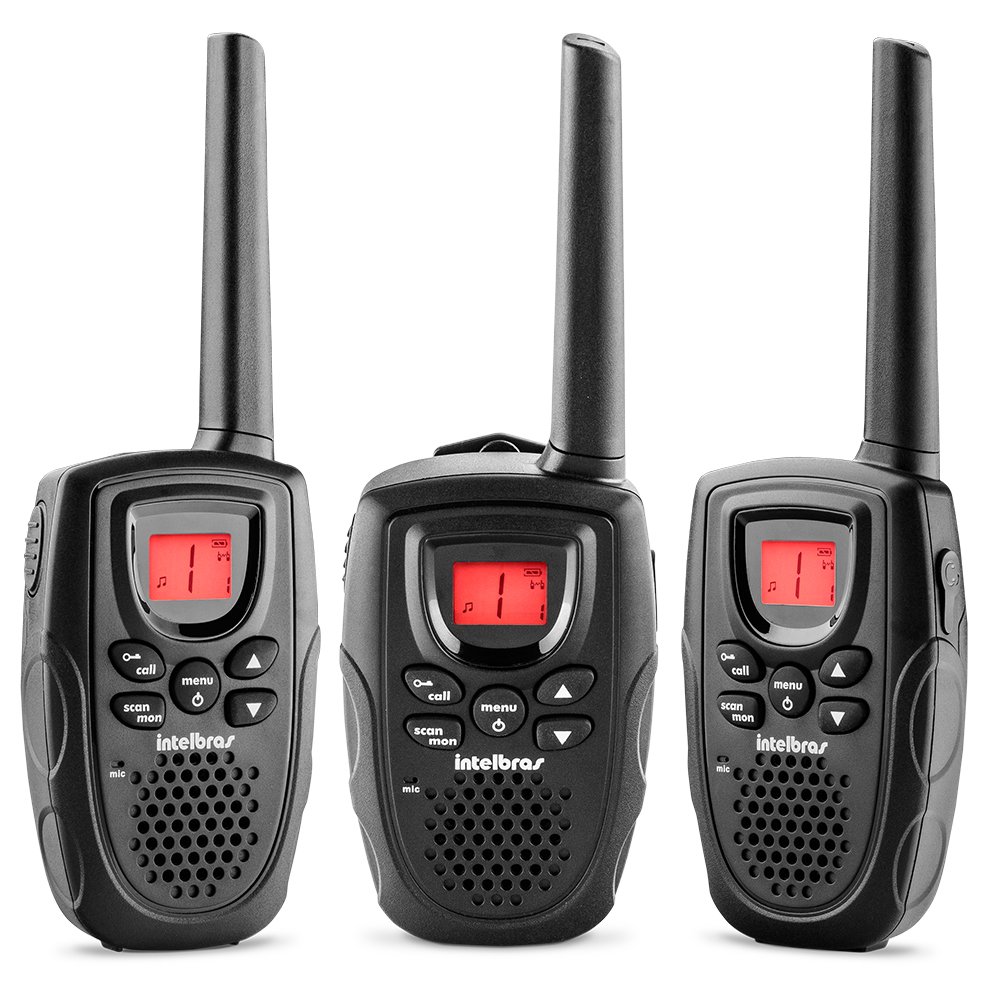
Figura 1: Davant view of the Intelbras RC 5003 Radio Communicator, showing the display, speaker, microphone, and main control buttons.
Components clau:
- Antena: Per transmetre i rebre senyals.
- Ponent: Sortides d'àudio rebudes.
- Pantalla lluminosa: Shows channel, battery level, and other status indicators.
- Control de potència/volum: Encén/apaga la unitat i ajusta el volum.
- Botons de canal amunt/avall: Selects operating channels.
- Botó PTT (Prem per parlar): Premeu i manteniu premut per transmetre, deixeu-lo anar per escoltar.
- Botó de menú: Accesses settings and features.
- Port de càrrega USB: For connecting the USB cable for charging.
5. Configuració
5.1. Instal·lació de la bateria
The Intelbras RC 5003 comes with rechargeable batteries pre-installed. If you need to replace them, ensure the radio is off, open the battery compartment cover on the back, insert the new batteries according to the polarity markings, and close the cover securely.
5.2. Càrrega de les bateries
Before initial use, fully charge the radio communicator's batteries.
- Connect the USB cable to the charging port on the radio communicator.
- Connecteu l'altre extrem del cable USB a l'adaptador de corrent proporcionat.
- Connecteu l'adaptador d'alimentació a una presa de corrent estàndard.
- The display will indicate charging status. A full charge takes approximately 6 hours.
- Desconnecteu el carregador un cop finalitzada la càrrega.
6. Instruccions de funcionament
6.1. Engegada/Apagada i Ajust de Volum
- Per encendre: Gireu el botó d'engegada/volum en sentit horari fins que sentiu un clic.
- Per apagar: Gireu el botó d'engegada/volum en sentit antihorari fins que sentiu un clic.
- Per ajustar el volum: Gireu el botó d'engegada/volum en sentit horari per augmentar el volum i en sentit antihorari per disminuir-lo.
6.2. Selecció de canals
The RC 5003 operates on 26 channels within the frequency range of 462.5625 MHz to 467.7125 MHz.
- Premeu el botó Menú per entrar al mode de selecció de canals.
- Use the Channel Up/Down buttons to select your desired channel (1-26).
- Press the PTT button or wait a few seconds for the selection to be confirmed.
- Assegureu-vos que totes les ràdios del vostre grup estiguin configurades al mateix canal de comunicació.
6.3. Transmissió i recepció
- Per transmetre: Press and hold the PTT button. Speak clearly into the microphone. Release the PTT button to finish transmitting.
- Per rebre: Assegureu-vos que no premeu el botó PTT. La ràdio rebrà automàticament les transmissions al canal seleccionat.
6.4. Funció VOX (centralita operada per veu)
The VOX function allows hands-free transmission by detecting your voice.
- Press the Menu button repeatedly until the VOX setting appears on the display.
- Use the Channel Up/Down buttons to select a sensitivity level (1-3, where 3 is most sensitive).
- Press the PTT button or wait to confirm the setting.
- When VOX is active, the radio will transmit automatically when you speak.
6.5. Call Tones
The RC 5003 offers 10 different call tones to alert other users.
- Press the Menu button repeatedly until the Call Tone setting appears.
- Use the Channel Up/Down buttons to cycle through the 10 available tones.
- Press the PTT button or wait to confirm your selection.
- To send a call tone, briefly press the Call button (if available, or refer to specific button mapping in your device).
6.6. Indicador de nivell de bateria
The luminous display includes an indicator for the current battery level. Recharge the device when the indicator shows low battery to ensure uninterrupted communication.
7. Manteniment
7.1. Neteja
- Wipe the radio communicator with a soft, damp tela.
- No utilitzeu productes químics ni productes de neteja abrasius.
- Ensure the device is dry before charging or storing.
7.2. Emmagatzematge
- Guardeu el dispositiu en un lloc fresc i sec quan no l'utilitzeu.
- Per a l'emmagatzematge a llarg termini, assegureu-vos que les bateries estiguin parcialment carregades (al voltant del 50%) per allargar-ne la vida útil.
8. Solució De Problemes
| Problema | Causa possible | Solució |
|---|---|---|
| La ràdio no s'encén. | Bateria baixa o esgotada. | Carregueu la bateria durant almenys 6 hores. |
| No es pot transmetre ni rebre. | Incorrect channel selected. | Ensure all radios are on the same channel. |
| Fora de rang. | Move closer to the other radio communicator. | |
| Mala qualitat d'àudio. | Bateria baixa. | Recarregueu la bateria. |
| Obstructions or interference. | Move to an open area or away from sources of interference. | |
| VOX not activating. | Sensibilitat VOX massa baixa. | Increase VOX sensitivity level (1-3). |
9. Especificacions
- Model: RC 5003
- Canals: 26
- Interval de freqüència: 462.5625 MHz a 467.7125 MHz
- Tons de trucada: 10
- Funció VOX: Yes, with 3 sensitivity levels
- Visualització: Lluminós
- Indicador de bateria: Sí
- Càrrega: USB cable, approximately 6 hours for full charge
- Dimensions (A x A x P): 19.6 x 6.65 x 2.7 cm (aproximadament)
- Pes: 300 g (aproximadament)
- Font d'alimentació: Rechargeable batteries (included)
10. Garantia i Suport
For warranty information, technical support, or service inquiries, please refer to the warranty card included with your product or visit the official Intelbras weblloc web. Conserveu el comprovant de compra per a reclamacions de garantia.
Intelbras Official Weblloc: www.intelbras.com.br