1. Introducció
This manual provides comprehensive instructions for the safe and efficient use of your Epson EP-306 A4 Inkjet Printer. Please read this manual thoroughly before operating the printer and keep it for future reference. The Epson EP-306 is a single-function A4 inkjet printer designed for high-quality document and photo printing, featuring both wired and wireless LAN connectivity and a 6-color dye ink system.
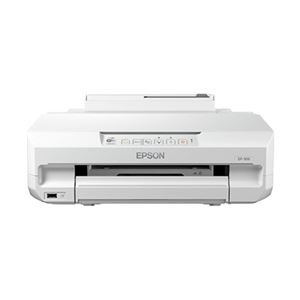
Figura 1: Frontal view of the Epson EP-306 A4 Inkjet Printer.
2. Informació de seguretat
Observe the following safety precautions to prevent injury or damage to the printer.
- Col·loqueu sempre la impressora sobre una superfície estable i anivellada.
- No bloquejar les obertures de ventilació.
- Feu servir només el cable d'alimentació que s'inclou amb la impressora.
- No desmunteu ni intenteu reparar la impressora vosaltres mateixos. Poseu-vos en contacte amb personal de servei qualificat.
- Keep ink cartridges out of reach of children.
- Avoid spilling liquids on the printer.
3. Contingut del paquet
Verifiqueu que tots els elements estiguin inclosos al paquet:
- Epson EP-306 Printer
- Set of 6 Ink Cartridges (Black, Cyan, Magenta, Yellow, Light Cyan, Light Magenta)
- Cable d'alimentació
- Guia de configuració
- Software CD-ROM (Drivers, Utilities)
4. Configuració
4.1 Desembalatge
- Traieu la impressora del seu embalatge.
- Traieu totes les cintes protectores i els materials d'embalatge de la impressora.
4.2 Connexió d'alimentació
- Connecteu el cable d'alimentació a l'entrada d'alimentació de la impressora.
- Connecteu l'altre extrem del cable d'alimentació a una presa de corrent amb connexió a terra.
- Premeu el botó d'engegada per encendre la impressora.
4.3 Instal·lació del cartutx de tinta
- Obriu la coberta de la impressora.
- Wait for the print head to move to the replacement position.
- Unpack each ink cartridge and remove the yellow tape.
- Introduïu cada cartutx a la ranura corresponent fins que encaixi al seu lloc.
- Tanqueu la coberta de la impressora. La impressora començarà a inicialitzar el sistema de tinta.
4.4 Càrrega de paper
- Obriu el suport del paper i traieu l'extensió.
- Feu lliscar les guies laterals fins a les posicions més externes.
- Load paper into the sheet feeder, print side up.
- Slide the edge guides against the paper stack.
4.5 Instal·lació del programari
- Insert the Software CD-ROM into your computer's CD/DVD drive.
- Seguiu les instruccions que apareixen a la pantalla per instal·lar els controladors de la impressora i el programari d'utilitats.
- If you do not have a CD/DVD drive, download the latest drivers from the official Epson support weblloc.
4.6 Network Connection (Wired/Wireless LAN)
The EP-306 supports both wired (Ethernet) and wireless (Wi-Fi) connections.
4.6.1 Wireless LAN Setup
- Use the printer's control panel to select Wi-Fi setup.
- Trieu la vostra xarxa Wi-Fi (SSID) de la llista.
- Enter the network password (WPA/WPA2 key) if prompted.
- Alternatively, use WPS (Wi-Fi Protected Setup) by pressing the WPS button on your router and then on the printer within two minutes.
4.6.2 Wired LAN Setup
- Connect an Ethernet cable from your router or network hub to the printer's LAN port.
- La impressora obtindrà automàticament una adreça IP.
5. Instruccions de funcionament
5.1 Impressió bàsica des d'un ordinador
- Obriu el document o la imatge que voleu imprimir a l'ordinador.
- Seleccioneu Imprimeix from the application's File menú.
- Tria Epson EP-306 com la vostra impressora.
- Adjust print settings such as paper size, media type, and print quality as needed.
- Feu clic Imprimeix.
5.2 Printing from a Mobile Device (Epson iPrint)
- Baixeu i instal·leu el Epson iPrint aplicació des de la botiga d'aplicacions del dispositiu.
- Assegureu-vos que el dispositiu mòbil estigui connectat a la mateixa xarxa Wi-Fi que la impressora.
- Open the Epson iPrint app and select your EP-306 printer.
- Choose the document or photo you want to print from within the app.
- Adjust settings and tap Imprimeix.
6. Manteniment
6.1 Substitució del cartutx de tinta
Replace ink cartridges when the ink level indicator on the control panel or software shows a cartridge is empty.
- Assegureu-vos que la impressora estigui encesa.
- Obriu la coberta de la impressora.
- Press the empty ink cartridge to release it, then lift it out.
- Unpack a new cartridge, remove the yellow tape, and insert it into the correct slot until it clicks.
- Tanqueu la coberta de la impressora.
6.2 Neteja del capçal d'impressió
Perform print head cleaning if print quality declines, such as missing lines or incorrect colors.
- Accediu al programari d'utilitats de la impressora a l'ordinador.
- Seleccioneu Neteja de capçals i seguiu les instruccions a la pantalla.
- Alternatively, use the printer's control panel to initiate head cleaning. Refer to the on-screen menu.
6.3 Comprovació del broquet
Perform a nozzle check to determine if the print head nozzles are clogged.
- Accediu al programari d'utilitats de la impressora a l'ordinador.
- Seleccioneu Comprovació de broquets and print the pattern.
- If the pattern has gaps, perform a print head cleaning.
7. Solució De Problemes
7.1 La impressora no respon
- Comproveu si la impressora està engegada.
- Verifiqueu que el cable d'alimentació estigui connectat correctament.
- Ensure the USB cable (if used) or network connection is secure.
- Reinicieu la impressora i l'ordinador/dispositiu mòbil.
7.2 Mala qualitat d'impressió
- Perform a nozzle check and then a print head cleaning if necessary.
- Comproveu els nivells de tinta i substituïu els cartutxos buits.
- Ensure you are using the correct paper type and print settings for your document.
7.3 Embussos de paper
- Apagueu la impressora i desendolleu el cable d'alimentació.
- Traieu amb cura el paper encallat de la safata d'entrada, la safata de sortida o l'interior de la impressora.
- Ensure paper is loaded correctly and not exceeding the maximum capacity.
8. Especificacions
| Característica | Especificació |
|---|---|
| Nom del model | EP-306 |
| Tecnologia d'impressió | Injecció de tinta |
| Sortida de la impressora | Color |
| Tecnologia de connectivitat | Wi-Fi |
| Característiques | Single Function Print |
| Dimensions del producte (W x D x H) | 42 x 47 x 22 cm |
| Pes del producte | 6.27 kg |
| Sistema operatiu compatible | Windows, Mac OS X |
| Resolució màxima | 5760dpi x 1440dpi |
| Tipus de tinta | Dye Ink (6 colors: Black, Cyan, Magenta, Yellow, Light Cyan, Light Magenta) |
| Max Print Size | A4 |
9. Garantia i Suport
For warranty information, please refer to the warranty card included with your product or visit the official Epson website. Technical support and driver downloads are also available on the Epson support weblloc.
Epson Oficial Weblloc: www.epson.com
For service or repairs, contact your local authorized Epson service center.


