1. Introducció
Gràcies per la compraasing the Genius GX Wired Gaming Keyboard, Scorpion K220. This manual provides detailed instructions for setting up, operating, and maintaining your new gaming keyboard. Designed for PC gaming, the Scorpion K220 features a sleek design, compact construction, and vibrant backlighting for an enhanced gaming experience.

Figura 1.1: Frontal view of the Genius GX Wired Gaming Keyboard Scorpion K220, showcasing its design and colorful backlighting.
2. Informació de seguretat
Please read the following safety precautions carefully before using the device to ensure optimal performance and prevent damage.
- No exposeu el teclat a l'aigua ni a altres líquids.
- Avoid extreme temperatures (hot or cold) and high humidity.
- No intenteu desmuntar ni modificar el teclat. Això anul·larà la garantia.
- Mantingueu el teclat allunyat de camps magnètics forts.
- Feu servir només un drap sec i suau per netejar.
- Ensure the USB cable is not pinched or damaged during setup and use.
3. Contingut del paquet
Verifiqueu que tots els elements siguin presents al paquet:
- Genius GX Wired Gaming Keyboard (Scorpion K220)
- Manual d'usuari (aquest document)
4. Configuració
4.1 Connexió del teclat
The Scorpion K220 keyboard uses a standard USB connection for compatibility with PCs and Laptops. No additional drivers are typically required for basic functionality.
- Locate an available USB port on your computer (PC or Laptop).
- Carefully insert the USB connector of the Scorpion K220 keyboard into the USB port.
- El vostre sistema operatiu hauria de detectar i instal·lar automàticament els controladors necessaris. Aquest procés pot trigar uns instants.
- Once installation is complete, the keyboard will be ready for use. The backlighting should illuminate.

Figure 4.1: The Genius GX Wired Gaming Keyboard Scorpion K220, ready for connection to a PC or laptop via its integrated USB cable.
5. Instruccions de funcionament
5.1 Funcions bàsiques del teclat
The Scorpion K220 functions as a standard QWERTY keyboard. All standard keys (alphanumeric, function keys, navigation keys, and numeric keypad) operate as expected.
Control de retroiluminació 5.2
The Scorpion K220 features vibrant backlighting to enhance your gaming and typing experience. The backlighting is always on when the keyboard is connected and powered.
- Ajust de brillantor: Look for dedicated keys or key combinations (often Fn + Scroll Lock or similar) to adjust backlight brightness. Refer to the keyboard's key legends for specific controls.
- Modes d'il·luminació: Some models may offer different lighting effects or static color modes. Experiment with function key combinations (e.g., Fn + F1-F12 or dedicated lighting keys) to cycle through available modes.
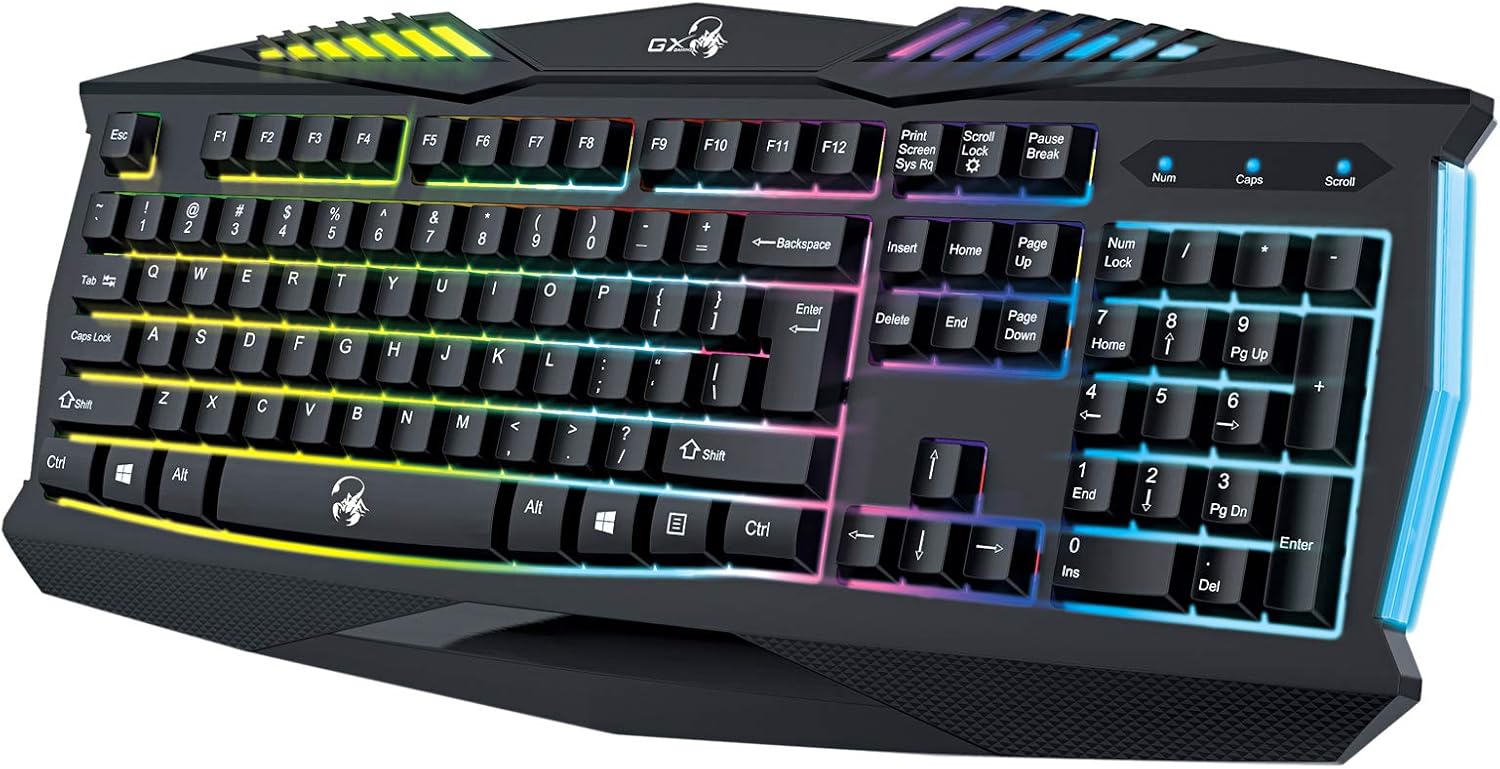
Figura 5.1: Primer pla view of the Genius GX Wired Gaming Keyboard Scorpion K220, highlighting the illuminated keys and vibrant backlighting.
5.3 Característiques del joc
The Scorpion K220 is designed for gaming with a responsive membrane switch type and a comfortable layout. While it does not feature programmable macro keys, its robust design and anti-ghosting capabilities (where applicable) ensure reliable performance during intense gaming sessions.
6. Manteniment
Un manteniment adequat garanteix la longevitat i el rendiment òptim del teclat.
- Neteja:
- Desconnecteu el teclat de l'ordinador abans de netejar-lo.
- Feu servir un drap suau, sec i sense borrissol per netejar la superfície del teclat.
- Per a la pols i les restes entre les tecles, feu servir aire comprimit.
- No utilitzeu productes químics agressius, netejadors abrasius ni dissolvents.
- Emmagatzematge: Guardeu el teclat en un lloc fresc i sec, allunyat de la llum solar directa i de temperatures extremes quan no l'utilitzeu durant períodes prolongats.
7. Solució De Problemes
If you encounter issues with your Scorpion K220 keyboard, refer to the table below for common problems and solutions.
| Problema | Causa possible | Solució |
|---|---|---|
| El teclat no respon | Connexió USB fluixa, port USB defectuós, problema amb el controlador. |
|
| La retroiluminació no funciona | Keyboard not powered, specific lighting mode selected. |
|
| Les tecles són enganxoses o no responen | Brutícia o deixalles sota les tecles. |
|
8. Especificacions
Detailed technical specifications for the Genius GX Wired Gaming Keyboard Scorpion K220:
| Característica | Detall |
|---|---|
| Marca | Geni |
| Número de model | K220 |
| Dimensions del producte | 23 x 49 x 4 cm |
| Pes de l'article | 980 g |
| Fabricant | Geni |
| Font d'alimentació | Elèctric amb cable |
| Piles incloses | No |
| Dispositius compatibles | PC, ordinador portàtil |
| Tecnologia de connectivitat | USB |
| Descripció del teclat | Jocs |
| Característiques especials | Retroil·luminat |
| Material | Materials mixtes |
| Tipus de canvi | Membrana |
| Disposició del teclat | QWERTY |
| Orientació de la mà | Ambidextre |
9. Garantia i Suport
Genius products are manufactured to the highest quality standards. For information regarding warranty coverage, technical support, or service, please refer to the warranty card included with your product or visit the official Genius weblloc.
For further assistance, you may contact Genius customer support through their official channels. Please have your product model number (K220) and purchase details ready when contacting support.
Oficial Weblloc: www.geniusnet.com


