1. Introducció
This user manual provides detailed instructions for the installation, configuration, and operation of your Mercusys 300Mbps Wireless N Router, Model MW305R. This device is designed to provide high-speed wireless connectivity for your home or small office network. Please read this manual thoroughly before using the product to ensure proper setup and optimal performance.
2. Informació de seguretat
Per evitar danys al producte o lesions a vostè o a altres persones, observeu les següents precaucions de seguretat:
- No exposeu el dispositiu a l'aigua ni a una humitat excessiva.
- No intenteu desmuntar ni reparar el dispositiu vosaltres mateixos. Encarregueu tot el manteniment a personal qualificat.
- Utilitzeu només l'adaptador d'alimentació subministrat amb el dispositiu.
- Assegureu-vos que hi hagi una ventilació adequada al voltant del router per evitar el sobreescalfament.
- Mantingueu el dispositiu lluny de fonts de calor i de la llum solar directa.
3. Contingut del paquet
Verifiqueu que tots els elements siguin presents al vostre paquet:
- Mercusys 300Mbps Wireless N Router (MW305R)
- Adaptador d'alimentació
- Cable Ethernet
- Guia d'instal·lació ràpida
4. Producte acabatview
Familiarize yourself with the physical features of your router.
4.1 Davant View

Figura 4.1: Frontal view of the MW305R router, showing the Mercusys logo and a single status LED indicator in the center.
4.2 Panell posterior
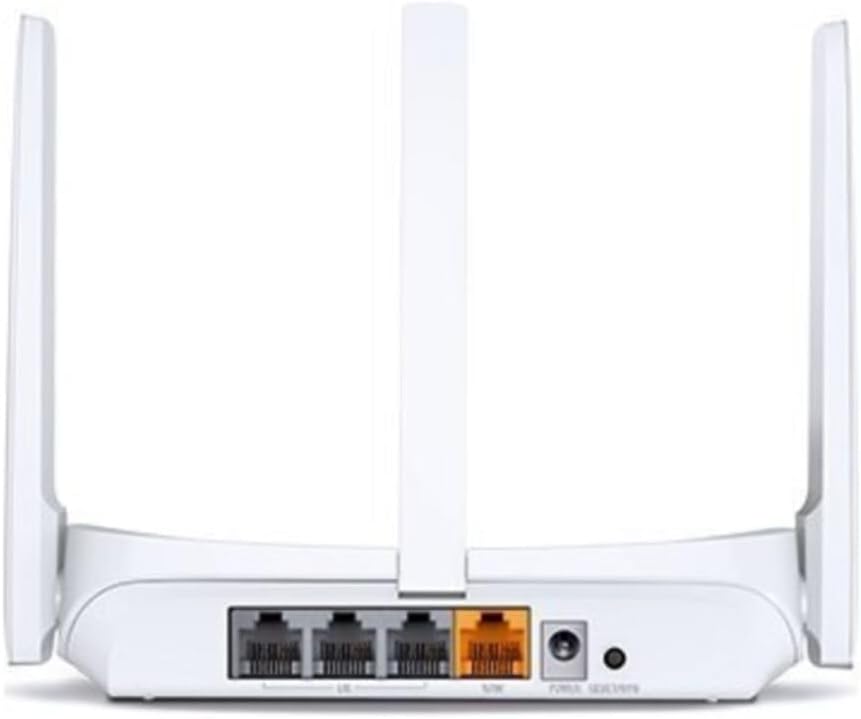
Figura 4.2: posterior view of the MW305R router, displaying the WAN port (yellow), three LAN ports (grey), power input, and reset button.
4.3 Indicadors LED
- LED del sistema: Indicates the router's operational status.
- Solid Green: Router is operating normally.
- Flashing Green: Router is starting up or performing an action.
- Off: Router is powered off.
5. Configuració
5.1 Connexió de maquinari
- Apagar: Desconnecteu l'alimentació del mòdem i del router (si escau).
- Connecta el port WAN: Connect one end of the Ethernet cable to the WAN (yellow) port on your MW305R router and the other end to your modem's Ethernet port.
- Connect LAN Port (Optional): For wired devices, connect an Ethernet cable from a LAN (grey) port on the router to your computer or other network device.
- Encès: Connect the power adapter to the router's power input and plug it into a power outlet. Power on your modem, then power on the router. Wait for the System LED to turn solid green.
5.2 Configuració inicial
To configure your router, you can use a wired or wireless connection.
- Connecteu-vos al router:
- Amb cable: Ensure your computer is connected to a LAN port on the router.
- Sense fil: Connect your wireless device to the router's default Wi-Fi network. The default SSID (network name) and password are printed on the label at the bottom of the router.
- Accés Web Pàgina de gestió: Obre a web navegador i tipus mwlogin.net or 192.168.1.1 a la barra d’adreces i premeu Retorn.
- Crea una contrasenya d'inici de sessió: The first time you access the page, you will be prompted to create a login password. Set a strong password and click Comencem.
- Segueix la configuració ràpida: The Quick Setup wizard will guide you through the basic internet and wireless settings. Select your connection type (e.g., Dynamic IP, Static IP, PPPoE) and configure your Wi-Fi network name (SSID) and password.
- Desa la configuració: After completing the wizard, save your settings. Your router should now be connected to the internet.
6. Funcionament del router
6.1 Connexió de dispositius
Un cop configurat el router, podeu connectar els vostres dispositius:
- Dispositius sense fil: Cerca your Wi-Fi network name (SSID) on your smartphone, tablet, or laptop, and enter the Wi-Fi password you configured during setup.
- Dispositius amb cable: Connect an Ethernet cable from your device to any of the available LAN ports on the router.
6.2 Configuració avançada
Accedeix al web pàgina de gestió (mwlogin.net) to configure advanced features:
- Xarxa: Configure WAN settings, LAN IP, DHCP server.
- Sense fil: Change Wi-Fi name/password, enable guest network, set up MAC filtering.
- Controls parentals: Gestionar l'accés a Internet per a dispositius específics.
- Control d'amplada de banda: Allocate bandwidth to different devices.
- Seguretat: Configure firewall settings, port forwarding, DMZ.
- Eines del sistema: Update firmware, backup/restore configuration, change login password, reboot.
7. Manteniment
7.1 Actualització del microprogramari
Regularly updating the router's firmware can improve performance, add new features, and fix bugs. Visit the official Mercusys website to download the latest firmware for your MW305R model. Navigate to Eines del sistema > Actualització del firmware a la web management page to perform the update.
7.2 Restabliment de fàbrica
If the router is not functioning correctly or you forget the login password, you can perform a factory reset. This will revert all settings to their default values.
- Mètode 1 (botó de maquinari): With the router powered on, press and hold the Reset button on the rear panel for approximately 5-8 seconds until the System LED flashes rapidly. Release the button and wait for the router to restart.
- Mètode 2 (Web Management Page): Inicieu sessió al web management page, navigate to Eines del sistema > Valors predeterminats de fàbrica, i feu clic Restaurar.
8. Solució De Problemes
Aquesta secció tracta problemes comuns que podeu trobar.
- No es pot accedir a web pàgina de gestió:
- Ensure your device is correctly connected to the router.
- Comproveu-ho mwlogin.net or 192.168.1.1 s'ha escrit correctament al navegador.
- Esborra la memòria cau i les galetes del navegador o prova un altre navegador.
- Disable any VPN or proxy software.
- No Internet access:
- Check if the WAN port LED is lit. If not, ensure the Ethernet cable from the modem is securely connected.
- Reinicieu el mòdem i l'encaminador.
- Verify your internet connection type and settings in the router's web pàgina de gestió.
- Contact your Internet Service Provider (ISP) to confirm your service status.
- Weak Wi-Fi signal or frequent disconnections:
- Relocate the router to a central location, away from obstacles and interference sources (e.g., cordless phones, microwaves).
- Adjust the router's antennas for optimal signal.
- Reduce the number of connected devices or upgrade your internet plan if bandwidth is an issue.
- Consider updating the router's firmware.
9. Especificacions
| Característica | Descripció |
|---|---|
| Nom del model | MW305R |
| Estàndard sense fils | IEEE 802.11n, IEEE 802.11g, IEEE 802.11b |
| Banda de freqüència | 2.4 GHz |
| Velocitat sense fil | 300 Mbps |
| Antenes | 3 Fixed Omni-Directional Antennas |
| Interfícies | 3 × 10/100Mbps LAN Ports, 1 × 10/100Mbps WAN Port |
| Botons | Botó de restabliment |
| Font d'alimentació | 5VDC/0.6A |
| Dimensions (L x P x A) | 4.49 x 3.7 x 1.02 polzades (114 x 94 x 26 mm) |
| Temperatura de funcionament | 0°C~40°C (32°F~104°F) |
| Temperatura d'emmagatzematge | -40°C~70°C (-40°F~158°F) |
| Humitat de funcionament | 10% ~ 90% sense condensació |
| Humitat d'emmagatzematge | 5% ~ 90% sense condensació |
10. Garantia i Suport
Mercusys products come with a limited warranty. For detailed warranty information, technical support, and frequently asked questions, please visit the official Mercusys weblloc web o poseu-vos en contacte amb el seu servei d'atenció al client. Conserveu el rebut de compra per a reclamacions de garantia.
Weblloc: www.mercusys.com


