1. Introducció
The FSP Champ 1K RM is a high-density, double-conversion online Uninterruptible Power Supply (UPS) designed to provide reliable power protection for critical equipment. It features an output power factor of 0.9 and includes an ECO mode for energy saving. This UPS is designed with a microprocessor controller and offers standard USB and RS-232 communication ports, along with a built-in intelligent slot for additional adapters and protocol converters.
Característiques clau
- True double-conversion for high-quality power output
- Output power factor of 0.9
- Vol d’entrada amplatage range (120 V – 300 V)
- Eco-mode operation for energy saving (ECO)
- SNMP + USB + RS-232 communication interfaces
2. Instruccions de seguretat importants
Please read all instructions carefully before installing or operating the UPS. Keep this manual for future reference.
- Seguretat elèctrica: El SAI conté volums perillosostagNo intenteu desmuntar la unitat. El manteniment només l'ha de realitzar personal qualificat.
- Seguretat de la bateria: Batteries can present a risk of electrical shock and high short-circuit current. Observe the following precautions:
- No llenceu les piles al foc; poden explotar.
- No obriu ni mutileu les bateries. L'electròlit alliberat és nociu per a la pell i els ulls.
- Replace batteries only with the same type and number of batteries as originally installed.
- Medi ambient: Install the UPS in a controlled environment, free from excessive dust, humidity, and extreme temperatures. Ensure adequate ventilation around the unit.
- Posada a terra: El SAI ha d'estar connectat a una presa de corrent de CA amb connexió a terra.
3. Producte acabatview
Panell frontal
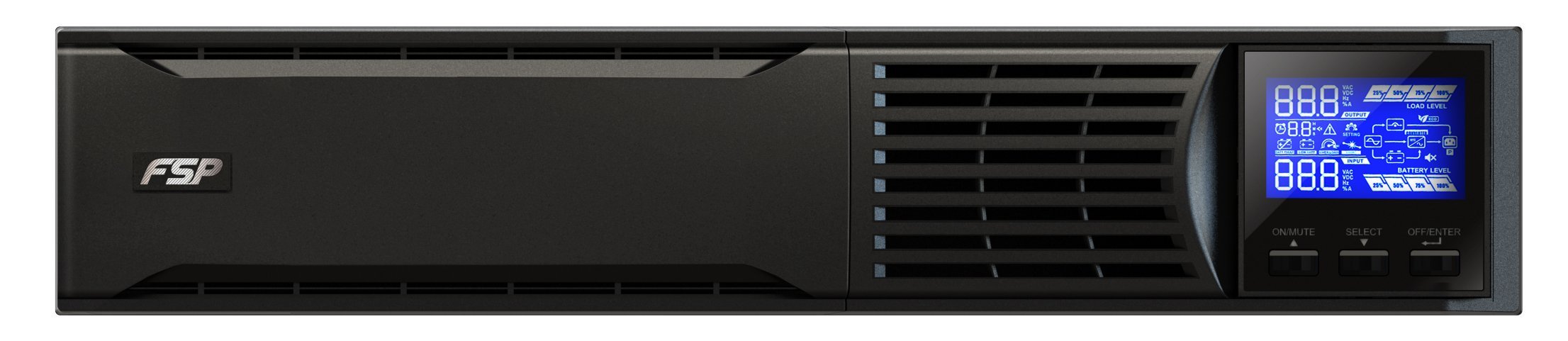
Figura 3.1: Frontal view of the FSP PPF9001401 UPS, showing the main chassis and display area.
Connexions del panell posterior

Figure 3.2: Rear panel of the FSP PPF9001401 UPS, illustrating various input, output, and communication ports.
- Tallacircuits: Provides overcurrent protection for the UPS.
- Entrada de CA: Connects the UPS to the utility power supply.
- Reixa de ventilació: Assegura un flux d'aire adequat per refredar els components interns.
- Ranura intel·ligent: For optional SNMP cards or other communication accessories.
- Port USB: For connecting to a computer for monitoring and management.
- Port RS-232: Serial communication port for monitoring and management.
- Endolls de sortida: Provides protected power output to connected devices.
- Terminal terrestre: For additional grounding if required.
4. Instal·lació i configuració
4.1 Desembalatge
Carefully unpack the UPS and inspect it for any shipping damage. Retain the original packaging for future transport or storage.
4.2 Connexió de la bateria
For safety, the UPS is shipped with battery wires disconnected. Follow these steps to connect the batteries before initial use:

Figure 4.1: Step-by-step guide for connecting the internal battery wires of the UPS.
- Pas 1: Traieu el panell frontal del SAI.
- Pas 2: Connect the internal battery wires. Ensure a secure connection.
- Pas 3: Reinstall the front panel onto the unit.
4.3 Connexió a l'alimentació i als dispositius
- Connect the UPS AC input cable to a grounded utility power outlet.
- Connect your critical devices (computers, monitors, network equipment) to the UPS output sockets.
- For monitoring, connect the USB or RS-232 cable from the UPS to your computer.
5. Funcionament
5.1 Encesa/apagada
- Encendre: Press and hold the power button on the front panel for a few seconds until the display illuminates.
- Apagar: Press and hold the power button again until the display turns off and the unit powers down.
5.2 Understanding the Display Panel
The LCD display provides real-time status and operational information. Refer to the diagram below for an explanation of the indicators:

Figura 5.1: Detallada view of the UPS display panel, highlighting various indicators for status, load, and battery levels.
- O/P & Battery VoltagInformació: Mostra el volum de sortidatage, frequency, and battery charge.
- Temps de còpia de seguretat: Shows estimated remaining backup time in hours and minutes.
- Avís de bateria baixa: Indicates when the battery charge is critically low.
- I/P & Battery VoltagInformació: Mostra el volum d'entradatage, frequency, and battery status.
- Avís de sobrecàrrega: Alerts if the connected load exceeds the UPS capacity.
- Short Circuit Warning: Indicates a short circuit condition.
- Nivell de càrrega: Bar graph indicating the percentage of the UPS's capacity being used.
- Mode Operation Information: Icons indicating current operating mode (e.g., Line mode, Battery mode, ECO mode).
- Operació de silenci: Indicates if audible alarms are silenced.
- Nivell de bateria: Bar graph showing the current battery charge percentage.
5.3 Monitoring Software
The FSP UPS comes with intelligent multi-language monitoring software to manage and monitor the UPS status from your computer. Install the software from the provided CD or download it from the FSP weblloc.

Figure 5.2: Screenshot of the FSP intelligent multi-language UPS monitoring software interface.
El programari et permet:
- Monitor input/output voltage, frequency, and load.
- View battery status and estimated backup time.
- Configure UPS settings and schedule shutdowns.
- Receive alerts and notifications.
6. Manteniment
6.1 Cura de la bateria
- Càrrega regular: Keep the UPS connected to AC power to ensure the batteries remain fully charged.
- Substitució de la bateria: Batteries typically last 3-5 years. Replace them when their capacity significantly diminishes. Only use FSP-approved replacement batteries.
- Emmagatzematge: If storing the UPS for an extended period, ensure it is fully charged and recharge it every 3 months to prevent battery degradation.
6.2 Neteja
- Ensure the UPS is turned off and disconnected from all power sources before cleaning.
- Utilitzeu un drap suau i sec per netejar l'exterior de la unitat.
- Do not use liquid or aerosol cleaners, as they may damage the unit.
- Netegeu periòdicament les reixetes de ventilació per evitar l'acumulació de pols, que pot afectar el rendiment de refrigeració.
7. Solució De Problemes
This section provides solutions to common issues you might encounter with your UPS. If the problem persists, contact customer support.
| Problema | Causa possible | Solució |
|---|---|---|
| El SAI no s'encén | Battery not connected; No AC input; Low battery charge | Ensure battery wires are connected; Check AC power cable and outlet; Allow UPS to charge for several hours. |
| El SAI emet un so continu | Overload; Low battery; Fault condition | Reduce connected load; Allow battery to charge; Check display for fault codes and refer to manual. |
| Temps de còpia de seguretat curt | Overloaded; Battery nearing end of life; Battery not fully charged | Reduce load; Consider battery replacement; Ensure UPS is connected to AC power for sufficient charging. |
| Software not connecting | Incorrect cable; Driver issue; Software not installed correctly | Verify USB/RS-232 cable connection; Install correct drivers; Reinstall monitoring software. |
8. Especificacions tècniques
The following table outlines the key technical specifications for the FSP PPF9001401 UPS Champ 1K RM.

Figure 8.1: Summary table of key technical specifications for the UPS.
| Característica | Especificació |
|---|---|
| Marca | FSP |
| Número de model | PPF9001401 |
| Tipus de producte | Torre |
| Potència màxima | 900 watts |
| Entrada Voltage | 230 Volts |
| Voltage | 230 Volts |
| Ampedat | 3.91 A |
| Connexions | RS-232, USB |
| Composició de la bateria | Plom-àcid segellat |
| Bateria recarregable | No (refers to user-replaceable, internal battery is rechargeable) |
| Pes de l'article | 10.4 quilos |
| Color | Negre |
| Material | Plàstic |
| Llengua | Anglès |
| Fabricant | FSP |
| Disponibilitat de peces de recanvi | Informació no disponible |
| Actualitzacions de programari garantides fins | Informació no disponible |
9. Garantia i Suport
9.1 Informació de la garantia
This FSP UPS product is covered by a manufacturer's warranty. Please refer to the warranty card included with your product or visit the official FSP weblloc web per obtenir informació detallada sobre els termes i condicions de la garantia específics de la vostra regió. Conserveu el rebut de compra com a comprovant de compra.
9.2 Atenció al client
For technical assistance, troubleshooting, or service inquiries, please contact FSP customer support. You can typically find contact information (phone numbers, email, support portals) on the official FSP website. When contacting support, please have your product model number (PPF9001401) and serial number ready.


