Introducció
This instruction manual provides essential information for the safe and efficient operation of your RCA RT2412 24-Inch LED TV. Please read this manual thoroughly before using the television and retain it for future reference. This television is designed to provide high-definition entertainment with a clear display and multiple connectivity options.
Informació important de seguretat
Always follow basic safety precautions when using this product to reduce the risk of fire, electric shock, and injury to persons. Keep these instructions in mind:
- No exposar aquest aparell a la pluja o la humitat.
- No bloquegeu cap obertura de ventilació. Instal·leu-ho d'acord amb les instruccions del fabricant.
- No instal·leu a prop de cap font de calor com ara radiadors, registres de calor, estufes o altres aparells (inclosos amplificadors) que produeixen calor.
- Eviteu que el cable d'alimentació sigui trepitjat o pessigat, especialment als endolls, els endolls i el punt on surten de l'aparell.
- Utilitzeu només accessoris/accessoris especificats pel fabricant.
- Desendolleu aquest aparell durant les tempestes amb llamps o quan no l'utilitzeu durant llargs períodes de temps.
- Demaneu tot el servei a personal de servei qualificat. El manteniment és necessari quan l'aparell s'ha fet malbé d'alguna manera, com ara el cable d'alimentació o l'endoll està danyat, s'ha vessat líquid o han caigut objectes a l'aparell, l'aparell ha estat exposat a la pluja o la humitat, no funciona amb normalitat. , o s'ha deixat caure.
Contingut del paquet
Please check to ensure all items are present and in good condition:
- RCA RT2412 24-Inch LED TV
- Control remot
- Cable d'alimentació
- Manual d'usuari (aquest document)
- TV Stand (if included, may vary by package)
Configuració
Desembalatge i col·locació
Carefully remove the TV from its packaging. Place the TV on a stable, flat surface or mount it on a wall using a compatible VESA 100mm x 100mm wall mount (not included). Ensure adequate ventilation around the TV.

Image: The RCA RT2412 24-Inch LED TV, shown with its stand, displaying a vibrant image of three football players on a grassy field.
Potència de connexió
Connect the power cord to the AC input on the back of the TV, then plug the other end into a wall outlet. The TV will enter standby mode.
Connexió de dispositius externs
Your RCA RT2412 TV offers various connection ports:
- HDMI: For high-definition audio and video from devices like Blu-ray players, game consoles, or cable/satellite boxes.
- VGA: Per connectar un ordinador.
- YPBPR (vídeo per components): For analog high-definition video.
- AV Audio/Video (Composite): For standard definition analog video and audio.
- RF (Antenna/Cable): Per connectar una antena per a emissions per aire o una connexió de televisió per cable.
- Àudio de PC: For audio input when using the VGA connection.
- Auriculars: Per connectar auriculars.
- Coaxial Out: Per a la sortida d'àudio digital a un sistema d'àudio extern.
- USB (FOR SERVICE): This port is primarily for service updates and is not intended for general media playback.
Ensure the TV and external devices are powered off before making connections. After connecting, power on the TV and select the appropriate input source using the remote control.
Assistent de configuració inicial
Upon first power-on, the TV may guide you through an initial setup wizard. This typically includes:
- Selecció de la llengua.
- Time zone and time settings.
- Channel scan (for antenna/cable connections).
Seguiu les indicacions a la pantalla per completar la configuració.
Funcionament del televisor
Control remot acabatview
The included remote control allows you to access all TV functions. Familiarize yourself with the buttons:
- POTÈNCIA: Encén o apaga el televisor (mode d'espera).
- ENTRADA/FONT: Cycles through available input sources (HDMI, VGA, AV, etc.).
- VOL +/-: Ajusta el nivell de volum.
- CH +/-: Canvia els canals (per a l'entrada d'antena/cable).
- MUT: Silencia o activa el so.
- MENÚ: Opens the main menu for picture, sound, and system settings.
- NAVIGATION (Arrow) Buttons: Used to navigate through menus and options.
- D'acord/Entrar: Confirma les seleccions als menús.
- SORTIDA: Surt del menú actual o de la visualització en pantalla.
- INFORMACIÓ: Mostra la informació del canal actual.
- NUMBER Buttons: Directly enter channel numbers.
Funcions bàsiques
- Encès/apagat: Press the POWER button on the remote or the TV's control panel.
- Ajust de volum: Feu servir els botons VOL +/-.
- Canvi de canals: Use the CH +/- buttons or the number buttons.
- Selecció de la font d'entrada: Press the INPUT/SOURCE button repeatedly to cycle through connected devices, or use the menu to select directly.
Navegació pel menú
Press the MENU button to access the TV's settings. Use the navigation arrows to move between categories and options, and the OK/ENTER button to select. Common menu categories include:
- Imatge: Adjust brightness, contrast, color, tint, sharpness, and picture mode (e.g., Standard, Dynamic, Movie).
- So: Adjust bass, treble, balance, sound mode (e.g., Standard, Music, Movie), and enable/disable built-in speakers.
- Canal: Perform auto-scan, manual scan, or edit channels.
- Hora: Set sleep timer, auto-off, and clock.
- Setup/System: Change language, restore factory defaults, update software (via service USB port).
Manteniment
Neteja del televisor
Abans de netejar-lo, desendolleu el televisor de la presa de corrent. Feu servir un drap suau i sec per netejar la pantalla i la carcassa. Per a marques difícils, netegeu-lo suaument.ampen the cloth with water or a mild, non-abrasive screen cleaner. Never spray cleaner directly onto the screen or cabinet.
Emmagatzematge
If storing the TV for an extended period, disconnect all cables and store it in a cool, dry place, preferably in its original packaging to protect it from dust and physical damage.
Resolució de problemes
Abans de contactar amb l'atenció al client, prova les solucions següents per a problemes comuns:
| Problema | Possible solució |
|---|---|
| Sense poder | Ensure the power cord is securely plugged into the TV and the wall outlet. Check if the outlet has power. |
| No hi ha imatge, però hi ha so | Check the input source selection. Ensure the external device is powered on and connected correctly. Try a different HDMI cable if applicable. |
| No hi ha so, però hi ha imatge | Check the volume level and ensure the TV is not muted. Verify audio cable connections for external devices. Check sound settings in the TV menu. |
| El comandament a distància no funciona | Check and replace the batteries. Ensure there are no obstructions between the remote and the TV's IR sensor. Point the remote directly at the TV. |
| Poca qualitat d'imatge | Adjust picture settings (brightness, contrast, sharpness) in the menu. For antenna, reposition the antenna or rescan channels. Ensure the source content is high quality. |
If the issue persists after trying these steps, please refer to the support section.
Especificacions
| Característica | Detall |
|---|---|
| Model | RT2412 |
| Mida de la pantalla | 24 polzades |
| Tecnologia de visualització | Panell pla LED |
| Resolució | 720p (1280 x 720) |
| Freqüència d'actualització | 60 Hz |
| Relació d'aspecte | 16:9 |
| Temps de resposta | 8.5 ms |
| Viewangle ing | 176°(H)/176°(V) |
| Sintonitzador | NTSC/ATSC |
| Connectivitat | HDMI, VGA, YPBPR, USB (FOR SERVICE), PC AUDIO, AV AUDIO/VIDEO, COAXIAL OUT, HEADPHONE, RF |
| Compatibilitat de muntatge a la paret | VESA 100 mm x 100 mm |
| Dimensions del producte (L x A x A) | 23.6 x 4.9 x 16.1 polzades |
| Pes de l'article | 8.6 lliures |
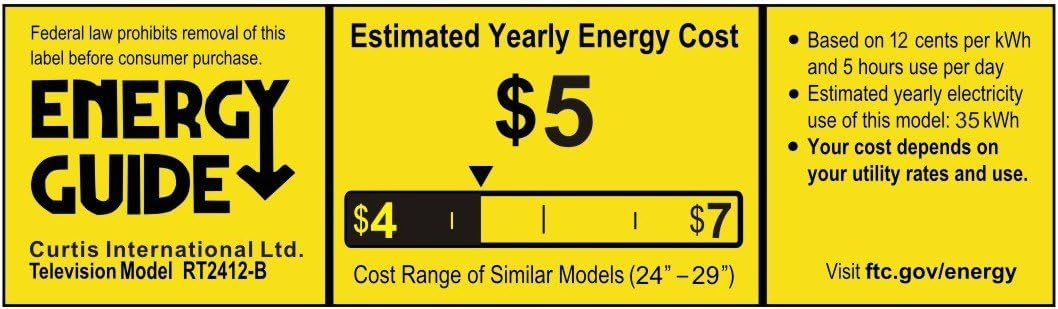
Image: Energy Guide label indicating an estimated yearly energy cost of $5 for the Curtis International Ltd. Television Model RT2412-B, based on 12 cents per kWh and 5 hours use per day.
Garantia i Suport
Per obtenir informació sobre la garantia i assistència tècnica, consulteu la targeta de garantia inclosa amb el producte o visiteu el lloc web d'assistència oficial de RCA. weblloc web. Conserveu el rebut de compra com a comprovant de compra per a reclamacions de garantia.
For general inquiries or to find authorized service centers, please contact RCA customer service. Contact details are typically available on the manufacturer's weblloc o a l'embalatge del producte.


