Introducció
This user manual provides detailed instructions for the setup, operation, maintenance, and troubleshooting of your ZTE MF971V Mobile WiFi Hotspot. Please read this manual carefully before using the device to ensure proper functionality and optimal performance.
Producte acabatview

Davant view of the ZTE MF971V Mobile WiFi Hotspot, showing the display screen and ZTE logo.
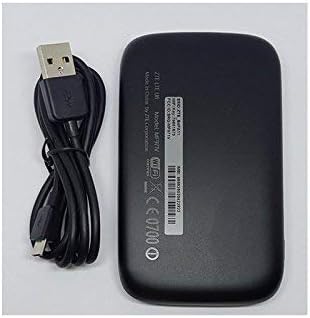
Enrere view of the ZTE MF971V Mobile WiFi Hotspot, alongside its USB charging cable.
The ZTE MF971V is a portable 4G LTE Mobile WiFi Hotspot designed to provide high-speed internet access for multiple devices simultaneously. It supports up to 32 Wi-Fi devices and features a 1.44-inch TFT LCD screen for status information.
Guia de configuració
1. Inserció de la targeta SIM i la bateria
- Obriu la coberta posterior del dispositiu.
- Insereix a Targeta micro SIM with an activated data plan into the SIM card slot. Ensure the SIM card is correctly oriented.
- Inseriu el proporcionat 2300mAh Lithium Ion battery into its compartment.
- Torneu a col·locar la coberta posterior, assegurant-vos que encaixi correctament al seu lloc amb un clic.
2. Engegada i configuració inicials
- Press and hold the power button until the device powers on and the screen illuminates.
- Wait for the device to boot up and establish a network connection. The screen will display network status.
- Important for AT&T and T-Mobile users: Manual APN (Access Point Name) change is required for internet access.
- For AT&T: APN is "Phone" or "WAP Cingular".
- For T-Mobile: APN is "fast.t-mobile.com".
- Consulteu el dispositiu web interface settings for APN configuration.
Instruccions de funcionament
Connecting Devices to the Hotspot
- Ensure the ZTE MF971V is powered on and has an active network connection.
- Al dispositiu amb Wi-Fi (telèfon intel·ligent, tauleta, ordinador portàtil), cerqueu les xarxes Wi-Fi disponibles.
- Select the Wi-Fi network name (SSID) displayed on the hotspot's screen or on the label inside the battery compartment.
- Enter the Wi-Fi password (Key) also displayed on the hotspot's screen or label.
- El dispositiu ara hauria d'estar connectat a Internet a través del punt d'accés.
Understanding the Display Screen
The 1.44-inch TFT LCD screen provides real-time information about the hotspot's status, including:
- Indicador de força del senyal
- Network type (4G LTE, 3G)
- Nivell de bateria
- Number of connected Wi-Fi devices
- Data usage (upload/download)
- Wi-Fi SSID and password
Manteniment
- Càrrega: Charge the device using the provided USB cable and a compatible power adapter. The battery indicator on the screen will show charging status.
- Neteja: Feu servir un drap suau i sec per netejar el dispositiu. Eviteu utilitzar netejadors líquids o materials abrasius.
- Emmagatzematge: When not in use for extended periods, store the device in a cool, dry place. It is recommended to fully charge the battery before long-term storage.
- Actualitzacions de programari: Reviseu periòdicament el fabricant weblloc o del dispositiu web interface for firmware updates to ensure optimal performance and security.
Resolució de problemes
| Problema | Causa possible | Solució |
|---|---|---|
| Sense connexió a Internet |
|
|
| El dispositiu no s'encén |
|
|
| Velocitat d'Internet lenta |
|
|
Especificacions
| Característica | Detall |
|---|---|
| Nom del model | MF971V |
| Bandes 4G LTE | FDD B1/2/3/4/5/7/8/17&12/20/28, TDD B38/40/41 |
| Bandes 3G | UMTS B1/2/5/8 |
| Speed (LTE FDD) | DL/UL 300/50Mbps (Category 6) |
| Mostra | Pantalla LCD TFT de 1.44 ” |
| Tipus de targeta SIM | Micro SIM |
| Bateria | Ió de liti de 2300 mAh |
| Max Wi-Fi Devices | Fins a 32 |
| Wi-Fi estàndard | 802.11 b/g/n/ac, 2x2 MIMO, dual band (2.4&5.8GHz) |
| Dimensions del producte | 10.7 x 1 x 6.5 cm; 80 g |
Garantia i Suport
For warranty information, please refer to the documentation included with your product or visit the official ZTE weblloc web. Els termes i condicions de la garantia poden variar segons la regió i el distribuïdor.
For technical support or further assistance, please contact your seller or the official ZTE customer support channels. Keep your product model number (MF971V) and purchase details ready when seeking support.
You can often find additional resources, FAQs, and driver downloads on the ZTE Global Weblloc.


