1. Introducció
Thank you for choosing the CELLO Quick Pop 300 2-Slice Automatic Pop-up Toaster. This appliance is designed for efficient and convenient toasting of bread slices. Featuring 7 browning levels, a cool-touch body, and a removable crumb tray, it ensures a safe and enjoyable user experience. Please read this manual thoroughly before use to ensure proper operation and maintenance.
2. Salvaguardes importants
- Llegiu totes les instruccions abans de fer funcionar la torradora.
- No toqueu superfícies calentes. Utilitzeu nanses o poms.
- Per protegir-vos contra les descàrregues elèctriques, no submergiu el cable, els endolls ni la torradora en aigua ni en altres líquids.
- És necessària una supervisió estreta quan qualsevol aparell és utilitzat per o a prop dels nens.
- Desendolleu la presa de corrent quan no utilitzeu i abans de netejar. Deixeu refredar abans de posar o treure peces.
- No feu servir cap aparell amb un cable o un endoll danyats, o després que l'aparell funcioni malament o s'hagi fet malbé de cap manera.
- L'ús d'accessoris no recomanats pel fabricant de l'aparell pot causar lesions.
- No utilitzar a l'aire lliure.
- No deixeu que el cable pengi de la vora de la taula o del taulell, ni toqui superfícies calentes.
- No col·loqueu-lo sobre o prop d'un cremador de gas o elèctric calent, ni en un forn calent.
- Connecteu sempre primer l'endoll a l'aparell i després el cable a la presa de corrent. Per desconnectar-lo, gireu qualsevol control a la posició "off" i, a continuació, retireu l'endoll de la presa de corrent.
- No utilitzeu l'aparell per a un altre ús que el previst.
- No s'han d'introduir aliments, embalatges de paper d'alumini o estris massa grans a la torradora, ja que poden provocar un incendi o risc de descàrrega elèctrica.
- Es pot produir un incendi si les torradores estan cobertes o toquen material inflamable, com ara cortines, cortines, parets i similars, quan estan en funcionament.
- No intenteu treure el menjar quan la torradora estigui endollada.
- No opereu sense vigilància.
3. Producte acabatview
Familiarize yourself with the components of your CELLO Quick Pop 300 Toaster:
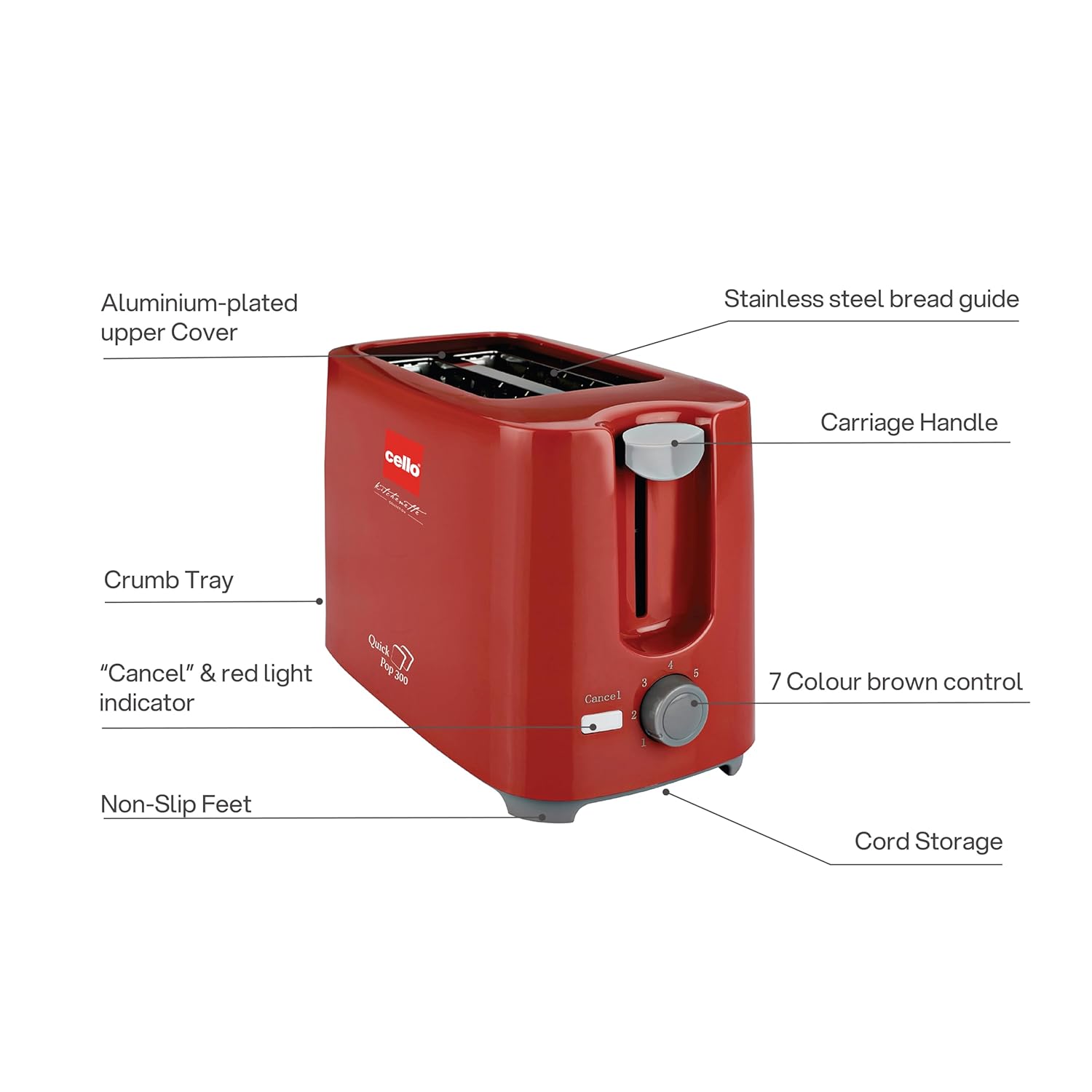
Figura 3.1: Main components of the CELLO Quick Pop 300 Toaster.
- Aluminium-plated Upper Cover: Provides durability and a sleek finish.
- Stainless Steel Bread Guide: Ensures bread slices are centered for even toasting.
- Nansa del carro: S'utilitza per baixar i pujar el pa a les ranures de torrar.
- Safata de molla: Safata extraïble situada a la part inferior per facilitar la neteja de les molles.
- "Cancel" & Red Light Indicator: Button to stop the toasting cycle and indicator light for operation.
- 7 Colour Brown Control: Dial to select desired browning level from 1 (lightest) to 7 (darkest).
- Peus antilliscants: Provides stability and prevents the toaster from sliding on surfaces.
- Emmagatzematge del cable: Integrated area at the base for neat storage of the power cord.

Figura 3.2: Detallada views of key features including the crumb tray, browning control, upper cover, carriage handle, cord storage, and non-slip feet.
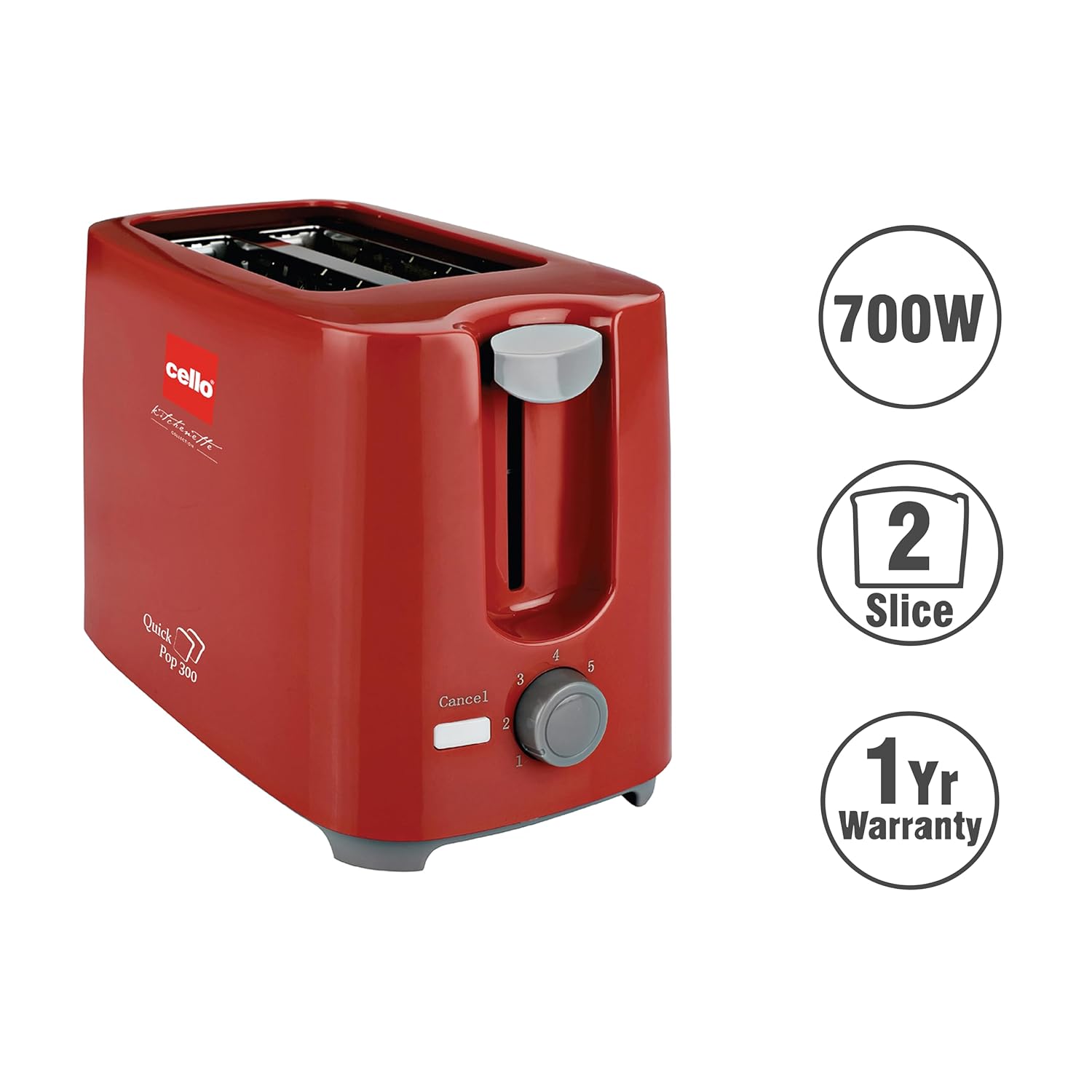
Figura 3.3: The CELLO Quick Pop 300 Toaster, a 700W appliance with a 2-slice capacity, backed by a 1-year warranty.
4. Configuració
- Unpack the Toaster: Carefully remove the toaster and all packaging materials from the box. Retain the user manual and warranty card.
- Col·locació: Col·loqueu la torradora sobre una superfície estable, plana i resistent a la calor, allunyada de materials inflamables com ara cortines o parets. Assegureu-vos que hi hagi una ventilació adequada al voltant de l'aparell.
- Ús inicial: Before first use, operate the toaster without bread for a few minutes on the highest browning setting (7) to burn off any manufacturing residues. A slight odor or smoke may be present; this is normal and will dissipate. Ensure the area is well-ventilated.
- Connexió d'alimentació: Connecteu el cable d'alimentació a una presa de corrent adequada.
Vídeo 4.1: Unboxing and initial setup of the CELLO Quick Pop 300 Toaster, demonstrating how to remove it from packaging and prepare for use. This video is provided by the seller.
5. Funcionament
- Inserir pa: Place up to two slices of bread into the toasting slots. The stainless steel bread guide will automatically center the bread.
- Selecciona el nivell de daurat: Gireu el 7 Colour Brown Control dial to your desired browning setting. Level 1 is for light toast, and Level 7 is for dark toast.
- Començar a torrar: Premeu cap avall Mànec de carro until it locks into place. The red light indicator will illuminate, signifying that the toasting cycle has begun.
- Automatic Pop-up: Once the selected browning level is achieved, the toast will automatically pop up, and the red light indicator will turn off.
- Funció de cancel·lació: Per aturar el cicle de torrada en qualsevol moment, premeu el botó "Cancel" button. The carriage handle will immediately pop up, and the red light will turn off.
Vídeo 5.1: Un breu sobreview of the CELLO Quick Pop 300 Toaster's features, including the carriage handle, browning control, and crumb tray. This video is provided by the seller.
6. Neteja i Manteniment
Una neteja regular garanteix un rendiment òptim i allarga la vida útil de la torradora.
- Desconnecta i refresca: Desendolleu sempre la torradora de la presa de corrent i deixeu-la refredar completament abans de netejar-la.
- Safata de recollir molles buida: Traieu el Removable Bread Crumbs Tray located at the bottom of the toaster. Dispose of the crumbs. Wipe the tray with a damp drap i eixugueu-lo bé abans de tornar-lo a introduir.
- Neteja exterior: Netegeu l'exterior de la torradora amb un drap suau i sec.amp drap. No utilitzeu productes de neteja abrasius ni fregalls metàl·lics, ja que poden ratllar la superfície.
- Neteja interior: Do not insert any objects into the toasting slots to clean them. If food gets stuck, unplug the toaster and carefully remove it once the appliance has cooled.
- Emmagatzematge del cable: Utilize the integrated cord storage facility at the base of the toaster to keep the power cord neatly wrapped when not in use.
7. Solució De Problemes
If you encounter any issues with your toaster, refer to the following common problems and solutions:
| Problema | Causa possible | Solució |
|---|---|---|
| La torradora no s'encén. | Not plugged in; power outlet malfunction; carriage handle not fully depressed. | Ensure the toaster is securely plugged into a working outlet. Press the carriage handle down until it locks. |
| El pa no es torra o es torra de manera desigual. | Browning control set too low; bread slices too thick or thin; first use residue. | Adjust the browning control to a higher setting. Ensure bread fits properly in slots. Perform initial burn-off cycle if new. |
| Fum o olor de cremat. | Crumbs in the toaster; food stuck in slots; initial use residue. | Unplug and let cool. Empty and clean the crumb tray. Carefully remove any stuck food. Ensure proper ventilation during initial use. |
| Carriage handle does not stay down. | Toaster not plugged in or no power; browning cycle not initiated. | Ensure the toaster is plugged in and the power outlet is active. The handle will only lock down when power is supplied and the toasting cycle can begin. |
8. Especificacions
- Marca: CELLO
- Model: Quick Pop 300
- Color: Vermell
- Material: Acrilonitril butadiè estirè (ABS)
- Dimensions del producte: 6.1P x 11.8A x 7.5H centímetres
- Wattage: 700 watts
- Nombre de rodanxes: 2
- Configuració de Browning: 7 nivells
- Voltage: 240 Volts
- Pes de l'article: 810 grams
- Característiques especials: Anti-Slip Base, Automatic Shut-Off, Cancel Function, Cool Touch Exterior, Removable Crumb Tray
- País d'origen: Índia

Figura 8.1: Dimensions of the CELLO Quick Pop 300 Toaster.
9. Garantia i Suport
The CELLO Quick Pop 300 Toaster comes with a 1 any de garantia des de la data de compra. Consulteu la targeta de garantia inclosa per conèixer els termes i condicions detallats.
For prompt after-sales service or any inquiries, please contact CELLO customer care:
- All India Customer Care No: 7400001799
- Correu electrònic: customercare@cellokitchenette.com

Figura 9.1: CELLO Customer Care details for support and service.


