1. Introducció
This manual provides essential instructions for the safe and efficient operation of your Automatic Mini Double Station Mug Heat Press Transfer Machine. Please read this manual thoroughly before use to ensure proper setup, operation, and maintenance.
This machine is designed for sublimation printing on various mug sizes, featuring a double station design for increased efficiency.
2. Instruccions de seguretat
- Feu servir sempre la màquina sobre una superfície estable i resistent a la calor.
- Keep hands clear of heating elements during operation to prevent burns.
- Assegureu-vos una ventilació adequada a la zona de treball.
- Do not expose the machine to water or excessive moisture.
- Desendolleu la màquina de la presa de corrent quan no l'utilitzeu o abans de netejar-la/mantenir-la.
- Do not attempt to modify or repair the machine yourself. Contact qualified personnel for service.
- Mantingueu els nens i les mascotes allunyats de la màquina en funcionament.
3. Contingut del paquet
Verifiqueu que tots els elements siguin presents al paquet:
- 1x Double Mug Heat Press Machine
- 1x English User Manual (this document)
- 2x 11oz Heating Pads (pre-installed or included separately)
Si falta algun element o està malmès, poseu-vos en contacte amb l'atenció al client.
4. Configuració
- Desembalatge: Carefully remove the heat press machine from its packaging. Retain packaging for future storage or transport.
- Col·locació: Place the machine on a flat, stable, and heat-resistant surface. Ensure there is adequate space around the machine for ventilation and safe operation.
- Connexió d'alimentació: Ensure the machine's power switch is in the OFF position. Plug the machine into a standard 110V AC power outlet.
- Inspecció inicial: Before first use, inspect the heating pads and control panel for any visible damage.

Figura 1: Frontal view of the Double Mug Heat Press Machine. This image shows the overall design with two mug stations and the central control panel.
5. Instruccions de funcionament
5.1 Tauler de control acabatview

Figure 2: Close-up of the LCD control panel. The panel features an LCD display for temperature and time, along with buttons for timing, temperature adjustment, and mode selection for left and right stations.
The machine features an LCD control panel for setting temperature and time. It allows for independent control of each mug station.
5.2 Passos bàsics d'operació
- Encès: Turn on the main power switch. The LCD display will illuminate.
- Temperatura establerta: Use the temperature adjustment buttons (often indicated by '+' and '-' or specific temperature setting buttons) to set the desired transfer temperature. The recommended transfer temperature is 180°C (356°F).
- Establir hora: Use the timing adjustment buttons to set the desired transfer time. The recommended transfer time is 90 seconds.
- Preescalfament: Allow the machine to preheat until it reaches the set temperature. The display will show the current temperature.
- Prepare Mug: Wrap your sublimation print around the mug, securing it with heat-resistant tape. Ensure the print is flat against the mug surface.
- Insert Mug: Carefully place the prepared mug into the heating pad of one or both stations. Ensure the mug is centered and the heating pad fully encompasses the printed area.
- Aplicar pressió: Tanqueu el clamp handle to apply even pressure to the mug. The machine is designed to accommodate various mug sizes (6OZ, 9OZ, 11OZ, 12OZ, 17OZ) with appropriate heating pads.
- Inicia la transferència: Press the start button (often labeled 'Timing' or 'Start') for the respective station. The timer will begin counting down.
- Remove Mug: Once the timer reaches zero, carefully open the clamp handle and remove the hot mug using heat-resistant gloves.
- Refredament: Place the mug on a heat-resistant surface to cool. Once cool, carefully remove the sublimation paper.

Figure 3: A mug correctly positioned within the heating element of the heat press machine, ready for the sublimation process.
5.3 Workflow Diagram
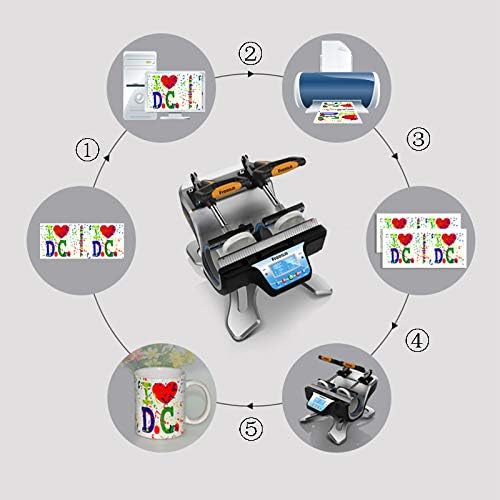
Figure 4: A visual representation of the sublimation printing process, from designing and printing the image to pressing it onto the mug and the final result.
5.4 Replacing Heating Pads
The heating pads are replaceable to accommodate different mug sizes. The machine includes two 11oz heating pads. For other sizes, contact customer support.

Figura 5: Detall view of the heating element, showing its construction and how it secures the mug for heat transfer.
- Apagueu i desconnecteu: Ensure the machine is turned off and unplugged from the power source. Allow the heating pads to cool completely.
- Loosen Fasteners: Locate the fasteners securing the heating pad to the machine frame. Loosen or remove them as required.
- Disconnect Pad: Carefully disconnect the electrical connector for the heating pad.
- Treure el coixinet vell: Slide out the old heating pad.
- Instal·leu un coixinet nou: Insert the new heating pad, ensuring it is correctly aligned.
- Connect and Secure: Reconnect the electrical connector and secure the heating pad with the fasteners.
- Prova: Plug in the machine and perform a test run to ensure the new heating pad functions correctly.
6. Manteniment
- Neteja: After each use, ensure the machine is cool and unplugged. Wipe down the exterior surfaces with a soft, dry cloth. Do not use abrasive cleaners or solvents.
- Heating Pad Care: Inspect heating pads regularly for wear or damage. Replace if necessary to ensure consistent heat transfer.
- Emmagatzematge: Guardeu la màquina en un entorn sec i sense pols quan no l'utilitzeu.
7. Solució De Problemes
| Problema | Causa possible | Solució |
|---|---|---|
| La màquina no s'encén. | Not plugged in; power switch off; faulty power outlet. | Comproveu la connexió del cable d'alimentació; assegureu-vos que l'interruptor estigui encès; proveu la presa de corrent amb un altre dispositiu. |
| La temperatura no arriba al valor establert. | Configuració incorrecta de la temperatura; element calefactor defectuós. | Verify temperature setting; allow more time for preheating; contact support if issue persists. |
| Resultats de transferència desiguals. | Uneven pressure; worn heating pad; incorrect mug placement. | Ensure mug is centered and clamp is fully engaged; inspect heating pad for wear; ensure print is flat on mug. |
| Timer not functioning. | Incorrect operation; control panel issue. | Review operating instructions for timer activation; contact support. |
8. Especificacions
| Model | Automatic Mini Double Station Mug Heat Press Transfer Machine |
| Compatible Mug Sizes | 6OZ, 9OZ, 11OZ, 12OZ, 17OZ |
| Voltage | 110 V |
| Poder | 280W + 280W (Total 560W) |
| Transfer Temperature | 180 °C (356 °F) |
| Temps de transferència | 90 Seconds (Adjustable) |
| Model de control | Control LCD |
| Pes | 14.6 lliures (7.2 kg) |
| Dimensions generals | 14.5" x 12" x 13.38" (37 x 30.6 x 34 cm) |
| Tipus d'endoll | Endoll dels EUA |
9. Garantia i Suport
No specific warranty information is provided with this product. For technical support, replacement parts (such as different sized heating pads), or any operational questions, please refer to the seller or manufacturer's contact information provided at the point of purchase.


