1. Introducció
Thank you for choosing the EXTEL diBi Flash Wireless Doorbell. This manual provides essential information for the proper installation, operation, and maintenance of your new doorbell system. Please read these instructions carefully before use and retain them for future reference.
The EXTEL diBi Flash Wireless Doorbell offers a reliable solution for visitor alerts, featuring a wireless range of up to 200 meters, a distinctive flash function, and customizable ringtones. Its low power alert system ensures you are always informed when batteries require attention.

Imatge 1.1: The EXTEL diBi Flash Wireless Doorbell system, showing both the receiver unit and the external call button.
2. Contingut del paquet
Si us plau, verifiqueu que tots els components siguin presents al vostre paquet:
- 1 x Flash Bell (Receiver Unit) - Piles no incloses
- 1 x Call Button (Transmitter Unit) - Bateria inclosa
- 1 x Rain Cover for Call Button
3. Informació de seguretat
Per garantir un funcionament segur i evitar danys, observeu les següents precaucions de seguretat:
- Do not expose the units to extreme temperatures, direct sunlight, or excessive moisture.
- Mantingueu el dispositiu allunyat de l'aigua i altres líquids.
- No intenteu obrir ni reparar les unitats vosaltres mateixos. Encarregueu tot el manteniment a personal qualificat.
- Desfeu-vos de les piles d'acord amb la normativa local. No barregeu piles velles i noves, ni piles de diferents tipus.
- Mantingueu les piles fora de l'abast dels nens.
4. Configuració i instal·lació
4.1. Call Button (Transmitter) Installation
- Prepare the Call Button: The call button comes with a battery pre-installed. Ensure any protective tabs are removed to activate the battery.
- Mount the Rain Cover: Position the rain cover in your desired location near your entrance. Mark the screw holes.
- Fixeu la coberta impermeable: Drill pilot holes if necessary and secure the rain cover to the wall using appropriate screws (not included).
- Insert Call Button: Place the call button inside the mounted rain cover, ensuring it is securely fitted and protected from the elements.

Imatge 4.1: The external call button, designed for outdoor installation with its protective rain cover.
4.2. Flash Bell (Receiver) Installation
- Insereix les piles: Open the battery compartment on the back of the flash bell receiver. Insert the required batteries (not included) according to the polarity markings. Close the compartment securely.
- Posicioneu el receptor: Place the receiver unit in a central location within your home, ensuring it is within the 200-meter wireless range of the call button. Avoid placing it near large metal objects or other electronic devices that may interfere with the signal.
- Prova la connexió: Press the call button outside. The flash bell should ring and flash. If it does not, refer to the Troubleshooting section.

Imatge 4.2: The internal flash bell receiver unit, showing its speaker grille and control buttons.
5. Instruccions de funcionament
The EXTEL diBi Flash Wireless Doorbell is designed for simple operation.
5.1. Selecció del to de trucada
The receiver unit offers 6 distinct ringtones. To change the ringtone:
- Locate the music note button (♫) on the top of the receiver unit.
- Press this button repeatedly to cycle through the available ringtones. Stop when you hear your preferred melody.
If you have multiple transmitters, you can customize a unique ringtone for each to easily distinguish which entrance a visitor is at.
5.2. Ajust de volum
To adjust the volume of the doorbell chime:
- Locate the volume button (speaker icon with sound waves) on the top of the receiver unit.
- Press this button to cycle through the available volume levels (e.g., high, medium, low, mute).
5.3. Flash Function
In addition to the audible chime, the flash bell receiver is equipped with a visual alert. When the call button is pressed, the receiver will emit a white flash light, providing an additional notification, especially useful in noisy environments or for individuals with hearing impairments.
5.4. Low Power Alert
The system includes a low power alert feature. When the batteries in either the call button or the flash bell receiver are running low, the unit will provide an indication (e.g., a specific light pattern or sound) to inform you that battery replacement is needed. This ensures continuous operation and prevents missed visitors.
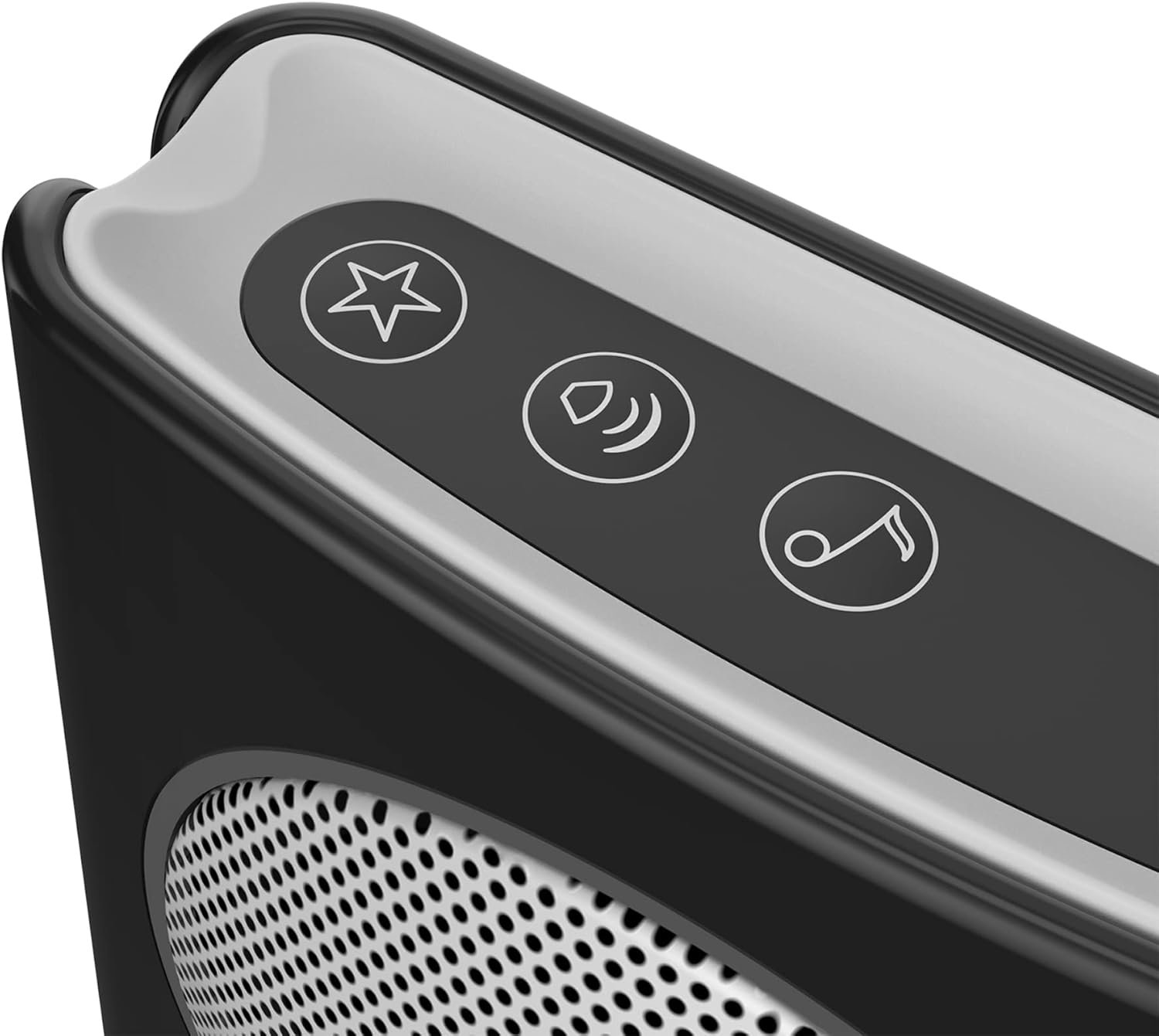
Imatge 5.1: Detail of the control buttons on the receiver unit for adjusting ringtone and volume.
6. Manteniment
6.1. Substitució de la bateria
When the low power alert is activated, replace the batteries promptly.
- Botó de trucada: Open the call button casing (refer to installation steps in Section 4.1). Replace the existing battery with a new, equivalent lithium battery. Ensure correct polarity.
- Flash Bell Receiver: Open the battery compartment on the back of the receiver. Replace the existing batteries with new, equivalent batteries. Ensure correct polarity.
Always use the recommended battery type and dispose of old batteries responsibly.
6.2. Neteja
To clean the doorbell units, use a soft, dry cloth. Do not use abrasive cleaners, solvents, or harsh chemicals, as these can damage the surface or internal components. The call button's rain cover should be periodically checked for debris and cleaned to ensure proper button function.
7. Solució De Problemes
If you encounter issues with your EXTEL diBi Flash Wireless Doorbell, please consult the following table:
| Problema | Causa possible | Solució |
|---|---|---|
| Doorbell does not ring or flash. |
|
|
| Curt abast operatiu. |
|
|
| El timbre sona de manera intermitent. |
|
|
8. Especificacions
- Número de model: 081735
- Marca: EXTEL
- Interval sense fil: Fins a 200 metres (en camp obert)
- Power Source (Receiver): Funciona amb piles (piles no incloses)
- Power Source (Call Button): Funciona amb piles (piles incloses)
- Tipus de pila de bateria: Lithium (for call button)
- Nombre de tons de trucada: 6
- Dimensions (producte): 4 x 9 x 9 cm
- Pes (producte): 180 g
- Components inclosos: 1 Flash Bell, 1 Call Button, 1 Rain Cover
9. Garantia i Suport
For warranty information and technical support, please refer to the warranty card included with your product or contact your retailer. You may also visit the official EXTEL weblloc web per obtenir més ajuda i dades de contacte.
Si us plau, conserveu el comprovant de compra per a qualsevol reclamació de garantia.


