Artlii Stone 1 Full HD Projector User Manual
Model: Artlii Stone 1 | Brand: Artlii
1. Introducció
This manual provides comprehensive instructions for the safe and efficient operation of your Artlii Stone 1 Full HD Projector. Please read this manual thoroughly before using the projector and retain it for future reference. The Artlii Stone 1 is designed to deliver a high-quality visual experience with its native 1080P resolution and advanced features.
2. Informació de seguretat
Observe the following safety precautions to prevent fire, electric shock, or injury, and to prolong the life of your projector:
- Font d'alimentació: Use only the power adapter supplied with the projector. Ensure the power outlet voltage coincideix amb els requisits del projector.
- Ventilació: No bloquegeu les obertures de ventilació. Assegureu-vos que hi hagi prou espai al voltant del projector per a un flux d'aire adequat per evitar el sobreescalfament.
- Calor: El projector lamp and internal components generate heat. Avoid touching the projector's surface immediately after use.
- Líquid i humitat: Do not expose the projector to rain, moisture, or any liquids. If liquid enters the projector, disconnect the power immediately and contact customer support.
- Neteja: Desconnecteu el cable d'alimentació abans de netejar-lo. Feu servir un drap suau i sec. No utilitzeu netejadors líquids ni en aerosol.
- Ubicació: Place the projector on a stable, level surface. Avoid placing it in direct sunlight, near heat sources, or in environments with excessive dust or humidity.
- Protecció ocular: No mireu directament a la lent del projector quan estigui encès.amp està encès. La llum brillant pot causar lesions oculars.
- Manteniment: Do not attempt to repair the projector yourself. Refer all servicing to qualified service personnel.
3. Contingut del paquet
Verifiqueu que tots els elements siguin presents al paquet:
- Artlii Stone 1 Full HD Projector
- Cable d'alimentació
- Comandament a distància (piles no incloses)
- Cable AV
- Cable HDMI
- Manual d'usuari
4. Producte acabatview
Familiarize yourself with the components of your Artlii Stone 1 projector.
4.1 Davant View

Imatge: Frontal view of the Artlii Stone 1 projector, showing the lens, focus ring, and keystone correction dial.
- Lent de projecció: Emet la imatge a la pantalla.
- Anell de focus: Ajusta la claredat de la imatge projectada.
- Dial de correcció trapezoidal: Corrects trapezoidal distortion of the image.
4.2 Part posterior i lateral Views (Ports)

Imatge: Lateral view of the Artlii Stone 1 projector highlighting the various input and output ports, including HDMI, USB, VGA, and audio out.
- Ports HDMI (x2): Connect to HDMI-enabled devices such as laptops, gaming consoles (PS4, Xbox, Switch), TV sticks, and Blu-ray players.
- Port USB: Connecteu unitats USB per a la reproducció de contingut multimèdia.
- Port VGA: Connect to computers with VGA output.
- Ranura per a targeta SD: Inseriu targetes SD per a la reproducció multimèdia.
- Sortida d'àudio de 3.5 mm: Connecteu altaveus externs o auriculars.
- Entrada d'alimentació: Connecteu el cable d'alimentació.
5. Configuració
5.1 Col·locació i mida de la pantalla
Optimal projection distance and screen size are crucial for the best viewing experience. The Artlii Stone 1 supports screen sizes up to 300 inches.
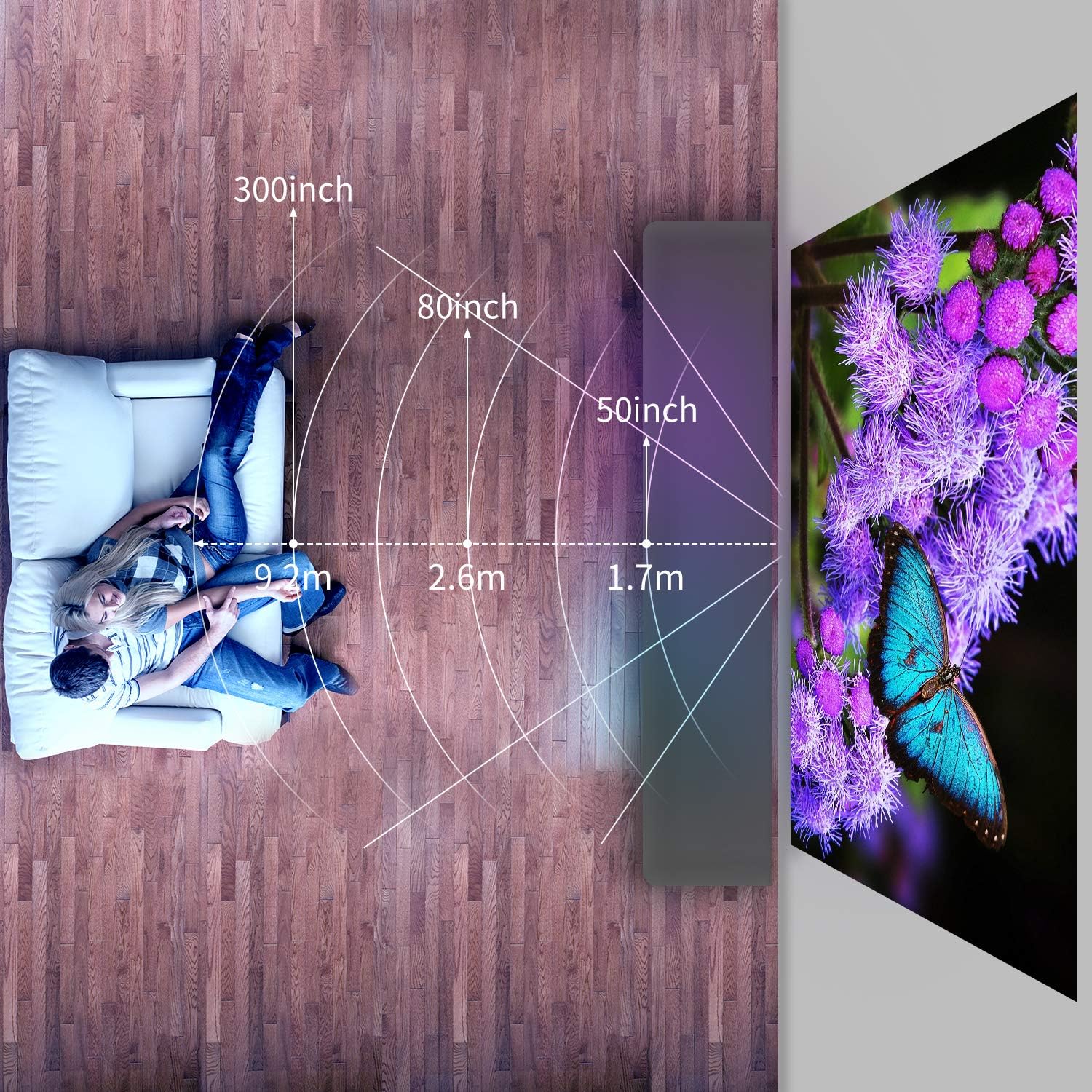
Image: Diagram illustrating recommended projection distances for various screen sizes, showing distances for 50-inch, 80-inch, and 300-inch projections.
Refer to the diagram for recommended distances. Adjust the projector's position to achieve your desired screen size.
5.2 Connexió d'alimentació
- Connecteu el cable d'alimentació al port d'entrada d'alimentació del projector.
- Connecteu l'altre extrem del cable d'alimentació a una presa de corrent.
- L'indicador lluminós d'engegada del projector s'il·luminarà.
5.3 Initial Adjustments
- Ajust del focus: Rotate the focus ring on the lens until the projected image appears sharp and clear.
- Correcció Keystone: If the image appears trapezoidal (wider at the top or bottom), rotate the keystone correction dial to square the image.
6. Instruccions de funcionament
6.1 Encès/Apagat
- Per encendre: Press the power button on the projector or the remote control. The projector will start up and display the main interface.
- Per apagar: Press the power button again. Confirm shutdown if prompted. Allow the fan to run briefly to cool down the lamp before disconnecting power.
6.2 Connexió de dispositius
The Artlii Stone 1 offers multiple connectivity options:
- HDMI: Connect your device (e.g., laptop, game console, TV stick) to one of the HDMI ports using the provided HDMI cable.
- USB: Insert a USB flash drive into the USB port. The projector will typically detect the drive automatically.
- VGA: Connect your computer to the VGA port using a VGA cable.
- Targeta SD: Inseriu una targeta SD a la ranura per a targetes SD.
- DE: Use the provided AV cable to connect older devices with AV output.
6.3 Selecció de la font d'entrada
After connecting a device, you may need to manually select the input source:
- Press the "Source" or "Input" button on the remote control or the projector's control panel.
- Navigate through the options (HDMI1, HDMI2, USB, VGA, AV, SD) using the arrow keys and press "OK" to confirm your selection.
6.4 Navegació de menús
Use the remote control to navigate the projector's on-screen menu:
- Press the "Menu" button to access settings.
- Use the arrow keys to move between options (Picture, Sound, Time, Option).
- Press "OK" to enter a sub-menu or confirm a setting.
- Press "Exit" or "Return" to go back to the previous menu or exit the menu.
6.5 Funció de zoom
The Artlii Stone 1 features a digital zoom function, allowing you to adjust the screen size from 75% to 100% without moving the projector.
Image: Screenshot of the projector's on-screen display showing the zoom adjustment from 100% down to 75%, demonstrating the digital zoom feature.
Access the zoom setting through the projector's menu (usually under "Picture" or "Option" settings) and adjust the percentagi segons sigui necessari.
6.6 Sortida d'àudio
The projector has built-in speakers. For enhanced audio, connect external speakers or headphones to the 3.5mm audio out port.
7. Manteniment
Un manteniment regular garanteix un rendiment òptim i allarga la vida útil del projector.
- Neteja de lents: Feu servir un drap suau i sense borrissol dissenyat específicament per a lents òptiques per netejar suaument la lent del projector. No utilitzeu productes de neteja abrasius ni força excessiva.
- Eliminació de pols: Periodically clean the projector's exterior with a soft, dry cloth. The Artlii Stone 1 features an accessible design for internal dust cleaning, which can be performed by opening a designated trap door. For persistent dust spots on the projection, professional cleaning may be required.
- Lamp Vida: El LED lamp in the Artlii Stone 1 has an estimated lifespan of over 50,000 hours under normal usage conditions. No lamp replacement is typically needed during the product's lifetime.
8. Solució De Problemes
Si teniu problemes amb el projector, consulteu els problemes i solucions més comuns següents:
| Problema | Causa possible | Solució |
|---|---|---|
| No es projecta cap imatge | Power not connected; Incorrect input source; Device not connected properly. | Ensure power cable is securely connected. Select the correct input source (HDMI, USB, etc.). Check all cable connections. |
| La imatge és borrosa | Enfocament no ajustat; Projector massa a prop/lluny de la pantalla. | Adjust the focus ring on the lens. Reposition the projector for optimal distance. |
| La imatge és trapezoïdal | Keystone not corrected. | Adjust the keystone correction dial until the image is rectangular. |
| Sense so | Volume too low; Audio cable not connected; Muted. | Increase volume. Ensure audio cables are connected correctly. Unmute the projector or source device. |
| El soroll del ventilador és fort | Normal operation; Blocked ventilation. | A certain level of fan noise is normal for cooling. Ensure ventilation openings are not blocked. |
| Dust spots on projection | Dust accumulated inside the optical path. | Clean the lens. If spots persist, refer to the maintenance section regarding internal dust cleaning or contact support. |
9. Especificacions
Key technical specifications for the Artlii Stone 1 Full HD Projector:
| Característica | Detall |
|---|---|
| Model | Artlii Stone 1 |
| Resolució nativa | 1920 x 1080p (Full HD) |
| Brillantor | 330 lúmens ANSI |
| Relació de contrast | 7000:1 |
| Lamp La vida | 50,000 hores (LED) |
| Mida de projecció | 50 - 300 polzades |
| Relació d'aspecte | 4:3 / 16:9 |
| Connectivitat | 2x HDMI, 1x USB, 1x VGA, 1x SD Card, 1x 3.5mm Audio Out |
| Correcció de pedra clau | Manual |
| Funció de zoom | 75% - 100% (Digital) |
| Dimensions (L x A x A) | 23.1 x 30.7 x 10.4 cm |
| Pes | 2.6 kg |
Nota: les especificacions estan subjectes a canvis sense previ avís.
10. Garantia i Suport
Artlii products come with a standard manufacturer's warranty. For detailed warranty information, product support, or technical assistance, please refer to the warranty card included in your package or visit the official Artlii website. You can also contact Artlii customer service through the platform where you purchased the product.
Per obtenir més ajuda, visiteu: Artlii Official Store


