1. Producte acabatview
The AT&T CD4930 is a corded telephone system designed for reliable communication with integrated digital answering system and Caller ID features. It offers user-friendly functionality with an extra-large tilt display and large buttons for enhanced visibility and ease of use.
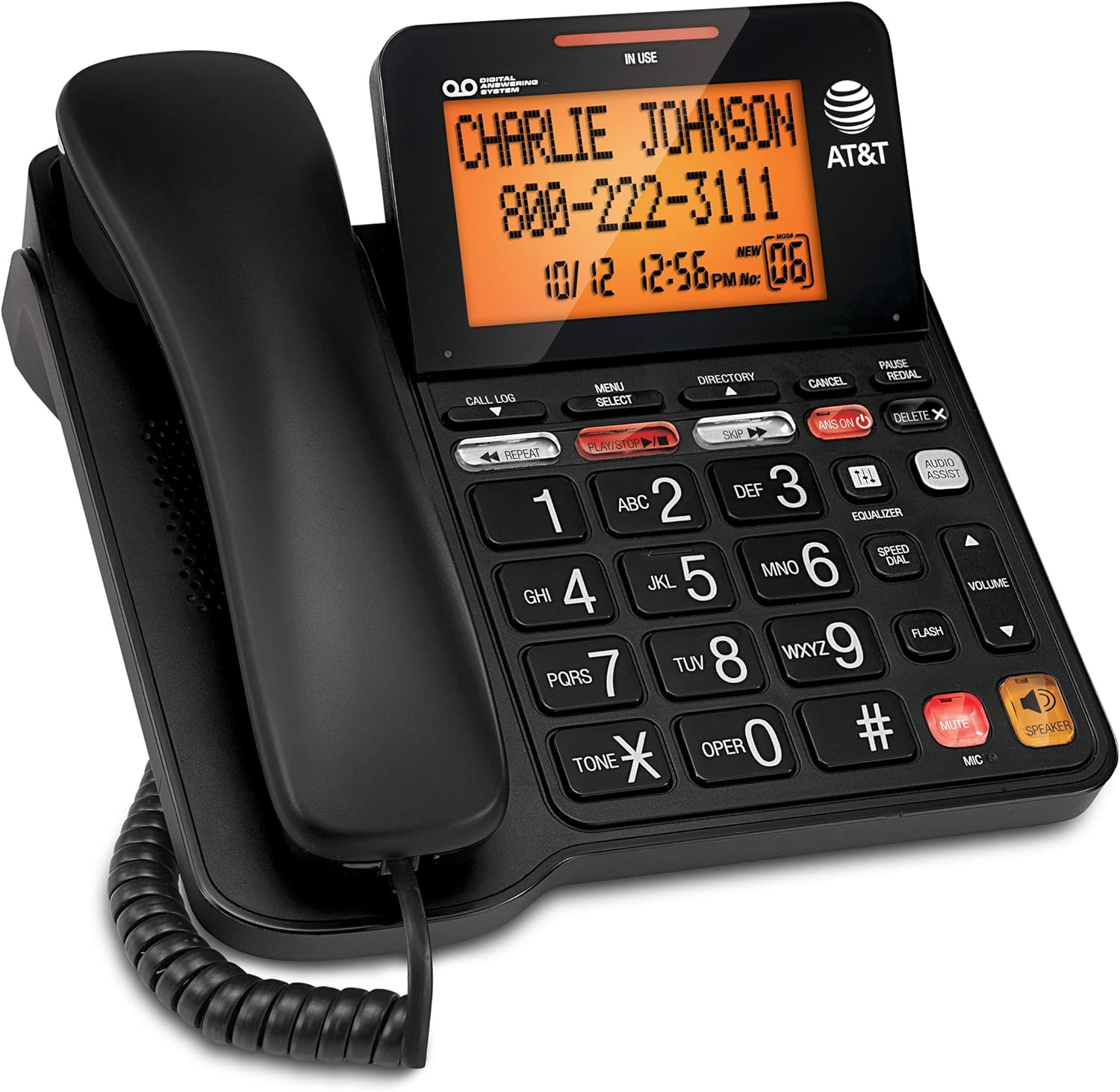
Figure 1: AT&T CD4930 Corded Phone with Digital Answering System and Caller ID.
Característiques principals:
- Sistema de contestador digital: Records up to 25 minutes of messages, announcements, and memos. Features instant playback, selective save/delete, and message skipping/repeating.
- Altaveu: Allows hands-free conversation, enabling multiple participants to join calls.
- Pantalla retroil·luminada: Provides clear visibility of caller information, time, and date.
- Identificador de trucada: Displays name, number, time, and date of incoming calls, including call waiting.
- Extra-Large Tilt LCD: Adjustable display for optimal viewing of Caller ID and call history.
- Audio Assist: Temporarily increases overall volume and enhances sound frequencies for clearer speech.
- Equalitzador: Customizable audio profiles (bass, treble, natural tones) to suit individual needs.
2. Configuració
2.1 Contingut del paquet
Assegureu-vos que tots els components estiguin presents al paquet:
- AT&T CD4930 Corded Phone Base Unit
- Telèfon
- Cable enrotllat del telèfon
- Cordó de línia telefònica
- Adaptador de corrent alterna
2.2 Connexió
- Connecteu el telèfon: Plug one end of the coiled handset cord into the handset and the other end into the jack labeled TELECOMPLE on the side of the phone base.
- Connect the Telephone Line: Plug one end of the telephone line cord into the jack labeled LÍNIA on the back of the phone base. Plug the other end into a telephone wall jack.
- Connectar l'alimentació: Plug the small end of the AC power adapter into the CC EN 6V jack on the back of the phone base. Plug the large end into a standard electrical outlet.
Upon successful connection, the display will illuminate, and the phone will perform a self-check. Allow a few moments for the phone to initialize.
2.3 Initial Setup (Date and Time)
Setting the correct date and time is crucial for accurate Caller ID and answering system timestamps.
- Premeu MENÚ/SELECT.
- Utilitza el ▼ or ▲ buttons to scroll to DEFINIR DATA/HORA, després premeu MENÚ/SELECT.
- Introduïu el mes, el dia i l'any actuals amb el teclat numèric. Premeu MENÚ/SELECT after each entry.
- Enter the current hour and minute. Use the ▼ or ▲ botons per seleccionar AM or PM, després premeu MENÚ/SELECT per confirmar.
- Premeu CANCEL·LA per sortir del menú.
3. Instruccions de funcionament
3.1 Fer i rebre trucades
- Per fer una trucada: Aixequeu l'auricular o premeu PONENTMarca el número de telèfon.
- Per respondre una trucada: When the phone rings, lift the handset or press PONENT.
- Per finalitzar una trucada: Place the handset back on the cradle or press PONENT if using speakerphone.
3.2 Altaveu
The speakerphone allows for hands-free communication.
- Per activar: Durant una trucada, premeu el botó PONENT botó.
- Per desactivar: Lift the handset to switch back to handset mode, or press PONENT de nou per finalitzar la trucada.
3.3 Control de volum
Adjust the listening volume during a call.
- Durant una trucada, premeu VOLUME ▲ to increase volume or VOLUME ▼ per reduir el volum.
3.4 Funció de silenci
Temporarily disable your microphone during a call.
- Durant una trucada, premeu MUT. The microphone will be muted.
- Premeu MUT de nou per reprendre la conversa.
3.5 Redial and Pause
- Torna a marcar: Aixequeu l'auricular o premeu PONENT, després premeu RECOMANTA to dial the last number called.
- Pausa: When entering a phone number, press PAUSA to insert a 4-second pause. Useful for dialing numbers that require access codes or extensions.
4. Digital Answering System
The integrated digital answering system can record up to 25 minutes of messages.
4.1 Turning the Answering System On/Off
- Premeu ANS ON/OFF to toggle the answering system on or off. When on, the ANS ON la llum indicadora s'il·luminarà.
4.2 Playing Messages
- Premeu PLAY/STOP to play new messages. If no new messages, it will play old messages.
- Durant la reproducció:
- Premeu REPETIR to repeat the current message. Press twice to play the previous message.
- Premeu SALTAR per passar al següent missatge.
- Premeu ELIMINAR to delete the current message.
- Premeu PLAY/STOP per aturar la reproducció.
4.3 Recording an Outgoing Announcement
- Premeu MENÚ/SELECT.
- Desplaça't fins a ANUNCI i premeu MENÚ/SELECT.
- Seleccioneu RECORD ANN. i premeu MENÚ/SELECT.
- Speak clearly into the microphone on the phone base.
- Premeu PLAY/STOP to end recording. The announcement will play back.
5. Caller ID Features
The Caller ID feature displays information about incoming calls.
5.1 Viewing Call Log
- Premeu HISTORIAL DE TRUCADES.
- Ús ▼ or ▲ to scroll through the call entries.
- Premeu CANCEL·LA per sortir.
5.2 Dialing from Call Log
- Mentre viewing a call log entry, lift the handset or press PONENT per marcar el número que es mostra.
5.3 Deleting Call Log Entries
- Mentre viewing a call log entry, press ESBORRA X to delete the current entry.
- To delete all entries, press MENÚ/SELECT, desplaça't fins a DELETE ALL CALLS, i premeu MENÚ/SELECT. Confirmeu quan se us demani.
6. Manteniment
6.1 Neteja del telèfon
To keep your phone clean, wipe it with a soft, slightly damp cloth. Do not use cleaning sprays or harsh chemicals, as these may damage the finish or electrical components.
6.2 Atenció general
- Eviteu exposar el telèfon a temperatures extremes, llum solar directa o humitat.
- Do not drop the phone or subject it to severe impact.
- Keep the phone away from sources of electrical noise, such as motors or fluorescent lighting.
7. Solució De Problemes
If you experience issues with your AT&T CD4930 phone, refer to the following common problems and solutions:
| Problema | Solució |
|---|---|
| Sense to de marcatge. |
|
| Cannot hear caller or caller cannot hear me. |
|
| Caller ID is not displaying. |
|
| Answering system is not recording messages. |
|
For further assistance, please refer to the full user manual available on the AT&T support website or contact AT&T customer service.
8. Especificacions
| Característica | Detall |
|---|---|
| Número de model | CD4930 |
| Marca | AT&T |
| Tipus de telèfon | Fixa |
| Tipus de contestador | Digital |
| Capacitat d’enregistrament | Fins a 25 minuts |
| Font d'alimentació | Elèctric amb cable |
| Tipus de marcador | Teclat dual |
| Material | Plàstic |
| Pes de l'article | 2.42 lliures |
| Dimensions del paquet | 10.2 x 8.98 x 3.62 polzades |
| Fabricant | VTech |
| País d'origen | Malàisia |
9. Garantia i Suport
9.1 Informació de la garantia
For detailed warranty information regarding your AT&T CD4930 Corded Phone, please refer to the warranty card included in your product packaging or visit the official AT&T weblloc. Els termes i condicions de la garantia poden variar.
9.2 Atenció al client
If you require technical assistance, have questions about your product, or need to report an issue, please contact AT&T Customer Support:
- Assistència en línia: Visit the official AT&T support website for FAQs, troubleshooting guides, and downloadable manuals.
- Suport telefònic: Refer to your product documentation or the AT&T website for the most current customer service contact numbers.
Please have your product model number (CD4930) and serial number ready when contacting support.


