1. Producte acabatview
The ORICO 6828US3-C is an aluminum dual-bay hard drive docking station designed for 2.5-inch and 3.5-inch SATA HDDs and SSDs. It provides high-speed data transfer via USB 3.0, supporting speeds up to 5Gbps. This docking station also features an offline clone function, allowing direct duplication of hard drives without requiring a computer connection. Its tool-free design ensures easy installation and removal of drives.
2. Contingut del paquet
Si us plau, verifiqueu que tots els elements siguin presents al paquet:
- 1 x ORICO Hard Drive Docking Station (6828US3-C)
- 1 x USB 3.0 Data Cable
- 1 x adaptador d’alimentació de 12V
- 1 x Manual d'usuari
- 1 x Targeta de servei
3. Diagrama del producte

Figura 3.1: Davant i posterior View of the ORICO 6828US3-C Docking Station. This image highlights the PC-Clone button, DC Port, Power Switch, LED indicators, and the Source/Target drive slots for both 2.5-inch and 3.5-inch SATA hard disk drives.

Figura 3.2: Dimensions of the ORICO 6828US3-C Docking Station, showing its compact design.
4. Instruccions de configuració
Follow these steps to set up your ORICO 6828US3-C docking station:
- Connectar l'alimentació: Connect the provided 12V power adapter to the DC port on the back of the docking station and then plug it into a power outlet.
- Connexió a l'ordinador (opcional): If using the docking station with a computer, connect the USB 3.0 data cable from the docking station's USB 3.0 port to an available USB port on your computer.
- Inserir discs durs: Carefully insert your 2.5-inch or 3.5-inch SATA hard drives or SSDs into the designated slots. Ensure they are firmly seated. The slots are labeled 'Source' and 'Target' for cloning operations, but can be used interchangeably for individual drive access.
- Encès: Press the power switch on the back of the docking station to turn it on. The LED indicators will illuminate.

Figura 4.1: Diagram illustrating the connection of the DC adapter, USB cable to PC, and insertion of SSD/HDD into the docking station, along with the power button.

Figura 4.2: The docking station supports both 2.5-inch and 3.5-inch SATA hard drives and SSDs, offering tool-free installation.
5. Instruccions de funcionament
5.1. Mode de connexió de l'ordinador
When connected to a computer via the USB 3.0 cable, the ORICO 6828US3-C functions as an external hard drive enclosure. Your operating system (Windows, Mac OS X, Linux) should automatically detect the inserted drives. You can then access, read, and write data to the drives as you would with any other external storage device.
- Assegureu-vos que l'estació d'acoblament estigui engegada.
- Connecteu el cable USB 3.0 a l'ordinador.
- Insert your SATA HDD/SSD into either slot.
- The drive will appear as a removable disk in your computer's file explorador.

Figura 5.1: The ORICO 6828US3-C docking station connected to a laptop with a 3.5-inch hard drive inserted, ready for data access.
5.2. Offline Clone Function
The offline clone function allows you to duplicate a hard drive without connecting the docking station to a computer. This is useful for creating backups or migrating data to a new drive.
Consideracions importants:
- El Objectiu drive must be equal to or larger in capacity than the Font conduir.
- All data on the Objectiu drive will be erased during the cloning process. Ensure you have backed up any important data from the Target drive before proceeding.
- Do not disconnect the power or drives during the cloning process.
Steps for Offline Cloning:
- Apagar: Assegureu-vos que l'estació d'acoblament estigui apagada i desconnectada de qualsevol ordinador.
- Insert Source Drive: Insert the hard drive you wish to clone (the original drive) into the slot labeled 'Source'.
- Insert Target Drive: Insert the hard drive you wish to clone to (the destination drive) into the slot labeled 'Target'.
- Encès: Enceneu l'estació d'acoblament.
- Iniciar clon: Press and hold the 'Clone' button (refer to Figure 3.1 for location) for approximately 3-5 seconds until the LED indicators begin to flash.
- Supervisar el progrés: The LED indicators (25%, 50%, 75%, 100%) will light up sequentially to indicate the cloning progress.
- Finalització: Once all four LED indicators remain solid, the cloning process is complete. You can then safely power off the docking station and remove the drives.
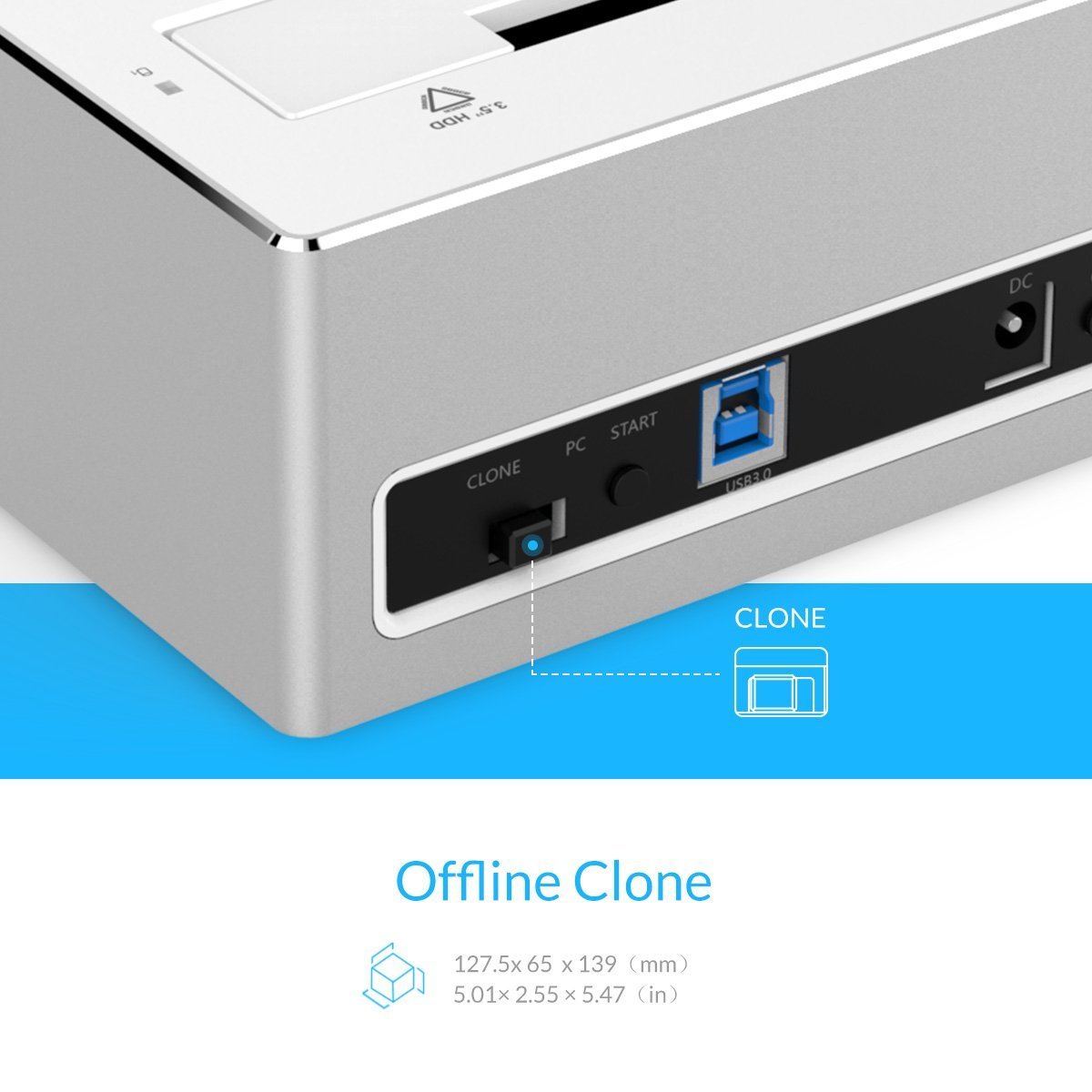
Figura 5.2: Primer pla view of the 'Clone' button on the ORICO 6828US3-C docking station, used to initiate the offline cloning process.
6. Manteniment
To ensure the longevity and optimal performance of your ORICO 6828US3-C docking station, follow these maintenance guidelines:
- Neteja: Use a soft, dry cloth to clean the exterior of the docking station. Avoid using liquid cleaners or solvents, as they may damage the finish or internal components.
- Prevenció de pols: Keep the docking station in a clean, dust-free environment to prevent dust accumulation in the drive slots and ventilation areas.
- Emmagatzematge: Quan no l'utilitzeu durant períodes prolongats, guardeu l'estació d'acoblament en un lloc fresc i sec.
- Manipulació: Manipuleu el dispositiu amb cura. Eviteu deixar-lo caure ni sotmetre'l a impactes forts.
7. Solució De Problemes
If you encounter issues with your ORICO 6828US3-C, refer to the following troubleshooting tips:
- Drive Not Detected by PC:
- Ensure the docking station is powered on and the USB 3.0 cable is securely connected to both the dock and the computer.
- Proveu de connectar-vos a un altre port USB de l'ordinador.
- Verify that the hard drive is properly seated in the slot.
- Consulteu l'Administració de discos (Windows) o la Utilitat de discos (Mac) per veure si la unitat es reconeix però no està inicialitzada o no està formatada.
- Prova amb un altre disc dur per descartar un problema amb el disc.
- Velocitat de transferència de dades lenta:
- Assegureu-vos que esteu connectat a un port USB 3.0 de l'ordinador. Els ports USB 2.0 tindran velocitats més lentes.
- Check the condition of the USB 3.0 cable. Try a different cable if available.
- The actual speed can be affected by the performance of the hard drive itself and your computer's system resources.
- Offline Clone Fails or Does Not Start:
- Ensure the docking station is disconnected from the computer before starting the clone process.
- Verify that the Target drive's capacity is equal to or greater than the Source drive's capacity.
- Make sure both drives are properly inserted into their respective 'Source' and 'Target' slots.
- Press and hold the 'Clone' button for the required 3-5 seconds until the LEDs start flashing.
- If the issue persists, try using different drives.
- Power LED Not On:
- Assegureu-vos que l'adaptador de corrent estigui connectat correctament tant a l'estació d'acoblament com a una presa de corrent que funcioni.
- Press the power switch on the back of the unit.
- Proveu la presa de corrent amb un altre dispositiu.
8. Especificacions
| Característica | Especificació |
|---|---|
| Model | 6828US3-C |
| Factor de forma del disc dur | 2.5 polzades, 3.5 polzades |
| Nombre màxim de dispositius compatibles | 2 (Source and Target for clone, or 2 independent drives) |
| Tecnologia de connectivitat | SATA, USB 3.0 |
| Velocitat de transferència de dades | Fins a 5 Gbps (USB 3.0) |
| Max Hard Drive Capacity | Up to 8 TB per slot (16 TB total) |
| Sistemes operatius compatibles | Windows XP/7/8/8.1/10, Mac OS X 9.1 or above, Linux |
| Característiques especials | Offline Clone Function, Tool-free installation, Hot-swappable |
| Material | Alumini, ABS (acrilonitril butadiè estirè) |
| Pes de l'article | 950 g |
| Dimensions del paquet | 20.6 x 15 x 10.3 cm |
9. Garantia i Suport
ORICO provides a 12-month warranty on this product. To register your product for warranty and for service & support, please visit the official ORICO India weblloc o contacteu amb l'atenció al client.
- Registre de garantia: www.oricoindia.in
- Número d'atenció al client: 022-24118805

Figura 9.1: ORICO 1-Year Warranty information, including website and customer care contact details.


